















Read state, unread and receipts
This page covers what a user knows about reading: which channels have unread messages, where the unread part of a channel starts, and whether the people in a channel have received and read the user's own messages.
What users get
- Unread counts. Each row in the channel list shows how many messages the user hasn't read. A muted channel shows none. Each row in the thread list shows the unread replies of its thread.
- Where unread starts. The user opens a channel with three new messages. A separator reading "3 new messages" sits above the first of them. While the separator is above the screen, a floating "3 unread" button at the top of the list jumps back to the first unread message. Its close button marks the channel read.
- New messages while scrolled up. While the user reads older messages, a scroll-to-bottom button shows, with their unread count in a badge. Pressing it takes them to the latest message and marks the channel read.
- Marking read. The channel is marked read when the user opens it, and when a message arrives while they're looking at the latest message with the app in the foreground. Mark as Unread in the menu of someone else's message marks the channel unread from that message on.
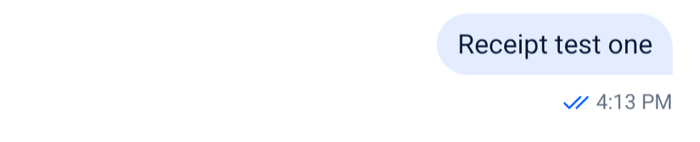
- Receipts. The user's own messages show their status next to the timestamp: a clock while sending, one check once sent, two checks once delivered, and two checks in the accent color once read. The status shows on the last message of each group of their messages, and on every message that is still sending. The channel list row shows the status of their last message too.
 |  |
How it works across the layers
- State.
channel.state.readholds each member's read position: when they last read (last_read), the last message they read, their unread count, and the last message delivered to them.message.read,notification.mark_read,notification.mark_unread,message.newandmessage.deliveredevents update it.Channel.markRead()andChannel.markUnread({ message_id })move the user's own position. Both need read events on, and the state changes when the server's event arrives.- The message list keeps an unread snapshot,
messagePaginator.unreadStateSnapshot: where the user's unread part started when the channel opened. Marking the channel read when it opens doesn't move it, so the separator stays where the user left off.MessagePaginator.jumpToTheFirstUnreadMessage()loads that part and jumps to it. - While
messagePaginator.isViewingLiveistrue, a new message doesn't raise the user's unread count, because the list marks it read. channel.messageReceiptsTrackerturns the read positions into receipts, see Receipts.
- UI.
Channelmarks the channel read when it mounts with unread messages, unlessmarkReadOnMountisfalse. It reseeds the unread snapshot from the current read state first, so a channel opened again shows its separator where the user stopped reading. WithinitialScrollToFirstUnreadMessage, it opens the list at the first unread message.MessageListandMessageFlashListtell the paginator whether the user is viewing live: the app is in the foreground, the latest messages are loaded, and the newest one is on screen. While that holds, each new message in the channel marks it read, unless the user marked it unread. After a reconnect,Channelmarks the channel read again when the list shows the latest messages. It does this onconnection.recovered, which isn't dispatched after a reconnect when connection recovery is turned off.- The calls go through
client.messageDeliveryReporter.throttledMarkRead, at most one a second. Scrolling down to the latest message by hand doesn't mark the channel read; the next message that arrives, or the scroll-to-bottom button, does. - The list renders
InlineUnreadIndicatorbetween the last read message and the first unread one from someone else, from the unread snapshot. Thread lists show no unread separator or notification. UnreadMessagesNotificationshows at the top of a channel's list while the last read message is above the screen. Its main button callsMessagePaginator.jumpToTheFirstUnreadMessage()and highlights the message; its close button marks the channel read and clears the snapshot, which removes the separator.ScrollToBottomButtonshows while the list isn't at the latest message. In a channel its badge shows the user's unread count fromchannel.state.read; in a thread it shows no count. Pressing it jumps to the latest messages, and in a channel marks the channel read while keeping the separator.MessageStatusrenders the receipts on the user's own messages.ChannelPreviewrenders the unread count and the last message's status, andThreadListItemthe thread's unread count.- An open
Threadis active, and an active thread marks its new replies read as they arrive.
- Navigation. Not involved.
After Mark as Unread, the notification.mark_unread event puts the chosen message in the snapshot as the first unread one, and new messages don't mark the channel read while the user stays in it. Dismissing the unread notification clears the mark. Pressing the scroll-to-bottom button marks the channel read but keeps the separator. Opening the channel again reseeds the snapshot and, with markReadOnMount, marks the channel read.
Read state and unread counts explains the read state in full: what counts as unread, every way to mark read and unread, and the differently shaped read state of threads. Message paginators covers jumps and the unread snapshot.
Receipts
A receipt answers two questions about one of the user's messages: who has received it, and who has read it. Receipts are worked out per channel.
Who received and read a message
channel.messageReceiptsTracker keeps, for each member, the last message delivered to them and the last message they read. A member has read every message up to their read position. Positions move forward as members read, and back when a member marks the channel unread.
Example
Take the user's messages "Lunch?" at 12:00 and "At 1?" at 12:01, in a channel with Bob and Cleo:
- Bob's and Cleo's devices receive both messages and report them delivered. The tracker moves both delivered positions to "At 1?". The user sees two checks on "At 1?".
- Bob opens the channel and reads both. His read position moves to "At 1?". The user sees the read checks.
- Cleo reads only up to "Lunch?".
MessageReceiptsTracker.readersForMessage()for "Lunch?" returns Bob and Cleo; for "At 1?" it returns Bob.
The tracker answers per message, given its id and created_at:
MessageReceiptsTracker.readersForMessage(ref)andMessageReceiptsTracker.deliveredForMessage(ref)return the users who read or received it;MessageReceiptsTracker.deliveredNotReadForMessage(ref)returns those who received it and haven't read it;MessageReceiptsTracker.hasUserRead(ref, userId)andMessageReceiptsTracker.hasUserDelivered(ref, userId)answer for one user;MessageReceiptsTracker.getUserProgress(userId)returns one user's positions.
The lists can include the user's own read position, so filter out client.userId when you show them. The tracker publishes a snapshot to snapshotStore on every change; subscribe to it to re-render. MessageStatus reads lastReadRefByOthers and lastDeliveredRefByOthers from that snapshot, the furthest any other member has read or received, so a message shows as read once anyone else has read past it. Message receipts tracker lists every method.
Delivery reports
The client reports delivery for the user by itself. When messages arrive, or a channel loads, client.messageDeliveryReporter notes the newest message the user hasn't read or confirmed yet in that channel. It waits a second, then sends the notes for all channels in one request, up to 100 channels at a time. The server then sends message.delivered to the channel, and every member's tracker moves.
The client sends no report:
- for a channel with delivery events off, see Turning it on or off;
- when the user's
privacy_settings.delivery_receipts.enabledisfalse; - for messages the user has already read;
- for thread replies.
In the client configuration, client.messageDelivery.markAsDeliveredBufferTimeoutMs changes the one-second wait, and client.messageDelivery.maxDeliveredMessageCountInPayload the 100.
Limits
- Per channel. Threads have no tracker of their own, and delivery isn't reported for thread replies. Inside a thread,
MessageStatuscompares a reply's time with the channel's read and delivered positions. - Only loaded messages resolve. When the server reports a read or delivered position without a message id, the tracker looks for the message at that time among the loaded messages. If that message isn't loaded, the position is skipped.
- Delivered needs the server. On the server, delivery events are off by default for a channel type; see Message delivery and read status to turn them on.
Turning it on or off
Each switch has a client side and a server side, and a server "no" wins. The resolved values are in channel.config.
| Switch | What turning it off does |
|---|---|
channel.readEvents.enabled (client), read_events (server) |
No read state is sent. The lists stop marking the channel read and hide the unread notification, and Channel.markRead() and Channel.markUnread() throw. |
channel.readEvents.localUnreadCountEnabled (client) |
Off by default. On, it keeps an unread count on the device while read events are off, and the lists reset it with Channel.markReadLocally() instead of a request. |
channel.deliveryEvents.enabled (client), delivery_events (server) |
No delivery reports for those channels. Messages go from sent to read. |
The user's privacy_settings.read_receipts.enabled |
The server doesn't tell other members when this user reads. |
The user's privacy_settings.delivery_receipts.enabled |
The client doesn't report delivery for this user, and the server doesn't show it to others. |
Mark as Unread also needs the read-events capability, which the server grants per channel.
On the UI side:
markReadOnMount={false}onChannelkeeps a channel unread when it opens.shouldShowUnreadUnderlay={false}onChannelandThreadhides the unread separator.showMessageStatus, a prop ofMessage, decides whether a message shows its status. It defaults totrueon the user's own messages.
To turn delivery reports off for every channel:
client.config.set({ channel: { deliveryEvents: { enabled: false } } });A user sets their own privacy settings when connecting:
import { useCreateChatClient } from "stream-chat-react-native";

const apiKey = "YOUR_API_KEY";
const userId = "YOUR_USER_ID";
const userToken = "YOUR_USER_TOKEN";

export const useClientWithPrivateReceipts = () =>
  useCreateChatClient({
    apiKey,
    tokenOrProvider: userToken,
    userData: {
      id: userId,
      privacy_settings: {
        delivery_receipts: { enabled: false },
        read_receipts: { enabled: false },
      },
    },
  });
Configuration explains client.config, and the privacy settings section of the JavaScript client docs covers the user side.
Customizing
Who read a message
useMessageReadData({ message }) returns the users who read a message, and useMessageDeliveredData({ message }) those who received it. This MessageStatus replacement names the readers, and keeps the default icons until someone has read the message:
import { Text } from "react-native";
import type { MessageStatusProps } from "stream-chat-react-native";
import {
  MessageStatus,
  useChatContext,
  useMessageContext,
  useMessageReadData,
  WithComponents,
} from "stream-chat-react-native";

const SeenBy = (props: MessageStatusProps) => {
  const { client } = useChatContext();
  const { message } = useMessageContext();
  const readBy = useMessageReadData({ message });
  const names = readBy
    .filter((user) => user.id !== client.userId)
    .map((user) => user.name || user.id);

  if (!names.length) return <MessageStatus {...props} />;

  return <Text>Seen by {names.join(", ")}</Text>;
};

export const App = () => (
  <WithComponents overrides={{ MessageStatus: SeenBy }}>
    {/* the rest of the app */}
  </WithComponents>
);
useIsMessageReadByOthers({ message }) and useIsMessageDeliveredToOthers({ message }) return just the two flags the default status uses. The Status indicators UI cookbook has more.
Receipts in your own components
Ask the tracker directly, and subscribe to its snapshot so the component re-renders when someone's position moves. Place it inside Channel:
import { Text } from "react-native";
import type { LocalMessage, MessageReceiptsSnapshot } from "stream-chat";
import {
  useChannel,
  useChatContext,
  useStateStore,
} from "stream-chat-react-native";

const revisionSelector = ({ revision }: MessageReceiptsSnapshot) => ({
  revision,
});

export const ReadByCount = ({ message }: { message: LocalMessage }) => {
  const { client } = useChatContext();
  const channel = useChannel();
  const tracker = channel.messageReceiptsTracker;

  // Re-renders whenever a read or delivered position moves
  useStateStore(tracker.snapshotStore, revisionSelector);

  const ref = { msgId: message.id, timestamp: message.created_at };
  const readers = tracker
    .readersForMessage(ref)
    .filter((user) => user.id !== client.userId);
  const waiting = tracker.deliveredNotReadForMessage(ref).length;

  return (
    <Text>
      Read by {readers.length}, delivered to {waiting} more
    </Text>
  );
};
The unread separator and notification
Replace them through WithComponents. InlineUnreadIndicator receives the unread count. UnreadMessagesNotification receives onCloseHandler, the list's own close handler, which marks the channel read and hides the notification:
import { Pressable, StyleSheet, Text, View } from "react-native";
import type { UnreadSnapshotState } from "stream-chat";
import type { InlineUnreadIndicatorProps } from "stream-chat-react-native";
import {
  DEFAULT_HIGHLIGHT_DURATION,
  useChannel,
  useStateStore,
  WithComponents,
} from "stream-chat-react-native";

const NewMessagesSeparator = ({ unreadCount }: InlineUnreadIndicatorProps) => (
  <Text style={styles.separator}>
    {unreadCount ? `${unreadCount} new messages` : "New messages"}
  </Text>
);

const unreadCountSelector = ({ unreadCount }: UnreadSnapshotState) => ({
  unreadCount,
});

const UnreadPill = ({ onCloseHandler }: { onCloseHandler?: () => void }) => {
  const channel = useChannel();
  const { unreadCount } = useStateStore(
    channel.messagePaginator.unreadStateSnapshot,
    unreadCountSelector,
  );

  const jump = () =>
    channel.messagePaginator
      .jumpToTheFirstUnreadMessage({
        focusSignalTtlMs: DEFAULT_HIGHLIGHT_DURATION,
        pageSize: 50,
      })
      .catch((error) => console.warn(error));

  return (
    <View style={styles.pill}>
      <Pressable onPress={jump}>
        <Text>{unreadCount ? `${unreadCount} unread` : "Unread messages"}</Text>
      </Pressable>
      <Pressable onPress={onCloseHandler}>
        <Text>Dismiss</Text>
      </Pressable>
    </View>
  );
};

const styles = StyleSheet.create({
  pill: { flexDirection: "row", gap: 12, padding: 8 },
  separator: { padding: 4, textAlign: "center" },
});

export const App = () => (
  <WithComponents
    overrides={{
      InlineUnreadIndicator: NewMessagesSeparator,
      UnreadMessagesNotification: UnreadPill,
    }}
  >
    {/* the rest of the app */}
  </WithComponents>
);
focusSignalTtlMs keeps the highlight of the first unread message on for as long as the default notification keeps it, and pageSize sets how many messages the jump loads around it.
To jump from your own button, call MessagePaginator.jumpToTheFirstUnreadMessage() on channel.messagePaginator. A thread's messagePaginator has the same method, but it takes the unread position from the channel's read state, not the thread's. ScrollToBottomButton is an override key too, and receives onPress. Message list UI explains the separators and what the list shows after a jump.
Reference
- Message receipts tracker: every method of
channel.messageReceiptsTracker. - Channel and channel state:
channel.state.readand the mark-read methods. - Message paginator:
unreadStateSnapshotandjumpToTheFirstUnreadMessage. - Channel:
markReadOnMount,initialScrollToFirstUnreadMessageandshouldShowUnreadUnderlay. - Message UI components: the
MessageStatusprops. - Scroll to bottom button and MessageList.
- ComponentsContext: the
InlineUnreadIndicator,UnreadMessagesNotification,ScrollToBottomButtonandMessageStatusoverride keys.