# Members and online status

> **Info:** This is release candidate documentation for **Stream Chat React Native SDK v10**. For the latest stable version, see the [latest version (v9)](https://getstream.io/chat/docs/sdk/react-native/).

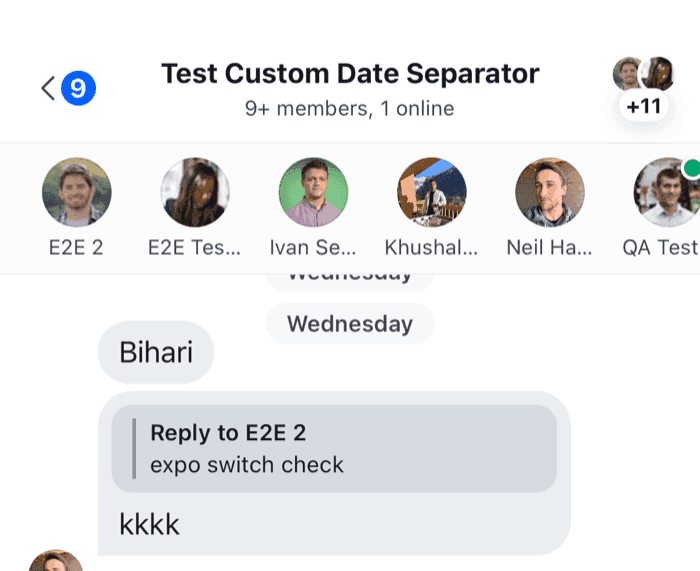
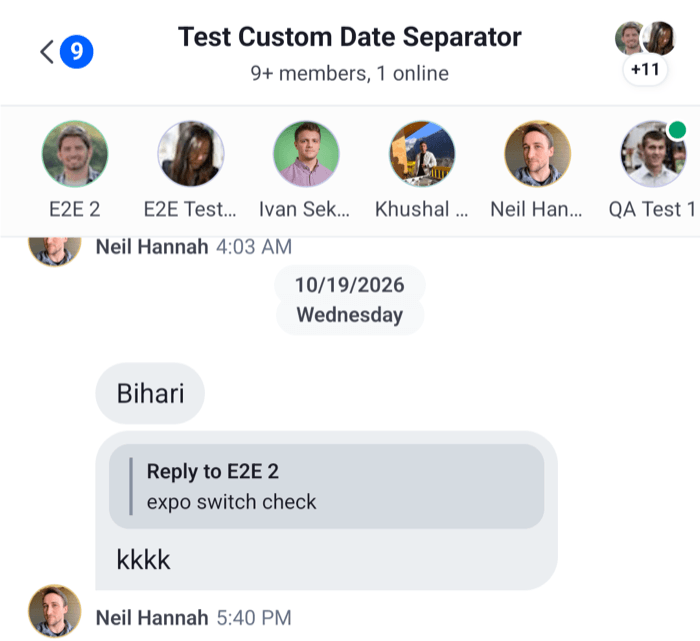
This UI cookbook renders the members of the open channel with their online status, in a row of avatars above the message list. The row stays current as members come online, go offline, join or leave.

## Best practices

- Read members from `channel.state` with `useChannelMembersState(channel)`. It subscribes to the store, so the component re-renders when the members change.
- Pass `useChannelMembersState` a `pick` function, declared at module scope, that returns the member fields you show. The members then update only when one of those fields changes, or when members join or leave.
- Load the channel with presence, so the server sends presence changes. Without it, `online` shows the value from when the channel loaded.
- Don't add your own `user.presence.changed` listener. The client already writes each presence change into the members it holds.
- Expect only some members in a large channel. A channel loads a limited number of members with its query. The member list of [Channel details and members](https://getstream.io/chat/docs/sdk/react-native/v10/features/channels/channel-details-and-members/) queries all of them.

## Implementation

### 1. The members row

The component reads the channel from `Channel` with `useChannel()`, and its members with `useChannelMembersState`:

```tsx title="src/ChannelMembers.tsx"
import { FlatList, StyleSheet, Text, View } from "react-native";
import type { ChannelMemberResponse } from "stream-chat";
import {
  useChannel,
  useChannelMembersState,
  UserAvatar,
  useTheme,
} from "stream-chat-react-native";
import type { ChannelMemberPick } from "stream-chat-react-native";

// The fields the row shows. Other changes to a member don't re-render it.
const pickShownFields: ChannelMemberPick = ({ user }) => ({
  image: user?.image,
  name: user?.name,
  online: user?.online,
});

const keyExtractor = (member: ChannelMemberResponse) =>
  member.user?.id ?? member.user_id ?? "";

const MemberItem = ({ member }: { member: ChannelMemberResponse }) => {
  const {
    theme: { semantics },
  } = useTheme();
  const { user } = member;
  if (!user) return null;

  const name = user.name ?? user.id;

  return (
    <View
      accessible
      accessibilityLabel={`${name}, ${user.online ? "online" : "offline"}`}
      style={styles.item}
    >
      <UserAvatar showOnlineIndicator={user.online} size="lg" user={user} />
      <Text
        numberOfLines={1}
        style={[styles.name, { color: semantics.textSecondary }]}
      >
        {name}
      </Text>
    </View>
  );
};

export const ChannelMembers = () => {
  const channel = useChannel();
  const members = useChannelMembersState(channel, pickShownFields);
  const {
    theme: { semantics },
  } = useTheme();

  return (
    <FlatList
      contentContainerStyle={styles.content}
      data={Object.values(members)}
      horizontal
      keyExtractor={keyExtractor}
      renderItem={({ item }) => <MemberItem member={item} />}
      showsHorizontalScrollIndicator={false}
      style={[styles.list, { borderBottomColor: semantics.borderCoreSubtle }]}
    />
  );
};

const styles = StyleSheet.create({
  content: { gap: 12, paddingHorizontal: 16, paddingVertical: 8 },
  item: { alignItems: "center", gap: 4, width: 56 },
  list: { borderBottomWidth: 1, flexGrow: 0 },
  name: { fontSize: 12 },
});
```

<table>
  <tr>
  <td align='center' width='50%'>

![A row of member avatars with names above the message list, with an online dot on one member on iOS](https://getstream.io/docs-assets/images/25f6b88f0a52.png)

  </td>
  <td align='center' width='50%'>

![A row of member avatars with names above the message list, with an online dot on one member on Android](https://getstream.io/docs-assets/images/084966521a16.png)

  </td>
  </tr>
</table>

`UserAvatar` shows the user's image, or their initials, and with `showOnlineIndicator` the online dot the SDK's own avatars use. It draws no dot for a member who is offline. `flexGrow: 0` keeps the horizontal list at the height of its row, so the message list below it takes the rest of the screen.

`channel.state.members` holds the loaded members by user id. Each member carries its `user`, with `name`, `image`, `online` and `last_active`. [What channels and threads hold](https://getstream.io/chat/docs/sdk/react-native/v10/state/channels-and-threads/what-channels-and-threads-hold/#data-and-members) lists the rest of `channel.state`. For a status line such as "Last seen 10 minutes ago", `useUserActivityStatus(user)` returns the text the channel details screen shows.

### 2. Render it in the channel

Render it inside `Channel`, above the message list:

```tsx title="src/ChannelScreen.tsx"
import type { Channel as StreamChannel } from "stream-chat";
import {
  Channel,
  MessageComposer,
  MessageList,
} from "stream-chat-react-native";
import { ChannelMembers } from "./ChannelMembers";

export const ChannelScreen = ({ channel }: { channel: StreamChannel }) => (
  <Channel channel={channel}>
    <ChannelMembers />
    <MessageList />
    <MessageComposer />
  </Channel>
);
```

Pass `Channel` the `keyboardVerticalOffset` and `topInset` your screen needs, as [Keyboard and insets](https://getstream.io/chat/docs/sdk/react-native/v10/ui/layout/keyboard-and-insets/) explains. The row is part of the screen's views, so it changes neither.

## Real-time updates

The row updates by itself.

>
> **Info:** **Example**
>
> Cleo, a member of the open channel, comes online:
>
> 1. The server sends `user.presence.changed` with Cleo's user, because the client loaded a channel she's in with presence.
> 2. The client puts the new user object into Cleo's member in `channel.state` of every channel it holds with her.
> 3. `channel.state` notifies its subscribers. `online` is one of the picked fields, so `useChannelMembersState` re-renders `ChannelMembers` with Cleo online.
>

A member who joins, leaves or is updated changes the same store, through `member.added`, `member.removed` and `member.updated`, so the row follows those too.

The server sends presence changes only for channels loaded with presence. Ask for it where the channel is loaded:

```ts
import { ChannelPaginator } from "stream-chat";
import type { StreamChat } from "stream-chat";

export const watchWithPresence = async (client: StreamChat, userId: string) => {
  // A channel list: every channel it loads is watched with presence.
  const teamChannels = new ChannelPaginator({
    client,
    filters: { members: { $in: [userId] }, type: "team" },
    id: "team",
    requestOptions: { presence: true },
  });

  // A channel you watch yourself.
  const support = await client
    .channel("messaging", "support")
    .watch({ presence: true });

  return { support, teamChannels };
};
```

`Channel.watch()` sends nothing for a channel that's watched and loaded when it gets no options, or the same options as the last `Channel.watch()` that succeeded during the current watch. A channel list's query isn't such a call, so `Channel.watch({ presence: true })` sends a request even for a channel a list already watches. Later calls with the same options send nothing while the watch lasts. [Channel list paginators](https://getstream.io/chat/docs/sdk/react-native/v10/state/loading-data/channel-list-paginators/#creating-a-channel-paginator) explains `requestOptions`, and [User presence](https://getstream.io/chat/docs/javascript/presence-format/) covers presence on the server.

A reconnect ends every watch. Connection recovery queries each registered channel list again with its own `requestOptions`, so a list with `presence: true` gets presence back. It reloads an open channel without presence, so for a channel no such list loads, run your `Channel.watch({ presence: true })` again on `connection.recovered`; [Connection](https://getstream.io/chat/docs/sdk/react-native/v10/state/connection/#what-reloads-after-a-reconnect) lists what recovery reloads.

## The SDK's member lists

The channel details screen shows members in two places, and they differ from this row:

- The members section shows the first five members from `channel.state.members`, through `useChannelMembersState`, so it follows presence like this row.
- The full member list, **View all**, queries every member from the server with a `ChannelMemberSearchSource`, and searches them by name. It shows each member's status as the query returned it, and queries its first page again only when the member count changes.

[Channel details and members](https://getstream.io/chat/docs/sdk/react-native/v10/features/channels/channel-details-and-members/#how-it-works-across-the-layers) explains both, and `ChannelMemberItem`, the row they render, is an override key.

## Read more

- [Channel details and members](https://getstream.io/chat/docs/sdk/react-native/v10/features/channels/channel-details-and-members/): the SDK's members section and member list.
- [Channel header](https://getstream.io/chat/docs/sdk/react-native/v10/ui-cookbook/headers/channel-header/): the member and online counts in a header.
- [Reading state in components](https://getstream.io/chat/docs/sdk/react-native/v10/ui/reading-state-in-components/): `useStateStore` and the hooks that wrap it.

---

For the most recent version of this documentation, visit [https://getstream.io/chat/docs/sdk/react-native/v10/ui-cookbook/channel-list/members-and-online-status/](https://getstream.io/chat/docs/sdk/react-native/v10/ui-cookbook/channel-list/members-and-online-status/).