# Preview UI

> **Info:** This is release candidate documentation for **Stream Chat React Native SDK v10**. For the latest stable version, see the [latest version (v9)](https://getstream.io/chat/docs/sdk/react-native/).

A channel list renders one row per channel. This UI cookbook replaces the look of the row and keeps everything else the SDK does for it: reading the channel's stores, the swipe actions, and calling `onSelect` when the user taps the row. It then shows a channel outside the list with the same helpers, and replaces the list's infinite scroll with a "Load more" button. What a row reads and which parts you can replace are explained in [Channel list UI](https://getstream.io/chat/docs/sdk/react-native/v10/ui/components/channel-list-ui/).

## Best practices

- Replace `ChannelPreview`, the row's content. `ChannelList` still renders the row around it: it computes the channel's latest message and its muted, pinned and unread values, passes them as props, and wraps the row in the swipe actions.
- Open the channel the way the default row does. Read `onSelect` from `useChannelsContext()` and call it with the channel. The row's props don't carry it.
- Show the `lastMessage` prop, not a message you read yourself. It's translated into the user's language when the message has a translation.
- Build the message line with `ChannelPreviewMessage`. It shows who is typing, the user's draft, poll votes, failed messages and the delivery mark before falling back to the latest message.
- Keep rows light. Each row subscribes to its own channel and re-renders when that channel changes.

## Custom channel preview

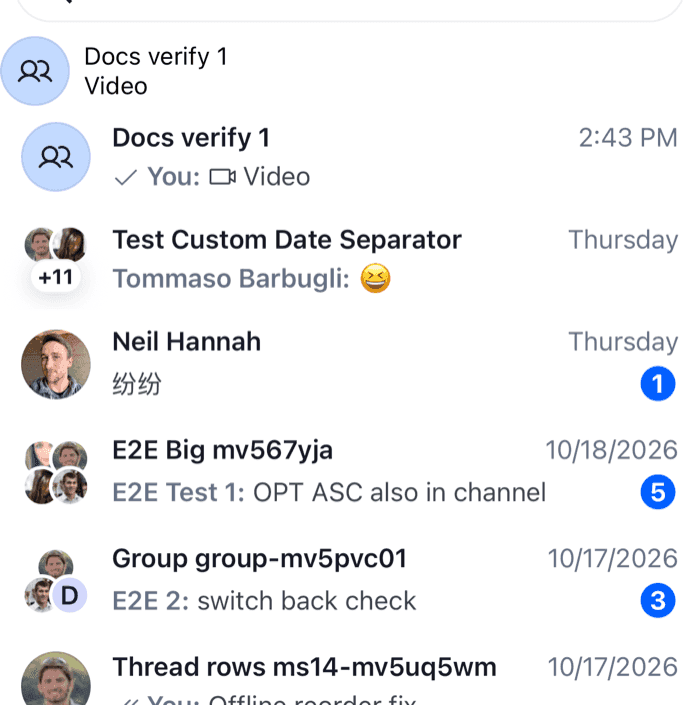
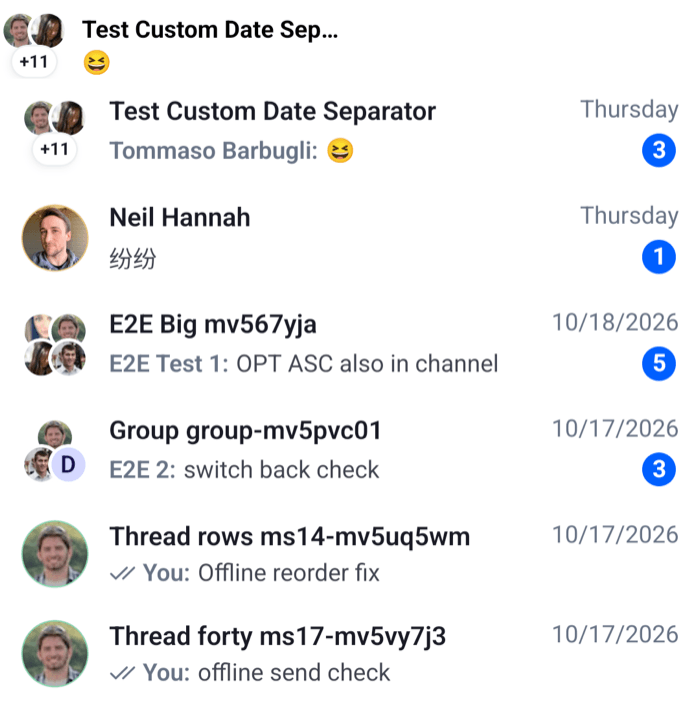
This screen shows each channel as a compact row with the avatar, the title, the pinned and muted icons, the time of the latest message, the message line and an unread badge:

```tsx title="src/ChannelListScreen.tsx"
import { Pressable, StyleSheet, Text, View } from "react-native";
import type { Channel, ChannelPaginator } from "stream-chat";
import {
  BadgeNotification,
  ChannelAvatar,
  ChannelList,
  ChannelPreviewMessage,
  ChannelPreviewMutedStatus,
  ChannelPreviewPinnedStatus,
  ChannelPreviewStatus,
  useChannelPreviewDisplayName,
  useChannelsContext,
  useTheme,
  WithComponents,
} from "stream-chat-react-native";
import type { ChannelPreviewViewProps } from "stream-chat-react-native";

const CompactChannelRow = ({
  channel,
  lastMessage,
  muted,
  pinned,
  unread,
}: ChannelPreviewViewProps) => {
  const { maxUnreadCount, onSelect } = useChannelsContext();
  const {
    theme: { semantics },
  } = useTheme();
  const title = useChannelPreviewDisplayName(channel);

  return (
    <Pressable
      accessibilityRole="button"
      onPress={() => onSelect?.(channel)}
      style={({ pressed }) => [
        styles.row,
        pressed
          ? { backgroundColor: semantics.backgroundUtilityPressed }
          : null,
      ]}
    >
      <ChannelAvatar channel={channel} size="lg" />
      <View style={styles.main}>
        <View style={styles.line}>
          <Text
            numberOfLines={1}
            style={[styles.title, { color: semantics.textPrimary }]}
          >
            {title}
          </Text>
          {pinned ? <ChannelPreviewPinnedStatus /> : null}
          {muted ? <ChannelPreviewMutedStatus /> : null}
          <ChannelPreviewStatus channel={channel} lastMessage={lastMessage} />
        </View>
        <View style={styles.line}>
          <View style={styles.message}>
            <ChannelPreviewMessage
              channel={channel}
              lastMessage={lastMessage}
            />
          </View>
          {unread ? (
            <BadgeNotification
              count={Math.min(unread, maxUnreadCount)}
              size="sm"
              type="primary"
            />
          ) : null}
        </View>
      </View>
    </Pressable>
  );
};

// Declared once, so WithComponents gets the same object on every render.
const overrides = { ChannelPreview: CompactChannelRow };

export const ChannelListScreen = ({
  onSelect,
  paginator,
}: {
  onSelect: (channel: Channel) => void;
  paginator: ChannelPaginator;
}) => (
  <WithComponents overrides={overrides}>
    <ChannelList onSelect={onSelect} paginator={paginator} />
  </WithComponents>
);

const styles = StyleSheet.create({
  line: { alignItems: "center", flexDirection: "row", gap: 6 },
  main: { flex: 1, gap: 2 },
  message: { flex: 1 },
  row: {
    alignItems: "center",
    flexDirection: "row",
    gap: 12,
    paddingHorizontal: 12,
    paddingVertical: 8,
  },
  title: { flex: 1, fontSize: 15, fontWeight: "600" },
});
```

<table>
  <tr>
  <td align='center' width='50%'>

![A channel list with compact rows showing the avatar, title, time, message line and unread badge on iOS](https://getstream.io/docs-assets/images/52c2e7b451bb.png)

  </td>
  <td align='center' width='50%'>

![A channel list with compact rows showing the avatar, title, time, message line and unread badge on Android](https://getstream.io/docs-assets/images/f0abfd810cf1.png)

  </td>
  </tr>
</table>

The paginator comes from your app, registered on `client.channelManager`, as in [Channel list paginators](https://getstream.io/chat/docs/sdk/react-native/v10/state/loading-data/channel-list-paginators/).

What happens for each channel:

1. `ChannelList` renders a row for the channel. The row reads the channel's latest message from `channel.messagePaginator.aggregateState`, and its mute status, membership and read state from `channel.state`. It renders the `ChannelPreview` override, `CompactChannelRow`, with `channel`, `lastMessage`, `muted`, `pinned` and `unread` as props.
2. `useChannelPreviewDisplayName(channel)` gives the title: the channel's name, or the other members' names when it has none. `ChannelAvatar` shows the channel's image, or the other member's avatar in a direct message, or the members' avatars in a group.
3. `unread` is the user's unread count, or `0` while the channel is muted. The badge caps it at `maxUnreadCount` from the list, 255 by default.
4. `ChannelPreviewStatus` renders the time of `lastMessage`: the time today, "Yesterday", the weekday within the last week, and the date before that.
5. `ChannelPreviewMessage` renders the message line from the same `lastMessage`.
6. Swiping the row toward the start still reveals the row's actions, because the list wraps the override in them.

A tap on the default row closes another row's open swipe actions instead of opening the channel. The registry it uses for that isn't exported, so a row of your own opens the channel on every tap.

## Using display helpers

Outside a channel list there is no list to compute the props, and no `useChannelsContext()`. The hooks the list uses are exported, so a channel shown anywhere else can look the same. This chip shows a channel your app holds, for example in a "Recent" strip above the list:

```tsx title="src/RecentChannelChip.tsx"
import { Pressable, StyleSheet, Text, View } from "react-native";
import type { Channel } from "stream-chat";
import {
  ChannelAvatar,
  useChannelPreviewData,
  useChannelPreviewDisplayName,
  useChatContext,
  useMessagePreviewText,
} from "stream-chat-react-native";

export const RecentChannelChip = ({
  channel,
  onPress,
}: {
  channel: Channel;
  onPress: (channel: Channel) => void;
}) => {
  const { client } = useChatContext();
  const { lastMessage, unread } = useChannelPreviewData(channel, client);
  const title = useChannelPreviewDisplayName(channel);
  const preview = useMessagePreviewText({ message: lastMessage });

  return (
    <Pressable
      accessibilityRole="button"
      onPress={() => onPress(channel)}
      style={styles.chip}
    >
      <ChannelAvatar channel={channel} size="lg" />
      <View style={styles.text}>
        <Text numberOfLines={1} style={unread ? styles.unread : undefined}>
          {title}
        </Text>
        <Text numberOfLines={1}>{preview}</Text>
      </View>
    </Pressable>
  );
};

const styles = StyleSheet.create({
  chip: { alignItems: "center", flexDirection: "row", gap: 8, width: 200 },
  text: { flex: 1 },
  unread: { fontWeight: "700" },
});
```

- `useChannelPreviewData(channel, client)` returns the four values the list passes to a row: `lastMessage`, `muted`, `pinned` and `unread`. It subscribes to the channel's stores, so the chip updates when a message arrives or the user reads the channel. Unlike the list, it doesn't translate `lastMessage`.
- `useMessagePreviewText({ message })` turns the message into one line of text: "Message deleted", the poll's name, "Location", "Photo", "3 Photos", a voice message with its duration, or the message's text. [Channel preview hooks](https://getstream.io/chat/docs/sdk/react-native/v10/reference/hooks/channel-preview-hooks/) lists every case, and `useMessagePreviewIcon` returns an icon to go with it.

## A "Load more" button instead of infinite scroll

`ChannelList` loads the next page when the user scrolls near the end. To load it from a button instead, replace the list's footer and turn off `onEndReached` through `additionalFlatListProps`:

```tsx title="src/LoadMoreChannelList.tsx"
import { Button } from "react-native";
import type {
  Channel,
  ChannelPaginator,
  ChannelPaginatorState,
} from "stream-chat";
import {
  ChannelList,
  useChannelsContext,
  useStateStore,
} from "stream-chat-react-native";

const loadStateSelector = ({
  hasMoreTail,
  isLoading,
  items,
}: ChannelPaginatorState) => ({
  hasMoreTail,
  isLoading,
  loaded: items !== undefined,
});

const LoadMoreButton = () => {
  const { loadNextPage, paginator } = useChannelsContext();
  const { hasMoreTail, isLoading, loaded } = useStateStore(
    paginator.state,
    loadStateSelector,
  );

  // Nothing before the first page has loaded, and nothing after the last one.
  if (!loaded || !hasMoreTail) return null;

  return (
    <Button
      disabled={isLoading}
      onPress={() => void loadNextPage()}
      title="Load more"
    />
  );
};

// Declared once: a new object on every render would re-render the FlatList.
const additionalFlatListProps = {
  ListFooterComponent: LoadMoreButton,
  onEndReached: () => undefined,
};

export const LoadMoreChannelList = ({
  onSelect,
  paginator,
}: {
  onSelect: (channel: Channel) => void;
  paginator: ChannelPaginator;
}) => (
  <ChannelList
    additionalFlatListProps={additionalFlatListProps}
    onSelect={onSelect}
    paginator={paginator}
  />
);
```

<table>
  <tr>
  <td align='center' width='50%'>

![The end of a channel list with a Load more button below the last row on iOS](https://getstream.io/docs-assets/images/8a8540885850.png)

  </td>
  <td align='center' width='50%'>

![The end of a channel list with a Load more button below the last row on Android](https://getstream.io/docs-assets/images/708b43f103a9.png)

  </td>
  </tr>
</table>

`ChannelList` spreads `additionalFlatListProps` over its own `FlatList` props, so the footer replaces the next-page spinner and the empty `onEndReached` replaces the one that loads. The footer renders inside the list, so `useChannelsContext()` gives it the paginator and `loadNextPage`, which loads the next page once the first one has loaded. `items` is `undefined` until the first page has loaded, and `hasMoreTail` is `false` once the server has returned the last page, so the button shows only between the two. Pull-to-refresh still loads the first page again.

## Going deeper

When replacing the row's content isn't the right size of change:

1. **One part of the default row.** Override `ChannelPreviewTitle`, `ChannelPreviewStatus`, `ChannelPreviewUnreadCount`, `ChannelPreviewAvatar`, or the message line, `ChannelPreviewMessage`, and keep the rest of the row.
2. **Only the latest message in the line.** Override `ChannelPreviewLastMessage`. The default message line still handles typing, drafts, polls and failed messages, and renders your component for the message itself and for the draft.
3. **The row actions.** Pass `getChannelActionItems` to `ChannelList`; [Channel actions](https://getstream.io/chat/docs/sdk/react-native/v10/ui/customizing/actions/#channel-actions) shows how. `swipeActionsEnabled={false}` turns swiping off.
4. **The empty, loading and error states.** Override `EmptyStateIndicator`, `ChannelListLoadingIndicator` and `LoadingErrorIndicator`; [Loading, empty and error states](https://getstream.io/chat/docs/sdk/react-native/v10/ui/components/channel-list-ui/#loading-empty-and-error-states) lists them.
5. **When the next page loads.** Set `loadMoreThreshold` on `ChannelList`. It's the `FlatList`'s `onEndReachedThreshold`, 0.1 by default.
6. **Which loaded channels render.** `channelRenderFilterFn` on `ChannelList` filters them on every render. To change which channels the list loads, change the paginator's filters instead.

Every key is listed in [Channel list UI](https://getstream.io/chat/docs/sdk/react-native/v10/ui/components/channel-list-ui/#replacing-parts), and the row components' props in the [Channel preview reference](https://getstream.io/chat/docs/sdk/react-native/v10/component-reference/channel-list/channel-preview/).

---

For the most recent version of this documentation, visit [https://getstream.io/chat/docs/sdk/react-native/v10/ui-cookbook/channel-list/preview-ui/](https://getstream.io/chat/docs/sdk/react-native/v10/ui-cookbook/channel-list/preview-ui/).