
 React
React iOS
iOS Android
 Flutter
 Angular
 JavaScript
 Unity
Unity Unreal
 Node
Node Python
 Ruby
Ruby PHP
PHP Java
Java .NET
.NET Go
Go REST
RESTenum class HistoryOption(val text: String) {
None("No history"),
Today("From today"),
All("All history"),
Custom("Custom"),
}Hide Channel History For Newly Added Members
In this tutorial we will demonstrate how to build a simple dialog that allows to specify the length of channel conversation history to be shared with a newly added member.
We will build the following simple dialog:
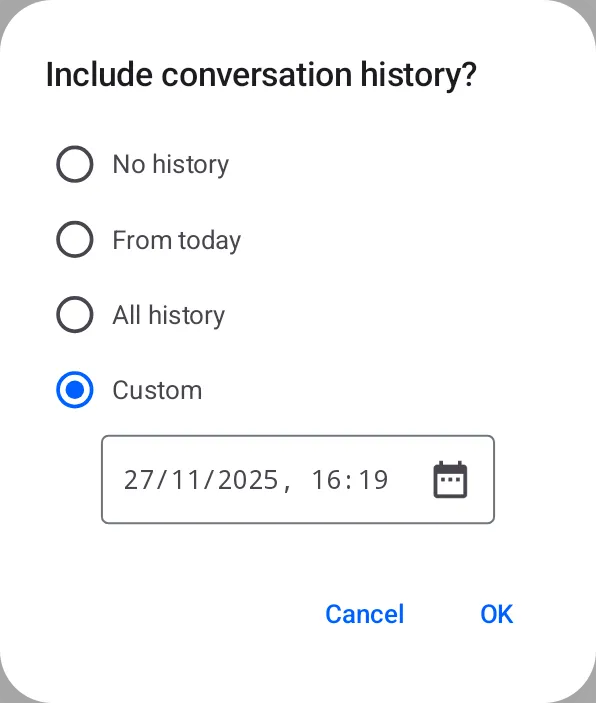
Minimal dialog to control history visibility when adding members
The UI below lets you choose how much of the conversation history a newly added member will see.
When clicking OK, it calls channel.addMembers() with hideHistoryBefore mapped from the
selected option:
- No history: hide all history before now →
hideHistoryBefore = Date() - From today: show only today →
hideHistoryBefore = atStartOfDay() - All history: show everything → omit
hideHistoryBefore(orhideHistoryBefore = null) - Custom: show from a specific date/time →
hideHistoryBefore = customDate
We will first define an enum to represent the history options:
And a method which will map the selected HistoryOption to the corresponding hideHistoryBefore
value:
fun getHideHistoryBefore(
    option: HistoryOption,
    customDate: Date,
): Date? {
    return when (option) {
        HistoryOption.None -> Date()
        HistoryOption.Today -> atStartOfDay()
        HistoryOption.All -> null
        HistoryOption.Custom -> customDate
    }
}

fun atStartOfDay(): Date {
    return Calendar.getInstance().apply {
        set(Calendar.HOUR_OF_DAY, 0)
        set(Calendar.MINUTE, 0)
        set(Calendar.SECOND, 0)
        set(Calendar.MILLISECOND, 0)
    }.time
}
Next we can define a Composable to represent each history option item:
@Composable
fun HistoryOptionItem(
    option: HistoryOption,
    isSelected: Boolean,
    onOptionSelected: (HistoryOption) -> Unit,
) {
    Row(
        modifier = Modifier
            .fillMaxWidth()
            .clickable { onOptionSelected(option) }
            .padding(4.dp),
        verticalAlignment = Alignment.CenterVertically,
        horizontalArrangement = Arrangement.spacedBy(8.dp)
    ) {
        RadioButton(
            selected = isSelected,
            onClick = null,
            colors = RadioButtonDefaults.colors(selectedColor = ChatTheme.colors.primaryAccent)
        )
        Text(
            text = option.text,
            fontSize = 14.sp,
            style = ChatTheme.typography.body,
        )
    }
}
We can then define the main dialog Composable:
@Composable
fun IncludeConversationHistoryDialog(
    onConfirm: (hideHistoryBefore: Date?) -> Unit,
    onCancel: () -> Unit,
) {
    // State for selected option and custom date
    var selectedOption by remember { mutableStateOf(HistoryOption.Custom) }
    var customDate by remember { mutableStateOf(Date()) }
    AlertDialog(
        containerColor = ChatTheme.colors.barsBackground,
        title = {
            Text(
                text = "Include conversation history?",
                fontSize = 18.sp,
                fontWeight = FontWeight.Medium,
            )
        },
        text = {
            Column(verticalArrangement = Arrangement.spacedBy(8.dp)) {
                // Show each history option
                HistoryOption.entries.forEach { option ->
                    HistoryOptionItem(
                        option = option,
                        isSelected = selectedOption == option,
                        onOptionSelected = { selectedOption = it },
                    )
                }
                // Custom date picker
                if (selectedOption == HistoryOption.Custom) {
                    DateTimeSelector(
                        selectedDate = customDate,
                        onDateTimeSelected = { date -> customDate = date }
                    )
                }
            }
        },
        confirmButton = {
            TextButton(
                onClick = {
                    // Map selected option to hideHistoryBefore value
                    val hideHistoryBefore = getHideHistoryBefore(selectedOption, customDate)
                    onConfirm(hideHistoryBefore)
                }
            ) {
                Text("OK", color = ChatTheme.colors.primaryAccent)
            }
        },
        dismissButton = {
            TextButton(onClick = onCancel) {
                Text("Cancel", color = ChatTheme.colors.primaryAccent)
            }
        },
        onDismissRequest = onCancel,
    )
}
Finally, we can use this dialog when adding members to a channel:
// Assume we will be adding the following members to the channel:
val channelClient = ChatClient.instance().channel("messaging:123")
val membersToAdd = listOf("user1", "user2", "user3")

// State to control the dialog visibility
var showIncludeHistoryDialog by remember { mutableStateOf(false) }

if (showIncludeHistoryDialog) {
    IncludeConversationHistoryDialog(
        onConfirm = { hideHistoryBefore ->
            // Call addMembers with the selected hideHistoryBefore value
            channelClient.addMembers(
                memberIds = membersToAdd,
                hideHistoryBefore = hideHistoryBefore,
            ).enqueue()
            // Dismiss the dialog
            showIncludeHistoryDialog = false
        },
        onCancel = {
            // Dismiss the dialog
            showIncludeHistoryDialog = false
        },
    )
}
For simplicity, we have omitted the implementation of the DateTimeSelector composable,
which would allow users to pick a custom date and time. You can implement this by using the Jetpack
Compose DatePicker/TimePicker composable-s or any third-party libraries that provide similar
functionality.
Additionally, this tutorial invokes channel.addMembers() directly from the composable.
In a real-world application, you would typically want to handle this logic in a ViewModel or a
similar layer to separate UI and business logic.