
 React
React iOS
iOS Android
 Flutter
 Angular
 JavaScript
 Unity
Unity Unreal
 Node
Node Python
 Ruby
Ruby PHP
PHP Java
Java .NET
.NET Go
Go REST
RESTclass CustomChannelListViewModel(val chatClient: ChatClient = ChatClient.instance()) : ViewModel()Custom Channel List
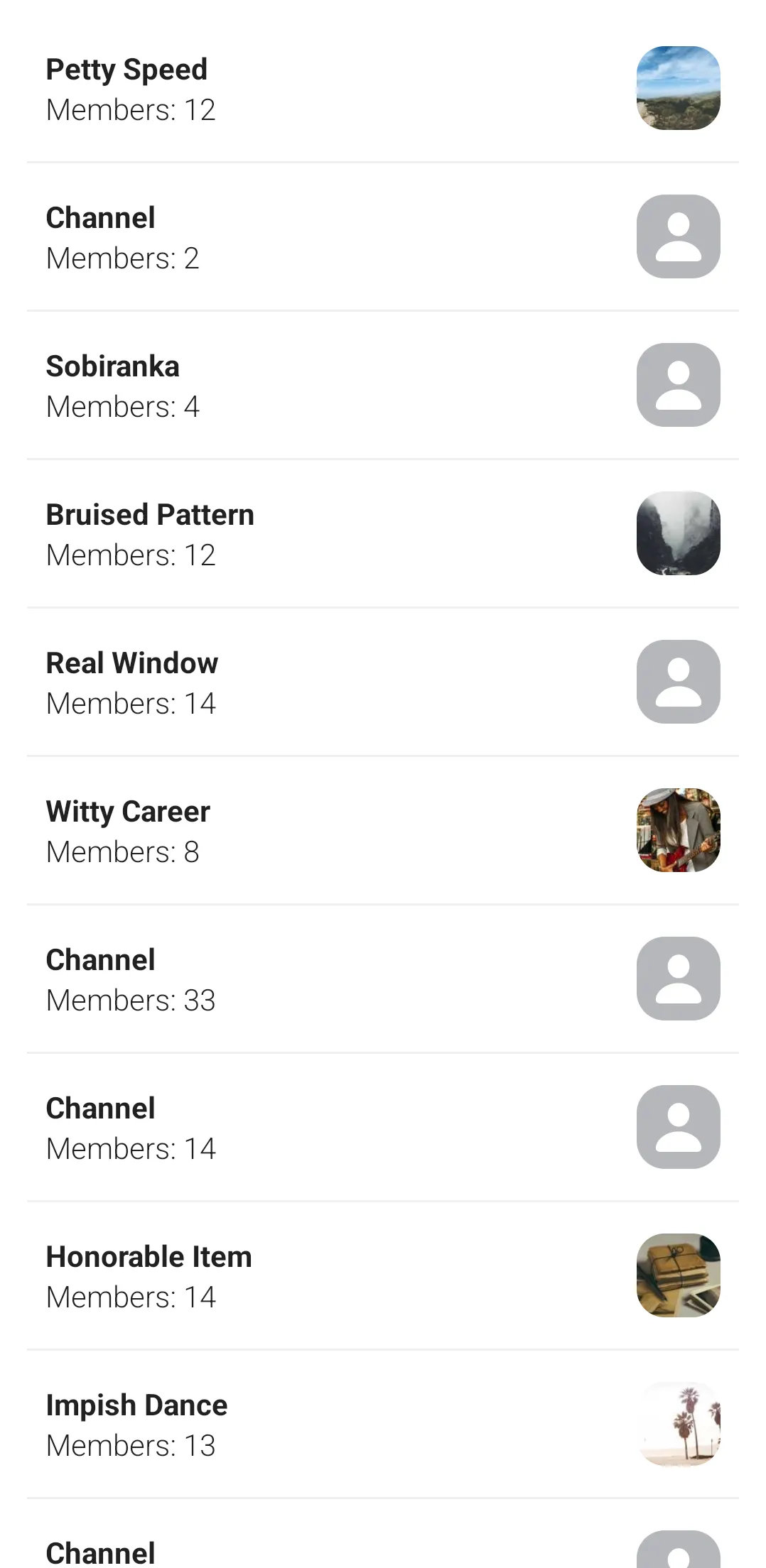
This recipe shows how to build a channel list from scratch using only the low-level ChatClient API and Jetpack Compose. No SDK UI components are used.
When to use this approach:
- You need a completely different layout (e.g., grid instead of list)
- Your design differs significantly from the SDK's default channel list
- You want full control over state management and UI
When to use SDK components instead:
- You want a working channel list quickly
- Minor UI tweaks are sufficient (colors, fonts, shapes)
- You need built-in features like search, swipe actions, or badges
Custom View Model
The UI state is handled by a view model, CustomChannelListViewModel. It receives a ChatClient instance as a constructor parameter. This is done for simplicity, you should use a repository class and a DI library in a real app.
In our view model we expose the UI state to the UI layer through the uiState property, which is a read-only StateFlow of ChannelListUiState. This allows the UI layer to observe changes to the state and update the UI accordingly.
private val _uiState = MutableStateFlow(ChannelListUiState())
val uiState = _uiState.asStateFlow()

data class ChannelListUiState(
    val channels: List<Channel> = emptyList(),
    val error: String? = null,
)
Next, we query the chat client for channels in the view model's init block. We do this by defining our request and passing it to chatClient.queryChannelsAsState. We get back a StateFlow<QueryChannelsState?>, which we store in the queryChannelsStateFlow class property.
Finally, we start collecting queryChannelsStateFlow and it's channels: StateFlow<List<Channel>?> property, and update _uiState accordingly.
private var queryChannelsStateFlow: StateFlow<QueryChannelsState?> = MutableStateFlow(null)

init {
    // Get the current user's ID
    val currentUserId = chatClient.getCurrentUser()?.id ?: return
    // Get last conversations I participated in, sorted by last updated
    val request = QueryChannelsRequest(
        filter = Filters.and(
            Filters.eq("type", "messaging"),
            Filters.`in`("members", listOf(currentUserId)),
        ),
        offset = 0,
        limit = 15,  // Channels per page
        querySort = QuerySortByField.descByName("last_updated")
    )

    // queryChannelsAsState returns a reactive StateFlow that updates automatically
    // when channels change (new messages, member updates, etc.)
    queryChannelsStateFlow = chatClient.queryChannelsAsState(request, coroutineScope = viewModelScope)

    viewModelScope.launch {
        queryChannelsStateFlow.collect { queryChannelsState ->
            if (queryChannelsState != null) {
                queryChannelsState.channels.collect { channels ->
                    channels?.let {
                        _uiState.update { it.copy(channels = channels, error = null) }
                    }
                }
            } else {
                _uiState.update { it.copy(error = "Cannot load channels") }
            }
        }
    }
}
The queryChannelsAsState method returns a StateFlow that automatically updates when:
- A new message arrives in any channel
- Channel metadata changes (name, image)
- Members join or leave
- The channel is deleted or hidden
This means your UI stays in sync without manual refresh logic.
To customize how real-time events affect the channel list (e.g., when using multiple lists filtered by channel type), see Channels State and Filtering.
Custom UI
The channel list screen is represented by a composable called CustomChannelListScreen, which gets the view model that we defined in the previous section as a parameter.
We start by observing the view model's uiState: StateFlow property for changes. We then pass the uiState.channels list down the Composition to build the UI.
Here is the full code for our custom channel list screen:
@Composable
fun CustomChannelListScreen(
    viewModel: CustomChannelListViewModel = viewModel(),
    navigateToMessageList: (String) -> Unit,
) {
    val uiState by viewModel.uiState.collectAsStateWithLifecycle()

    if (uiState.error == null) {
        CustomChannelList(channels = uiState.channels, onChannelClick = navigateToMessageList)
    } else {
        Error(message = uiState.error!!)
    }
}

@Composable
private fun CustomChannelList(channels: List<Channel>, onChannelClick: (String) -> Unit) {
    LazyColumn(
        modifier = Modifier.fillMaxSize(),
        contentPadding = PaddingValues(all = 15.dp),
        verticalArrangement = Arrangement.spacedBy(7.dp),
    ) {
        itemsIndexed(channels) { index, item ->
            CustomChannelListItem(channel = item, onChannelClick = onChannelClick)
            if (index < channels.lastIndex) {
                Spacer(modifier = Modifier.height(7.dp))
                Divider(color = Color(0xFFEEEEEE), thickness = 1.dp)
            }
        }
    }
}

@Composable
private fun CustomChannelListItem(channel: Channel, onChannelClick: (String) -> Unit) {
    Row(
        modifier = Modifier
            .fillMaxWidth()
            .clickable { onChannelClick(channel.cid) }
            .padding(all = 10.dp),
        horizontalArrangement = Arrangement.SpaceBetween,
        verticalAlignment = Alignment.CenterVertically
    ) {
        Column {
            Text(text = if (channel.name != "") channel.name else "Channel", fontWeight = FontWeight.Bold)
            Text(text = "Members: ${channel.memberCount}", fontWeight = FontWeight.Light)
        }
        ChannelImage(channel.image)
    }
}

@Composable
private fun ChannelImage(url: String) {
    // We use coil for getting the images
    AsyncImage(
        model = ImageRequest.Builder(LocalContext.current)
            .data(url)
            .crossfade(durationMillis = 500)
            .build(),
        contentDescription = null,
        modifier = Modifier
            .size(45.dp)
            .clip(shape = RoundedCornerShape(15.dp)),
        contentScale = ContentScale.Crop,
        error = painterResource(id = R.drawable.ic_avatar),
        fallback = painterResource(id = R.drawable.ic_avatar),
        placeholder = painterResource(id = R.drawable.ic_avatar),
    )
}

@Composable
private fun Error(message: String) {
    Box(
        modifier = Modifier.fillMaxSize(),
        contentAlignment = Alignment.Center
    ) {
        Text(text = message)
    }
}
Paginating Channels
Determine if the channel list is scrolled to the end
To create simple pagination for the channel list, we create an extension method, OnListEndReached, on the LazyListState class.
This function takes two parameters: buffer and handler. handler is a lambda that will be executed when the end of the list (considering the buffer) is reached.
Inside the function, a derivedStateOf block is used to create a boolean state that tells us if handler should be called. This state, named shouldCallHandler, is true when the index of the last visible item equals the total number of items minus the buffer.
Finally, a LaunchedEffect block is used to call the handler function when shouldCallHandler is true. This effect is re-launched every time shouldCallHandler changes. In other words, handler will be called every time the user scrolls the list to its end (considering the buffer).
@Composable
fun LazyListState.OnListEndReached(buffer: Int = 0, handler: () -> Unit) {
    val shouldCallHandler by remember {
        derivedStateOf {
            layoutInfo.visibleItemsInfo.lastOrNull()?.let { lastVisibleItem ->
                lastVisibleItem.index == layoutInfo.totalItemsCount - 1 - buffer
            } ?: false
        }
    }

    LaunchedEffect(shouldCallHandler) {
        if (shouldCallHandler) handler()
    }
}
Load more channels in the View Model
The next step is to add a method to CustomChannelListViewModel that will be used to load more channels when the list is scrolled to the end.
fun loadMoreChannels() {
    val queryChannelsState = queryChannelsStateFlow.value ?: return

    queryChannelsState.nextPageRequest.value?.let {
        chatClient.queryChannels(it).enqueue(
            onError = { streamError ->
                Log.e("[Channels]", "Cannot load more channels. Error: ${streamError.message}")
            },
        )
    }
}
Tie everything together in the UI
The last step is to adjust the UI by making a few changes in our composables.
We add a new lambda parameter named onListEndReached to the CustomChannelList composable and we use the list state OnListEndReached extension method what we created earlier:
private fun CustomChannelList(
    channels: List<Channel>,
    onChannelClick: (String) -> Unit,
    onListEndReached: () -> Unit,
) {
    val listState = rememberLazyListState()
    listState.OnListEndReached(buffer = 5, handler = onListEndReached)

    LazyColumn(
        // ...
        state = listState,
        // ...
    ) {
        // ...
    }
}
In CustomChannelListScreen, we call the view model method that loads more channels when the onListEndReached lambda is called:
// ...
CustomChannelList(
    // ...
    onListEndReached = viewModel::loadMoreChannels
)
// ...
Now, when the user scrolls to the end of the list, more channels will be loaded.
There might be edge cases that are not covered by this pagination implementation. Its purpose is to demonstrate how more channels can be fetched for pagination. Make sure you test your production implementation.
More Resources
If you want to learn how to use and customize our Compose UI Components, see here.