
 React
React iOS
iOS Android
 Flutter
 Angular
 JavaScript
 Unity
Unity Unreal
 Node
Node Python
 Ruby
Ruby PHP
PHP Java
Java .NET
.NET Go
Go REST
RESTChannelsScreen(
viewModelFactory = channelsViewModelFactory,
onHeaderActionClick = {
// Start the "New Chat" screen
}
)Creating Channels Flow
Different apps have different UIs for starting a chat with other users. For example, there can be a way to search through the available users, or show a button to invoke a chat with a user from their profile.
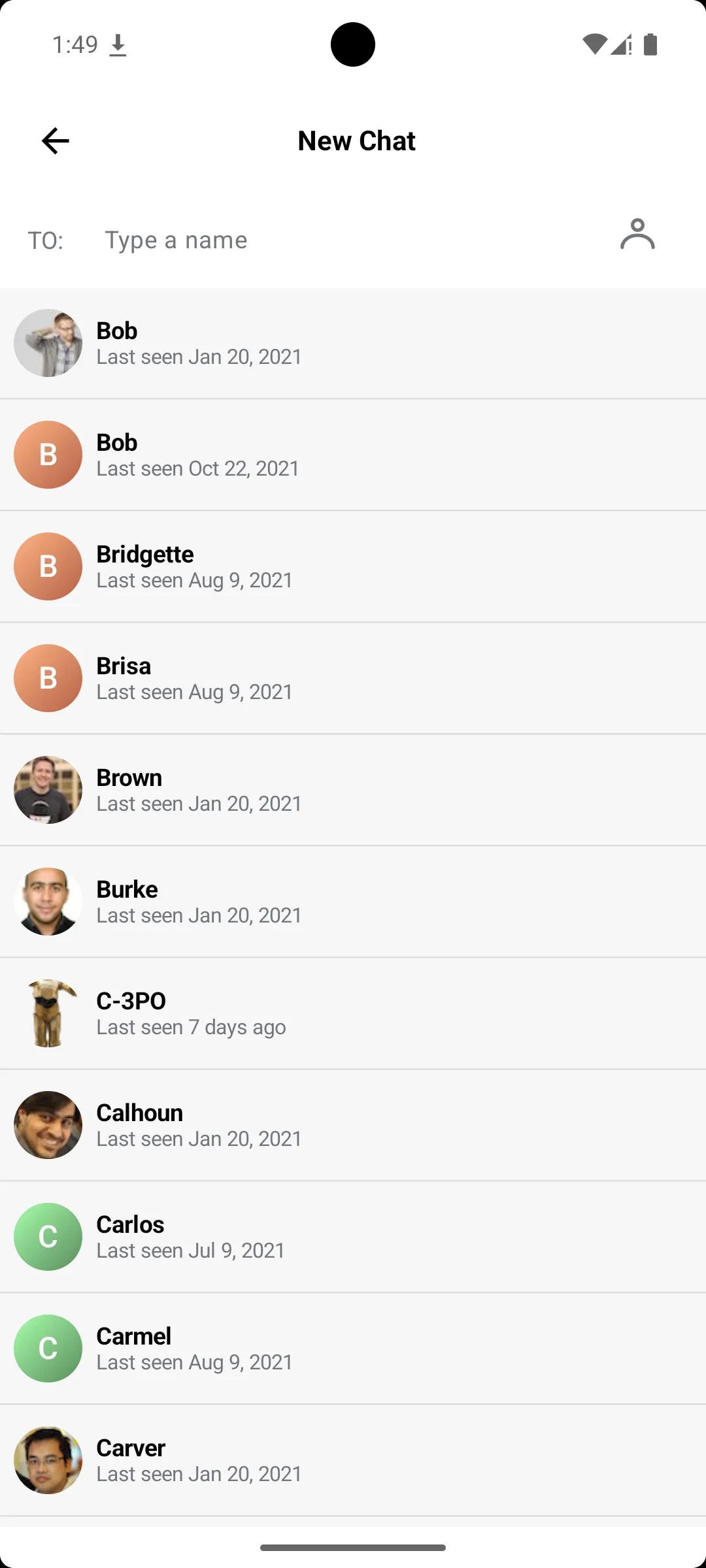
In this cookbook, we will build a UI that will allow creation of channels by searching the users on the platform.
Custom Channel List Header
The screen will be opened from the channel list's header, which by default has a New Chat button with no default action in the trailing position. We can override its click handler to show our New Chat screen.

To add a click handler on the New Chat button, set the onHeaderActionClick lambda in the ChannelsScreen composable:
The ChannelsScreen includes the header by default. But you can also use the ChannelListHeader as a standalone component:
val connectionState by channelListViewModel.connectionState.collectAsStateWithLifecycle()
ChannelListHeader(
    title = "Stream Chat",
    connectionState = connectionState,
    onHeaderActionClick = {
        // Start the "New Chat" screen
    }
)
Screen for Adding Chats
Now that we have our header setup, let's implement the screen that is displayed when the button is tapped.
To do this, create a new file called NewChatScreen and add the following content.
@Composable
fun NewChatScreen(
    viewModel: NewChatViewModel,
    onBack: () -> Unit,
) {
    val state by viewModel.state.collectAsStateWithLifecycle()
    Scaffold(
        modifier = Modifier.safeDrawingPadding(),
        topBar = {
            NewChatToolbar(
                state = state,
                onSearchQueryChanged = viewModel::onSearchQueryChanged,
                onUserClick = viewModel::onUserClick,
                onBack = onBack,
            )
        },
        floatingActionButton = {
            CreateChatButton(
                visible = state.selectedUsers.isNotEmpty() && !state.isCreatingChannel,
                onClick = viewModel::onCreateChatClick,
            )
        },
    ) { padding ->
        UserListContent(
            padding = padding,
            state = state,
            onUserClick = viewModel::onUserClick,
            onLoadMore = viewModel::onEndOfListReached,
        )
    }
}

@Composable
private fun NewChatToolbar(
    state: NewChatViewModel.NewChatState,
    onSearchQueryChanged: (String) -> Unit,
    onUserClick: (User) -> Unit,
    onBack: () -> Unit,
) {
    val hasSelectedUsers = state.selectedUsers.isNotEmpty()
    var searchFieldVisible by remember(state.selectedUsers) {
        mutableStateOf(!hasSelectedUsers)
    }
    Column(
        modifier = Modifier
            .fillMaxWidth()
            .background(ChatTheme.colors.barsBackground),
    ) {
        Row(
            modifier = Modifier
                .fillMaxWidth()
                .height(56.dp)
                .background(ChatTheme.colors.barsBackground)
                .padding(horizontal = 4.dp),
            verticalAlignment = Alignment.CenterVertically,
        ) {
            IconButton(onClick = onBack) {
                Icon(
                    modifier = Modifier.size(24.dp),
                    painter = painterResource(id = R.drawable.stream_compose_ic_arrow_back),
                    contentDescription = "Back",
                    tint = ChatTheme.colors.textHighEmphasis,
                )
            }
            Text(
                text = "New Chat",
                fontWeight = FontWeight.Bold,
                fontSize = 16.sp,
                color = ChatTheme.colors.textHighEmphasis,
            )
        }
        Row(
            modifier = Modifier
                .fillMaxWidth()
                .background(ChatTheme.colors.barsBackground)
                .padding(horizontal = 16.dp),
            verticalAlignment = Alignment.CenterVertically,
            horizontalArrangement = Arrangement.SpaceBetween,
        ) {
            Text(
                modifier = Modifier
                    .align(Alignment.Top)
                    .padding(top = 20.dp),
                text = "To:",
                fontSize = 14.sp,
                color = ChatTheme.colors.textLowEmphasis,
            )
            Spacer(modifier = Modifier.size(8.dp))
            Column(modifier = Modifier.weight(1f)) {
                if (hasSelectedUsers) {
                    SelectedUsersList(
                        selectedUsers = state.selectedUsers,
                        onUserClick = onUserClick,
                    )
                }
                if (searchFieldVisible) {
                    SearchUserTextField(
                        query = state.query,
                        onQueryChanged = onSearchQueryChanged,
                    )
                }
            }
            IconButton(
                modifier = Modifier
                    .align(Alignment.Bottom)
                    .padding(bottom = 8.dp),
                enabled = !searchFieldVisible,
                onClick = { searchFieldVisible = true },
            ) {
                val iconId = if (searchFieldVisible) R.drawable.ic_member else R.drawable.ic_member_add
                Icon(
                    painter = painterResource(iconId),
                    contentDescription = null,
                    tint = ChatTheme.colors.textLowEmphasis,
                )
            }
        }
    }
}

@Composable
fun UserListContent(
    padding: PaddingValues,
    state: NewChatViewModel.NewChatState,
    onUserClick: (User) -> Unit,
    onLoadMore: () -> Unit,
) {
    when {
        state.users.isEmpty() && state.isLoading -> LoadingIndicator(padding)
        state.users.isEmpty() -> EmptyState(padding)
        else -> UserList(
            padding = padding,
            users = state.users,
            selectedUsers = state.selectedUsers,
            isLoadingMore = state.isLoading,
            onUserClick = onUserClick,
            onLoadMore = onLoadMore,
        )
    }
}

@Composable
fun CreateChatButton(
    visible: Boolean,
    onClick: () -> Unit,
) {
    AnimatedVisibility(visible) {
        FloatingActionButton(
            onClick = onClick,
            shape = CircleShape,
            containerColor = ChatTheme.colors.primaryAccent,
        ) {
            Icon(
                imageVector = Icons.AutoMirrored.Filled.ArrowForward,
                contentDescription = "Create chat",
                tint = ChatTheme.colors.appBackground,
            )
        }
    }
}
The code above builds the UI for adding new channels. It consists of:
- A toolbar with a back button, a search field, and a list of selected users.
- A user list that shows search results and allows selecting users.
- A floating action button to create the channel when users are selected.
In the code above, we are also using some helper components that help us achieve the desired UI.
@Composable
fun SearchUserTextField(
    query: String,
    onQueryChanged: (String) -> Unit,
    leadingContent: @Composable (() -> Unit)? = null,
) {
    TextField(
        modifier = Modifier.fillMaxWidth(),
        value = query,
        singleLine = true,
        maxLines = 1,
        colors = TextFieldDefaults.colors(
            focusedContainerColor = ChatTheme.colors.barsBackground,
            unfocusedContainerColor = ChatTheme.colors.barsBackground,
            focusedIndicatorColor = Color.Transparent,
            unfocusedIndicatorColor = Color.Transparent,
            disabledIndicatorColor = Color.Transparent,
            focusedTextColor = ChatTheme.colors.textHighEmphasis,
            unfocusedTextColor = ChatTheme.colors.textHighEmphasis,
            cursorColor = ChatTheme.colors.primaryAccent,
        ),
        onValueChange = onQueryChanged,
        placeholder = {
            Text(
                text = "Type a name",
                fontSize = 14.sp,
                color = ChatTheme.colors.textLowEmphasis,
            )
        },
        leadingIcon = leadingContent,
    )
}

@Composable
fun SelectedUsersList(
    selectedUsers: List<User>,
    onUserClick: (User) -> Unit,
) {
    FlowRow(
        modifier = Modifier
            .fillMaxWidth()
            .background(ChatTheme.colors.barsBackground)
            .padding(12.dp),
        horizontalArrangement = Arrangement.spacedBy(4.dp),
        verticalArrangement = Arrangement.spacedBy(4.dp),
    ) {
        selectedUsers.forEach { user ->
            SelectedUserChip(
                user = user,
                onClick = { onUserClick(user) },
            )
        }
    }
}

@Composable
fun SelectedUserChip(
    user: User,
    onClick: () -> Unit,
) {
    SuggestionChip(
        modifier = Modifier.height(32.dp),
        colors = SuggestionChipDefaults.suggestionChipColors(containerColor = ChatTheme.colors.appBackground),
        shape = RoundedCornerShape(16.dp),
        icon = {
            UserAvatar(
                modifier = Modifier.size(24.dp),
                textStyle = ChatTheme.typography.title3Bold.copy(fontSize = 12.sp),
                user = user,
            )
        },
        border = null,
        onClick = onClick,
        label = {
            Text(
                text = user.name,
                fontSize = 12.sp,
                color = ChatTheme.colors.textHighEmphasis,
            )
        },
    )
}

@Composable
fun LoadingIndicator(padding: PaddingValues) {
    Box(
        modifier = Modifier
            .padding(padding)
            .fillMaxSize()
            .background(ChatTheme.colors.appBackground),
        contentAlignment = Alignment.Center,
    ) {
        CircularProgressIndicator(strokeWidth = 2.dp, color = ChatTheme.colors.primaryAccent)
    }
}

@Composable
fun EmptyState(padding: PaddingValues) {
    Box(
        modifier = Modifier
            .padding(padding)
            .fillMaxSize()
            .background(ChatTheme.colors.appBackground),
        contentAlignment = Alignment.Center,
    ) {
        Text(
            text = "No users found",
            fontSize = 14.sp,
            color = ChatTheme.colors.textLowEmphasis,
        )
    }
}

@Composable
fun UserList(
    padding: PaddingValues,
    users: List<User>,
    selectedUsers: List<User>,
    isLoadingMore: Boolean,
    onUserClick: (User) -> Unit,
    onLoadMore: () -> Unit,
) {
    val listState = rememberLazyListState()
    LazyColumn(
        modifier = Modifier
            .padding(padding)
            .fillMaxSize()
            .background(ChatTheme.colors.appBackground),
        state = listState,
    ) {
        items(users) { user ->
            UserItem(
                user = user,
                isSelected = selectedUsers.contains(user),
                onClick = { onUserClick(user) },
            )
            HorizontalDivider(color = ChatTheme.colors.borders, thickness = 1.dp)
        }
        if (isLoadingMore) {
            item {
                Box(
                    modifier = Modifier.fillMaxWidth().padding(8.dp),
                    contentAlignment = Alignment.Center,
                ) {
                    CircularProgressIndicator(strokeWidth = 2.dp, color = ChatTheme.colors.primaryAccent)
                }
            }
        }
    }
    // Implement a handler that triggers `loadMore` when the user scrolls near the end of the list.
    // This can be done by observing the LazyListState and checking if the last visible item is close to the total item count.
    // (implementation left out for brevity)
    LoadMoreHandler(lazyListState = listState, loadMore = onLoadMore)
}

@Composable
fun UserItem(
    user: User,
    isSelected: Boolean,
    onClick: () -> Unit,
) {
    val context = LocalContext.current
    Row(
        modifier = Modifier
            .fillMaxWidth()
            .height(64.dp)
            .background(ChatTheme.colors.appBackground)
            .clickable(
                interactionSource = remember { MutableInteractionSource() },
                indication = ripple(),
                onClick = onClick,
            )
            .padding(horizontal = 8.dp, vertical = 12.dp),
        verticalAlignment = Alignment.CenterVertically,
    ) {
        UserAvatar(modifier = Modifier.size(40.dp), user = user)
        Spacer(modifier = Modifier.size(8.dp))
        Column(
            modifier = Modifier.weight(1f),
            verticalArrangement = Arrangement.Center,
        ) {
            Text(
                text = user.name,
                fontWeight = FontWeight.Bold,
                fontSize = 14.sp,
                color = ChatTheme.colors.textHighEmphasis,
            )
            Text(
                text = user.getLastSeenText(context),
                fontSize = 12.sp,
                color = ChatTheme.colors.textLowEmphasis,
            )
        }
        if (isSelected) {
            Icon(
                imageVector = Icons.Default.Check,
                contentDescription = null,
                tint = ChatTheme.colors.primaryAccent,
            )
        }
    }
}
New Chat View Model
Next, let's see the view model that provides the state and logic for this screen.
The ViewModel provides the list of users based on the search query, manages the selected users, and handles the channel creation process.
class NewChatViewModel(private val chatClient: ChatClient = ChatClient.instance()) : ViewModel() {

    private val _state: MutableStateFlow<NewChatState> = MutableStateFlow(NewChatState())
    val state: StateFlow<NewChatState> = _state.asStateFlow()

    private val _navigationEvent: MutableSharedFlow<NavigationEvent> = MutableSharedFlow()
    val navigationEvent: SharedFlow<NavigationEvent> = _navigationEvent

    // Pagination data
    private var offset: Int = 0
    private var isEndReached: Boolean = false

    // Call state management
    private var searchCall: Call<List<User>>? = null

    init {
        searchUsers()
    }

    fun onSearchQueryChanged(query: String) {
        // Ignore same query
        if (query == _state.value.query) return
        // Update pagination data
        this.offset = 0
        this.isEndReached = false
        // Search users with new query
        _state.update {
            it.copy(isLoading = true, query = query, users = emptyList())
        }
        searchUsers()
    }

    fun onUserClick(user: User) {
        _state.update { currentState ->
            val currentSelected = currentState.selectedUsers
            val updatedUsers = if (currentSelected.contains(user)) {
                currentSelected - user
            } else {
                currentSelected + user
            }
            currentState.copy(selectedUsers = updatedUsers)
        }
    }

    fun onEndOfListReached() {
        // Prevent loading more users if all users are already loaded or currently loading
        if (isEndReached || _state.value.isLoading) {
            return
        }
        _state.update { it.copy(isLoading = true) }
        searchUsers()
    }

    fun onCreateChatClick() {
        val selectedUsers = _state.value.selectedUsers
        if (selectedUsers.isEmpty()) return

        val currentUserId = chatClient.clientState.user.value?.id
            ?: run {
                Log.e(TAG, "Cannot create channel: User not logged in")
                return
            }

        _state.update { it.copy(isCreatingChannel = true) }

        val memberIds = selectedUsers.map(User::id) + currentUserId
        chatClient.createChannel(
            channelType = "messaging",
            channelId = "",
            memberIds = memberIds,
            extraData = emptyMap(),
        ).enqueue { result ->
            _state.update { it.copy(isCreatingChannel = false) }
            result.onSuccess { channel ->
                viewModelScope.launch {
                    _navigationEvent.emit(NavigationEvent.NavigateToChannel(channel.cid))
                }
            }.onError { error ->
                Log.e(TAG, "Failed to create channel: $error")
            }
        }
    }

    private fun searchUsers() {
        searchCall?.cancel()
        searchCall = chatClient.queryUsers(searchQuery(_state.value.query))
        searchCall?.enqueue(
            onSuccess = { users ->
                // Append new results
                val currentUsers = _state.value.users
                val allUsers = currentUsers + users
                _state.update {
                    it.copy(isLoading = false, users = allUsers)
                }
                // Update pagination data
                this.offset += users.size
                this.isEndReached = users.size < 30
            },
            onError = { error ->
                _state.update { it.copy(isLoading = false) }
                Log.e(TAG, "Failed to search users: $error")
            },
        )
    }

    private fun searchQuery(query: String): QueryUsersRequest {
        val filter = if (query.isEmpty()) {
            Filters.neutral()
        } else {
            Filters.autocomplete("name", query)
        }
        return QueryUsersRequest(
            filter = filter,
            offset = offset,
            limit = 30,
            querySort = QuerySortByField.ascByName("name"),
            presence = true,
        )
    }

    companion object {
        private const val TAG = "NewChatViewModel"
    }

    data class NewChatState(
        val query: String = "",
        val users: List<User> = emptyList(),
        val selectedUsers: List<User> = emptyList(),
        val isLoading: Boolean = true,
        val isCreatingChannel: Boolean = false,
    )

    sealed interface NavigationEvent {
        data class NavigateToChannel(val cid: String) : NavigationEvent
    }
}
The most important bits here are the searching of the users and the creation of a new channel.
To perform the search, we listen for changes provided by the onSearchQueryChanged function. For every change in the query, we create a new QueryUsersRequest with an autocomplete filter on the user's name. Then, we call ChatClient.queryUsers to get the matching users.
For the creation of the channel, we gather the selected users' IDs and call ChatClient.createChannel. Upon success, we emit a navigation event to go to the newly created channel. It is also important to note that we also provide the current user's ID in the member list to ensure they are part of the channel.
With that, we have completed the functionality for our new chat screen.
Navigation
To complete the implementation, we need to handle the navigation from the channel list to the new chat screen, and from there to the newly created channel.
ChatTheme {
    var showNewChat by rememberSaveable { mutableStateOf(false) }

    if (showNewChat) {
        // Note: you might need to handle ViewModel scoping based on your navigation setup
        val newChatViewModel: NewChatViewModel = viewModel()
        LaunchedEffect(Unit) {
            newChatViewModel.navigationEvent.collect { event ->
                when (event) {
                    is NewChatViewModel.NavigationEvent.NavigateToChannel -> {
                        showNewChat = false
                        // Your logic for starting the Channel screen
                    }
                }
            }
        }
        NewChatScreen(
            viewModel = newChatViewModel,
            onBack = { showNewChat = false },
        )
    } else {
        ChannelsScreen(
            onChannelClick = {
                // Your logic for starting the Channel screen
            },
            onHeaderActionClick = { showNewChat = true },
            onBackPressed = ::finish,
        )
    }
}
Summary
In this cookbook, you learnt how to implement a screen that allows you to create direct messaging channels with particular users easily.
You can find more ways to create channels in our docs here.
As a next step, you can also explore other parts of our cookbook, where we build many interesting customizations. Furthermore, for a complete social experience, we recommend looking into our Video SDK.