
Which Tools Support Real-Time Media Processing for Live Streaming and Conferencing?

It doesn't seem too long ago that a livestream was an "event." Something that required a dedicated team, dedicated hardware, and custom or enterprise software to run. And if your audience was anything more than a few thousand, the likelihood of failure rose significantly.
Now, you could start a livestream in the next couple of minutes to an audience of hundreds of thousands, even millions, with off-the-shelf tools and services.
The choice has changed from "can you do it?" to "how do you do it?" Here, we want to break down the tools that support real-time media processing for live streaming and conferencing, from low-level open-source libraries to fully managed platforms, and help you figure out which layer of the stack you actually need to build on.
What Are the Main Categories of Real-Time Media Processing Tools?
Real-time media tools sit in layers, and you'll probably end up pulling from more than one.
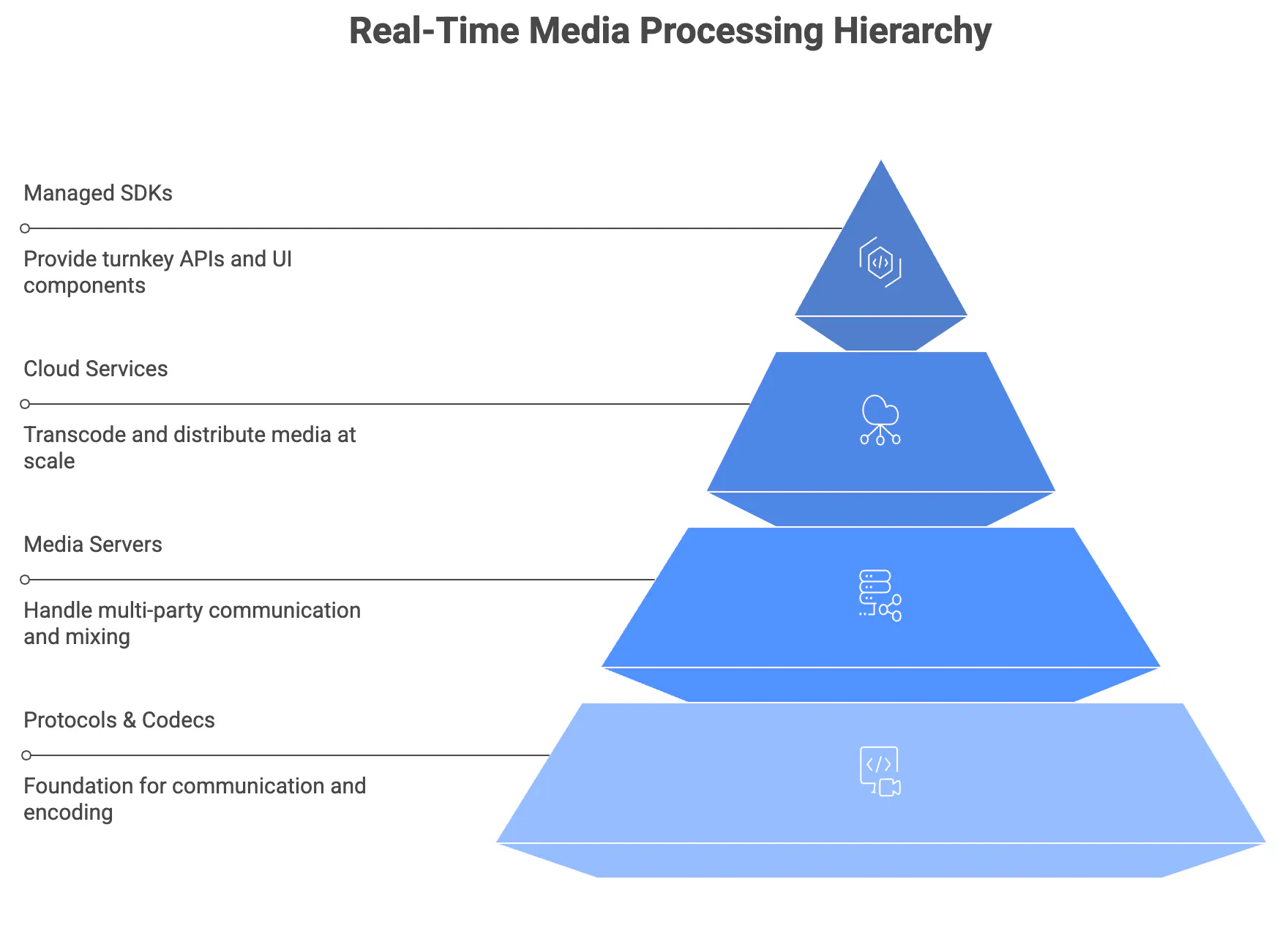
Protocols and codecs form the foundation. WebRTC handles bidirectional, sub-500ms communication and is embedded in every major browser. It supports VP8, VP9, and H.264 universally, with AV1 now shipping in Chrome. On the delivery side, HLS and DASH serve large audiences at higher latency (5-30 seconds), while SRT has overtaken RTMP as the preferred ingest protocol among broadcasters.
Open-source media servers sit above the protocol layer and handle the hard part of multi-party communication. Three dominate:
- Janus Gateway (C): Plugin-based architecture with SFU conferencing, audio MCU mixing, and unmatched SIP/WebRTC bridging in a single server.
- mediasoup (C++/Node.js): Library-first design optimized for raw performance, reporting 40-100ms end-to-end latency.
- Jitsi: The most complete self-hosted conferencing platform, with UI, SFU, recording, and XMPP signaling included. Harder to repurpose for custom applications, but hard to beat if you want to deploy a full video conferencing product on your own infrastructure.
Cloud encoding and delivery services handle transcoding and distribution at scale. AWS dominates with MediaLive and IVS, and Cloudflare is building WebRTC streaming across its 330+ edge locations. This layer is changing fast. Managed video SDKs like Stream provide the fastest path to production, with turnkey APIs, pre-built UI components, and infrastructure you don't have to operate yourself. AI processing tools add noise suppression, transcription, background effects, and real-time translation at any layer of the stack.
What's the Difference Between SFU, MCU, and Mesh Architectures?
If you're building anything with real-time video, this is the first architectural question you'll hit. It determines your server costs, latency, encryption options, and how far you can scale.
Mesh (P2P) connects every participant directly to every other participant. No server touches the media, so you get zero infrastructure cost, the lowest possible latency, and natural end-to-end encryption. The tradeoff is brutal at scale: bandwidth grows quadratically. With 4 participants, each person maintains 3 upload and 3 download connections. Beyond 3-4 people, most consumer devices and networks can't keep up.
MCU (Multipoint Control Unit) takes the opposite approach. The server decodes every participant's stream, composites them into a single mixed output, re-encodes it, and sends one stream to each participant. Simple for the client, punishing for the server.

Re-encoding is CPU-intensive (roughly 100x the cost of SFU for the same call), every participant gets the same locked layout, and end-to-end encryption is impossible because the server must decrypt media to mix it. MCU survives mainly in legacy telephony gateways and IoT devices that can only handle a single inbound stream.
SFU (Selective Forwarding Unit) has won. An SFU receives each participant's single upload and selectively forwards those streams to other participants without decoding or re-encoding. It's a smart packet router, not a media processor.

The advantages compound:
- Server CPU costs drop dramatically since there's no transcoding
- Clients control their own layout and rendering
- End-to-end encryption works because the server never sees plaintext media
- Simulcast and SVC enable adaptive quality per receiver, so a phone on 4G gets a lower resolution than a desktop on fiber
Stream, like virtually every modern platform, uses the SFU architecture.
For global deployments, cascaded SFUs extend the pattern. Multiple SFU instances in different regions connect: participants in Tokyo connect to a nearby SFU, participants in London connect to theirs, and the SFUs exchange streams between regions. In Stream's 100,000-participant benchmark, 132 cascading SFUs handled 225 Gbps peak traffic with zero API failures and 0% packet loss.
What Should You Look for in a Managed Video SDK?
Once you've decided you don't want to run your own media servers, the question becomes what to optimize for in a managed platform. A few dimensions matter more than they first appear.
Architecture transparency matters more than you'd think
Most managed SDKs run WebRTC-based SFUs under the hood, but the implementations vary. Some use proprietary transport stacks (WebTransport + WebCodecs instead of standard WebRTC), which can introduce browser compatibility issues. Others build on well-understood open-source foundations like the Pion WebRTC framework. Knowing what's underneath matters when you're debugging call quality issues at 2 am.
Integration breadth determines how many vendors you need
If your product needs chat alongside video (and most social, collaborative, and marketplace products do), evaluate whether you'll stitch together multiple vendors or work with a single API. Separate vendors for chat, video, activity feeds, and moderation means separate authentication flows, separate billing, and a lot of glue code.
SDK coverage and developer experience vary wildly
Check whether the platform offers SDKs for the platforms you actually ship on, and whether those SDKs use modern frameworks. Some platforms still ship UIKit-based iOS components and imperative Android APIs. Look for:
- SDKs that use current framework conventions (SwiftUI, Jetpack Compose, React hooks) rather than wrapping legacy approaches
- A two-tier design with pre-built UI components for speed and a low-level client layer for full customization
- Server-side SDKs in your backend language, not just client-side libraries
Managed vs. self-hosted is a team-size question
A few platforms offer open-source servers you can run on your own infrastructure. That's appealing if you need full control over data residency or want to avoid per-minute fees at scale, but it comes with real operational cost: Kubernetes expertise, monitoring, and on-call engineers who understand WebRTC internals. For most teams, a fully managed platform that handles scaling, failover, and codec negotiation is the faster path to production.
When Should You Use WebRTC vs. HLS for Live Streaming?
This comes down to one variable: how much latency can your use case tolerate?
| Protocol | Latency | Direction | Scale |
|---|---|---|---|
| WebRTC | < 500ms | Bidirectional | SFU-dependent |
| Low-Latency HLS | 2-5s | Unidirectional | CDN-scale |
| Standard HLS/DASH | 5-30s | Unidirectional | CDN-scale |
WebRTC delivers sub-500ms bidirectional communication. Every participant can both send and receive. This is essential for video conferencing, telehealth consultations, live auctions, sports betting, and any scenario where a viewer might need to respond in real time. The tradeoff is scaling cost: WebRTC's SFU-based delivery consumes more resources per viewer than CDN-based protocols.
HLS and DASH deliver content through standard CDN infrastructure, which can scale to millions of viewers cost-effectively. But latency runs 5-30 seconds for standard HLS. Low-Latency HLS (LL-HLS) narrows this to 2-5 seconds. Neither supports bidirectional communication natively.
The most common production pattern is a hybrid: WebRTC for active speakers and interactive participants, with an HLS fallback for large passive audiences. A live shopping event might have 5 hosts on a WebRTC call while 50,000 viewers watch via HLS, with the platform bridging between the two.
The ingest side is changing fast. Two shifts are worth paying attention to:
- WHIP and WHEP are standardizing WebRTC streaming. WHIP (WebRTC-HTTP Ingestion Protocol) lets you ingest WebRTC streams without vendor-specific SDKs. OBS now supports it natively with simulcast, which means content creators can achieve \~150ms glass-to-glass latency using their existing workflows instead of the 1-3 seconds typical of RTMP. WHEP provides the playback counterpart. Together, they're replacing proprietary signaling protocols across the industry.
- SRT has overtaken RTMP among professional broadcasters, hitting 78% adoption. It provides AES-256 encryption, error correction, and codec-agnostic transport (supporting HEVC and AV1, unlike RTMP's limitation to H.264/AAC). RTMP persists due to universal platform support, but is increasingly a legacy choice.
Further out, Media over QUIC (MoQ) aims to deliver CDN-scale distribution with WebRTC-class latency, but it's at least two years from mainstream production use.
How Is AI Changing Real-Time Media Processing?
AI is moving from post-call processing (transcribing and summarizing after the meeting) to inline, real-time processing (translating, captioning, enhancing, and suppressing noise during the call). Every major platform is investing heavily here.
Three capabilities have gone real-time in the last two years.
- Noise suppression now runs on-device via WASM in browsers and native SDKs on mobile, handling not just ambient noise but background voices, accent conversion, and live translation.
- Transcription APIs from multiple providers now deliver streaming results with sub-300ms latency across dozens of languages, with add-ons such as PII redaction and sentiment analysis.
- Background removal runs client-side via lightweight ML models small enough to run in browsers, enabled by the WebRTC Insertable Streams API, which allows custom video processing within the media pipeline.
The bigger shift is AI agents as call participants. Platform-level frameworks now let developers build AI-powered participants that join calls as voice agents, translators, or assistants, running STT->LLM->TTS pipelines fast enough for natural conversation. Vision Agents can see, hear, and remember, with plugins for OpenAI, Gemini, ElevenLabs, and Deepgram running on Stream's edge network for minimal latency.
Choosing the Right Tool
The real-time media stack you choose depends on three questions:
- Do you need conferencing, live streaming, or both? Conferencing requires SFU-based WebRTC infrastructure. One-to-many streaming can use HLS/DASH for scale or WebRTC for low latency. Most production apps need both, so pick a platform that handles the bridge between them.
- How much do you want to own? Self-hosting Janus or mediasoup gives you maximum control at the cost of dedicated WebRTC engineering talent. LiveKit's open-source server splits the difference. Managed platforms like Stream let you ship in days but come with architectural constraints.
- What else does your product need alongside video? If you need chat, activity feeds, or moderation alongside video, Stream's unified API eliminates the need for that integration work. If video is your only need and you want maximum flexibility, LiveKit or Daily is a strong choice.
The landscape will keep consolidating around WebRTC + SFU as the dominant architecture, with AI capabilities rapidly becoming the primary differentiator between platforms. Build for that future.