
How Do You Build Event-Driven Applications with Vision AI?

A security camera detects a package on your front porch. Ten seconds later, someone walks up and takes it. A built-in detection model can identify both activities, but without downstream use, the detection is redundant.
That's the gap between Vision AI and a Vision AI application. The model produces predictions. Event-driven architecture turns those predictions into actions, routing them to the right consumers in real time, whether that's a push notification the moment the package arrives, an automated snapshot of whoever took it, or a message to your security provider to start the manhunt.
Why Does Vision AI Need Event-Driven Architecture?
Vision AI workloads are bursty. A single security camera running object detection at 30 fps can produce hundreds of detection events per second, and if you've wired your detection model directly into your application logic with synchronous calls, a slow downstream consumer can back-pressure your entire inference pipeline. One sluggish notification service can bring down your entire detection system.
Event-driven architecture breaks this coupling. The inference service has one job: take in visual data, run a model, and emit structured events. Everything downstream, like alerts, dashboards, and automated controls, subscribes to those events independently. If your alerting service falls over, your detection pipeline keeps running. If you need to add a new consumer, you subscribe it to the event stream without touching the producer.
The pattern breaks into three layers:
| Layer | Responsibility | Example |
|---|---|---|
| Ingestion and inference | Receive raw visual input, run model, emit structured event payloads | A YOLO model processing a camera frame and emitting a PersonDetectedEvent |
| Event routing and delivery | Fan out events to consumers with ordering, filtering, and delivery guarantees | A message broker filters events by confidence threshold before forwarding to a notification service |
| Consumption and action | Subscribe to relevant events and execute business logic | A security agent is generating a wanted poster when a package disappears |
This separation makes the system composable in ways that matter day-to-day. You can swap out a YOLO model for Florence-2 without touching your alerting logic. You can A/B test two models in parallel by having both publish to the same event stream with different model_version tags. The event contract is the interface between layers, and as long as that contract holds, each layer can evolve independently.
How Do You Ingest Visual Data and Run Inference?
The ingestion layer is where raw pixels become structured data. A producer service receives visual input, whether that's a camera frame, an uploaded image, or a batch of photos from cloud storage, and passes it through a Vision AI model. The output (bounding boxes, class labels, confidence scores) gets serialized into a structured event payload and published downstream.
The first decision is where inference runs:
- Edge inference (TensorFlow Lite, ONNX Runtime) minimizes latency but limits you to smaller models.
- Dedicated inference servers (Triton, TorchServe) give you full control over batching, model versioning, and GPU allocation, and are the most common choice for production video pipelines.
- Managed APIs (Google Cloud Vision, AWS Rekognition) get you to production fastest but cost more per request and offer less customization.
The Vision Agents framework takes a different approach, handling the full pipeline from frame processing through event delivery. It supports YOLO, Roboflow, and custom models, runs on Stream's edge network for sub-500ms latency, and integrates with 25+ AI providers.
Regardless of where inference runs, the critical design decision is how you structure the event payload. A well-designed payload is self-contained: any downstream consumer should be able to act on it without calling back to the inference service. Here's what that looks like with YOLOv8 in a custom pipeline:
def build_event(detection, image_shape):
    """Build a structured detection event payload."""
    class_name, confidence, bbox = detection
    height, width = image_shape[:2]
    return {
        "event_id": str(uuid.uuid4()),
        "timestamp": datetime.now(timezone.utc).isoformat(),
        "source": SOURCE_ID,
        "model_name": MODEL_NAME,
        "model_version": MODEL_WEIGHTS,
        "class_name": class_name,
        "confidence": round(float(confidence), 4),
        "bbox": [round(float(v), 2) for v in bbox],
        "image_width": int(width),
        "image_height": int(height),
    }
Every field has a reason. The event_id enables idempotent processing, so reprocessing after a failure doesn't trigger duplicate alerts. The model_name and model_version let consumers interpret confidence scores correctly, because a 0.82 from YOLOv8n has a different meaning than a 0.82 from a fine-tuned Florence-2. The bounding box and image dimensions provide consumers with sufficient spatial context to render overlays or crop regions without having to call back to the producer.
Vision Agents formalizes this with typed event dataclasses:
@dataclass
class PersonDetectedEvent(PluginBaseEvent):
    """Event emitted when a person/face is detected."""
    type: str = field(default="security.person_detected", init=False)
    face_id: str = ""
    is_new: bool = False
    detection_count: int = 1
    first_seen: Optional[str] = None
    last_seen: Optional[str] = None

@dataclass
class PackageDisappearedEvent(PluginBaseEvent):
    """Event emitted when a package disappears from the frame."""
    type: str = field(default="security.package_disappeared", init=False)
    package_id: str = ""
    confidence: float = 0.0
    first_seen: Optional[str] = None
    last_seen: Optional[str] = None
    picker_face_id: Optional[str] = None
    picker_name: Optional[str] = None
Notice the PackageDisappearedEvent includes picker_face_id and picker_name. The processor figures out who was present when the package vanished and attaches that context directly to the event. Downstream consumers don't need to cross-reference face detections with package detections themselves. The event is self-contained.
The detection loop follows the same pattern whether you're using a custom pipeline or Vision Agents. Run the model, filter by confidence, yield results:
def run_detection(image_path, confidence_threshold):
    """Run YOLOv8 on the image and yield filtered detections."""
    model = YOLO(MODEL_WEIGHTS)
    results = model(image_path)

    for result in results:
        names = result.names
        image_shape = result.orig_shape
        boxes = result.boxes
        if boxes is None:
            continue

        for box in boxes:
            conf = float(box.conf[0])
            if conf < confidence_threshold:
                continue
            cls_id = int(box.cls[0])
            class_name = names[cls_id]
            xyxy = box.xyxy[0].tolist()
            yield (class_name, conf, xyxy), image_shape
For video pipelines, you'll also need a frame sampling strategy. Processing every frame at 30 fps is rarely necessary and almost always wasteful. Fixed-interval sampling (every Nth frame) is the simplest approach. Change detection (only processing frames where pixel-level difference exceeds a threshold) is smarter but adds complexity. Adaptive sampling (increasing the rate when something interesting is happening, throttling back when the scene is static) gives you the best efficiency but requires a lightweight pre-filter model.
How Do You Route and Deliver Vision Events?
Once inference produces structured events, a messaging layer takes over. For service-to-service communication, Kafka and Redis Streams are common choices, offering high throughput, replay capability, and durability.
But vision AI applications often need to deliver events to humans, not just services. An operator needs to see an alert. A reviewer needs to approve a flagged image. And they need to see it now, not on a polling interval. That means building a real-time delivery layer on top of your broker: WebSocket servers, push notifications, presence tracking, and read receipts. It's a lot of infrastructure that has to work reliably at exactly the moment something has gone wrong.
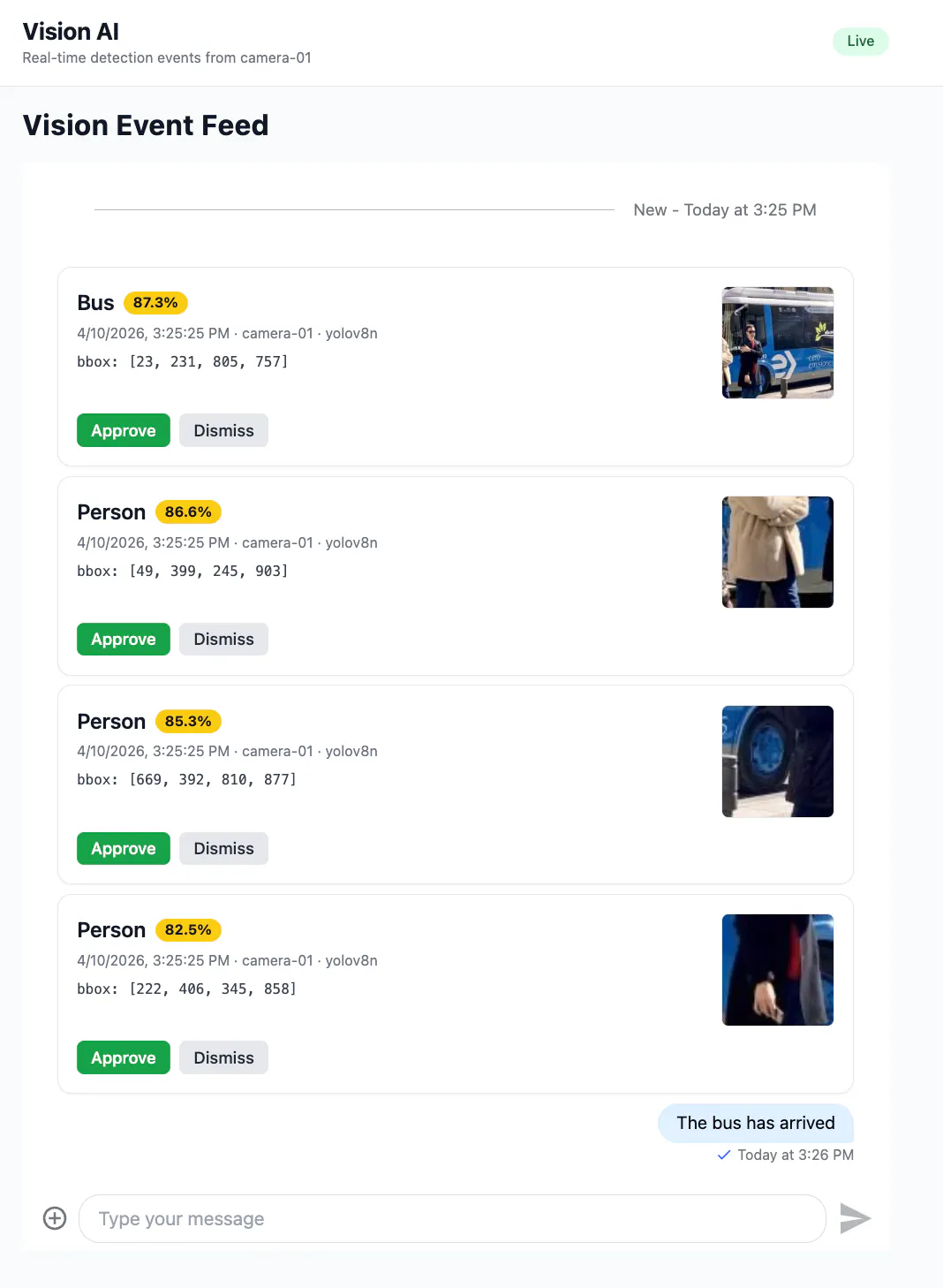
Here, the producer publishes each detection event as a custom message type on a chat channel, with the structured payload attached alongside a human-readable summary:
def publish_event(client, channel, event_payload):
    """Publish a single detection event to the Stream channel."""
    bbox = event_payload["bbox"]
    summary = (
        f"Detected {event_payload['class_name']} "
        f"({event_payload['confidence']:.2f} confidence) "
        f"at {bbox}"
    )

    message = {
        "text": summary,
        "type": "regular",
        "custom_type": "vision_event",
        "vision_event": event_payload,
    }

    response = channel.send_message(message, user_id=PRODUCER_USER_ID)
    return response, summary
The custom_type field lets frontend consumers render vision events differently from regular chat messages. The full structured payload under vision_event serves automated consumers, while the text field gives human operators a readable summary in any standard chat UI. One message, two audiences.
In Vision Agents, routing happens through an EventManager that handles pub/sub internally and integrates with Stream's infrastructure for delivery:
# Event manager for detection events
self.events = EventManager()
self.events.register(PersonDetectedEvent)
self.events.register(PackageDetectedEvent)
self.events.register(PackageDisappearedEvent)
self.events.register(PersonDisappearedEvent)
The agent merges the processor's events into its own event system so that subscribers can listen to detection events and agent-level events through a single interface:
agent.events.merge(security_processor.events)Beyond transport, the routing layer needs to handle filtering, ordering, and fan-out. Not every inference output deserves to become a downstream event. We can apply configurable threshold and area-based filters to reject detections that are too small (noise) or too large (the model detecting a wall).
For ordering, vision events from video streams arrive sequentially, but distributed brokers don't always preserve that across partitions. If your logic is order-sensitive (tracking an object's path through a scene), partition by source ID and handle reordering at the consumer level. For fan-out, a single detection often needs to reach an analytics database, a dashboard, an alerting service, and a human operator simultaneously. The Vision Agents event system handles this natively: multiple @agent.events.subscribe handlers receive the same event independently, so adding a new consumer never requires changes to the producer.
How Do You Act on Vision AI Events in Real Time?
The consumption layer is where events become outcomes. What happens here depends on how much confidence you have in the prediction and how much is at stake if it's wrong.
- Automated actions handle the bulk of events in most production systems: logging detections to a time-series database, updating real-time counts, and triggering alerts when a safety violation is detected. These are high-confidence, low-risk responses that run without human involvement.
- Human-in-the-loop actions kick in when the stakes are higher or the model is less certain. A moderation system might auto-reject at 0.99 confidence but route anything between 0.7 and 0.99 to a reviewer.
The Vision Agents security camera demo shows both patterns working together. Automated handlers log events and greet returning visitors:
@agent.events.subscribe
async def on_person_detected(event: PersonDetectedEvent):
    if event.is_new:
        agent.logger.info(f"NEW PERSON ALERT: {event.face_id} detected!")
    else:
        agent.logger.info(
            f"Returning visitor: {event.face_id} (seen {event.detection_count}x)"
        )
        await agent.say(f"Welcome back, {event.face_id}!")
The package theft workflow shows the more interesting pattern. When a package disappears, the handler doesn't react immediately. It waits 3 seconds to confirm the package is truly gone, then triggers a multi-step response:
@agent.events.subscribe
async def on_package_disappeared(event: PackageDisappearedEvent):
    picker_display = event.picker_name or (
        event.picker_face_id[:8] if event.picker_face_id else "unknown"
    )

    async def delayed_theft_check():
        await asyncio.sleep(PACKAGE_THEFT_DELAY_SECONDS)
        if event.picker_face_id:
            face_image = security_processor.get_face_image(event.picker_face_id)
            if face_image is not None:
                await handle_package_theft(
                    agent, face_image, picker_display, security_processor
                )

    _pending_theft_tasks[event.package_id] = asyncio.create_task(
        delayed_theft_check()
    )
If the package reappears within those 3 seconds (a detection blip or someone putting it back), the pending task is canceled. If it doesn't, the system generates a wanted poster using Gemini's image-generation API, displays it during the video call, and posts it to X. One event triggers a cascade of actions across multiple services, and the processor that emitted the event doesn't know or care about any of them. It published a PackageDisappearedEvent with the relevant context and moved on to the next frame.
When event consumption happens in a frontend, a CustomMessage component checks each incoming message for the vision_event type and routes it to a specialized renderer:
function CustomMessage({ onApprove, onDismiss }) {
  const { message } = useMessageContext();

  if (message.custom_type === "vision_event" || message.vision_event) {
    return (
      <VisionEventMessage
        message={message}
        onApprove={onApprove}
        onDismiss={onDismiss}
      />
    );
  }

  return <MessageSimple />;
}
Regular chat messages render normally, allowing operators to discuss events in the same channel. The VisionEventMessage component renders each detection as a card with the class name, a color-coded confidence badge, bounding box coordinates, and approve/dismiss controls:
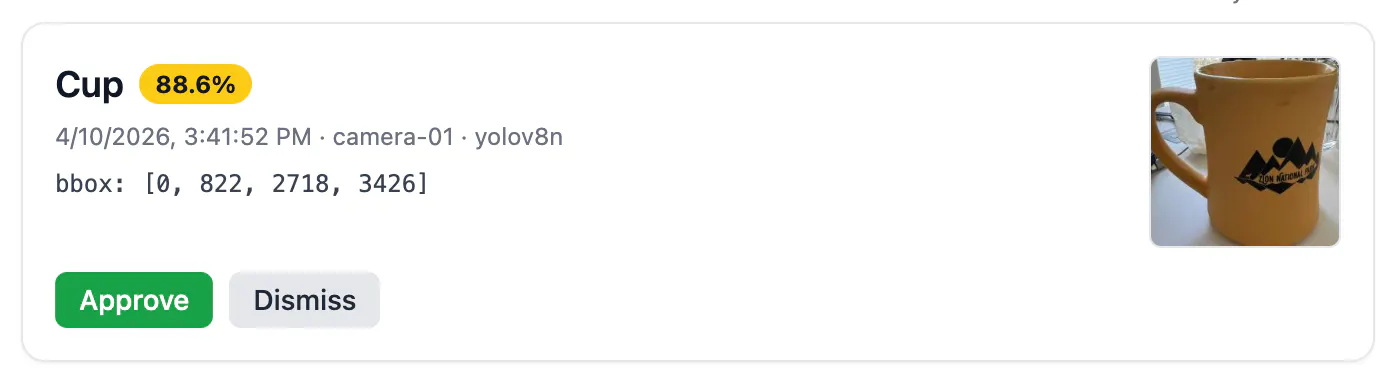
function VisionEventMessage({ message, onApprove, onDismiss }) {
  const event = message.vision_event;
  if (!event) return null;

  const confidencePct = `${(event.confidence * 100).toFixed(1)}%`;
  const [x1, y1, x2, y2] = event.bbox || [0, 0, 0, 0];
  const boxWidth = Math.max(0, Math.round(x2 - x1));
  const boxHeight = Math.max(0, Math.round(y2 - y1));

  return (
    <div className="my-2 rounded-xl border border-gray-200 bg-white p-4 shadow-sm">
      <div className="flex items-start justify-between gap-3">
        <div className="flex-1">
          <div className="flex items-center gap-2">
            <span className="text-lg font-semibold capitalize">
              {event.class_name}
            </span>
            <span
              className={`rounded-full px-2 py-0.5 text-xs font-bold ${
                event.confidence >= 0.9
                  ? "bg-green-500 text-white"
                  : event.confidence >= 0.7
                    ? "bg-yellow-400 text-gray-900"
                    : "bg-red-500 text-white"
              }`}
            >
              {confidencePct}
            </span>
          </div>
          <div className="mt-1 text-xs text-gray-500">
            {new Date(event.timestamp).toLocaleString()} · {event.source} ·{" "}
            {event.model_name}
          </div>
          <div className="mt-2 font-mono text-xs text-gray-700">
            bbox: [{x1.toFixed(0)}, {y1.toFixed(0)}, {x2.toFixed(0)},{" "}
            {y2.toFixed(0)}]
          </div>
        </div>

        <div
          className="flex shrink-0 items-center justify-center rounded-md
                     border border-dashed border-gray-300 bg-gray-100
                     text-[10px] text-gray-500"
          style={{ width: 96, height: 96 }}
        >
          {boxWidth} x {boxHeight}
        </div>
      </div>

      <div className="mt-3 flex gap-2">
        <button
          onClick={() => onApprove(message, event)}
          className="rounded-md bg-green-600 px-3 py-1 text-sm font-medium
                     text-white hover:bg-green-700"
        >
          Approve
        </button>
        <button
          onClick={() => onDismiss(message, event)}
          className="rounded-md bg-gray-200 px-3 py-1 text-sm font-medium
                     text-gray-800 hover:bg-gray-300"
        >
          Dismiss
        </button>
      </div>
    </div>
  );
}
Those approve/dismiss decisions can flow back into the system as events themselves. Confirmed detections become positive training examples. Dismissed false positives become hard negatives. Over time, the confidence threshold for automated action drifts upward, and the volume of events requiring human review shrinks.
From One Camera to a Hundred
The architecture covered here, ingestion, routing, and consumption, works whether you're processing a single camera feed or hundreds. The starting point matters less than the pattern:
- Structure your model's output as self-contained events
- Decouple producers from consumers
- Build your human-in-the-loop workflows on a real-time messaging infrastructure rather than polling
Start with Vision Agents and a single camera feed, get the event pipeline working end-to-end, then scale from there.