
How Do Video Platforms Maintain Low Latency in Large Group Calls?

TL;DR
- Large group calls maintain low latency by routing streams through Selective Forwarding Units (SFUs) instead of resource-heavy mesh or MCU architectures.
- They leverage WebRTC's efficient real-time transport, optimized encoding, and short buffers to keep delay under a few hundred milliseconds.
- Platforms dynamically send only the necessary video quality to each client, optimizing bandwidth and device performance.
Large group calls maintain low latency by routing streams through SFUs, using WebRTC's real-time transport, and dynamically adjusting stream quality per client - keeping delay under a few hundred milliseconds even in rooms with 50+ participants.
That's possible because the hard work runs on the servers rather than on everyone's devices. Each person uploads one encoded stream to a media server, and that server works out which version of everyone else's video each person actually gets.
Put that together with WebRTC's real-time transport, adaptive encoding, and very short buffers, and a fifty-person call can still land under a few hundred milliseconds.
Why Do Large Group Calls Route Through an SFU Instead of a Mesh or an MCU?
Because the two obvious alternatives both break down: a full mesh runs out of bandwidth fast, and an MCU adds delay. A Selective Forwarding Unit sits between them and routes streams without re-mixing anything. In a mesh, every client connects to every other client and sends a separate copy to each one, so the combinatorial math eventually falls apart. An MCU fixes the upload problem, but it comes at the cost of latency.
An MCU, short for Multipoint Control Unit, decodes every incoming stream, mixes them into a single composite, and re-encodes that for each viewer. Each client only uploads once, which is nice, but all that decoding, mixing, and re-encoding on the server adds delay and burns a lot of CPU.
Here's what the SFU actually does:
Each client uploads one stream, and the server forwards packets selectively, re-scaling for specific viewers now and then but mostly just routing. So each client ends up with one stream going out and a handful coming in, which keeps both latency and client load down.
| Approach | Upload per user | Server work | Typical latency | Fits large calls? |
|---|---|---|---|---|
| Full P2P mesh | One stream per peer | None | Low with few peers, degrades fast | No, struggles past 4 to 6 |
| MCU (mixing) | One stream to server | Heavy decode, mix, re-encode | Higher, server does more work | Workable, but costly and slower |
| SFU | One stream to server | Routing, selective re-encode | Low, tens to a few hundred ms | Yes, the standard for group calls |
For interactive calls, the SFU won out because it keeps the real-time feel of a direct connection while still letting the server decide what each person actually needs.
What Keeps a WebRTC Call Low-Latency in the First Place?
WebRTC was built for conversation, so it leans on tiny buffers, fast codecs, and congestion control that eases off the quality before the network starts to choke.
Streaming protocols like HLS and DASH chop video into multi-second segments, which is fine when you're just watching, but adds whole seconds of delay. Real-time video can't live with that, so it's packetized into tiny windows and played back almost the moment it arrives.
A few things do most of the work here:
- Real-time codecs. Opus for audio, and VP8, VP9, AV1 or H.264 for video, all encoded in small frames so there's barely anything to wait on before a packet goes out.
- Short jitter buffers. The player holds for at most a few hundred milliseconds, instead of the multi-second cushions streaming relies on. Less buffer means less delay, though it does ask more of the code handling network jitter.
- Hardware-accelerated encoding. NVENC, QuickSync, and the encoders built into phones reduce per-frame encoding time, and real-time presets happily trade a little compression for speed.
- Low-latency congestion control. WebRTC keeps adjusting bitrate, frame rate, and resolution to stop queues from piling up in the network, which is often the single biggest source of delay.
Conversational video really wants one-way delay to be under about 150 milliseconds to feel invisible, and it holds up to roughly 300 milliseconds before the lag starts getting in the way of the back-and-forth. Most of these techniques exist to protect that budget when the network gets flaky.
How Do Platforms Send 50+ Video Streams Without Overwhelming Each Device?
They only send each client what they can actually use: high quality for the handful of people who matter right now, and low-res or audio-only for everyone else. No laptop should be trying to decode fifty HD videos at once. The SFU gets around that by keeping multiple quality layers per stream and watching who's actually talking.
Three things make that work:
- Simulcast or SVC. Each publisher sends a few quality layers at once, say 180p, 360p, and 720p, or scalable layers bundled into one stream. The SFU then picks a layer per subscriber based on the tile's size and the subscriber's bandwidth.
- Selective subscription. Full quality goes only to the pinned and active people. Everyone else shows up as a low-res tile, a thumbnail, or audio-only, depending on the layout.
- Active-speaker detection. The SFU, or a service sitting next to it, watches the audio levels and quickly bumps whoever starts talking up to a sharper track for the rest of the room.
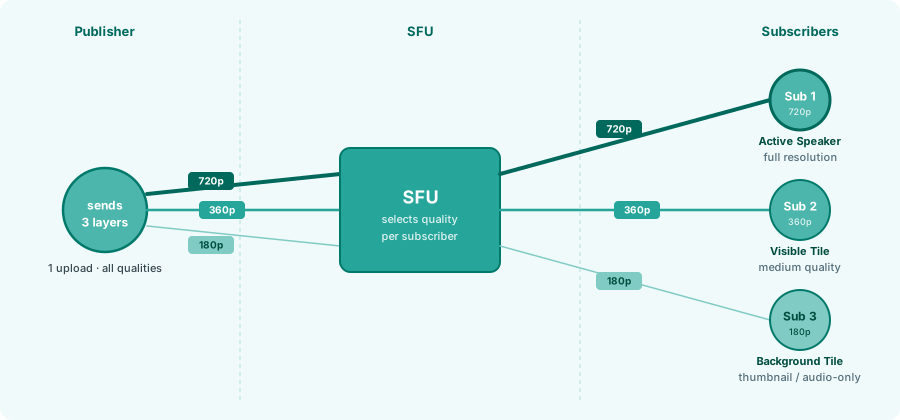
One workable policy for a sixty-person call: 720p for the top speaker or two, 360p for the next four to eight tiles that matter, and 180p or thumbnails for everyone after that. The exact cutoffs depend on the device and the layout, but the shape holds.
Where Do the Media Servers Live, and Why Does That Change Latency?
Distance turns into delay, so platforms run media servers in many regions and route each user to the nearest one with room. Someone in Sydney hitting a server in Virginia pays for every one of those miles, twice, on every round trip. Spreading servers out with edge infrastructure and choosing the right one per user is a big part of keeping delays steady when the room is spread across the globe.
The infrastructure side comes down to a handful of practices:
- Regional points of presence. With servers in many regions, each user connects to the nearest one, which keeps the round-trip short.
- Smart region selection. The control plane selects a server based on geolocation, measured RTT, and current load, so nobody is sent to a distant or overloaded node.
- Autoscaling and room sharding. Servers scale up as a room grows and remain below the CPU and network levels, where queues start to build. A really big room can move to a beefier server or get spread across cascaded SFUs.
- Continuous monitoring. Latency, dropped frames, and buffer health are tracked per region and per server, so a struggling node can be drained or scaled back before anyone notices.
What Hits a Limit on the Client Side, and How Does the UI Work Around It?
On the client side, the decode pipeline is usually what gives out first. Every live tile runs its own decoder against the CPU or GPU, so a laptop starts to struggle well before the network does, and exactly where depends on the hardware, the browser, and whether decoding is hardware-accelerated. Either way, the ceiling sits well short of a full room.
So the UI keeps the number of decoding videos bounded, however large the call gets. A sixty-person room never paints sixty live tiles. It renders a handful and shows the rest as static avatars.

Pagination handles this by swapping tiles in and out as you page through. Spotlight and stage modes enlarge the active speaker or a screen share, dropping the rest to thumbnails, and, past a certain size, the room can switch to an audience mode where only a few people send video at all.
These choices feed back to the server. When a tile scrolls out of view or shrinks to a thumbnail, the client tells the SFU to stop sending that track or send a smaller layer, so capping what gets painted also trims what comes over the wire.
None of this lifts the decode ceiling. It just spends what the device has on the videos people are actually watching.
Where the Engineering Effort Actually Goes
Low latency in a big call comes out of a stack of decisions rather than one clever trick:
-> route through an SFU instead of a mesh or MCU
-> run WebRTC with short buffers and fast encoding
-> send each subscriber only the quality they can use
-> keep servers close to people
-> cap what any one client has to render
Each layer is protecting the same few hundred milliseconds that make a call feel live.
Most teams don't build the media layer themselves. They start from an SDK that already handles the SFU, the simulcast, and the active-speaker logic, and spend their time on the room instead: who's pinned, who's visible, when to bump someone up to a better track.
Stream's Video SDK handles the media layer in WebRTC, so you get to design the call rather than the server behind it.