
Top 10 Dating App Features - Technical Guide

TLDR;
- Deepfake fraud and identity verification are now core engineering problems, not edge cases. The dating sector tied for the highest identity fraud rate of any industry at 6.35%.
- Real-time chat is the single biggest retention driver. Users who message retain dramatically better at 30 days, and building it yourself takes 6-12 months minimum.
- The features with the clearest retention impact are real-time chat, smart filters, and push notifications. Get these solid before layering in AI matching, video calling, and gamification.
- Sequence matters as much as the feature list. Build moderation into your MVP timeline, not after launch when abuse has already appeared.
The global dating app market hit $6.18 billion in revenue in 2024 and is projected to reach $12.52 billion by 2026. The space keeps growing, but so does the bar for what users expect from a new platform.
Building a competitive dating app today means making decisions that reach far beyond which swipe mechanic to copy. You're choosing a real-time messaging architecture and deciding how much matching logic to hand to an ML model. You're also engineering a safety system that can detect a deepfake during a liveness check.
This guide will help you decide what to build, why it matters, and what to consider under the hood.
Feature Prioritization at a Glance
Before getting into each feature, here's a framework for what belongs in your MVP versus later iterations.
| Feature | MVP | V2 | V3 |
|---|---|---|---|
| Smart Preference Filters | Yes | ||
| Real-Time Chat (text, media, reactions) | Yes | ||
| Profile Verification (photo + liveness) | Yes | ||
| Push Notifications & Re-Engagement | Yes | ||
| AI-Assisted Matching | Yes | ||
| Video & Voice Calling | Yes | ||
| Gamification & Engagement Loops | Yes | ||
| AI Content Moderation | Yes | ||
| Profile Performance Insights | Yes | ||
| Short-Form Video Profiles | Yes |
1. Smart Preference Filters
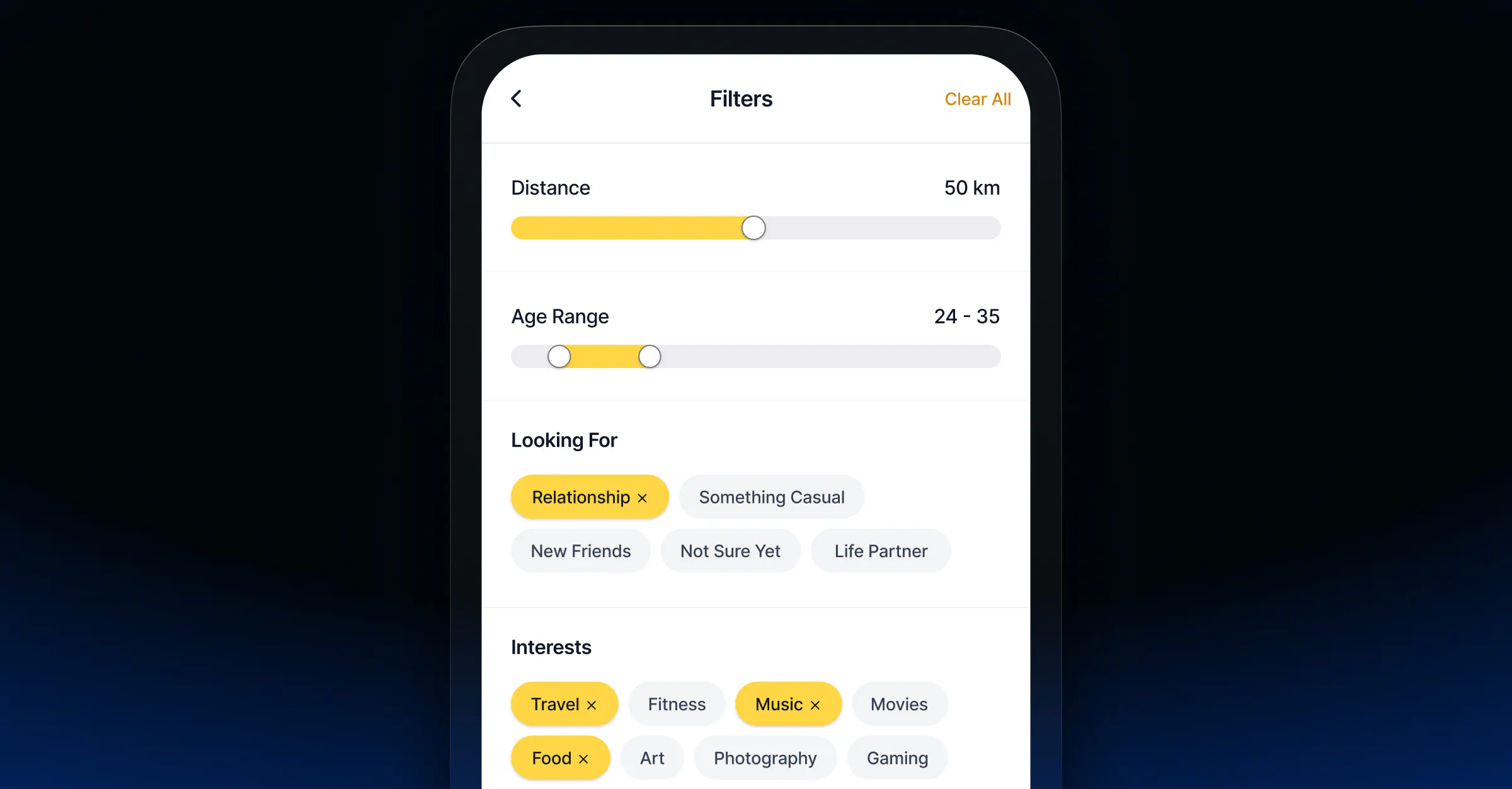
What it is: The filtering layer that lets users express who they're looking for before the matching algorithm does its work.
Every dating app ships preference filters. The differentiation is in how granular you go, how well filters feed your matching signal, and how you monetize the advanced tier.
Geolocation filtering is table stakes. Most implementations use a proximity radius (e.g., within 30 miles), but the more useful approach for engagement is exposing distance as a match signal rather than a hard cutoff. Users can see matches slightly outside their range when the algorithm thinks compatibility is high.
Beyond location, the filters that move retention metrics tend to cluster into three buckets:
- Lifestyle and values: relationship intent (casual, long-term, marriage), views on kids, religion, diet
- Behavioral signals: activity level, response rate, last active
- Identity: age, height, education, ethnicity (with careful attention to how you implement and expose these to avoid discriminatory filtering patterns)
Technical considerations: Geolocation filtering at scale is a database problem. PostGIS with spatial indexes handles proximity queries well for Postgres stacks; Elasticsearch's geo_distance query is a strong choice if you're already using Elastic for search. Plan your indexing strategy before you have millions of profiles; it's expensive to rebuild.
Monetization hook: Free filters handle the basics. Gating advanced filters (e.g., filter by income level, relationship history, detailed personality traits) behind a premium tier is one of the cleanest freemium upgrade flows in the category.
2. AI-Assisted Matching
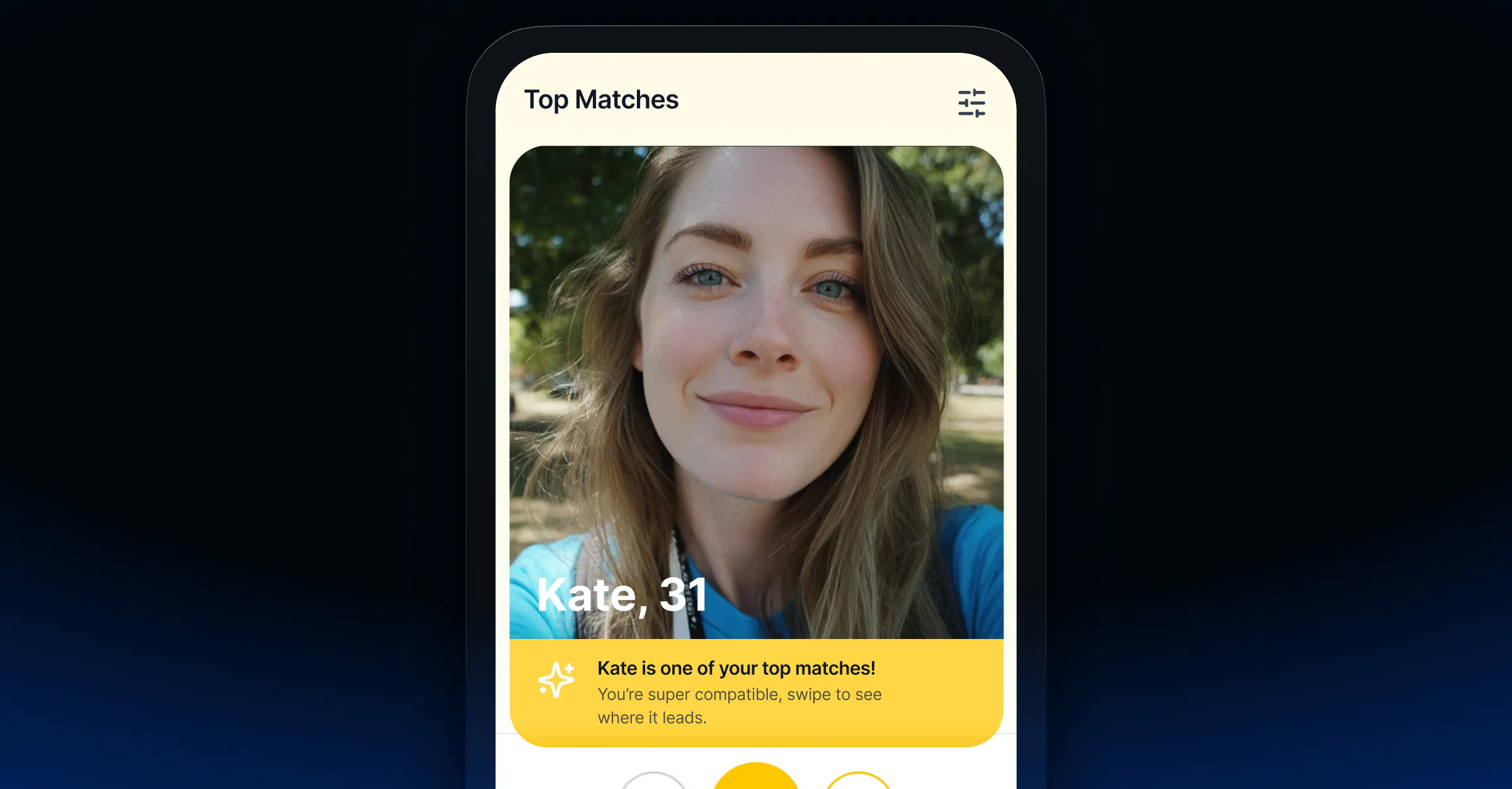
What it is: The algorithmic layer that decides which profiles to surface to which users, and in what order.
Simple filter-based matching ("show me women, ages 25-35, within 20 miles") is a product from 2012. Competitive apps now use behavioral signals to rank profiles rather than just filter them.
The shift matters because stated preferences and actual behavior diverge significantly. A user might filter for ages 28 - 35 but consistently engage with profiles outside that range. A good matching model picks this up and adapts.
The signals that matter:
- Explicit: filter settings, relationship goals, profile completions
- Implicit behavioral: which profiles a user lingers on, who they super-like vs. quick-skip, messaging patterns, response time, conversation length
- Reciprocity: whether the people you match with tend to also engage back (a signal of compatibility beyond surface preferences)
Hinge's "Most Compatible" feature is a strong example. Their ML model analyzes communication patterns and compatibility signals beyond basic preferences.
"Considering everything we know about you so far, your 'Most Compatible' is the person we think you would be most interested in dating, who would be most interested in dating you." Jean-Marie McGrath, Director of Communications at Hinge.
Technical approach: Most teams start with collaborative filtering (users similar to you liked these profiles) and layer in content-based signals over time. Most teams use PyTorch or TensorFlow for model training; feature stores like Feast or Tecton handle the real-time feature serving that inference requires at scale.
If you're building an MVP and don't have the data volume to train your own model yet, AWS Personalize can get you started without a dedicated ML team.
What to watch: Algorithmic opacity is a known trust killer. Research from the University of Osnabrück (2025) found that users accept AI match recommendations when outcomes match expectations; when they don't, or when the algorithm feels like it's managing access to drive upgrades, trust erodes fast.
3. Real-Time Chat and Rich Messaging

What it is: The in-app communication layer between matched users: text, media, reactions, voice notes, and (at higher maturity) calling.
Chat is where retention lives. A match that turns into a real conversation is a retained user. The technical and product decisions you make here compound over time.
What users actually use:
- Text messaging with read receipts and typing indicators
- Rich media (photos, GIFs, short video clips)
- Voice messages (high adoption, especially mobile-first users)
- Emoji reactions to individual messages
- Message requests / filtered inboxes (to separate matches from unsolicited messages)
Technical architecture:
Real-time messaging in a dating app context has specific constraints that generic chat infrastructure may not handle out of the box:
- Message delivery guarantees: offline message queuing with push fallback (user isn't in the app when a message arrives)
- Match-gated conversations: users should only be able to message people they've mutually matched with; this is an access control layer, not just a UI concern
- Ephemeral match expiry: some apps expire unstarted conversations after 24 hours (ex: Bumble's model); this requires soft-delete logic and notification triggers, not hard deletes
- End-to-end encryption: increasingly expected; technically complex to implement at scale, especially with moderation requirements running concurrently
WebSockets are the standard transport for real-time messaging. For most teams building on this from scratch, the build versus buy question deserves serious attention. A chat service can handle message delivery, offline queuing, reactions, and moderation hooks out of the box, which saves months of infrastructure work on a feature that isn't core product differentiation.
Implementation tip: Icebreakers reduce drop-off. The blank chat box is a conversion problem. Apps that prompt users with conversation starters (Hinge's prompts, Bumble's Question Game) see meaningfully higher first-message rates. Build this into your messaging flow.
4. Video and Voice Calling

What it is: In-app video and voice calling that lets users connect face-to-face before meeting in person.
Video calling arrived in dating apps during the pandemic and stayed. The use case shifted from "pandemic substitute for dates" to "screening layer before in-person meetings," a genuinely useful function that drives dating retention.
Why it's worth the engineering complexity:
Users who video-call before meeting show higher match-to-date conversion and lower ghost rates. Beyond just safety theater, it filters for intent.
Technical stack decisions:
WebRTC is the open-source foundation almost everything is built on. It handles peer-to-peer audio/video with sub-second latency and mandatory SRTP/DTLS encryption. But raw WebRTC implementation is non-trivial:
- You need a STUN server for most connections (to discover the public IP behind NAT)
- You need a TURN server for cases where peer-to-peer fails (symmetric NAT, restrictive firewalls), roughly 10-15% of connections depending on your user geography
- You need a signaling server (typically WebSocket-based) to negotiate the initial connection before media flows
- For group video (not common in dating, but worth planning for if you're building group date features), you'll need an SFU (Selective Forwarding Unit) architecture. mediasoup and Janus are popular open-source options
Teams that want to move faster often use managed WebRTC providers rather than running their own TURN infrastructure. A video & audio API can handle the signaling, TURN, and SDK layers, including native iOS/Android SDKs.
Feature add-ons that reduce first-call anxiety: Structured prompts, in-call games, and virtual backgrounds remove jitters from that first cold video call. Hinge's video prompts feature is a good example. It gives users something to react to together rather than staring at each other in silence.
5. Profile Verification and AI Safety Infrastructure
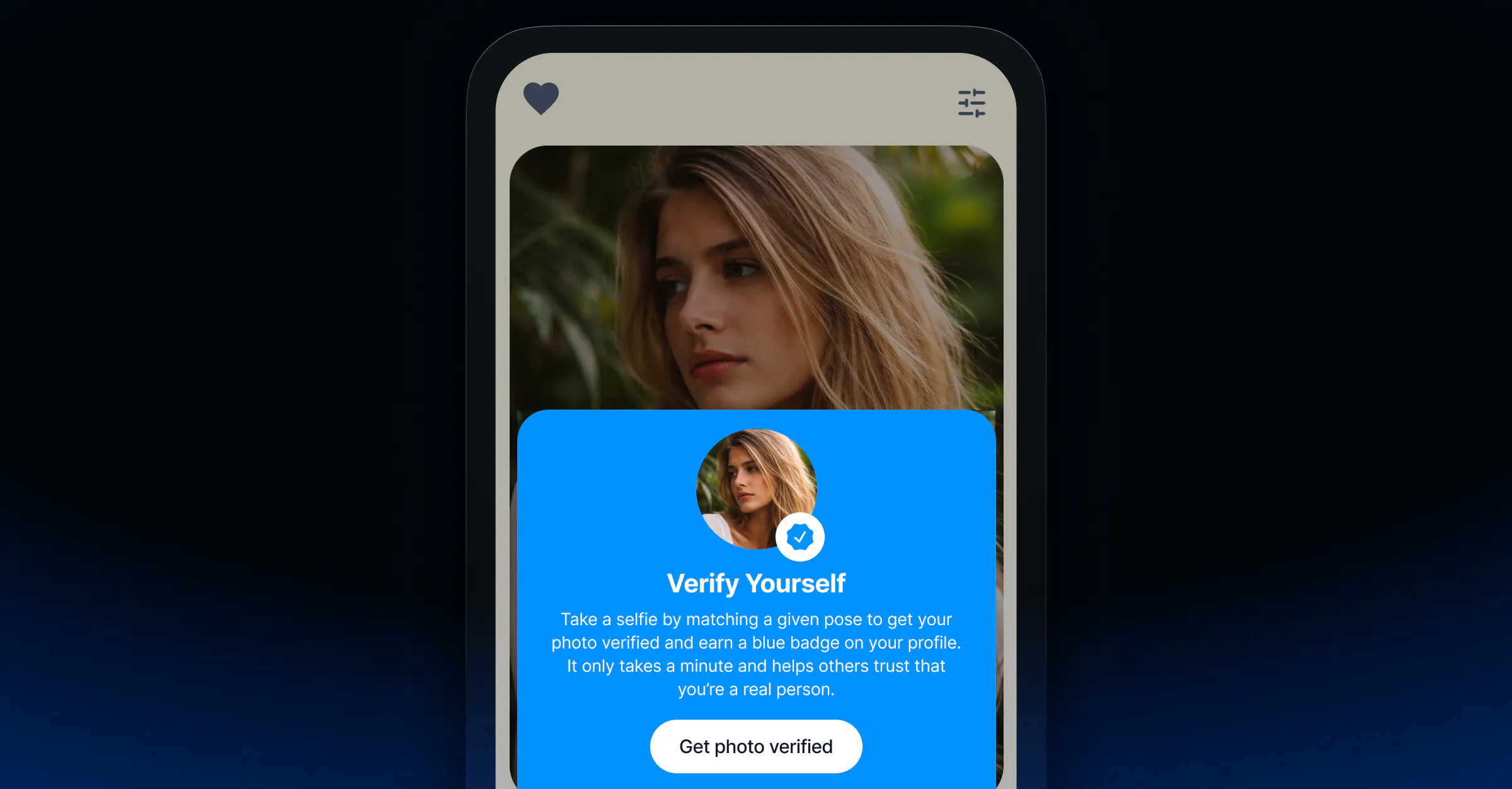
What it is: The identity and content layer that keeps your platform trustworthy. Think photo verification, liveness detection, deepfake detection, and behavioral fraud signals.
This feature set deserves serious engineering attention because the threat landscape has shifted dramatically. A 2026 Sumsub survey of 2,000 UK dating app users found 84% believe AI-generated content has made it harder to trust people on dating apps, up from 64% the previous year. The dating sector tied for the highest identity fraud rate of any industry at 6.35%, based on analysis of more than 4 million fraud attempts.
The consequences aren't good for your business. 43% of users say they would use dating apps less if AI content became prevalent, and 11% said they'd stop altogether.
The verification stack, in order of maturity:
- Photo verification (MVP-level): User submits a selfie that's matched against their profile photos using face comparison APIs. Confirms the person in the photos is the person signing up. Amazon Rekognition, Microsoft Face API, and dedicated identity providers like Persona or Veriff all support this.
- Liveness detection (now essential): Static photo matching is not sufficient. Attackers inject pre-recorded videos or real-time deepfakes into verification flows. Active liveness checks (prompts like "turn your head left," "blink") detect replay attacks and deepfake injection.
- Behavioral fraud detection (scales with you): AI learns normal usage patterns (like swipe velocity, message cadence, typing speed, navigation paths) and flags anomalies: copy-paste intros at scale, 24/7 activity, instant location jumps. This catches bot farms that pass photo verification. Per identity verification researchers at JPLoft, behavioral models flag anomalies with high sensitivity while using gentle friction (rate limits, additional selfie prompts) rather than silent bans to avoid false positives.
- Content moderation layer: Consider an AI moderation solution that includes automated scanning of images for NSFW content, harassment detection in messages, and report workflows that escalate to human review.
6. Push Notifications and Re-Engagement Systems

What it is: The trigger layer that brings users back to the app at the right moment: new matches, message notifications, "your match is about to expire," activity spikes.
This gets under-invested in early builds and immediately impacts retention. A match that generates no notification when a message arrives is a dead conversation.
The notifications that drive re-engagement:
- New match notification (send immediately)
- New message notification (send immediately, with message preview for opted-in users)
- Match expiry warning (before a Bumble-style expiry fires)
- "Activity surge" alerts (Tinder's Swipe Surge equivalent, high-activity periods)
- Re-engagement nudges for dormant users ("5 new people near you")
Technical implementation:
Firebase Cloud Messaging (FCM) handles both Android and iOS push delivery with good SDK support. For iOS, APNs (Apple Push Notification service) is the underlying layer. FCM abstracts this. If you want more control over delivery analytics, scheduling, and A/B testing of notification copy, dedicated tools like OneSignal or Braze sit on top of FCM/APNs and add a lot of PM-friendly tooling.
What to get right early: Permission prompts. iOS requires explicit opt-in for push notifications, and the timing and framing of that prompt significantly affects opt-in rates. Ask after a user has had a first positive moment in the app (their first match, completing their profile), not at first launch.
7. Gamification and Engagement Loops

What it is: The mechanics that create habitual usage: streaks, boosts, super-likes, activity surges, and features that reward participation.
Tinder pioneered the swipe mechanic and transformed online dating into something with variable-reward dynamics familiar from gaming. It showed that not only is swiping fun, but also that the unpredictability of when you get a match creates engagement loops similar to what keeps people returning to slot machines.
The mechanics worth considering:
| Mechanic | How It Works | Monetization Angle |
|---|---|---|
| Boosts | Surface your profile as "top profile" for 30 min | Premium purchase or subscription perk |
| Super Likes / Roses | Signal high interest to a specific user | Limited per day; extras as IAP |
| Swipe Surges | Notify users of high-activity periods | Drives DAU, creates urgency |
| Match Expiry | Unmatched conversations expire without a first message | Premium extends the timer |
| Daily limits | Cap free swipes/likes per 24 hours | Core freemium conversion driver |
The Gen Z wrinkle:
Apps designed around infinite swipes face fatigue among younger cohorts. Research on Gen Z dating behavior shows a preference for more intentional interaction over high-volume, low-commitment browsing. Apps like Hinge (daily like cap) and Thursday (app only opens one day a week) are experiments in intentional scarcity. Bumble's built-in Question Game, where both users answer before seeing each other's response, reduces anxiety around the first message.
Design principle: Gamification works when it serves genuine connection. Mechanics that feel designed to extract payment rather than improve match quality ruin trust. If it feels like it should just be basic functionality, don't charge for it.
8. Social Integrations and Authentication

What it is: Third-party account linking for login, profile enrichment, and trust signaling.
The most valuable use of social integration is reducing signup friction. Offering Sign in with Apple, Google, or Facebook means users can create an account without a new password and without manually entering profile data.
What to integrate and what to skip:
- Sign in with Apple / Google (ship on day one): These are the standard authentication options for mobile. Apple's sign-in requires minimal data sharing and is privacy-forward, which resonates with post-2020 users. OAuth 2.0 is the underlying standard for all three major providers.
- Spotify integration (high retention value): Linking Spotify lets users display their music taste and can surface shared listening as a compatibility signal. Tinder's Music Mode proved the engagement value; a shared favorite artist is a genuine conversation starter. The Spotify Web API is well-documented and the integration is relatively lightweight.
- Instagram linking (evaluate carefully): The Instagram Basic Display API that dating apps historically used for profile photo enrichment has been significantly restricted by Meta. If you're building now, check current API availability before scoping this.
- Facebook mutual friends (skip for new builds): The Facebook Graph API social features that powered "mutual friends" matching have been restricted since the Cambridge Analytica fallout. The trust signal value was real; the API access to build it reliably is not.
9. Profile Performance Insights

What it is: Data surfaces that help users understand how their profile is performing/ what to improve and create natural upgrade moments.
This is the feature most likely to get deprioritized in an MVP... but regretted later. Profile performance data does two important things: it gives users agency to improve their match rate, and it creates a natural hook for premium features.
What to measure and surface:
- Profile views vs. right-swipe rate (are people viewing the profile and not engaging?)
- Match rate relative to cohort averages (am I performing above or below similar profiles?)
- Which profile photos are getting the most engagement (split-test photo ordering)
- Bio engagement signals (do users who read the bio convert at higher rates?)
Implementation: This is largely a data pipeline and dashboard problem. Events (profile view, swipe, match, message) feed into an analytics store; aggregated metrics surface in a lightweight stats UI. Amplitude or Mixpanel can handle the event layer and power the user-facing dashboards with relatively minimal custom build.
The upgrade path: Basic stats (total matches, messages received) are free. Detailed analytics (who viewed your profile, photo-by-photo performance, cohort benchmarking) are premium. This is a cleaner upgrade proposition than "pay to see more profiles." It gives users a tangible reason the premium tier is worth it.
10. Short-Form Video Profiles

What it is: A video component on user profiles, either auto-playing short clips or prompted video responses, that gives users a more dynamic sense of a potential match.
Static photo-plus-text profiles have a big limitation: they're easy to misrepresent and hard to read personality from. Short-form video addresses both. A 15-second clip conveys energy, humor, and communication style in a way that no combination of photos and bio text can match.
Current implementations to reference:
- Hinge's video prompts (prompted responses to specific questions: the structure reduces "what do I record" anxiety)
- Tinder's Double Date feature uses short video as a social layer for group matching
Technical requirements:
Video upload, transcoding, and delivery at scale is a solved problem via cloud services, but it's not trivial to set up. AWS Elastic Transcoder or MediaConvert handles format normalization (users upload MOV, MP4, HEVC; you normalize to a consistent delivery format). CloudFront or another CDN handles adaptive bitrate delivery based on connection speed.
On the moderation side, video content requires both automated scanning (for explicit content) and human review escalation paths. This is more complex than image moderation; budget accordingly if you're building video profiles into your roadmap.
Frequently Asked Questions
- How long does it take to build a dating app MVP?
A focused MVP (with user profiles, matching filters, real-time chat, basic photo verification, and push notifications) typically takes 3 - 5 months with a team of 4 - 6 engineers. Adding video calling, AI matching, or video profiles extends that to 6 - 9 months. The variables that matter most are team experience with real-time systems and how much you're building versus buying at the infrastructure layer.
- What's the best tech stack for a dating app?
React Native or Flutter for cross-platform mobile (covers iOS and Android from one codebase). Node.js or Go on the backend for handling the high-concurrency requirements of real-time messaging. PostgreSQL with PostGIS for user data and geolocation queries; Redis for session management and real-time features. For video, WebRTC handles the media transport; whether you run your own STUN/TURN infrastructure or use a managed provider depends on your team's bandwidth and expected call volume.
- How much does it cost to build a dating app?
A basic app requiring five team members with core features (profiles, matching, text chat) generally runs $150,000 - $200,000 depending on team location and experience. A fully-featured platform with AI matching, video calling, and robust safety infrastructure typically runs $650,000+. Ongoing infrastructure costs (particularly TURN server bandwidth for video, AI model inference, and push notification volume) are the variables most teams underestimate at build time.
- What's the biggest technical mistake in dating app development?
Underestimating the moderation and safety stack. Most teams build matching and messaging first, then scramble to add moderation after launching and encountering abuse. Building content moderation, behavioral fraud detection, and a report/review workflow into the MVP timeline is significantly cheaper than retrofitting it.
- How do dating apps make money?
The freemium model dominates. Paying tiers captured 69.45% of total dating app revenue in 2025, driven by subscriptions (unlimited swipes, see who liked you, advanced filters) and in-app purchases (boosts, super-likes, virtual gifts). Advertising represents a much smaller share for established apps and is generally deprioritized until significant MAU scale.
- How do you prevent fake profiles on a dating app?
A layered approach works better than any single check. Photo verification catches basic catfishing. Active liveness detection catches deepfake injection attacks on verification flows. Behavioral anomaly detection catches bot accounts that pass manual checks. And ongoing content moderation with a human review tier handles edge cases the automated systems miss.
- What's the difference between building vs. buying real-time chat for a dating app?
Building from scratch gives you complete control over data, behavior, and cost at extreme scale. It also takes 6 - 12 months of engineering time for a production-quality implementation. Buying (using a provider like Stream, Sendbird, or Twilio) gets you to production in days or weeks, with delivery guarantees, SDKs for every platform, and moderation hooks, but at a per-MAU cost that needs to be modeled against your growth projections.
Build for the Long Game
The dating app market is crowded, but most of what's out there was built on assumptions from five years ago.
Users today want AI-assisted matching that adapts to their behavior, verification that can spot a deepfake, and a messaging experience that matches what they're used to on every other platform they use daily.
Start with the foundation (smart filters, real-time chat, photo verification, and push notifications) and validate retention before layering in AI matching, video calling, and gamification.
On the build vs. buy question: the more of your infrastructure you can source from proven providers (messaging, video, moderation), the faster you'll move and the more engineering bandwidth you'll have for the features that actually differentiate your product.