
Inside Stream's Unity Video SDK: 7 Main Features


In gaming development, voice chat alone doesn't cut it anymore. Players expect clear audio, responsive conversations, stable video, livestreaming, privacy controls, and an experience that keeps working when network conditions get worse.
For Unity developers, that pushes the real work down into the media stack. The API is less important than whether the audio and video underneath it actually hold up. Stream Video for Unity is designed around those requirements, with a strong focus on low latency, media quality, network resilience, flexibility, scalability, and mobile performance.
This piece walks through the specific technical choices behind our Unity SDK, and what each means for the games built on it.
1. Clear, Low-Latency Voice
Voice chat has to feel immediate. Even relatively small delays can make conversations feel unnatural, especially in fast-paced multiplayer games.
Stream puts particular emphasis on reducing audio latency while providing noise cancellation, echo cancellation, automatic gain control, and other audio processing needed for clear conversations.
On mobile platforms, Stream integrates directly with native audio recording and playback rather than relying entirely on Unity's standard audio pipeline. The SDK leverages system-level audio capture and playback through platform APIs (such as Android's VoiceCommunication audio source preset and iOS's VoiceProcessingIO unit), combining platform-specific audio processing with WebRTC's software audio processing capabilities for optimal vocal clarity.
To enable these optimizations, Stream's Unity SDK is built on a custom fork of Unity's WebRTC package, providing greater control over audio processing and platform-specific behavior. Voice is encoded using Opus, a codec designed for real-time communication. The SDK supports Android (ARM64), iOS, Windows (x64), and macOS, providing a consistent voice communication experience across platforms.
These capabilities aren't limited to video calls. Stream also supports audio-only calls and audio rooms, making it suitable for in-game voice chat and other voice-first experiences. Getting started with microphone capture is straightforward: as shown in the Camera & Microphone guide, developers can select a microphone and enable audio capture with a single call: _client.AudioDeviceManager.SelectDevice(microphone, enable: true).

2. Stable Audio & Video on Unreliable Networks via SFU Routing
Players rarely have identical network conditions. One player might have a stable Wi-Fi connection while another is on a congested mobile network. Stream uses Selective Forwarding Units (SFUs) to handle these differences and deliver audio and video efficiently to each participant.
Instead of connecting players directly to each other, Stream routes media through an SFU. In a traditional full-mesh peer-to-peer (P2P) setup, each device sends a separate stream to every other participant. In a 10-person call, that means 9 outgoing streams per device. With an SFU, each device publishes its media to the server, which then forwards it to other participants. This allows calls to scale without each player's upload bandwidth increasing with the number of participants.
The SFU can also adapt the video quality delivered to each participant based on their network conditions. When available bandwidth decreases, Stream can reduce video resolution or frame rate, or even pause incoming video to prioritize audio. This helps maintain usable communication without unnecessarily affecting other participants.
Developers can further optimize bandwidth usage by controlling which video streams are received and requesting resolutions that match how participants appear on screen. For example, a small player thumbnail doesn't need the same resolution as a full-screen video feed. The Unity SDK provides APIs to manage these subscriptions and request video resolution per participant.
Why it's important: Players get smoother communication when network conditions fluctuate, without developers having to build their own bandwidth-management system.
3. Built for Mobile Performance
Mobile games have to share limited device resources between rendering, gameplay systems, networking, UI, and other processes. A communication SDK needs to operate efficiently without unnecessarily competing with the game for CPU and memory.
Stream's Unity SDK is designed with those constraints in mind. Native mobile integrations provide tighter control over media capture and playback, while adaptive video helps avoid using more bandwidth and processing power than necessary.
We tested this in an internal benchmark of Stream Video SDK for Unity v0.8.16. It simulated a livestream with 4,817 total participants (4,799 peak concurrent) joining in a near-instantaneous burst, simulating an "everyone joins at once" launch moment. The publishing device, a OnePlus 9 Pro, held a stable ~30 FPS for the full session, with only two brief, insignificant frame drops. On the receiving side, a low-end Redmi 5 stayed at 26-30 FPS the entire time, watching the same stream everyone else did.
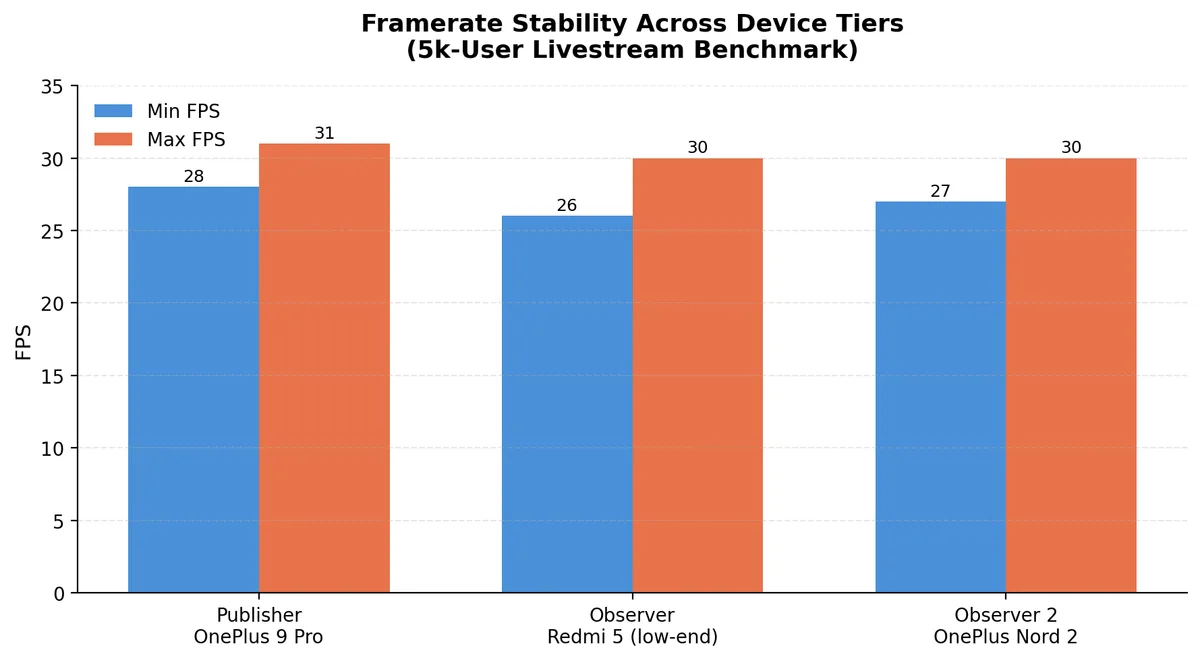
The resource use is just as important as the video quality. The host ran a debug build with the Unity Profiler attached, which adds overhead. Even so, CPU use on the host did not rise significantly after about 4,800 participants connected, compared with before the call. Memory rose moderately after joining, then stayed stable, with no sign of leaks or runaway allocations.
Why it's important: Communication features can fit more naturally into mobile games without unnecessarily competing with the rest of the game for resources.
4. Granular Capability-Based Permissions System
Different games need completely different communication models.
Rather than relying solely on generic role labels, Stream uses dynamic, capability-based grants (such as SendAudio, SendVideo, and Screenshare) to give developers fine-grained control over player interactions in real time.
Stream's permissions and role system can support scenarios such as:
- team or party voice chat
- listeners who cannot publish audio or video
- hosts broadcasting to an audience
- selected players receiving microphone or camera permissions
- moderators muting or removing participants
- different communication privileges for different player roles
Why it's important: Developers can shape communication around the design of the game instead of being limited to a fixed calling model.
5. Voice, Video, and Livestreaming
Stream's Unity SDK allows developers to build a wide range of real-time audio and video experiences.
That can mean a livestream with thousands of viewers, an audio room with many active speakers, a multiplayer voice experience, or a full video conferencing application similar to Zoom or Google Meet. In our internal benchmark, a Unity host published a livestream to 4,817 participants (see section 3).
Developers can build one-to-one calls, group calls, large interactive sessions, audio rooms, livestreams, recordings, and broadcasts using the same SDK.
Why it's important: Teams can choose the communication model that fits their product without having to adopt a different solution for each use case.

6. Built for Massive Rooms
Stream is designed to support everything from small multiplayer calls to large-scale real-time events, where thousands of players may join simultaneously.
A key advantage of SFU-based architecture is that participants don't need to establish direct connections with everyone else in a call. As the diagram below illustrates, traditional full-mesh peer-to-peer (P2P) calls require each participant to send additional video streams as the room grows. With an SFU, each participant can publish a single stream that the server forwards to others, avoiding the growing upload demands of a P2P mesh.

The chart illustrates the number of outgoing video streams per device in a full-mesh P2P call versus an SFU-based call, assuming every participant publishes video.
For massive audiences, however, a single SFU isn't enough. Stream extends this architecture through SFU cascading, where multiple SFUs work together to distribute audio and video across servers and geographic regions. Instead of having one server handle every participant, media is forwarded between SFUs, allowing the infrastructure to scale as the audience grows.
This architecture was demonstrated in a published benchmark, where Stream supported 100,000 concurrent viewers watching a single 1080p WebRTC livestream. The test simulated rapid audience growth, with 10,000 participants joining per minute and peaks of 600 joins per second across six global regions.
At peak load, 132 cascading SFUs handled 225 Gbps of traffic while maintaining a stable 30 FPS, with no recorded packet loss or API failures during the test.
These capabilities make Stream suitable for large-scale gaming experiences such as esports broadcasts, virtual concerts, creator livestreams, and community events.
Why it's important: Developers can build real-time experiences for large audiences without having to design and manage their own distributed media infrastructure.
7. Privacy and Player Safety
Adding cameras and microphones to a game also introduces new privacy and moderation requirements.
Stream provides controls for managing participants, permissions, blocking, moderation, and other aspects of user-generated communication.
Background filtering is also being added to the Unity SDK, starting with background blur. This gives players the option to appear on camera without exposing their surroundings.
Safety also has to work at game scale. Stream's AI moderation covers text, image, video, and audio in 50+ languages from a single API. A top-5 mobile gaming publisher with 750M+ monthly active users chose it to replace Community Sift. These were the results:
| What was measured | Result |
|---|---|
| Migration | Completed in six months, with no quality degradation during the cutover |
| Latency at 4,000 requests per second (1,000,000-request run) | p50 37.6 ms, p99 237.1 ms, 0 errors; the target was a 50 ms median |
| Test data | About 3 million chat messages and usernames, plus about 1,500 known-failure lines across 15 languages |
| Gains from two-day tuning rounds | Latin Hindi detection from 0.1% to 85%; Arabic classification precision from 59.2% to 77.5% |
| Overall language detection accuracy | From 75.3% to an expected 80.3% on production traffic |
| Test infrastructure | Dedicated US shard set up in 48 hours |
Why it's important: Games with live voice and video need moderation that keeps up with the game. The publisher's tests show what to check, including latency at peak load, accuracy in each language, and results on the studio's own data. Developers get tools for creating safer communication experiences, while players have more control over how much of their real-world environment they share.
Gameplay Demos in Action
Integrating Stream's video and audio capabilities transforms player interaction across any game genre, turning isolated gameplay into an interactive community experience. Below are three gameplay demo videos demonstrating how seamless real-time communication drives player retention, enhances teamwork, and creates immersive multiplayer environments:
2D Platformer Proximity Video Demo
Experience spatial audio and video in a vibrant 2D platformer. As players navigate the map and approach one another, proximity-based communication automatically connects their audio and video streams. This seamless transition allows players to form spontaneous groups, coordinate actions, or simply hang out without leaving the game world or disrupting the flow of play.
Collaborative Team Meeting Demo
Explore a virtual office environment designed to replace routine video calls with dynamic, interactive spaces. Team members can move their avatars around a shared workspace, pop into virtual meeting rooms, and collaborate naturally. It combines structured conferencing tools with the informal, high-engagement feel of a multiplayer game.
Fast-Paced FPS Chat Integration Demo
This demo showcases text chat displayed either as an expanded window or as a streamlined, low-profile chat overlay commonly used in MMO and fast-paced FPS games.
Conclusion
Whether you're building fast-paced multiplayer voice chat, a social experience with video, an audio room, a creator broadcast, or a massive live event, Stream Video for Unity gives you the building blocks to bring that idea to life.
You get low-latency audio, adaptive video, flexible permissions, mobile-focused media handling, privacy features, and infrastructure proven to support very large audiences, without having to assemble and maintain the entire real-time media stack yourself.
The goal is to let your team focus on what makes your experience unique while Stream handles the complexity of real-time audio and video underneath.
Start building with Stream Video for Unity and see how quickly you can turn your real-time audio or video idea into a working experience.