
Top 6 Real-Time Speech-to-Speech APIs for Voice Agents

A speech-to-speech (STS) API takes a user's voice as input and streams a spoken reply from a single realtime model, without separate speech-to-text (STT) and text-to-speech (TTS) steps. In 2026, the six leading options for building voice agents are the OpenAI Realtime API, Gemini Live API, xAI Grok Voice Agent API, Amazon Nova Sonic, Azure Voice Live API, and AssemblyAI Voice Agent API.
The right choice depends on your stack and use case. OpenAI offers the most complete set of connection options (WebRTC, WebSockets, and SIP), Gemini Live has the lowest per-token audio pricing and the broadest language support, Grok Voice and AssemblyAI charge a simple per-minute rate, and Nova Sonic and Azure Voice Live are the natural fits for teams already on AWS or Azure.
Real-Time Speech-to-Speech APIs Compared
The table below summarizes each API as of October 2026. Detailed sections for each one follow later in this article.
| API | Current models | Architecture | Connections | Pricing | Output languages | Best for |
|---|---|---|---|---|---|---|
| OpenAI Realtime API | gpt-realtime-2.1, gpt-realtime-2.1-mini |
Native STS | WebRTC, WebSocket, SIP | $32 / $64 per 1M audio tokens in / out (mini: $10 / $20) | Not published | Browser and phone agents that need every transport option |
| Gemini Live API | gemini-3.8-live, gemini-3.8-live-extended-thinking |
Native STS | WebSocket (WebRTC through partners) | $3 / $12 per 1M audio tokens in / out | ~97 | Multilingual agents, video input, and low audio cost |
| xAI Grok Voice Agent API | grok-voice-3.0 |
Native STS | WebSocket (OpenAI-compatible), SIP | $0.08/min | 20+ | Phone agents with built-in web and X search |
| Amazon Nova Sonic | Nova 2.5 Sonic, Nova 2 Sonic | Native STS | Amazon Bedrock bidirectional stream | Per speech and text token | 7 | Teams on AWS and Amazon Connect contact centers |
| Azure Voice Live API | gpt-realtime-2.1, azure-realtime, or GPT-5.x via a managed pipeline |
Native STS or managed pipeline | WebSocket, WebRTC (preview) | Per 1M tokens, by model tier | 150+ TTS locales | Azure enterprises that need avatars, noise suppression, or custom voices |
| AssemblyAI Voice Agent API | Universal-3.5 Pro Streaming + LLM + TTS | Managed pipeline | WebSocket, Twilio SIP | $0.075/min ($4.50/hr), all-inclusive | 6 (understands 18) | Support agents with predictable per-minute cost |
Native STS means one model listens and speaks. Managed pipeline means the provider runs separate STT, LLM, and TTS models behind a single connection, so you integrate it like an STS API but it works like a turn-based pipeline under the hood.
How Fast Are Real-Time Speech-to-Speech APIs? What We Measured
Most providers describe their latency in relative terms, so we measured it ourselves. While building an AI football commentator with Vision Agents, Stream's open-source framework for voice and video AI, we compared the time to first audio of the OpenAI Realtime API and the Gemini Live API. We sent the same prompt ("What's happening on the field?") about 30 times per configuration while streaming match footage to each model at 1 or 2 frames per second over Stream's edge network.
| API | Frames per second | Mean | Std. dev. | Min | Max |
|---|---|---|---|---|---|
| OpenAI Realtime | 1 | 0.39 s | 0.10 s | 0.31 s | 0.72 s |
| OpenAI Realtime | 2 | 0.47 s | 0.22 s | 0.32 s | 1.20 s |
| Gemini Live | 1 | 3.06 s | 0.88 s | 1.52 s | 5.05 s |
| Gemini Live | 2 | 4.08 s | 1.04 s | 2.75 s | 6.85 s |
In our tests, OpenAI Realtime returned its first audio about 8x faster than Gemini Live and with much less variation. We attribute much of the gap to transport: OpenAI's API connected over WebRTC, while Gemini Live used WebSockets over TCP. Sending more video frames per second made both APIs slightly slower.
Keep two caveats in mind. We published these results in January 2026, so they reflect the models available at the time, before gpt-realtime-2.1 and gemini-3.8-live, and they included video input, which adds work compared to voice-only conversations. Read the full write-up for the details.
For the other APIs, here is what the providers themselves report. These figures use different methods, so they are not directly comparable:
- xAI Grok Voice 3.0: Under one second, according to xAI.
- Amazon Nova 2.5 Sonic: 1.08 s median time to first audio, down from 1.50 s for Nova 2 Sonic, according to AWS's migration guide.
- AssemblyAI Voice Agent API: About one second end to end, according to AssemblyAI.
Speech-to-Speech vs. Turn-Based Voice Pipelines
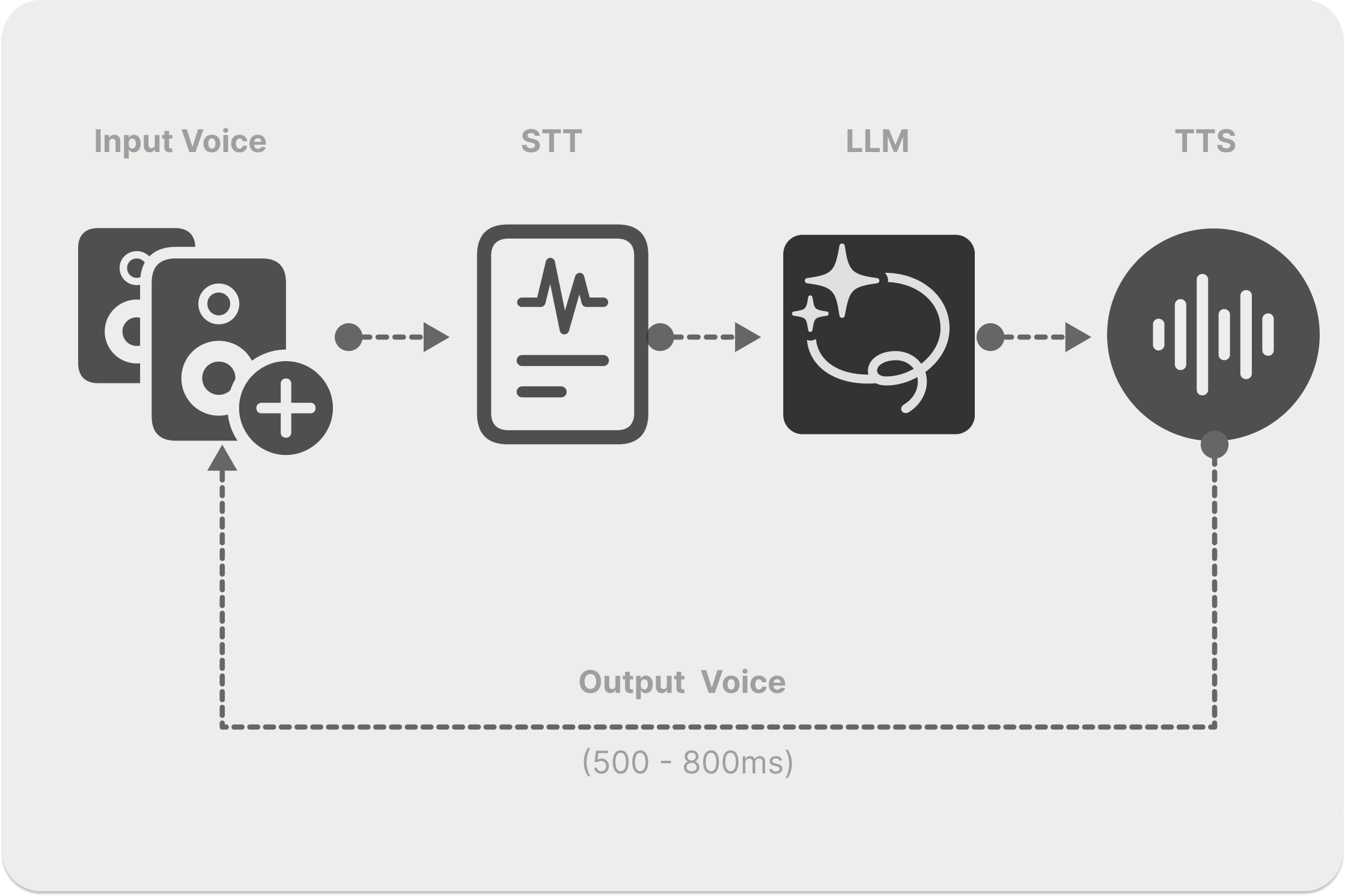
There are two main ways to build a voice agent:
- Speech-to-speech (
Voice → LLM → Voice): A single multimodal model takes in the user's audio and generates spoken audio directly. - Turn-based pipeline (
Voice → STT → LLM → TTS → Voice): A speech-to-text model transcribes the user, a text LLM writes a reply, and a text-to-speech model speaks it.
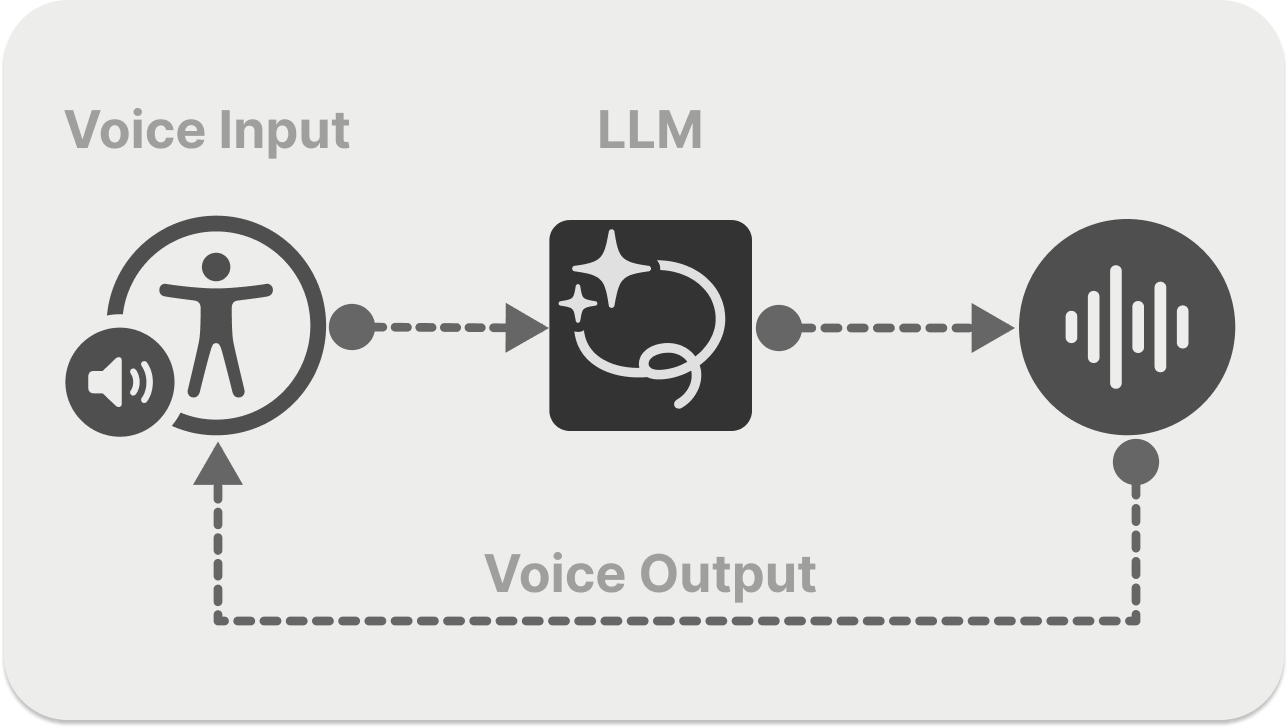
Because a speech-to-speech model hears the audio itself, it can respond to tone, emotion, and non-verbal sounds such as laughter, which are lost when speech is converted to text. It also removes the hand-offs between models, which simplifies your architecture and cuts out sources of delay.
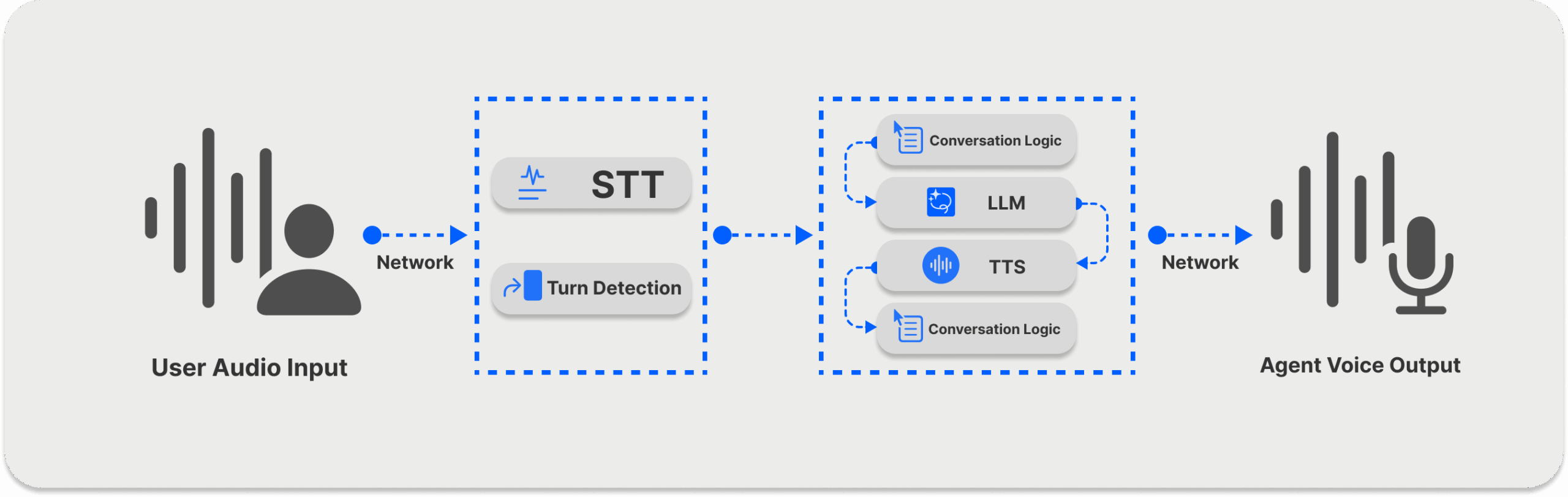
The diagram above shows a single turn in a turn-based system. The STT component transcribes the user's speech while turn detection decides when they have finished, then the LLM generates a reply and the TTS component speaks it. Each step adds latency, and the transcript strips out how something was said.
Speech-to-speech offers these advantages over a turn-based pipeline:
- Simpler architecture: You work with one model and one connection instead of coordinating three models.
- Lower latency: There are no hand-offs between separate STT, LLM, and TTS services, which makes STS a good fit for live support and other fast-paced conversations.
- Richer understanding: The model hears tone, emotion, accents, and non-verbal cues directly instead of reading a transcript.
- More natural turn-taking: Most STS APIs handle interruptions (barge-in) and voice activity detection natively.
Turn-based pipelines still have their place. They let you pick the best model for each step, swap providers independently, and inspect the transcript at every stage, which some regulated industries require. If you take that route, these are popular STT and TTS providers:
- Qwen3-TTS: Open-source text-to-speech model family from Alibaba's Qwen team.
- ElevenLabs: Realistic voice AI platform.
- Deepgram: Voice AI APIs for developers.
- Cartesia: Ultra-realistic voice AI platform.
- Pipecat: Open-source framework for real-time voice AI.
- Gladia: Speech-to-text API provider.
- Rime: Voice AI models for customer experience.
- Speechmatics: Enterprise-grade speech-to-text APIs.
- Silero: Open-source TTS and STT models.
- Inworld TTS: Low-latency text-to-speech.
- Moonshine: On-device speech recognition.
- Kyutai: STT and TTS for developers.
- Smallest.ai's Pulse speech-to-text API: Streaming transcription paired with low-latency Lightning text-to-speech for modular, real-time voice pipelines.
Voice-to-Voice AI: Audio Streaming Mechanisms
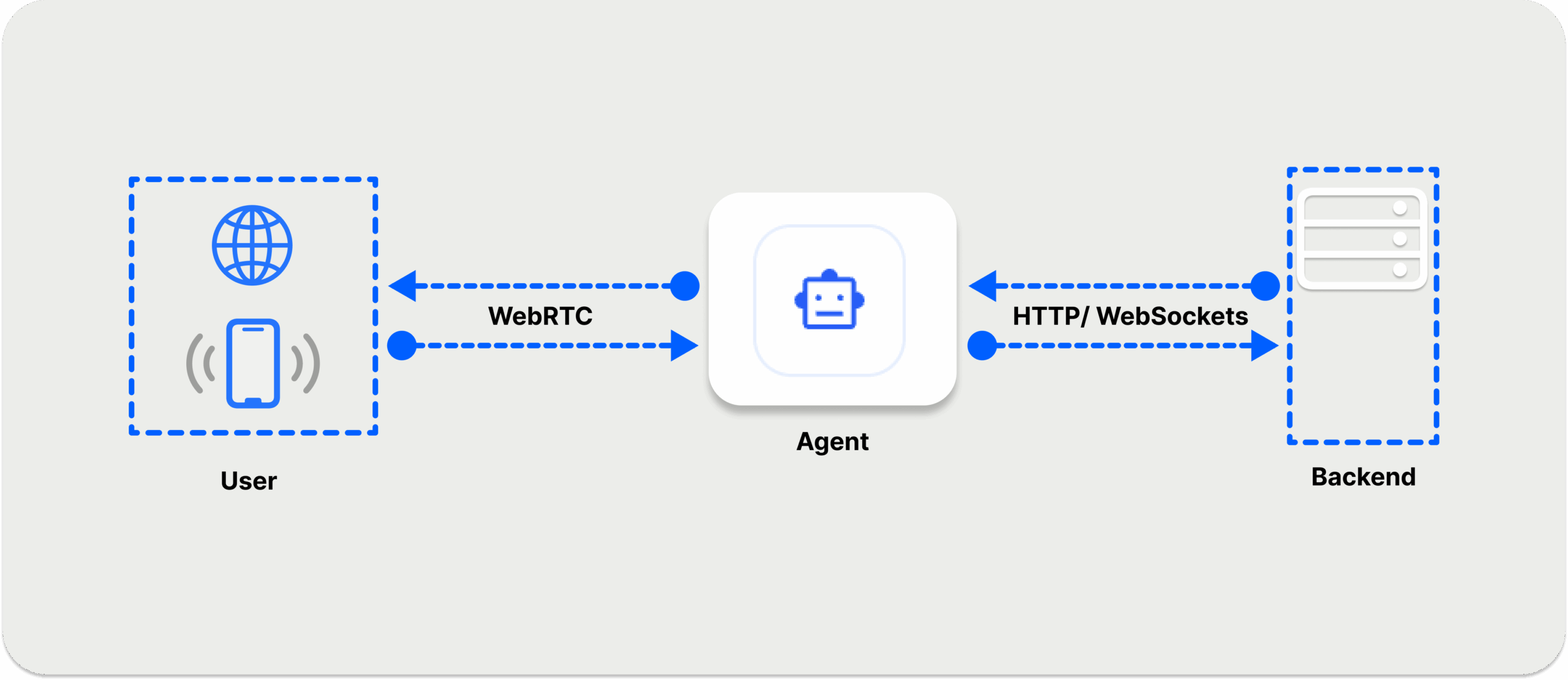
The transport layer, which carries audio between the user and the agent, has a big effect on how responsive a voice agent feels. Production agents use WebRTC, WebSockets, or Session Initiation Protocol (SIP) connections:
- WebRTC: Best for browser and mobile clients. It runs over UDP, handles poor network conditions well, and delivered the lowest latency in our measurements above.
- WebSockets: Best for server-to-server connections and prototyping. Because they run over TCP, a lost packet delays everything behind it, which can add latency on unreliable networks.
- SIP: Used to connect voice agents to the phone network, so users can call your agent directly.
A common setup is WebRTC between the user and your backend, and WebSockets between your backend and the model provider. For the pros and cons of each, check out our post WebRTC vs. WebSockets.
Top 6 Real-Time Speech-to-Speech APIs
This section covers each API in detail, including its current models, connection options, pricing, and how to get started.
1. OpenAI Realtime API
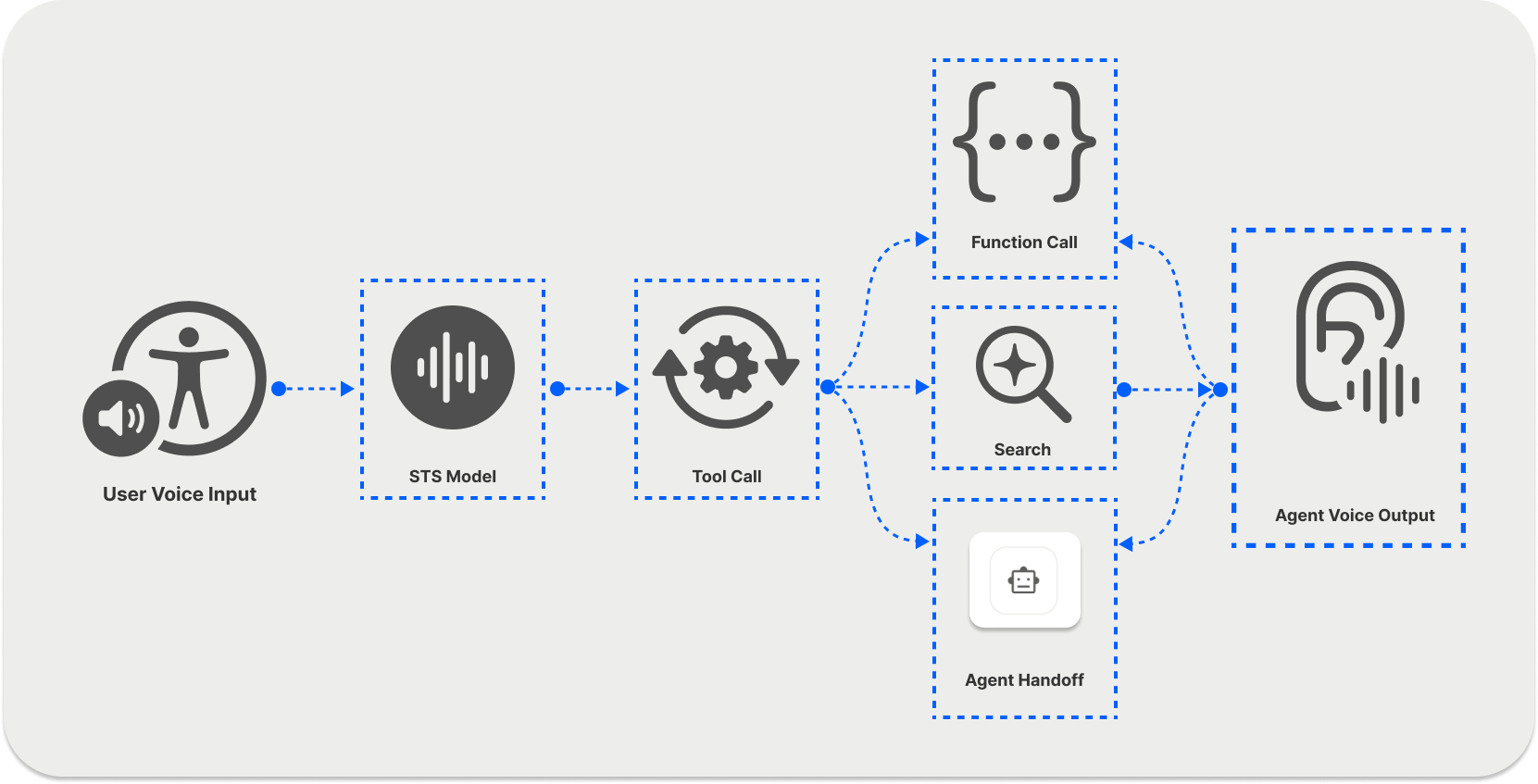
The OpenAI Realtime API lets developers build low-latency voice agents with native audio-in, audio-out models. The current models are gpt-realtime-2.1 and the faster, lower-cost gpt-realtime-2.1-mini, released in July 2026. Older gpt-4o-realtime-preview models were shut down in May 2026, and the original gpt-realtime and gpt-realtime-mini families are scheduled to shut down on January 20, 2027.
Key features include:
- Connection Types: WebRTC for browsers, WebSockets for servers, and SIP for phone calls.
- Interruption Handling: Semantic voice activity detection is on by default, and interrupting the agent cancels its current response.
- Tool Calling and MCP: Call your own functions or connect remote MCP servers during a conversation.
- Image Input: Send images alongside audio in the same session.
- Voices: 10 built-in voices, with
marinandcedarrecommended for the best quality. - Pricing: $32 per 1M audio input tokens and $64 per 1M audio output tokens for
gpt-realtime-2.1, or $10 and $20 for the mini model. See OpenAI pricing. - Limits: Sessions last up to 60 minutes.
OpenAI also launched GPT-Live (gpt-live-1) in September 2026, a separate full-duplex voice product priced at $0.05 per minute. It uses its own endpoint and hands reasoning and tool calls off to a backend model or your own agent.
OpenAI Realtime API Quickstart
An everyday use case of the Realtime API is voice-to-voice generation for any service that needs natural spoken input and output, such as kids' storytelling apps. The example below uses the Realtime API in the OpenAI Playground to listen to a user and reply with audio in real time.
The Realtime API can also run in transcription-only mode for live captions in a video conferencing app. See OpenAI's realtime transcription guide for details.
To build a voice agent, use the Realtime API with the OpenAI Agents SDK in TypeScript or Python. The following TypeScript example creates an agent you can talk to in the browser over WebRTC.
import { RealtimeAgent, RealtimeSession } from "@openai/agents/realtime";

const agent = new RealtimeAgent({
  name: "Assistant",
  instructions: "You are a helpful assistant.",
});

const session = new RealtimeSession(agent, {
  model: "gpt-realtime-2.1",
});

// Automatically connects your microphone and audio output in the browser via WebRTC.
try {
  await session.connect({
    // Generate this ephemeral key on your server, for example:
    // curl -s -X POST https://api.openai.com/v1/realtime/client_secrets \
    //   -H "Authorization: Bearer $OPENAI_API_KEY" -H "Content-Type: application/json" \
    //   -d '{"session": {"type": "realtime", "model": "gpt-realtime-2.1"}}' | jq .value
    apiKey: "ek_...(put your own key here)",
  });
  console.log("You are connected!");
} catch (e) {
  console.error(e);
}
Consult the voice agent quickstart for a step-by-step guide.
2. Gemini Live API
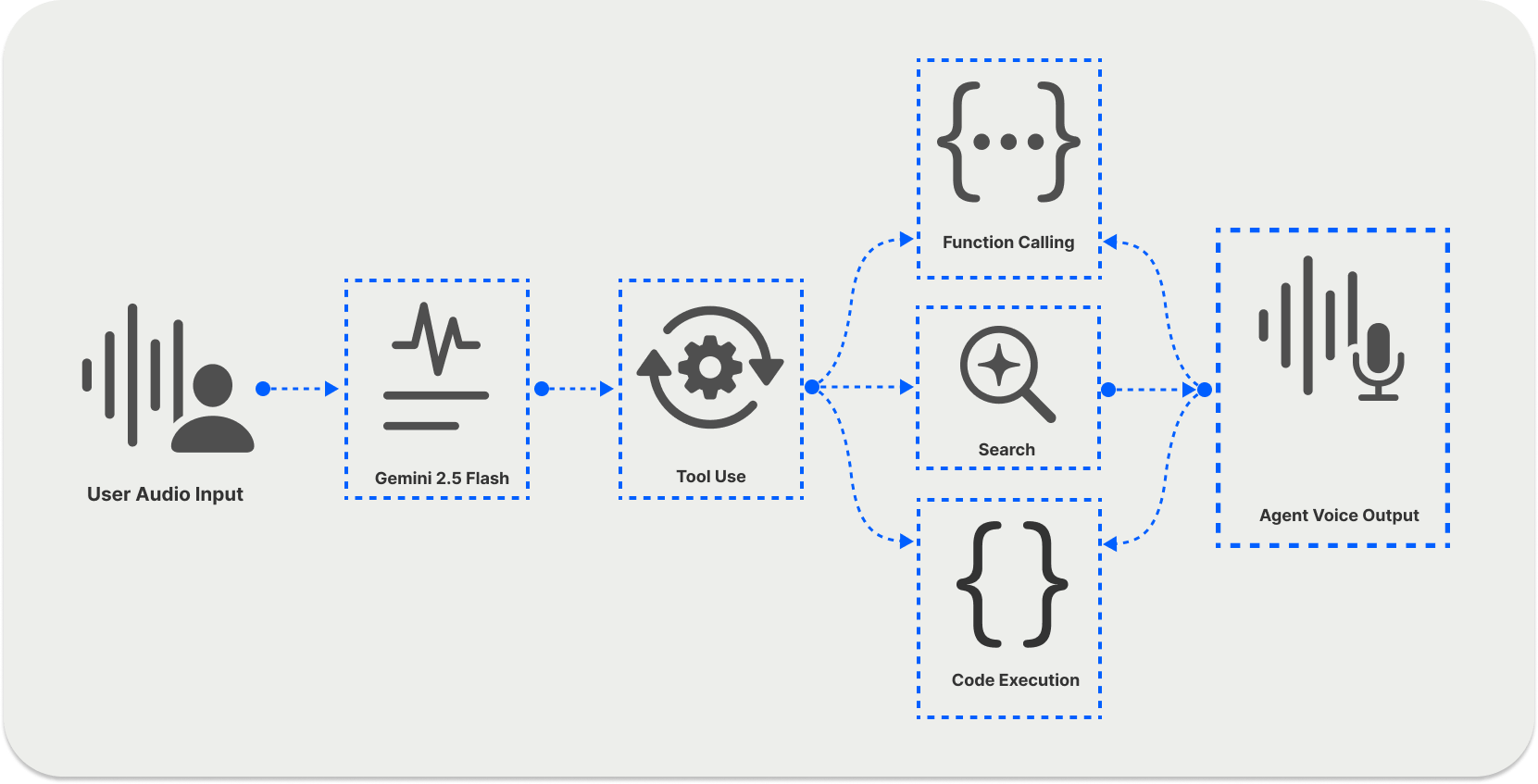
The Gemini Live API streams audio, video, and text into Gemini models and returns spoken responses. The current model, gemini-3.8-live, became generally available in September 2026, along with gemini-3.8-live-extended-thinking for harder reasoning tasks. All current Live models generate audio natively. The earlier "half-cascade" models, including gemini-2.0-flash-live-001 and gemini-live-2.5-flash-preview, have been shut down.
Key features include:
- Connection: WebSockets, either from your server or directly from the client with ephemeral tokens. For WebRTC, Google works with partners such as Daily, LiveKit, and Twilio.
- Voice Activity Detection (VAD): Detects when a user starts and stops talking, and lets users interrupt the model.
- Tool Use: Function calling, which runs asynchronously by default in Gemini 3.8, plus Google Search grounding.
- Video Input: Stream camera or screen frames at up to one frame per second.
- Languages: About 97 languages, with switching mid-conversation, according to Google's launch post.
- Pricing: $3 per 1M audio input tokens and $12 per 1M audio output tokens, which works out to about $0.005 per minute of input and $0.018 per minute of output. See Gemini pricing.
- Session Management: Audio-only sessions last 15 minutes by default, and context window compression lets them run indefinitely.
End-to-End Use Cases of Gemini Live API
Using the Live API, you can create a bidirectional voice system that streams audio from a user's microphone. Visit the Live audio starter app in Google AI Studio to try a working Gemini voice agent.
You can connect your app to the Live API from your backend (server-to-server) or directly from your frontend (client-to-server). Both use WebSockets, and client-side connections should use short-lived ephemeral tokens instead of your API key.
Gemini Live API Quickstart
To build voice applications with the Live API, first install the SDK and store your Google API key on your machine.
pip install -U -q google-genai
export GEMINI_API_KEY="YOUR_GEMINI_API_KEY"
The following example shows a simple text-to-voice interaction. The user sends a text message, and the agent responds with audio, which is saved to a WAV file and played back.
import asyncio
import contextlib
import os
import subprocess
import sys
import wave

from google import genai

client = genai.Client(api_key=os.environ["GEMINI_API_KEY"])

MODEL = "gemini-3.8-live"

@contextlib.contextmanager
def wave_file(filename, channels=1, rate=24000, sample_width=2):
    with wave.open(filename, "wb") as wf:
        wf.setnchannels(channels)
        wf.setsampwidth(sample_width)
        wf.setframerate(rate)
        yield wf

config = {"response_modalities": ["AUDIO"]}

async def main():
    async with client.aio.live.connect(model=MODEL, config=config) as session:
        file_name = "audio.wav"
        with wave_file(file_name) as wav:
            message = "Hello? Gemini are you there?"
            print("> ", message, "\n")
            await session.send_client_content(
                turns={"role": "user", "parts": [{"text": message}]}, turn_complete=True
            )

            async for response in session.receive():
                if response.data is not None:
                    wav.writeframes(response.data)
                    print(".", end="")

        # Play the audio after the session is complete
        print(f"\nAudio saved to {file_name}")
        try:
            if sys.platform == "darwin":  # macOS
                subprocess.run(["afplay", file_name])
            elif sys.platform == "win32":  # Windows
                subprocess.run(["start", file_name], shell=True)
            else:  # Linux
                subprocess.run(["aplay", file_name])
        except Exception as e:
            print(f"Could not play audio automatically: {e}")

if __name__ == "__main__":
    asyncio.run(main())
Running this script generates an audio.wav file with Gemini's spoken reply.
For streaming microphone audio and more advanced examples, see Google's Live API SDK quickstart.
3. xAI Grok Voice Agent API
The Grok Voice Agent API from xAI is a native speech-to-speech API built on grok-voice-3.0, released in October 2026. Its WebSocket protocol is compatible with the OpenAI Realtime API, so you can often switch an existing Realtime integration over by changing the endpoint and model.
Key features include:
- Connection: WebSockets at
wss://api.x.ai/v1/realtime, with ephemeral tokens for browsers, plus SIP and LiveKit for telephony. - Built-In Search Tools: Besides function calling and remote MCP servers, agents can search the web, X, and your uploaded files without extra setup.
- Interruption Handling: Server-side voice activity detection lets users interrupt the agent.
- Custom Voices: Clone a voice from a short audio sample.
- Languages: 20+ languages with automatic language detection.
- Pricing: $0.08 per minute, plus a small charge for text input. See xAI's model pricing.
- Compliance: SOC 2 Type II, HIPAA eligibility with a BAA, and zero data retention options.
To get started, follow the speech-to-speech guide in the xAI docs.
4. Amazon Nova Sonic
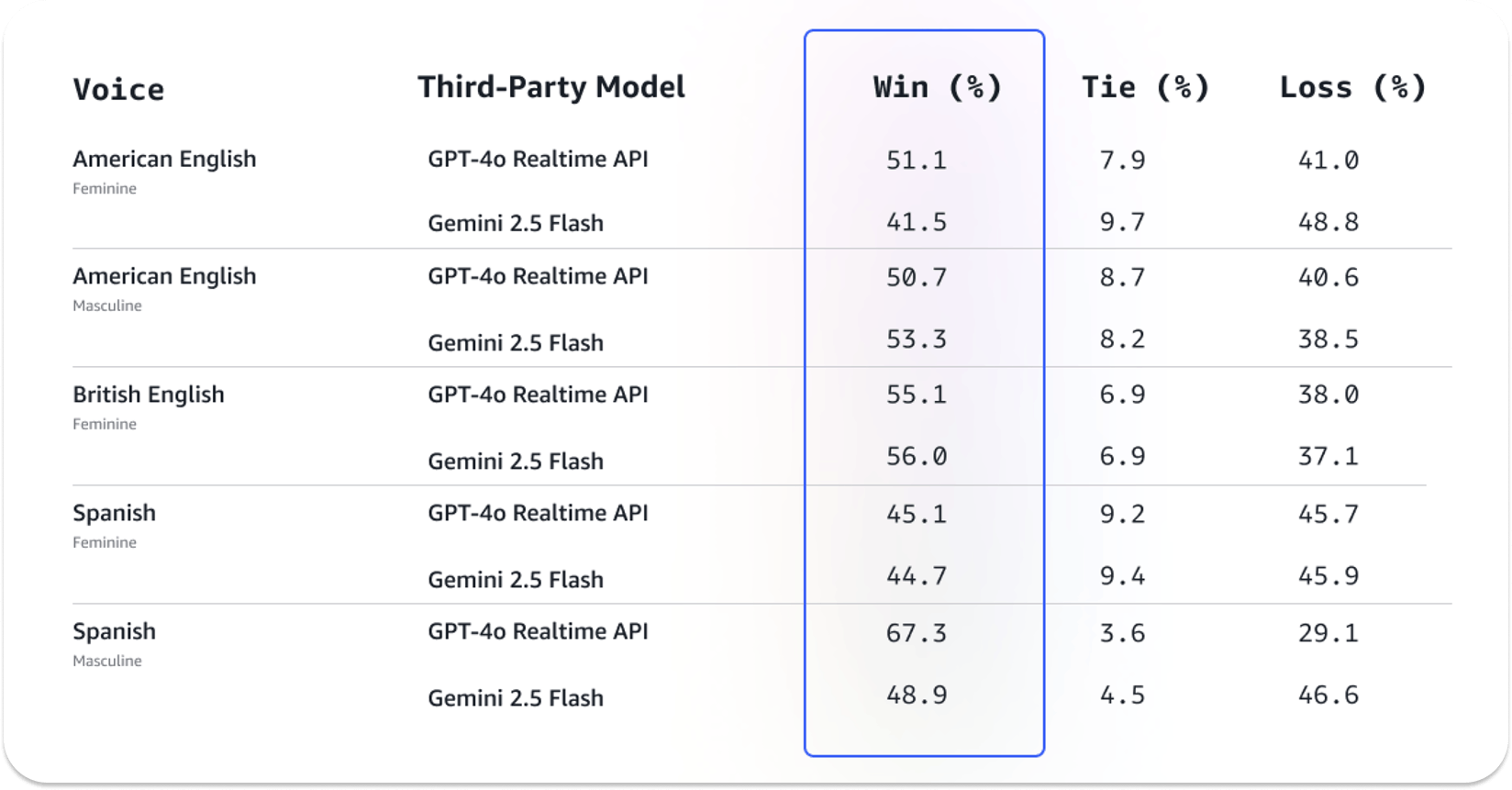
Amazon Nova Sonic is AWS's speech-to-speech model family, available through Amazon Bedrock. Nova 2.5 Sonic became generally available in October 2026 with better reasoning, more accurate tool calling, and lower latency than Nova 2 Sonic (amazon.nova-2-sonic-v1:0), at the same price. The original Nova Sonic (amazon.nova-sonic-v1:0) reached end of life in September 2026.
Key Features of Nova Sonic
- Dialog Handling: Detects non-verbal cues such as laughter and handles interruptions and pauses natively.
- Connection: Bedrock's bidirectional streaming API (
InvokeModelWithBidirectionalStream). For WebRTC, use a framework such as LiveKit or Pipecat as the transport layer. Each connection lasts up to eight minutes, and AWS's samples show how to renew it. - Supported Languages: English, French, Italian, German, Spanish, Portuguese, and Hindi, with automatic language switching.
- Tool Use: Function calling, asynchronous tools, and retrieval-augmented generation (RAG).
- Telephony: Integrations with Amazon Connect, Twilio, Vonage, and SIP.
- Availability: US East (N. Virginia), US West (Oregon), Europe (Stockholm), and Asia Pacific (Tokyo).
Amazon Nova Sonic Quickstart
To get started, enable Nova Sonic in your Bedrock account and follow the getting started guide. AWS's sample repository includes runnable examples for Nova 2 Sonic and Nova 2.5 Sonic. Visit the Nova Sonic user guide for tool use, error handling, and other advanced topics.
5. Azure Voice Live API
The Azure Voice Live API is Microsoft's fully managed speech-to-speech API, part of Microsoft Foundry. It runs either natively, with OpenAI's realtime models or Microsoft's own azure-realtime model, or as a managed pipeline that pairs Azure speech recognition and text-to-speech with a text LLM such as GPT-5.x. Its events are compatible with the Azure OpenAI Realtime API.
Key features include:
- Connection: WebSockets, with WebRTC in public preview.
- Audio Quality Features: Built-in noise suppression, echo cancellation, and semantic turn detection that can ignore filler words.
- Voices and Languages: Speech recognition in 140+ locales and 600+ text-to-speech voices across 150+ locales, plus custom voices.
- Avatars: Optional photo or video avatars with lip-synced speech.
- Tool Calling: Function calling and integration with the Foundry Agent Service.
- Pricing: Per 1M tokens, based on the tier of the model you choose (Pro, Standard, or Lite). See Azure Speech pricing.
If you only need OpenAI's models on Azure, you can also call them directly through the Azure OpenAI Realtime API, which supports WebRTC, WebSockets, and SIP and works much like the OpenAI Realtime API covered above. Deploy and manage either option in the Microsoft Foundry portal.
6. AssemblyAI Voice Agent API
The AssemblyAI Voice Agent API takes a different path to the same goal: instead of asking you to wire up an STS model yourself, it runs the entire voice loop (speech-to-text, LLM, and voice generation) behind a single WebSocket connection. You stream audio in, you get audio back, and AssemblyAI handles everything in between.
Under the hood, it runs on AssemblyAI's Universal-3.5 Pro Streaming speech-to-text model, with roughly one second of end-to-end latency and turn detection tuned for real conversation rather than fixed silence timers. You can use AssemblyAI's managed LLM or bring any OpenAI-compatible endpoint.
Like the other APIs in this list, the Voice Agent API supports:
- Connection: A single WebSocket connection (
wss://agents.assemblyai.com/v1/ws) carries audio in both directions, with browser support via short-lived tokens and telephony through Twilio over SIP. - Turn Detection and Barge-In: Speech-aware, adaptive endpointing decides when the user is done talking, and interruption handling lets callers talk over the agent.
- Tool Calling: Define tools with JSON Schema, and the agent calls them mid-conversation.
- Configurable Persona and Voice: Set the system prompt, greeting, and one of 16 voices at session start.
- Multilingual Support: The agent understands 18 languages and speaks English, Spanish, French, German, Italian, and Portuguese.
- Pricing: $4.50 per hour ($0.075 per minute), covering speech-to-text, the LLM, and voice generation. See AssemblyAI pricing.
AssemblyAI Voice Agent API Quickstart
A common use case for the Voice Agent API is a production phone or browser support agent: the single connection means you don't orchestrate separate transcription, reasoning, and speech models, which keeps latency low and the codebase small.
The example below connects over a single WebSocket, configures the agent's persona, greeting, and voice, and then handles the audio and transcript events the API streams back. In production, you'd mint a short-lived token server-side rather than passing a key from the client.
// 1. Open a single WebSocket to the Voice Agent API.
//    In production, mint a short-lived token on your server instead of
//    exposing your API key in the browser.
const url = new URL('wss://agents.assemblyai.com/v1/ws');
url.searchParams.set('token', token); // short-lived token from your server
const ws = new WebSocket(url);

// 2. Configure the agent's persona, greeting, and voice on connect.
ws.onopen = () =>
  ws.send(
    JSON.stringify({
      type: 'session.update',
      session: {
        system_prompt: 'You are a friendly, concise customer support agent.',
        greeting: 'Hi! Thanks for calling. How can I help you today?',
        output: { voice: 'default' },
      },
    })
  );

// 3. Handle the events the API streams back.
ws.onmessage = (event) => {
  const msg = JSON.parse(event.data);
  switch (msg.type) {
    case 'session.ready':
      // Connection is live - start streaming mic audio (base64 PCM16, 24 kHz mono).
      startMicrophone(ws);
      break;
    case 'reply.audio':
      // Base64-encoded PCM16 audio chunk from the agent - queue it for playback.
      playAudio(msg.audio);
      break;
    case 'transcript.user':
    case 'transcript.agent':
      console.log(`${msg.type}: ${msg.text}`);
      break;
  }
};
Once session.ready fires, you stream microphone audio as base64-encoded PCM16 and play the reply.audio chunks the agent sends back. For a complete browser demo, including mic capture and audio playback, see the Voice Agent API quickstart. You can sign up for a free account and get $50 in free credits, no credit card required.
Other Speech-to-Speech APIs and Models To Consider
These options didn't make our top six, but they are worth evaluating for specific needs:
- ElevenLabs Realtime: In October 2026, ElevenLabs launched Eleven Realtime v1 Mini and Max, its first native speech-to-speech models. They follow the OpenAI Realtime protocol over WebSockets and cost $0.08 per minute plus LLM tokens. The ElevenAgents platform still uses a managed pipeline by default.
- Qwen-Omni Realtime: Alibaba Cloud's native omni model accepts streaming audio and video and speaks 36 languages, over WebSockets or WebRTC.
- Ultravox: Feeds audio directly into its LLM without a separate transcription step, then speaks through a TTS model. Ultravox was acquired by Inworld in September 2026 and costs $0.05 per minute.
- Deepgram Voice Agent API: A managed pipeline (Deepgram STT, an LLM, and Aura-2 TTS) behind one WebSocket, starting at $0.075 per minute, with options to bring your own LLM or TTS.
- Open-weight models: NVIDIA PersonaPlex and Kyutai Moshi are full-duplex speech-to-speech models you can run on your own GPUs, though neither offers a hosted API.
If you're evaluating Hume AI's EVI, note that Hume is retiring the EVI API on November 13, 2026.
Build Voice Agents With Any Speech-to-Speech API
Choosing an API is only part of building a voice agent. You also need a reliable way to move audio between your users and the model, especially on mobile networks and phone lines.
If you'd rather not wire up that connection yourself, Stream's open-source Vision Agents framework ships with pre-built integrations for OpenAI, Gemini, and AWS Nova - plus pluggable computer-vision pipelines for agents that need to see as well as hear.
Check out these articles to learn more about integrating voice and video AI capabilities in your app:
- 8 Best Platforms To Build Voice AI Agents
- Using a Speech Language Model That Can Listen While Speaking
- WebRTC vs. WebSockets
- Lessons From Building an AI Football Commentator
Speech-to-speech models are improving quickly, and new models from OpenAI, Google, xAI, AWS, and ElevenLabs shipped within weeks of each other in the fall of 2026. Whichever API you choose, building on a framework that lets you swap providers makes it easy to move to a better model as soon as it's released. For broader conversational AI use cases, many teams also combine STS models with turn-based pipelines, using each where it fits best.