
How to Build a Social Media App: A Technical Guide


Building a social media app means a single user action must propagate to potentially millions of other users in real time, while staying fast, safe, and cheap.
Every feature touches every other feature. And the hard problems shift as you scale. At 100K users, it's the database. At 1M users, it's the fan-out strategies. At 10M, you have a moderation problem.
This guide covers the architecture, data model, real-time layer, moderation pipeline, and scaling strategy behind a production social media app (without the expensive mistakes).
Define Your Product Shape Before Your Architecture
The architecture of a social media app follows directly from three product decisions. Get these wrong, and you'll be migrating under production traffic.
1. Connection Model: Unidirectional or Bidirectional?
Most new social apps choose unidirectional follows. It reduces friction, simplifies onboarding, and makes content discovery easier. Bidirectional friendships make sense when the core value depends on mutual trust (professional networks, private communities).
| Unidirectional follows | Bidirectional friendships | |
|---|---|---|
| Social graph schema | One row per follow edge | One or two rows per friendship, with transactional consistency on accept/reject |
| Fan-out complexity | Asymmetric: celebrities have millions of followers, most users have few | More symmetric: friend counts are naturally bounded |
| Feed generation | Must handle the celebrity problem (hybrid fan-out) | Fan-out on write works longer before hitting limits |
| Privacy model | Public by default, with optional private accounts | Private by default, content visible only to confirmed friends |
| Discovery | Follows are cheap, so algorithmic discovery matters early | Connections are expensive, so people-you-may-know matters early |
One product decision with big data model consequences: if you choose bidirectional friendships, you need to decide whether to store one row or two per friendship in your database. Two rows are simpler to query but require transactional consistency. One row saves storage but complicates lookups. We cover this in detail in the data model section.
2. Primary Content Type
Video-first apps have a fundamentally different cost structure and need an asynchronous moderation pipeline from day one. Photo-first and text-first apps can start with synchronous moderation and add async processing later.
| Content type | Storage profile | Processing needs | Moderation cost |
|---|---|---|---|
| Short text | Minimal | None | Text classification only |
| Photos | Moderate (S3 + CDN + thumbnails) | Resize, EXIF strip, thumbnail generation | Text + image classification |
| Long-form + media | Moderate | Markdown/rich text rendering | Text + image, plus context-aware thread review |
| Short video | High (transcoding, adaptive bitrate, CDN) | HLS transcoding (10-30s per 30s clip) | Most expensive: frame sampling + audio analysis, async required |
Your primary content type also determines your launch timeline. A text-first app can ship a working feed in weeks. A video-first app needs transcoding infrastructure, CDN configuration, and an async moderation pipeline before the first user posts anything.
3. Feed Model: Chronological or Algorithmic?
Chronological feeds are simpler to build and easier for users to trust. Algorithmic feeds require engagement data you won't have at launch. Most apps start chronological and layer in ranking once they have the interaction data to support it. The architecture in this guide works with both.
One thing to note: "chronological" and "algorithmic" aren't binary. Many apps start with a chronological feed and add lightweight ranking signals (boost posts from close friends, demote posts you've already scrolled past) well before building a full recommendation system.
Where These Decisions Intersect
The rest of this guide assumes unidirectional follows with a photo/text content model and a chronological feed that can be extended to algorithmic ranking. These are the most common choices for new social apps.
But your product shape may not match any of these exactly. The table below maps common configurations to the architectural pressure that will hit you first, so you know which sections of this guide matter most for your app.
| Product shape | Example | Primary architectural pressure |
|---|---|---|
| Short text + unidirectional + chronological | Early X | Fan-out at scale (celebrity problem) |
| Photos + unidirectional + algorithmic | Media pipeline + ranking infrastructure | |
| Short video + unidirectional + algorithmic | TikTok | Transcoding costs + recommendation system |
| Long-form + bidirectional + chronological | Early Facebook | Friend suggestion + news feed relevance |
| Mixed media + unidirectional + chronological | Mastodon/Bluesky | Federation + moderation across instances |
What to Ship First
Social apps live or die on network effects, and you can't test network effects without users. Ship the minimum viable social loop, then build outward. The core loop is: create -> distribute -> engage.
- Phase 1: The social loop. User profiles with follow/friend functionality, content creation for your primary content type, a chronological feed, and basic engagement (likes, comments). Use a single Postgres database with Redis for sessions. A simple background job queue (Sidekiq, Celery, BullMQ) handles fan-out at this scale.
- Phase 2: Retention mechanics. Push notifications (the single highest-leverage retention feature), user search, and basic content moderation, which is legally required in most jurisdictions before it's a product decision.
- Phase 3: Growth infrastructure. Content discovery (trending, hashtags, explore), the transition from background jobs to a proper event bus, and hybrid fan-out for high-follower accounts. This is also when build vs. buy decisions for feeds, chat, and moderation start to matter, because the operational cost of in-house systems compounds here.
- Phase 4: Scale and differentiation. Algorithmic ranking, real-time chat, ML-based moderation with appeals workflows, and the full media pipeline with video transcoding.
Each phase gives you the data you need to make the next phase's decisions well. You can't design a ranking algorithm without engagement data. You can't optimize fan-out without knowing your follower distribution. Ship, measure, then build the next layer.
With your product shape defined and your shipping sequence mapped out, let's get into the architecture. We'll start with the decision that affects every layer above it: how your app handles reads and writes.
The Read/Write Split Defines Social Media Architecture
At the highest level, the architecture for a social media app will look something like this:
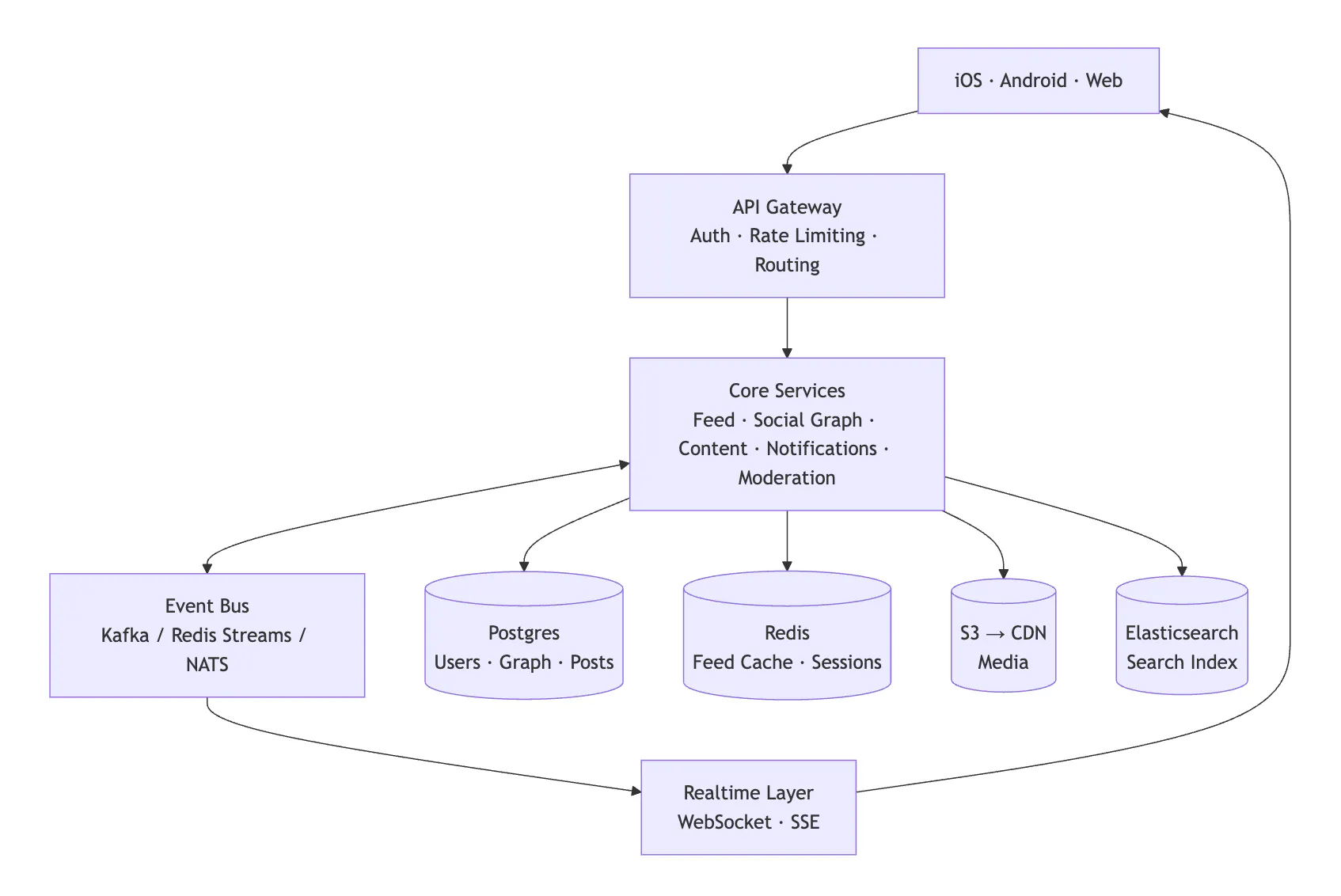
Client apps (such as iOS, Android, or web) communicate with an API gateway that handles authentication, rate limiting, and request routing. Behind that, core services handle business logic: feed generation, social graph operations, content management, notifications, and moderation.
The critical piece is the event bus connecting these services.
When a user publishes a post, the write path emits an event. Downstream consumers handle fan-out to followers' feeds, push notifications, and moderation checks asynchronously. Kafka is the common choice at scale because of its durability guarantees and replay capability, but it carries real operational overhead (ZooKeeper/KRaft, partition management, consumer group coordination). For teams not yet at 1M MAU, Redis Streams or NATS JetStream offer similar semantics with less operational burden. The key requirement is durable, ordered event delivery with consumer group support.
Data stores are purpose-matched:
- Postgres for users and social graph
- Redis for feeds and sessions
- S3 for media
- Elasticsearch for content discovery.
A real-time layer manages persistent connections for live updates, typing indicators, and presence.
But hidden within this architecture is an interesting issue for social media apps: they have two completely different workloads running simultaneously, and they fight each other.
Separate Reads From Writes Early
When a user scrolls their feed, that's a read. It needs to be fast, every time, for every user. When a user posts something, that's a write, and that single write needs to reach potentially millions of followers' feeds. The read path needs to be cheap and cacheable. The write path needs to fan out across your entire system, triggering feed updates, notifications, moderation checks, and search indexing.
These two paths diverge early in your architecture, and the sooner you design for that, the better. This is the single most important architectural decision you'll make, and it pays for itself almost immediately.
When a user creates a post, write it to Postgres. That's the source of truth. Then, asynchronously, a consumer picks up the event from the bus and denormalizes it into a read-optimized format. For a feed, that means a per-user sorted set in Redis where each entry contains the post ID, author ID, timestamp, and a content preview.
The feed read path never touches Postgres. It pulls the sorted set from Redis, then hydrates full post objects from a separate post cache (also Redis) in a single MGET. This two-tier cache lookup is fast and predictable regardless of how many people the user follows.
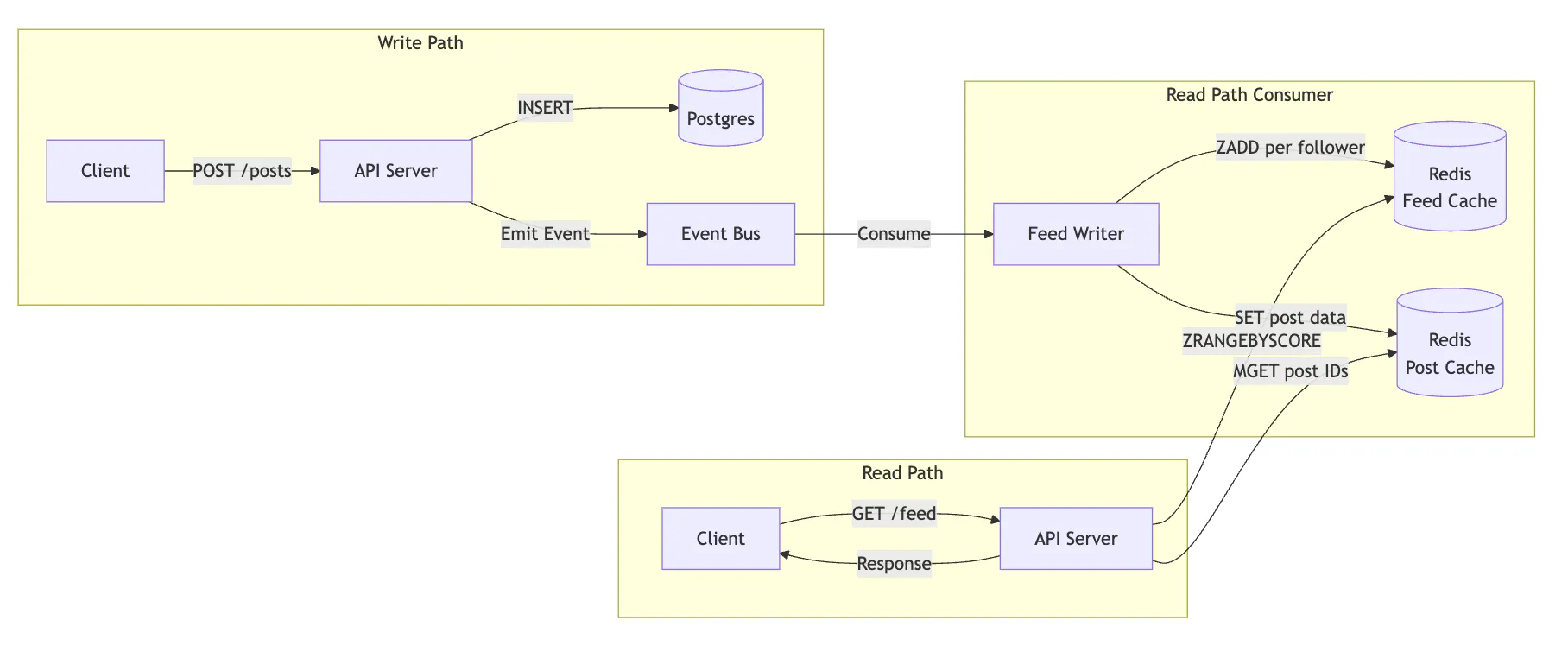
This is a lightweight application of CQRS (Command Query Responsibility Segregation). It adds complexity to the write path, since you now have two representations to keep in sync, but it makes the read path trivially fast. The event bus keeps them consistent: every write emits an event, and the read-side consumer updates the cache. If the cache falls behind, the worst case is a slightly stale feed, not a slow one.
Start With a Monolith, But Invest in the Bus
One thing that trips teams up is that they see a diagram like the one above and immediately start splitting everything into microservices. Don't. The boundaries between these services are clear enough that you can extract them later. Premature decomposition into microservices adds operational overhead that a small team doesn't need.
The event bus is the exception. That's worth investing in early because it decouples the write path from the read path. Start with a monolithic application that publishes events to the bus, and extract services only as individual components need to scale independently.
Your Social Media Data Model Determines What's Cheap and What's Expensive
Every query pattern you don't plan for now becomes a migration you run under production traffic later.
X learned this three times over: first migrating their tweets table from MySQL to Cassandra (a week-long import that had to be throttled to avoid saturating their network), then from Cassandra to a custom distributed database called Manhattan when Cassandra couldn't meet their needs.
Instagram hit a different version of the same problem: their likes table grew so fast that row insertion order no longer matched query order, forcing them to build custom tooling to physically reorganize rows on disk across hundreds of Postgres machines, all without taking the service down.
Migrations under production traffic, on tables with hundreds of millions of rows, while users are actively posting and scrolling, are about as fun as they sound.
Users and the Social Graph
The user table is straightforward. The interesting problem is the social graph: who follows whom. But do take notice of the follower_count and following_count columns. This is deliberate denormalization that pays for itself quickly.
CREATE TABLE users (
    id              UUID PRIMARY KEY DEFAULT gen_random_uuid(),
    username        VARCHAR(32) UNIQUE NOT NULL,
    display_name    VARCHAR(128),
    avatar_url      TEXT,
    bio             TEXT,
    follower_count  INTEGER DEFAULT 0,
    following_count INTEGER DEFAULT 0,
    created_at      TIMESTAMPTZ DEFAULT now()
);
Why not just count the follows table at query time? At 500M, follow edges, SELECT COUNT(*) FROM follows WHERE following_id = X means scanning hundreds of index leaf pages that no longer fit in memory, competing with every other query for cache space. Thus, response times climb. Multiply that by thousands of profile views per second, and your p99 is in trouble. A materialized count column turns that into a point lookup that returns in under 1ms regardless of scale.
The follow relationship needs two indexes to support the two most common queries.
CREATE TABLE follows (
    follower_id  UUID REFERENCES users(id),
    following_id UUID REFERENCES users(id),
    created_at   TIMESTAMPTZ DEFAULT now(),
    PRIMARY KEY (follower_id, following_id)
);

CREATE INDEX idx_follows_following ON follows(following_id);
The primary key gives you "who does user X follow?" and the secondary index gives you "who follows user X?" Without both, one of those queries is a sequential scan.
This adjacency list scales well to tens of millions of edges. At hundreds of millions, index bloat becomes the bottleneck, and the standard move is sharding by follower_id (which works because most queries are scoped to a single user's follow list). Cross-shard queries like mutual followers need a secondary store like Neo4j or Dgraph, but don't start there. Most apps won't need multi-hop queries until well past 10M users.
One product decision with big-data-model consequences: bidirectional vs. unidirectional follows. The schema above models unidirectional follows (X/Instagram-style). If your app uses bidirectional friendships (Facebook-style), you need to decide whether to store one row or two per friendship. Two rows (A follows B, B follows A) are simpler to query but require transactional consistency when creating or deleting friendships. One row with canonical ordering (lower user ID first) saves storage but forces "who does X follow?" to check both columns.
Posts, Reactions, and Comments
The posts table is the core content store. Most of the interesting decisions are in the columns you might not expect.
CREATE TABLE posts (
    id          UUID PRIMARY KEY DEFAULT gen_random_uuid(),
    author_id   UUID REFERENCES users(id),
    content     TEXT,
    status      VARCHAR(16) DEFAULT 'published' NOT NULL,
    created_at  TIMESTAMPTZ DEFAULT now(),
    updated_at  TIMESTAMPTZ DEFAULT now(),
    deleted_at  TIMESTAMPTZ
);
Two columns here that you won't find in most tutorials:
- The
statuscolumn is the hook your moderation pipeline uses. A post can bedraft,pending_review,published, orremoved. Without this, you have no way to hold a post for moderation review before it appears in feeds, and no way to distinguish between a user-deleted post and a platform-removed one. - The
deleted_atcolumn is for soft deletes. Do not hard-delete user content. You need deleted content for moderation review (users who post something harmful and immediately delete it are still violating your policies), for GDPR compliance (which requires you to distinguish between user-initiated deletion and platform-initiated removal, with different retention timelines), and for conversation integrity (a hard-deleted comment leaves orphaned replies with broken context). Filter soft-deleted content at the application layer, not via database views. Views that filter on deleted_at IS NULL tend to surprise engineers who forget they exist.
Store media references in a separate join table, not as a JSONB array on the posts table.
CREATE TABLE post_media (
    id         UUID PRIMARY KEY DEFAULT gen_random_uuid(),
    post_id    UUID REFERENCES posts(id),
    media_url  TEXT NOT NULL,
    media_type VARCHAR(16) NOT NULL,
    position   SMALLINT NOT NULL,
    alt_text   TEXT,
    created_at TIMESTAMPTZ DEFAULT now()
);
You'll see many examples that use a media_urls JSONB column instead. It's convenient for the write path, but it creates real problems at scale. When a piece of content is flagged for moderation, you need to find every post that shares that media URL. With JSONB, that's a full table scan. With a join table, it's an index lookup. You also get per-item metadata (alt text, dimensions, processing status) without making the JSON structure progressively more complex.
The primary key for reactions encodes a product decision that's easy to get wrong.
CREATE TABLE reactions (
    user_id     UUID REFERENCES users(id),
    post_id     UUID REFERENCES posts(id),
    type        VARCHAR(16) NOT NULL,
    created_at  TIMESTAMPTZ DEFAULT now(),
    PRIMARY KEY (user_id, post_id, type)
);
(user_id, post_id, type) allows multiple reaction types per user per post, the way Slack allows multiple emoji reactions on the same message. If your app only allows one reaction per user per post (Instagram-style), change the primary key to (user_id, post_id). This is a product decision masquerading as a schema decision, so make it deliberately.
For comments, threading is handled through a self-referential foreign key.
CREATE TABLE comments (
    id          UUID PRIMARY KEY DEFAULT gen_random_uuid(),
    post_id     UUID REFERENCES posts(id),
    author_id   UUID REFERENCES users(id),
    parent_id   UUID REFERENCES comments(id),
    content     TEXT NOT NULL,
    created_at  TIMESTAMPTZ DEFAULT now(),
    deleted_at  TIMESTAMPTZ
);
The parent_id approach is simpler than the materialized path and works well for two or three levels of nesting. If you need deep threading (Reddit-style), consider storing a materialized path column (ltree in Postgres) alongside parent_id.
The Fan-Out Decision That Shapes Everything Else
This is the single most consequential architectural decision for a social media app. How do you build each user's feed?
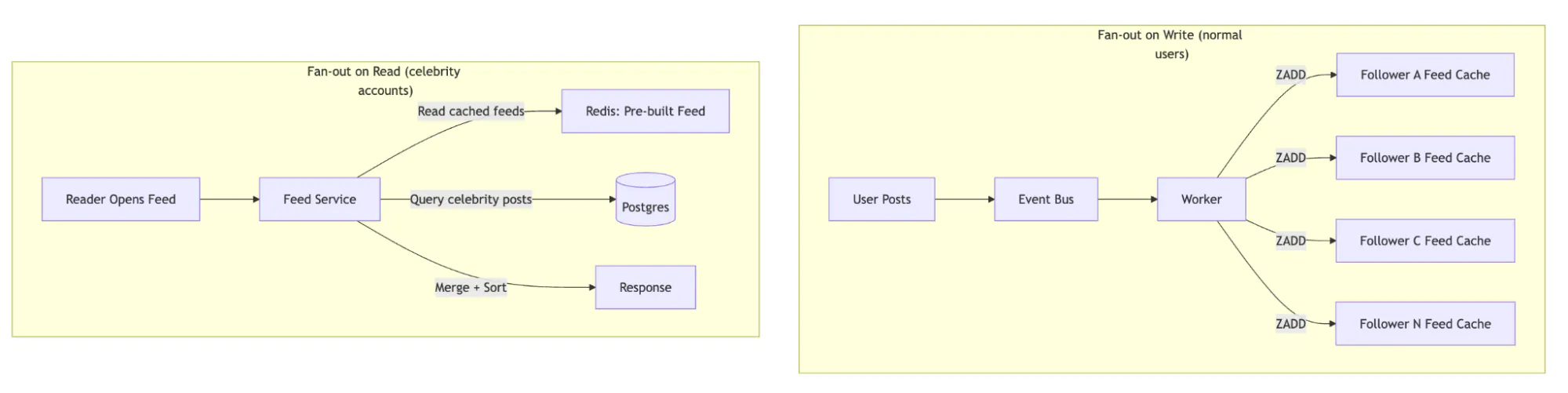
- Fan-out on write. When a user publishes a post, you immediately write a reference to that post into every follower's feed cache. Reading the feed is a simple, fast lookup.
- Fan-out on read. You store posts by author. When a user opens their feed, you query the posts table for all users they follow, merge the results, sort them, and return them.
The tradeoffs look like this:
| Fan-out on write | Fan-out on read | |
|---|---|---|
| Write cost | High (1 write per follower) | Low (1 write total) |
| Read cost | Low (single lookup) | High (N queries + merge) |
| Storage | High (duplicated references) | Low |
| Latency | Low reads, async writes | Variable read latency |
| Celebrity problem | Expensive (millions of writes) | Handled naturally |
To put real numbers on this: if a user with 10,000 followers publishes a post, fan-out on write generates 10,000 cache writes (each a Redis ZADD, taking ~0.1ms). That's about 1 second of fan-out time for a single worker, or 100ms with 10 parallel workers. For a user with 10M followers, the same operation takes ~17 minutes with a single worker.
That's why most production social apps use a hybrid approach: fan-out on write for normal users, fan-out on read for high-follower accounts. X's original architecture pre-computed timelines via fan-out on write, but handled accounts with millions of followers differently to avoid write storms.
Activity Feeds handles this hybrid fan-out natively. Instead of building and tuning this yourself, you define feed groups, follow relationships, and activity schemas, and Stream manages the fan-out, ranking, and storage. Feed fan-out is the most operationally complex layer to build and maintain in-house, which is why it's the first component most teams evaluate for a managed solution.
How Users Find Content and Each Other
You can build a perfectly scalable feed system and still watch your app stagnate if people can't find anything. Search and discovery are what turn a content database into a network. They require a dedicated infrastructure layer separate from your primary database.
User Search
When someone types "John" into the search bar, they expect to see the John Smith they follow before the John Doe they don't. That one expectation means you need partial matching, typo tolerance, and relevance ranking that accounts for social proximity.
Elasticsearch (or OpenSearch) is the standard choice. Index user profiles with fields for username, display name, and bio. The part that makes this social rather than generic search is boosting results based on relationship signals: mutual followers, second-degree connections, and recent interactions. Maintain a lightweight social graph in your search index for this purpose. It doesn't need to be the full graph, just enough to weight results toward people the searcher is likely to know.
Content and Hashtag Search
Content search (searching for posts by keyword or hashtag) adds significant volume. Index post content, hashtags, and metadata alongside your user index in Elasticsearch.
For hashtag-centric apps (X/Instagram-style), maintain a separate hashtag aggregation that tracks trending tags over sliding time windows: 1 hour, 24 hours, 7 days. This aggregation powers your trending section and is typically its own service, since the query pattern (top N tags by velocity of use) is fundamentally different from the query pattern for search (find posts matching a string).
Algorithmic Discovery
Recommending content from users you don't follow is the most complex layer and the one most likely to be a real product differentiator. The temptation is to jump straight to ML-driven recommendation models. But there are simpler options:
- Second-degree engagement. Surface popular content from second-degree connections, posts liked or shared by people you follow. This requires no ML at all, just a query against your social graph and engagement data.
- Collaborative filtering. Users similar to you also liked X. This requires enough engagement data to compute meaningful similarity scores, usually tens of millions of interactions.
- Embedding-based retrieval with ranking models. This is the full recommendation system approach. It's a significant investment (dedicated ML team, training infrastructure, feature stores). It only makes sense once you have the engagement data to train on and the traffic to justify the cost.
Most apps that launch with option 3 end up ripping it out because they don't have enough data to make it work. Start with option 1, measure engagement lift, and move up when the data supports it.
The Indexing Pipeline
When a post is created, an event consumer pushes it to your search index. This is eventually consistent, meaning there's a delay between posting and the content being searchable. For most social apps, a few-second lag is acceptable. Users don't expect to search for their own post the instant they publish it (though they do expect to see it in their own feed immediately, which is handled by the CQRS write path, not search).
Keep your search index as a secondary store, never as your source of truth. If the index gets corrupted or falls behind, you can always rebuild it from Postgres.
The API Decisions That Are Unique to Social Apps
Most of your API surface is standard REST. We'll skip that and focus on three places where social media APIs diverge.
1. Feed Pagination
Use cursor-based pagination for every feed endpoint. Offset-based pagination breaks because new content arrives between requests, causing duplicates across pages. The cursor encodes the last item's sort key (a timestamp + ID pair to break ties), so the next page starts after that point, regardless of what's been inserted above it.
GET /api/v1/feed?limit=20&cursor=eyJpZCI6ImFiYzEyMyJ9...

{
  "data": [...],
  "next_cursor": "eyJpZCI6ImRlZjQ1NiJ9...",
  "has_more": true
}
2. Rate Limiting by Abuse Profile
Generic rate limiting doesn't work for social apps. Different endpoints have different abuse vectors: auth endpoints need strict per-IP limits (5 attempts/minute) to prevent brute force, follow/unfollow needs per-user velocity detection (100 follows in an hour is a bot, not a power user), and read endpoints need limits high enough for infinite scroll but low enough to deter scrapers (100-200 requests/minute).
3. Content Type Versioning
Social apps constantly add new content types (polls, stories, live video, collaborative posts). Version your content payload schema independently of your API version. A post's content field should be a polymorphic structure that older clients can gracefully degrade on, showing a fallback message rather than crashing. This avoids forced app updates every time you ship a new format.
Making a Social App Feel Alive with Real-Time Infrastructure
Social apps feel alive because of real-time updates. New posts appearing in the feed, typing indicators in chat, read receipts, and online/offline presence. All of these require persistent connections between client and server.
Choosing a Transport
You have three options, and most social apps should use two of them.
| SSE (Server-Sent Events) | WebSockets | Long Polling | |
|---|---|---|---|
| Direction | Server to client only | Bidirectional | Simulated bidirectional |
| Use case | Feed updates, notifications | Chat, typing, presence | Fallback for restricted environments |
| Scaling complexity | Low (stateless HTTP) | High (stateful connections) | Medium (frequent reconnections) |
SSE works over HTTP/2, needs no special infrastructure, and handles feed updates and notifications well. WebSockets are required for chat, typing indicators, and presence, but because every connection is stateful and long-lived, they are significantly harder to scale. Use SSE for the simple stuff, WebSockets for chat. Scale them independently.
Why WebSockets Get Hard at Scale
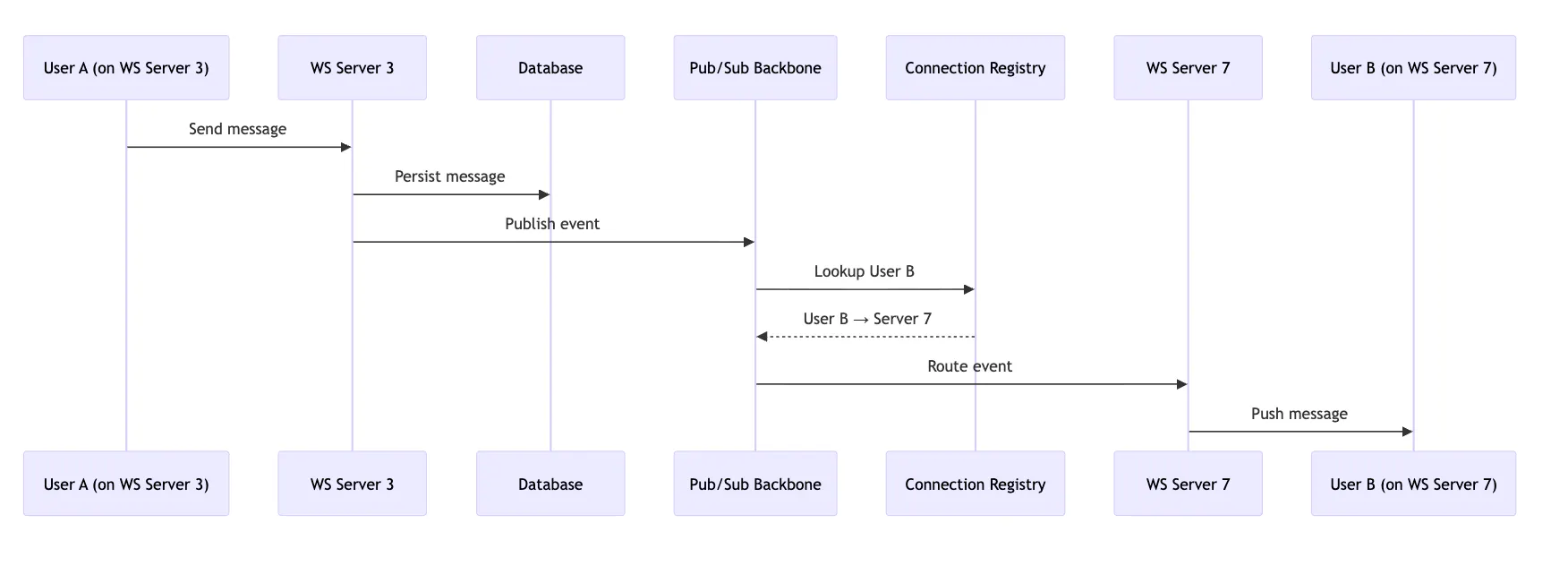
At 100K concurrent users, you're managing 100K persistent TCP connections. At 1M, you need a routing layer that can distribute clients across a fleet of WebSocket servers and deliver messages to the right connections.
This requires three pieces:
- A connection registry (Redis or a dedicated service) mapping user IDs to server instances.
- A pub/sub backbone (Redis Pub/Sub, Kafka, or NATS) for cross-server message routing.
- Graceful reconnection on the client, because mobile connections drop constantly.
Here's how message routing actually works end-to-end. User A sends a message from their WebSocket connection on Server 3. Server 3 writes the message to the database and publishes an event to the pub/sub backbone. The connection registry says User B is on Server 7. Server 7 picks up the event and pushes it down User B's WebSocket. This indirection through pub/sub is necessary because two users in a conversation are rarely on the same server.
Chat
Chat multiplies this complexity. On top of message routing, you need ordering guarantees, delivery confirmations, read receipts, typing indicators, and offline message queuing. Building production-quality chat typically takes 6-12 months and requires a dedicated team. The Stream Chat SDK covers this entire layer as a managed service.
Push Notifications
Push notifications require integration with Apple Push Notification Service (APNs) and Firebase Cloud Messaging (FCM).
Both are best-effort with no delivery guarantee, so build a notification delivery table that tracks state (created, sent, delivered, opened) and implement retry logic for failures. Batch aggressively: if a post gets 50 likes in a minute, send one notification ("50 people liked your post"), not 50.
Content Moderation Is a Legal Requirement, Not a Feature
This is the section most teams skip until it's too late. But moderation is no longer something you can bolt on after launch. If you are expecting European users, the EU's Digital Services Act requires transparent content moderation, user appeals, and reporting on moderation actions. The UK Online Safety Act and various US state laws impose similar requirements.
Your moderation system needs audit trails for every action, user notification when content is removed, and an appeals process. Build these workflows from the start, because retrofitting them into a live product with an angry user base is significantly harder.
Even setting aside the legal requirements, unmoderated social platforms accumulate toxic content fast. And cleaning up retroactively is far harder than filtering proactively.
Two-Stage Pipeline
Build moderation as two stages: one synchronous, one async.

- Pre-publish runs automated checks before a post goes live. Text classification might add 50-100ms. Image classification takes an additional 200-500ms per image. For text-only posts, that latency is invisible. For media-heavy posts, consider a hybrid: run text checks synchronously, publish the post immediately with a media placeholder, and swap in the processed media once moderation clears. Video is a different story entirely, seconds to minutes depending on length, and should always be handled asynchronously with the post held in pending_review status until processing completes.
- Post-publish catches what automation misses. User reports feed into a human review queue. Moderators can remove content, warn users, or escalate to bans. This is also where you run deeper, slower ML models that would add too much latency to the pre-publish path.
The Stream AI Moderation stack is purpose-built for social and chat content and integrates directly with Stream's feed and chat SDKs. If you're using Stream for feeds or chat, this is the lowest-cost option for integration.
User-Level Controls
Blocks and mutes are separate from platform moderation. They're user-controlled.
CREATE TABLE blocks (
    blocker_id  UUID REFERENCES users(id),
    blocked_id  UUID REFERENCES users(id),
    created_at  TIMESTAMPTZ DEFAULT now(),
    PRIMARY KEY (blocker_id, blocked_id)
);

CREATE TABLE mutes (
    user_id     UUID REFERENCES users(id),
    muted_id    UUID REFERENCES users(id),
    created_at  TIMESTAMPTZ DEFAULT now(),
    PRIMARY KEY (user_id, muted_id)
);
Both need to be checked on every feed query and message delivery, so keep them in cache. A blocked user should never appear in your feed, your search results, or your DMs. Muted users still exist in your social graph, but their content is hidden. Getting this wrong, even once, is the kind of bug that makes the front page of Hacker News.
Scaling a Social Media App Without Rewriting Everything
Most social apps don't have a scaling problem on day one. They have a performance problem. Before you add caching layers and read replicas, make sure you've optimized your queries, added the right indexes, and aren't doing N+1 fetches in your feed hydration. A well-optimized single Postgres instance with 64GB RAM can handle more than most teams expect.
Everything below is for when you've exhausted those options.
Caching Strategy for Social Apps
Your feed is your hottest read path, and Redis Sorted Sets are the right data structure for it. Use ZADD to insert and ZRANGEBYSCORE for pagination. The score is the post timestamp (or a ranking score for algorithmic feeds), and each member is a compact string like post_id:author_id. Keep feed caches to the last 500-1,000 items per user. Anything older falls back to a database query that almost nobody will trigger.
Hydrate full post data in a second lookup via MGET against a separate post cache. The feed entry is a lightweight reference, not the full post. This two-tier pattern (sorted set for ordering, hash/string for content) keeps your feed cache small and your hydration fast.
Cache invalidation is where things get interesting. When a user deletes a post, you need to remove it from every feed cache that contains it. Maintain a reverse index in Redis, mapping each post ID to the set of user IDs whose feed caches contain it. When a post is deleted, look up the reverse index and issue ZREM commands against each affected feed. For high-follower accounts using fan-out-on-read, their posts aren't in follower feed caches at all, so there's nothing to invalidate.
Your cache hierarchy from hottest to coldest:
- Session cache. Auth tokens, rate limit counters. Always in memory.
- Feed cache. Materialized feed per user, TTL of 5-15 minutes.
- Entity cache. User profiles, post data, follower counts. TTL of 1-5 minutes with event-driven invalidation.
- Query cache. Search results, trending content. Short TTL (30-60 seconds).
Database Scaling
Start with read replicas. Route feed reads and search queries to replicas, keep writes on the primary. This alone gets you surprisingly far.
One thing to watch: replication lag. A user who publishes a post and then refreshes their profile expects to see it immediately. If that read hits a replica that's 500ms behind, the post is missing. Route writes and reads-after-writes for the same user to the primary. Route everything else to replicas. This is called "read-your-own-writes" consistency, and it's the difference between a system that feels broken and one that feels fast.
When you outgrow a single primary, shard by user ID. This works because most social app queries are scoped to a single user: my feed, my posts, who I follow. All of those hit one shard. The queries that break this pattern (mutual followers, global trending, search) need their own denormalized stores: Elasticsearch for search, a dedicated aggregation service for trending.
The Media Pipeline
User-uploaded media poses its own scaling challenge and follows a completely separate path from your application data.
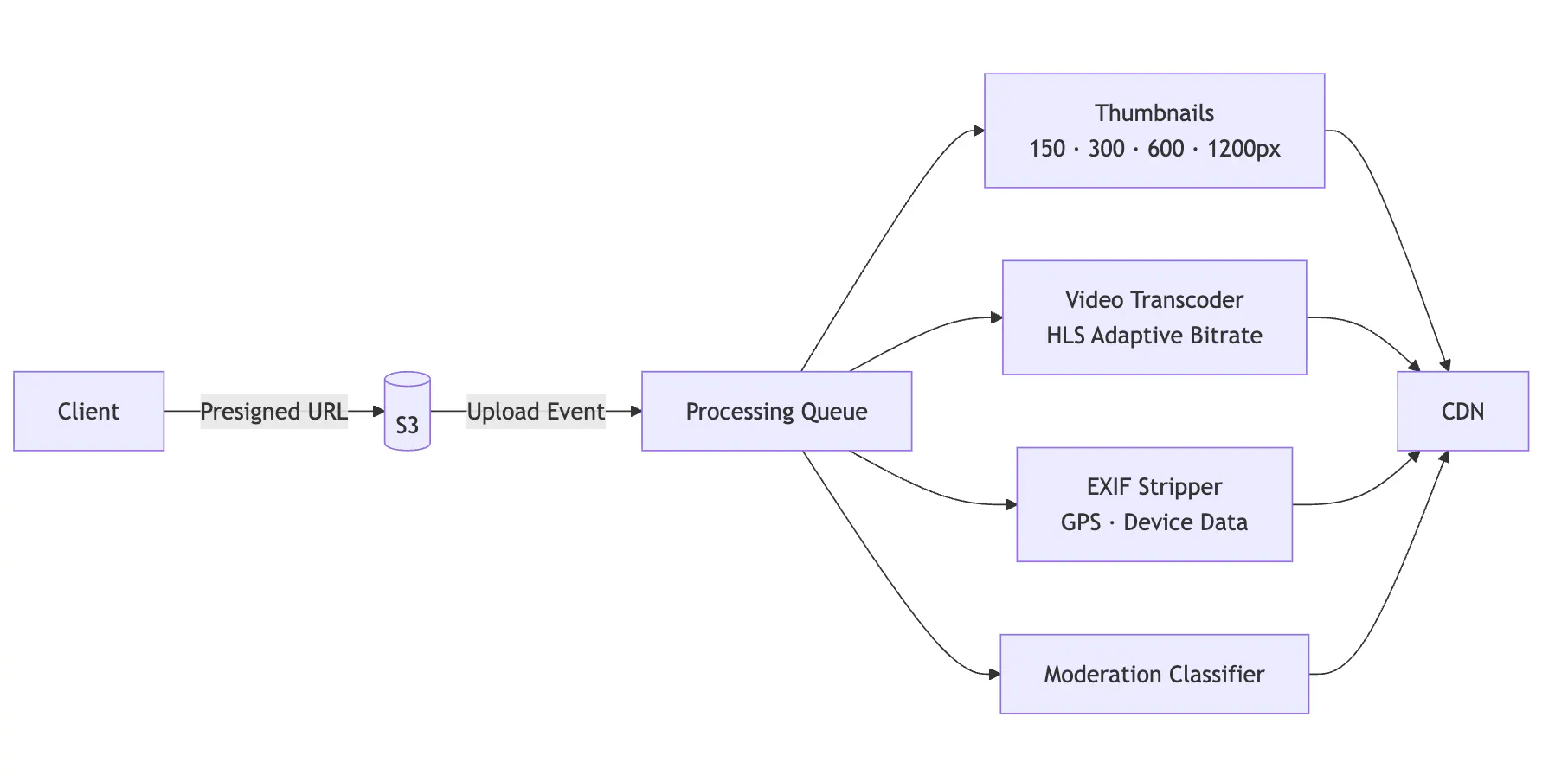
The important decisions: clients upload directly to S3 via presigned URLs (never proxy media through your API servers), the processing pipeline generates multiple thumbnail sizes for responsive serving, video gets transcoded into HLS for adaptive bitrate streaming, and EXIF metadata gets stripped because it contains GPS coordinates and camera serial numbers. Processed media lands on a CDN, and posts reference CDN URLs, not origin URLs.
For video, transcoding is the bottleneck. A 30-second 1080p video takes 10-30 seconds to transcode.
Build vs. Buy for Each Layer of Your Social Media App
Social apps have a predictable failure progression, and each layer you build in-house is a layer you're signing up to operate through those failures.
Database connections exhaust first. A slow query under load holds connections open, and suddenly every request is waiting. Cache stampedes follow: if your Redis instance restarts, every read falls through to Postgres simultaneously. Then fan-out storms from viral content flood your queues, and latency cascades into unrelated features. Then your WebSocket servers start dropping connections during deploys because you haven't built connection draining yet.
Each of these is solvable. Connection poolers, request coalescing, staggered TTLs, backpressure handling, and graceful draining. But each is also a week or more of engineering time to build, test, and get it right under production load. The question is which of these layers are worth that investment for your team, and which are commodity infrastructure where a managed service lets you skip the hard parts.
Here's how the decision breaks down:
| Component | Build time (team of 3-5) | Build if... | Buy if... |
|---|---|---|---|
| Feed fan-out + ranking | 3-6 months | Feed ranking algorithm is itself the product differentiator and you need full ownership of the ranking model, training data, and infrastructure | You need chronological or simple-ranked feeds and want to ship in weeks |
| Realtime chat | 6-12 months | Chat is the primary experience, your requirements are narrow and stable, and you're prepared to staff real-time infrastructure over multiple years | Chat is a supporting feature alongside feeds |
| Content moderation | 2-4 months for basic, ongoing tuning | You have domain-specific moderation needs (medical, legal) | Standard social content (text, images, video) |
| Media pipeline | 2-3 months | You need custom processing (AI-generated content, AR filters) | Standard upload, transcode, serve via CDN |
| Auth + identity | 1-2 months | You need custom identity verification (government ID, professional credentials) | Standard email/OAuth signup |
| Search + discovery | 2-4 months | Discovery is a core product differentiator | Basic search is sufficient |
Stream covers the first three rows:
- Activity Feeds handles feed infrastructure and fan-out.
- Chat SDK handles real-time messaging, presence, and typing indicators.
- AI Moderation handles content safety.
Stream also provides CDN hosting for media attached to feed activities and chat messages, though the heavier processing work (video transcoding, thumbnail generation, EXIF stripping) is a separate concern you'll handle with services like Cloudinary or Imgix.
These are the layers with the highest build cost, the most operational surface area, and the lowest differentiation potential for most apps. Using managed infrastructure here lets your team focus on what makes your app different: the content-creation experience, the discovery algorithm, and the community mechanics.
The tradeoff with any managed service is a dependency on a vendor's availability, pricing, and roadmap. Stream mitigates this with usage-based pricing, flexible APIs that support custom ranking and white-label UI components, and an architecture that handles infrastructure without taking over your product layer. You keep full control over your UX, content types, and discovery logic, allowing you to build the greatest social media app the world has seen.
Frequently Asked Questions
- Should I use fan-out on write or fan-out on read for my social media feed?
It depends on your user distribution. Fan-out on write pre-computes each follower's feed at post time, making reads fast and cheap - but for users with large followings, a single post can trigger millions of cache writes. Fan-out on read avoids that write amplification but makes every feed load expensive, requiring you to query and merge posts across everyone a user follows.
Most production social apps use a hybrid: fan-out on write for normal accounts, fan-out on read for high-follower accounts above a threshold (typically 10,000-100,000 followers).
- What database should I use for a social media app?
There's no single answer because social apps have multiple distinct data access patterns that no single database handles well. The standard production stack is: PostgreSQL for users, relationships, and structured content (it handles social graphs well up to hundreds of millions of edges with proper indexing); Redis for feed caches and sessions (sorted sets are the right data structure for per-user feeds); Elasticsearch or OpenSearch for content and user search; and S3-compatible object storage for media.
- How do I handle the social graph at scale, specifically the follower/following relationship?
Start with a follows table in PostgreSQL with (follower_id, following_id) as the primary key and a secondary index on following_id for reverse lookups. Denormalize follower and following counts as columns on the user table; COUNT(*) at query time becomes a full index scan at scale. At hundreds of millions of edges, shard by follower_id; multi-hop queries like mutual followers need a dedicated graph store, but most apps don't reach that until well past 10M users.
Decide upfront whether you're building unidirectional follows or bidirectional friendships; the schema differs, and migrating between them under production traffic is painful.
- How do I build a content moderation pipeline for a social media app?
Build it in two stages. The first runs synchronously before a post goes live: text classification adds ~50-100ms, which is acceptable; image classification adds 200-500ms per image, so consider publishing with a placeholder and swapping in media once it clears. Video should always be held in pending_review and processed asynchronously.
The second stage runs post-publish. User reports feed a human review queue while slower, more accurate ML models run in the background. Your data model needs to support this from day one: a status column on your posts table (draft, pending_review, published, removed) and soft deletes rather than hard deletes, since you need deleted content for appeals, GDPR compliance, and audit trails.
- What's the right way to implement pagination for a social media feed?
Always use cursor-based pagination, never offset-based. Offset pagination breaks in real-time feeds because new content arrives between requests, causing items to be skipped or duplicated as pages shift. Instead, anchor each query to the last item the user saw using a composite cursor of timestamp and ID. Keep the cursor opaque to the client; base64-encode it so you can change the underlying sort key without breaking existing clients. For algorithmic feeds, include the ranking score in the cursor alongside the timestamp, otherwise users will see duplicates when items are re-ranked between scroll events.