
Activity Feed APIs Compared: Fan-Out, Ranking, Scale


A feed is a deceptively simple UI element built on top of a genuinely hard distributed systems problem. Every time a user posts, follows someone, or reacts, that action potentially has to show up in thousands, or millions, of people's feeds, in roughly the right order, fast enough that nobody notices a delay.
This piece covers four APIs and two platforms built to solve that problem.
We'll compare Stream, social.plus, Weavy, MirrorFly, Ably, and PubNub across:
- scalability
- feeds types and engagements
- limitations
- and use cases
... to help you pick the right implementation for your app.
Different Types of Feed APIs
"Activity feed" gets used as a catch-all term, but it actually covers a few genuinely different products.
Knowing which one you need determines which vendor and architecture fit your app.
| Type | What it does | Typical example |
|---|---|---|
| Flat feed | A simple, reverse-chronological list of activities | A basic "recent posts" list with no grouping or ranking |
| Aggregated feed | Groups related activities together instead of listing each one separately | "Sam and 12 others liked your photo" |
| Notification feed | An aggregated feed with read/unread state, built for a bell icon or alerts panel | "3 new comments," clearing to zero once viewed |
| Timeline (following) feed | A personalized feed assembled from the people, groups, or topics a user follows | A Twitter- or Instagram-style main feed |
| Activity stream / audit log | A record of actions taken in a system, built for tracking and compliance rather than social display | "User X updated File Y at 3:42pm," in an internal admin panel |
Let's look at each one by one.
Flat and aggregated feeds are the building blocks. A flat feed is the simplest case; new activities just get added to a list. An aggregated feed adds grouping logic on top, combining similar activities (multiple likes on the same post, for example) so the feed doesn't turn into noise as activity volume grows.

Notification feeds are a specific, common use of aggregation. The read/unread state matters as much as the content itself, and the UI (a bell icon, a dropdown, a badge count) is different from a main content feed. Some vendors treat this as a distinct product with its own API, rather than just a filtered view of a general feed.

Timeline feeds are what most people picture when they hear "activity feed": a ranked or chronological stream built from who and what a user follows. This is where the fan-out problem (covered next) actually bites, since a popular account's posts have to reach every follower's individual timeline.

Activity streams and audit logs are a different animal entirely, less about social display and more about tracking what happened and when, often for internal visibility or compliance in B2B and SaaS products. This is a common use case for vendors like Weavy, which lean toward embedding feeds into internal tools rather than consumer social apps.

This piece focuses mainly on timeline and notification feeds, since that's where most of the six vendors compete directly, but it helps knowing which type your product actually needs before comparing vendors on the wrong axis.
The Problem an API Solves
Before comparing activity feed APIs, consider:
When someone posts, follows, or reacts, who needs to see it, and when does that work actually happen?
How a vendor answers this determines how their pricing scales, how they handle a sudden spike in followers, and whether one popular account can slow things down for everyone else.
The options:
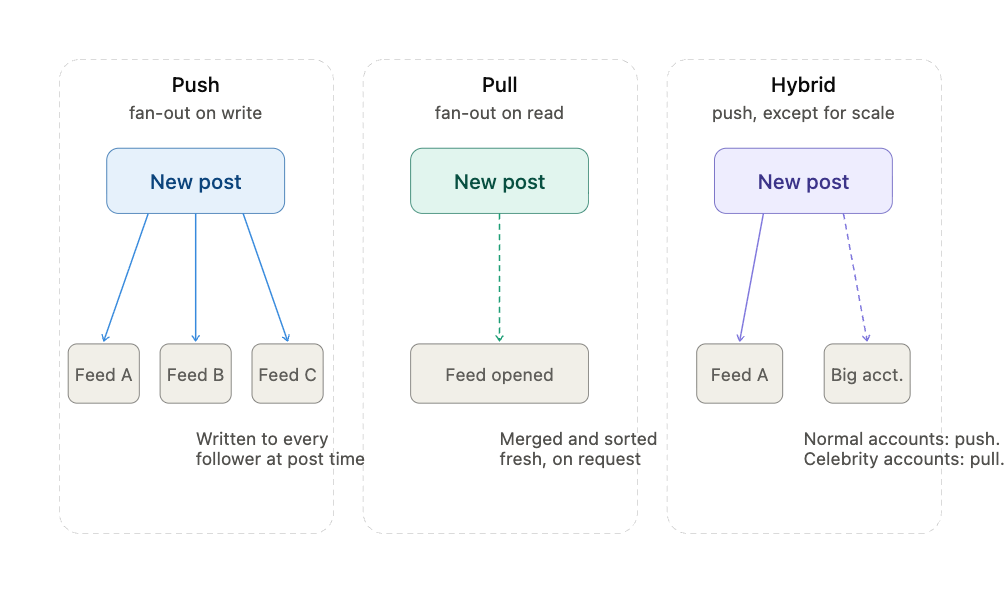
Fan-Out On Write (Push)
When a user posts, the system immediately writes that post into the feed of every one of their followers.
If someone has 500 followers, one post triggers 500 writes, one per follower's feed. When a follower opens their app, their feed is already assembled and sitting there.
Reads are fast and cheap. Writes get expensive fast, and they get disproportionately expensive for popular accounts. A creator with 10 million followers triggers 10 million feed writes from a single post. This is sometimes called the celebrity problem, and it's the main reason pure push-based fan-out breaks down at real social-network scale.
Fan-Out On Read (Pull)
Instead of writing to every follower's feed in advance, the system stores the post once and computes each user's feed on demand. At read time, it looks up everyone the user follows and merges their recent posts together, sorted and assembled fresh, every time the feed is opened.
Writes are cheap and constant, no matter how many followers someone has. Reads get expensive instead, especially for a user who follows thousands of accounts, since assembling their feed means querying and merging activity from every one of them on every single request.
Hybrid Fan-Out
This is what most production systems actually use. Regular accounts get push-based fan-out, since their follower counts are small enough that writing to every follower's feed is cheap. High-follower accounts get treated differently, either skipped from push entirely and merged in at read time, or handled through a separate, specialized path.
X's widely-cited early architecture is the canonical example of this pattern: push for most users, pull for accounts above a follower threshold.
Ranking adds another layer on top of whichever fan-out strategy is in play. A chronological feed just needs fan-out to work correctly. A ranked feed needs a scoring step on top of that, applied either at write time, read time, or some blend of both, which is its own added complexity regardless of which fan-out model a vendor uses underneath.
What Matters When Comparing?
Once you understand the fan-out problem, the differences between vendors are easier to see.
Here's what separates one feed API from another.
Fan-out configurability: Whether you get any say in how fan-out works, or whether it's an internal implementation detail you can't see or adjust.
- Some vendors expose push, pull, and hybrid as configurable options per feed group
- Others handle it entirely internally, with no visibility into which strategy applies to your use case
Ranking and personalization: Whether a feed is strictly chronological, algorithmically ranked, or something you control yourself.
- Chronological feeds are easier to understand, but a few very active accounts can crowd out everything else
- Ranked feeds add a scoring step after fan-out. How much control you get over that scoring varies a lot from vendor to vendor

Notification feeds vs. content feeds: Whether these are treated as the same underlying primitive or as genuinely separate products.
- A notification feed needs read/unread state and usually a different delivery pattern than a scrolling content feed
- Some vendors offer a single feed primitive you configure for either use case; others ship them as distinct products with separate APIs
Real-time delivery: Whether new activity shows up in an open feed automatically, or whether the client has to ask for it.
- Real-time delivery (via WebSocket or similar) pushes updates to an already-open feed without the user refreshing
- Some vendors only support this on certain feed types, or require a separate real-time layer entirely

Reactions, comments, and aggregation: Whether the parts of a feed beyond the raw activity, likes, comments, grouped notifications, are built in or something you build yourself.
- Some vendors treat reactions and comments as a top priority, queryable parts of the feed object
- Others give you the raw activity stream and expect you to build engagement features on top separately
Multi-tenancy and data isolation: Whether the API is built for a single consumer app or for embedding into multiple customers' separate environments.
- This matters most for B2B and SaaS products, where one vendor account might need to serve many separate customer organizations with fully isolated data
- Consumer-social-first vendors don't always support this cleanly
4 Activity Feed APIs
Next, we'll break down four activity feed APIs across scale, features, limitations, and use cases.
Stream

Stream's Activity Feed API (now on its third major version, v3) is built to handle the full range of feed types under one configurable data model rather than treating flat feeds, notification feeds, and personalized feeds as separate products.
| How It Handles Scale | Feed Types and Engagement |
|---|---|
|
|
Limitations:
- No built-in email or SMS notification channels, and no end-user preference management for choosing which notification types arrive on which channel. Push (APNs/FCM) is tightly integrated with the feed data model, but full omnichannel orchestration would mean pairing Stream with a separate notification-workflow tool.
- Configurability is a strength but also a setup cost. Teams wanting a single, opinionated default feed experience have more decisions to make upfront than with a narrower, less flexible product.
social.plus

social.plus is a broader social-infrastructure suite, activity feeds, groups, chat, live streaming, and moderation, with the Activity Feed positioned as the core, foundational piece that ties the rest together.
| How It Handles Scale | Feed Types and Engagement |
|---|---|
|
|
Limitations:
- No published fan-out architecture or scale benchmarks, making it harder to evaluate how the system behaves under a sudden spike in followers or activity.
- Feed queries are capped at a maximum of 20 posts per request, regardless of feed type (user, group, or global), a hard pagination limit that affects how you'd build infinite-scroll or bulk-loading feed experiences.
- The API enforces a rate limit of 100 calls per user within a 5-second window. This matters most for any backend process posting on behalf of many users at once, where that limit is easy to hit.
Weavy

Weavy is built specifically for embedding activity feeds, chat, and file collaboration into B2B and SaaS products, dashboards, internal tools, CRMs, and LMS platforms, rather than consumer social apps.
| How It Handles Scale | Feed Types and Engagement |
|---|---|
|
|
Limitations:
- No published large-scale benchmark or fan-out architecture, since Weavy isn't built or marketed for consumer social-network-scale follower graphs.
- Feed types are oriented around workspace/tenant-scoped activity (deploys, alerts, releases) rather than personalized, algorithmically-ranked "For You" style discovery feeds.
MirrorFly

MirrorFly bundles activity feeds with chat, voice, and video calling under one self-hosted-first license. Full source code access is available, and deployment options range from fully managed cloud to fully self-hosted on your own infrastructure.
| How It Handles Scale | Feed Types and Engagement |
|---|---|
|
|
Limitations:
- No distinct notification-feed data model (read/unread state, badge counts) for activity feed content specifically.
- Feed-specific technical documentation (ranking mechanics, pagination limits, rate limits) is thinner.
- No published fan-out architecture or scale benchmark, so evaluating performance under a sudden spike in followers or activity requires direct testing rather than published figures.
The DIY Route: 2 Platforms for Building Your Own Feed
If you prefer to build the feed yourself, consider one of the following two providers.
They're general-purpose real-time infrastructure, the same pub/sub layer that underlies chat and live data delivery in a lot of other contexts, with no follow relationships, aggregation, or ranking built in.
Choosing either one means building the feed-specific logic yourself on top of real-time delivery. That's a valid option, especially if you want full control over feed logic or you're already using one of these for something else.
Ably

Ably is a real-time messaging platform built around a global network of points of presence, guaranteed message ordering, and multi-protocol support (WebSocket, SSE, MQTT, HTTP/REST). Feeds are built on top of Ably's core Pub/Sub primitive, channels, presence, and history.
| How It Handles Scale | Feed Types and Engagement |
|---|---|
|
|
Limitations:
- No aggregation, ranking, or notification read-state primitives. This needs to be built and maintained by your own team.
- No concept of a follow relationship in the data model itself; if your feed depends on who follows whom, that logic and its storage lives entirely in your application, not in Ably.
- Better suited to broadcast-style delivery (one channel, many subscribers) than to individualized, per-user timeline feeds, which need a different architecture than Ably provides natively.
PubNub

PubNub is one of the longer-standing real-time infrastructure platforms, built around a global point-of-presence network and a broad SDK library spanning constrained devices (down to 64KB of memory) as well as standard web and mobile clients. Like Ably, it has no dedicated feed product; feeds are assembled from its pub/sub, presence, and event-history primitives.
| How It Handles Scale | Feed Types and Engagement |
|---|---|
|
|
Limitations:
- No aggregation, ranking, or notification read-state primitives, the same gap as Ably; these would need to be built and maintained by your own team on top of PubNub's raw event infrastructure.
- No concept of a follow relationship in the data model; feed personalization logic and its storage lives entirely in your application.
- Full event traceability and audit history are strong for fintech-style activity logs, but that's a different problem than a social following feed. Confirm PubNub's building blocks actually map to your specific feed type before committing.
Comparison Table
| API / Tool | Fan-out and scale approach | Feed types supported | Pricing model |
|---|---|---|---|
| Stream | Push, pull, and hybrid, configurable; 100M-user benchmark | Flat, aggregated, notification, ranked "For You," all under one model | Tiered by monthly activities and API calls, with separate overage rates for each beyond plan limits |
| social.plus | Not published; sub-100ms latency for live/concurrent use cases | Community, commerce, tracking, and private group feeds | Per-MAU, with additional charges for video minutes, concurrent connections, image moderation volume, and storage beyond plan quotas |
| Weavy | Workspace-scoped, not follower-graph fan-out; multi-tenant by design | Workspace/tenant-scoped activity feeds (deploys, alerts, releases) | Flat, fixed subscription with unlimited users, no per-seat or per-MAU math |
| MirrorFly | Not published | Permanent posts, 24-hour disappearing statuses, likes/comments/shares | Two tracks: managed cloud is MAU-based, while self-hosted/custom licensing is quote-based with no MAU gating |
| Ably | Broadcast (one channel, many subscribers), not follower-graph fan-out | None built in, build your own on top of pub/sub | Usage-based: billed on connection-minutes plus messages published and delivered |
| PubNub | Broadcast/event-stream, not follower-graph fan-out | None built in, build your own on top of pub/sub | Tiered by monthly active users, with add-on charges for function calls and storage beyond plan limits |
Which One is Right For You?
This list is a great starting point, but the best way to find your perfect match is hands-on testing.
A few things to build before you pick your API:
- Simulate a follower spike. Create a test account, give it a few thousand simulated followers, and post from it. Watch what happens to write latency and to your bill. This is the fastest way to see whether a vendor's "hybrid fan-out" claim is real.
- Build the feed type you actually need. Most quickstarts show a simple chronological feed. If you need ranking, notification badges, or workspace-scoped isolation, build that specific thing early.
- Check what a follower graph costs you at your actual scale. Run the numbers on your expected MAU and average follows-per-user against each vendor's pricing model. The difference between per-MAU, usage-based, and flat pricing can shift which vendor is cheapest depending on your specific shape of usage.
- Test reconnection behavior. Kill a client's connection mid-session and see how each system recovers, whether it backfills missed activity, and how that's exposed in the SDK.
Stream, social.plus, Weavy, and MirrorFly all get you a working feed faster, since the primitives are already built.
Ably and PubNub get you a blank canvas, more work upfront, but no ceiling on how the feed logic ends up shaped.
The right choice is up to you.