


Traditional keyword search relies on what users can describe; visual search relies on what they can see. Users can snap a photo and get near-instant matches, without slowing down shopping by trying to find the right keyword. Google Lens alone processes over 20 billion of these searches a month, and nearly 4 billion of those are purchase-related.
Many eCommerce sites haven't caught up because their search bars are still purely text-based. In this guide, we'll explore how visual search works, the benefits driving adoption, and some of the top brands and tools using this technology now.
What Is Visual Search?
Visual search is a computer-vision-enabled search technique that uses images instead of text. When someone uploads or snaps a photo, AI systems, powered by machine learning (ML) and image recognition, scan the picture pixel by pixel to identify objects, colors, and patterns.
These models learn from millions of labeled examples, improving their accuracy with each new search. They match input to similar visuals online or from a predefined set, like a product catalog. This is particularly useful when shoppers are unsure of a product's name or how to describe it accurately.
For eCommerce product teams, it offers users an intent-driven search experience and can shorten the path to conversion.
Text vs. Image vs. Visual Search
Text search, image search, and visual search all help users find what they need in different ways. Let's look at how Google handles each type.
Text search depends on words. Users type the input, and the system scans indexed text, such as titles, tags, and metadata.

The system displays the matching results, which are traditionally websites, although Google and other modern search engines often include images and product links.
Image search still begins with text input, but the output is visual. It returns related photos or product listings based on the user's query.

It’s useful when potential customers know what to type but want to see the options. They might browse through product photos using Google Images before making a decision.

Visual search, on the other hand, starts with an image instead of text. A user might upload or capture a picture of a jacket they saw in a store. The system displays either an exact match or whatever's closest in its reference set.
Examples of Visual Search
Visual search is already part of how many customers browse and shop every day. Let's look at how some major brands and platforms have implemented it.
Browsing for New Outfit Ideas with Pinterest Lens
Pinterest is a visual-heavy social app that acts as a digital pinboard for user-generated content (UGC) like outfits, home decor, and recipes. Lens is the platform's visual search feature that lets users explore UGC that resembles their input.

Users often visit Pinterest with commercial intent, looking for products from brands on the platform or ideas from others on what to buy or where to buy from. For example, someone looking for a new street style outfit to match their sunglasses can pull up outfit breakdowns, style ideas, and product links.
Product Discovery on TikTok
Like many other platforms, TikTok has a social-commerce marketplace where independent sellers can list their goods. In addition to creator promotion and live commerce, TikTok drives sales with its "Find Similar" button.

This button pops up when the system recognizes an item. It pulls up shop results for users to purchase similar-looking items, as well as videos for them to see what it looks like when worn or used by a non-branded account.
Blending AR and Search With Sephora Virtual Artist
Sephora's Virtual Artist shows how image-based search and augmented reality (AR) can help with product discovery. The tool scans a user's face, detects key features like eyes and lips, and overlays virtual makeup.

Users can test lip colors, eyeshadows, or lash styles and purchase directly from the same interface. It also offers guided "virtual tutorials" for contouring and highlighting, using AR overlays to show each step on the user's face.
How Visual Search Works
When implemented well, visual search will feel simple to your users. However, this feature is made possible by a specialized pipeline consisting of deep learning models, indexing structures, ranking logic, and more.
Image Analysis
When a user provides the input, the pipeline begins a process called content-based image retrieval (CBIR). Unlike text-based image retrieval (TBIR), which depends on file names or written tags, CBIR analyzes the image itself.
CBIR systems use deep learning models designed for computer vision, particularly convolutional neural networks (CNNs) and vision transformers (ViTs). These models have been trained on massive image datasets to recognize patterns and differentiate between objects, even with variations in lighting, angle, or background.
Feature Extraction
Once an image is analyzed, the pipeline extracts a set of features that describe what it contains:
-
Low-level features include the basics like color distribution, texture, and geometric shapes. These are easy for machines to detect and are useful for quick comparisons, like matching two items with similar color palettes or fabric textures.
-
High-level features capture the semantic meaning of the image: the object type, material, style, brand, text, and other patterns that hint at what the item actually is. This more precisely identifies an object as a "perfume bottle" rather than just a collection of shapes and tones.
CNNs, ViTs, and other deep learning models handle this stage. They translate each feature into a mathematical representation called a vector embedding.
Comparison and Matching
After extracting an image's features, the retrieval engine needs to find where it fits among millions of others online. Each image in the database already has its own embedding. When a new image is uploaded, the system compares its vector to all the stored ones to measure how similar they are.
The comparison relies on mathematical methods like Euclidean distance or cosine similarity that calculate how close or far two images are in feature space. This is how platforms like Google Image Search or eCommerce visual search tools deliver precise, contextually accurate matches.
Indexing and Retrieval
Indexing organizes all the extracted image features to speed up comparisons.
Instead of scanning the entire database, the system narrows its focus to a small, relevant subset of images that share similar characteristics. Techniques like k-d trees, ball trees, and hashing algorithms make this possible:
-
K-d trees and ball trees group data into clusters, so that the engine can skip over unrelated sections during a search.
-
Hashing algorithms, such as locality-sensitive hashing, assign similar images to the same bucket, ensuring comparisons happen only within that small set.
ML and Feedback
When users click a product, ignore results, or refine their search, that behavior becomes feedback data. Instead of retraining from scratch, the model fine-tunes its ranking logic in real time.
If users consistently favor certain matches, those features get more weight in future searches. If they ignore others, the system down-ranks them.
The more images and interactions it processes, the better it becomes at predicting intent and context.
Search Results
Once visual matches are found, the system populates the UI with them. Results usually appear as thumbnails along with metadata, such as product titles, prices, and short descriptions. All of these help users recognize what they're seeing before clicking or tapping on the result.
Many platforms also use recommendation logic to expand discovery. As we saw with Pinterest Lens, a user can search for matching outfits and relevant style advice if they provide a photo of their sunglasses as input.
Key Benefits for eCommerce
Adding visual search to your app brings many benefits for your users, including:
Frictionless Discovery for Buyers and Sellers
When customers can't describe the product they're looking for, they're more likely to give up and close your app.
Consider a user searching for a makeup bag with a specific print that they saw on a social app. Typing "pink makeup bag" or "makeup bag with heart print" might not pull up what they had in mind.

Offering a visual option, like ASOS and other top eCommerce brands, simplifies their shopping experience and reduces search fatigue. This is why retailers experienced a 38% boost to their conversion rates when they added this functionality to their product.
If you're running a marketplace, sellers will also appreciate this option as it reduces the burden of needing to optimize keywords, tags, and more in their listings.
Enhanced Personalization
As your system collects more information about user preferences, it can tailor the visually-matched results for deeper personalization.
For example, when a user uploads a photo of a sofa, the system will pull up items that match it, like cushions, side tables, and rugs. In tandem with your ranking algorithm, it can surface the colors, patterns, and brands that it knows they like.
Improved Accessibility and Inclusivity
Traditional text search requires typing and spelling. Users with reduced hand- or finger-mobility or with limited writing knowledge will appreciate having a more accessible way to find the products they need.
It also aids in reaching users who don't speak your platform's language(s). Whether they're a recent immigrant or a tourist, they can navigate your catalog more smoothly without needing an additional translation step.
Deeper Omnichannel Experiences
For companies with brick-and-mortar locations, this type of search offers an omnichannel experience by linking physical and digital shopping.

Shoppers in-store at Target can scan a product's barcode to instantly check reviews, availability across branches, product features, and more.
Top Visual Search Tools
Tech giants like Google, Amazon, and Microsoft were some of the first to bring visual search to consumers. Through their respective cloud services, all three offer services that you can integrate into your product to add image-based search capabilities, like Google's Vision AI and AWS Rekognition.
Let's look at what each company's consumer-facing tool does, and what PMs can learn from them.
Google Lens
Google Lens is the company's visual search tool, accessible across Android, iOS, and web. It can be used for commercial purposes, as well as for translation, object identification, and general web search.

Google Lens powers Circle to Search, which allows users to search by highlighting a specific segment of a picture. It also includes Multisearch, a multimodal feature for asking text-based questions about image-based input.
When building an eCommerce app, you can add multimodal search for customers to ask questions about the items in the images they upload, like "Does this shirt come in teal?" or "Does another vendor have this device at a cheaper price?" You can even combine multimodal image-based search with an AI chatbot for a more powerful virtual shopping assistant.
Bing Visual Search
Bing Visual Search offers most of the same services as Google Lens, but it's more tailored to Microsoft's ecosystem; it's available on the Edge browser, in the Windows photo app, in the Bing and Edge apps, and as extensions for Firefox and Chrome.
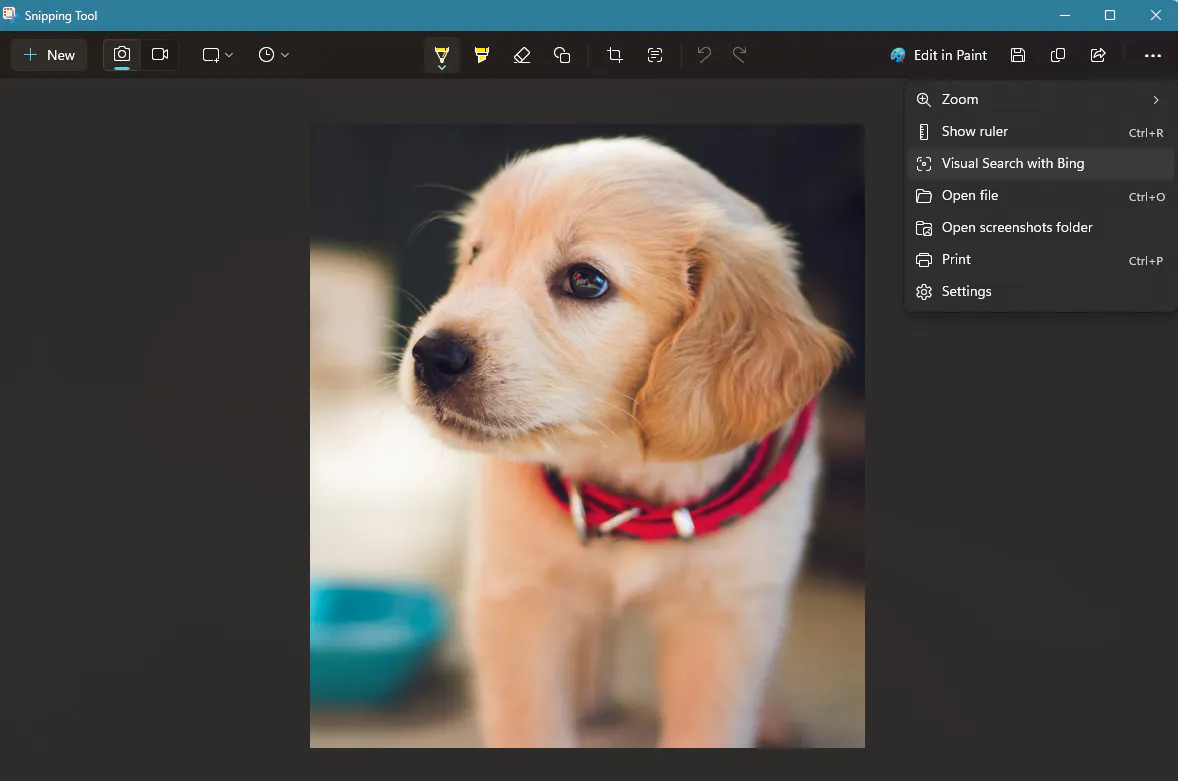
One of the main differentiators between Google Lens and Bing's visual tool is its focus on the desktop environment. This feature is also available as part of the Windows Snipping Tool for PCs.
While you may want to build out your mobile app first, it's important to offer feature parity for desktop and web versions. You can implement something like Google's Circle to Search on phones and Microsoft's screengrab search on other platforms.
Amazon Lens
Visual searches via Amazon Lens on the platform grew 70% year over year, showing how much users now rely on this feature to search for similar products across the company's catalog.

Like Google, Amazon Lens has a multimodal search that customers can use to refine results. For example, they can go comparison shopping in-app by uploading a rubber duck image and specifying "large" or "blue" to see their options.
The main difference is in their implementations. Google is primarily a search engine; even though its interface contains some product links, it's still focused on providing information.
In contrast, Amazon Lens is built around the product catalog; it takes the user to the main shopping interface, giving them the option to add text, as well as add standard filters like review thresholds or same-day delivery.
The takeaway for PMs is to make this feature fit naturally into the UI of your product, instead of an overly specialized function that users can forget about. The search method may be different, but the core shopping UX should remain the same.
Conclusion
Visual search is only increasing in popularity over time. Throughout this guide, we've unpacked how it works: from feature extraction and matching to real-world applications.
Product teams need to build systems that make this interaction seamless through fast image loading, clean metadata, and feedback loops that learn from user behavior. As younger shoppers lean on image-based search across Google, Amazon, and social apps, the expectations for this functionality will only grow.
That means, to stay competitive, eCommerce teams must prepare data, catalogs, and interfaces for a world where visual and behavioral intent signals work together.