


Every vision-language model tutorial shows you the same thing: send an image to GPT-4o, get a description back. Ten lines of Python. Done.
12345678910response  =  client.chat.completions.create(
    model="gpt-4o",
    messages=[{
        "role":  "user",
        "content":  [
            {"type":  "image_url",  "image_url":  {"url":  f"data:image/jpeg;base64,{img_b64}"}},
            {"type":  "text",  "text":  "What's in this image?"}
        ]
    }]
)
Real applications need something different. A security camera that watches continuously and sends alerts when someone enters. A quality inspector that checks every product on a manufacturing line and triggers a reject mechanism. A meeting assistant that listens to audio, watches the room, and logs action items.
These applications require continuous video processing, audio transcription, automatic tool execution, and conversation memory. The gap between "analyze this image" and "monitor this camera" seems enormous.
But is it? Not really. We can build a complete stack for real-time multimodal agents with a core loop of about 150 lines of Python. This stack handles video from webcams and IP cameras, audio from microphones, transcription via Whisper, tool calling to Slack and Notion, integration with industrial PLCs, and conversation memory. It runs on any provider and swaps between them with a single line change.
You can grab the code for this entire multimodal build and follow along as we explain how this all works.
A Security Monitor in 50 Lines
Before explaining the complete stack, here it is in action to build a security monitoring app:
12345678910111213141516171819202122232425262728293031323334353637383940from  src.core.agent  import  AgentLoop
from  src.core.config  import  AgentConfig
from  src.inputs.webcam  import  WebcamInput
from  src.memory.sliding_window  import  SlidingWindowMemory
from  src.models  import  create_model
from  src.tools.slack  import  SlackAlertTool

SYSTEM_PROMPT  =  """You  are  a  security  monitoring  agent  watching  a  camera  feed.

Analyze  each  frame  for:
1.  People  entering  or  leaving  the  area
2.  Unusual  movement  patterns  or  behaviors
3.  Suspicious  objects  or  packages  left  unattended
4.  Safety  hazards  (spills,  obstacles,  blocked  exits)

When  you  observe  something  notable:
-  Use  send_slack_alert  with  severity  "info"  for  routine  observations
-  Use  send_slack_alert  with  severity  "warning"  for  potential  issues
-  Use  send_slack_alert  with  severity  "critical"  for  immediate  threats

Be  concise  but  specific.  Include  what  you  observed  and  why  it's  concerning.
"""

async  def  main():
    model  =  create_model("openai",  "gpt-4o-mini")
    memory  =  SlidingWindowMemory(max_messages=20)

    agent  =  AgentLoop(
        model=model,
        memory=memory,
        config=AgentConfig(
            frame_interval_ms=5000,
            system_prompt=SYSTEM_PROMPT,
        ),
    )

    agent.register_tool(SlackAlertTool(webhook_url="https://hooks.slack.com/..."))

    camera  =  WebcamInput(device_id=0,  fps=0.2,  max_size=512)
    await  agent.run(camera)
That's the entire application, and a third of it is the prompt. When you run it, the agent captures a webcam frame every 5 seconds, sends it to GPT-4o-mini with the system prompt, and automatically executes any Slack alerts the model requests.
So a nefarious intruder like this:

Leads to a Slack alert like this:

The model decides when to send alerts based on the system prompt. You don't write if-statements for motion detection, object recognition, or ne'er-do-wells. You describe what matters in plain English, and the vision-language model handles the interpretation.
Swap WebcamInput for RTSPInput to monitor an IP camera. Swap gpt-4o-mini for claude-haiku-4-5 or gemini-2.5-flash to change models. Register additional tools to write to a database, trigger an alarm, or send an email. The structure stays identical.
We can keep this stack so lightweight by building on standard Python libraries rather than heavy frameworks:
-
opencv-python for camera capture (webcam, RTSP, video files)
-
numpy for frame and audio array manipulation
-
Pillow for image resizing, format conversion, and base64 encoding
-
httpx for async HTTP requests to webhooks and external APIs
-
sounddevice for microphone capture
No LangChain or abstraction layers. For model providers, install whichever you plan to use:
-
openai for GPT-4o, GPT-4o-mini, and Whisper transcription
-
anthropic for Claude Sonnet, Haiku, and Opus
-
google-genai for Gemini Flash and Flash-Lite
The VisionLanguageModel protocol makes adding new providers straightforward. Wrap your preferred client in a class with an analyze() method, and the agent loop accepts it without modification. This works for hosted APIs like Fireworks and Together, or local models through vLLM or Ollama.
The next few sections explain how this works: how frames flow through the system, how models are abstracted, and how tools get executed automatically. But the critical point is that fifty lines of code (plus the system prompt) is genuinely all you need for a working multimodal agent.
The Pattern Behind It: One Loop for Everything
Here's the security monitor again in diagram form:
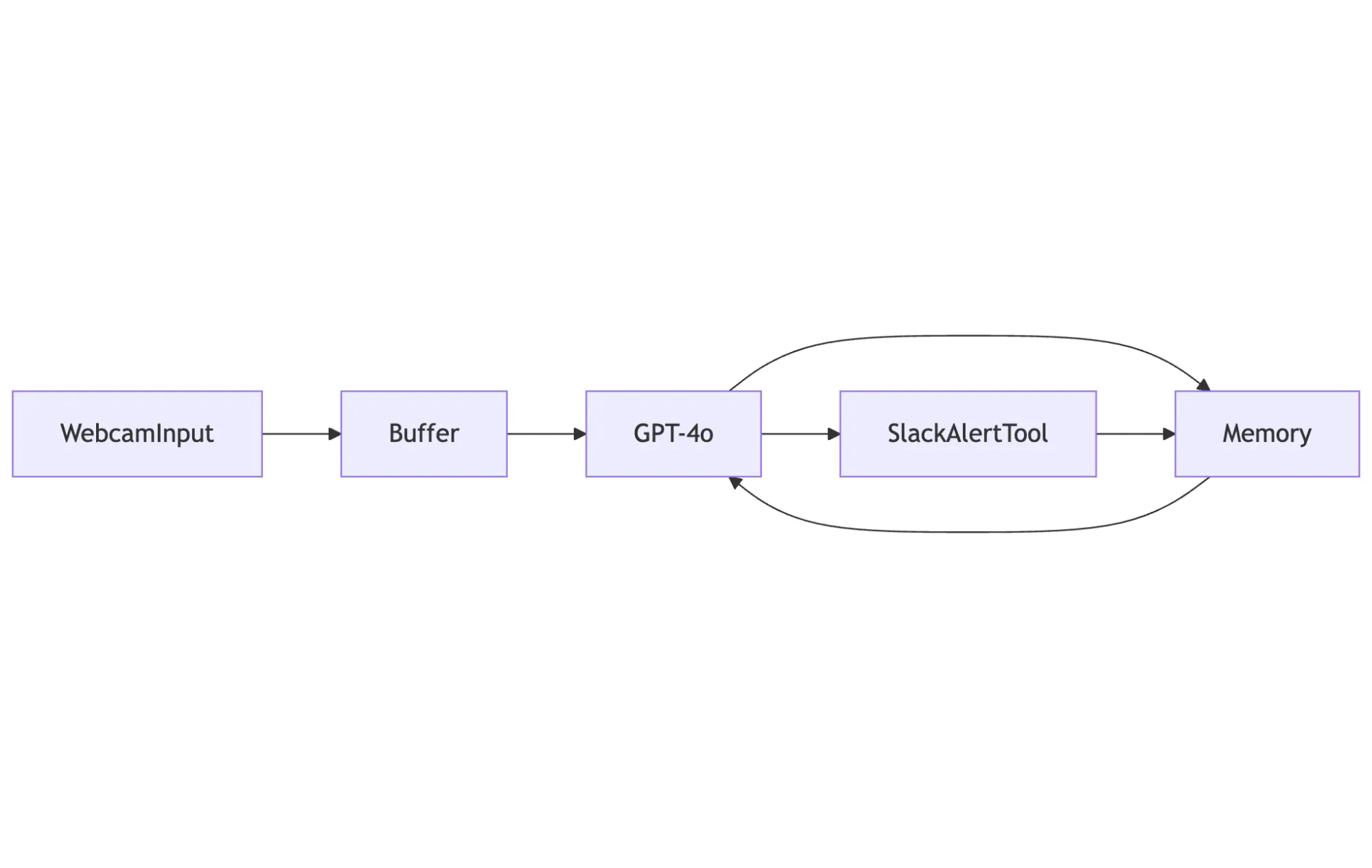
WebcamInput produces frames. The agent buffers them until five seconds pass (our frame_interval_ms). The agent sends frames plus conversation history from Memory to GPT-4o. The LLM responds with observations and, at times, requests a tool call. SlackAlertTool executes and returns a result. Everything gets stored in memory. The loop repeats.
Now look at a quality inspector for a manufacturing line:

Same structure, but different model and different tools. The same goes for a meeting assistant:
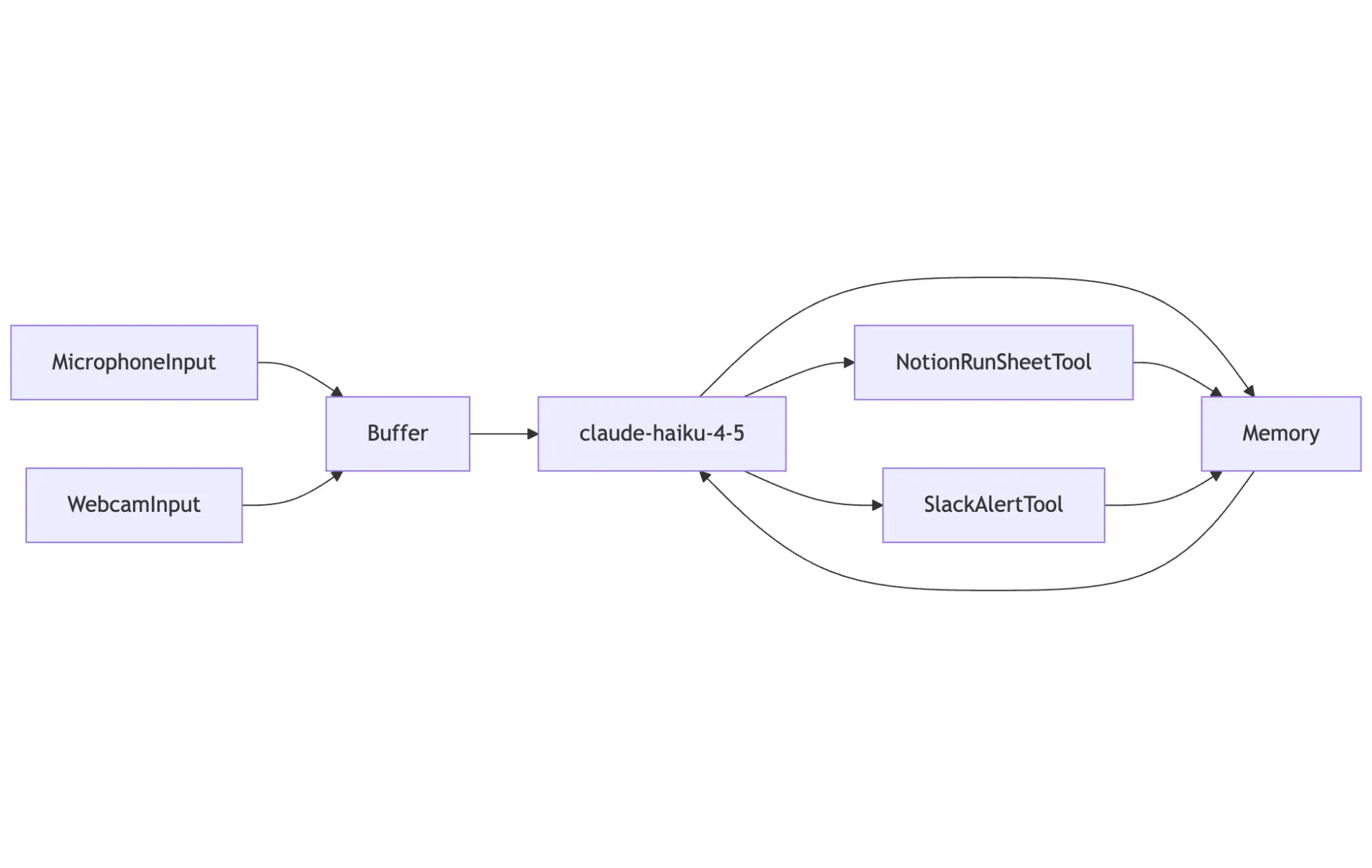
Two inputs instead of one. Audio is transcribed via Whisper before entering the buffer. The model extracts action items and decisions. Tools log them and send summaries.
The pattern holds because the core problem is always the same:
-
Frames arrive from cameras, audio chunks arrive from microphones, and the buffer accumulates them until there's enough to justify an API call.
-
The vision-language model receives the frames, any transcribed audio, and the conversation history, then reasons about what it's seeing.
-
When the model determines that an action is required, it requests a tool call, and the agent executes it automatically.
-
The model's observations and the tool results get stored in memory, providing context for the next iteration.
Three design choices make this flexibility possible.
-
Protocols instead of inheritance. Any object with a
stream()method works as an input source. A webcam, an IP camera, a microphone, and a video file have nothing in common except that they produce data over time. Protocols let them stay different while still being interchangeable. -
Async everywhere. The agent reads frames while waiting for model responses, executes multiple tool calls without blocking, and handles slow networks and fast cameras simultaneously. The entire stack is async from input sources through model calls through tool execution.
-
One interface for all models. OpenAI, Anthropic, and Google format messages differently, handle images differently, and structure tool calls differently. The
VisionLanguageModelprotocol hides this behind a singleanalyze()method. Swapping models is a one-line change:create_model("anthropic", "claude-4-5-haiku")becomescreate_model("google", "gemini-2.5-flash").
The key takeaway: the structure for the security monitor isn't specific to security monitoring. It's the structure of every multimodal agent.
Data Structures Carry Everything Through the System
Frames hold video. Audio chunks hold sound. Messages hold conversation history. Tool calls and tool results track actions. Every input source produces the first two, every model consumes and produces messages, and every tool interaction uses the last two.
123456789101112131415161718@dataclass
class  Frame:
    data:  np.ndarray #  RGB  image  array  (H,  W,  3)
    timestamp:  datetime
    source:  str

    def  to_base64(self,  format:  str  =  "JPEG",  quality:  int  =  85)  ->  str:
        """Convert  frame  to  base64-encoded  string  for  API  calls."""
        img  =  Image.fromarray(self.data)
        buffer  =  io.BytesIO()
        img.save(buffer,  format=format,  quality=quality)
        return  base64.b64encode(buffer.getvalue()).decode("utf-8")

    def  resize(self,  max_size:  int  =  512)  ->  Frame:
        """Resize  frame  maintaining  aspect  ratio."""
        img  =  Image.fromarray(self.data)
        img.thumbnail((max_size,  max_size),  Image.Resampling.LANCZOS)
        return  Frame(data=np.array(img),  timestamp=self.timestamp,  source=self.source)
A Frame holds a numpy array of RGB pixels plus metadata. The to_base64() method handles the conversion that every vision API requires. The resize() method keeps images small enough to be cost-effective.
12345678910@dataclass
class  AudioChunk:
    data:  np.ndarray #  Audio  samples
    sample_rate:  int  =  16000
    timestamp:  datetime
    source:  str

    @property
    def  duration_seconds(self)  ->  float:
        return  len(self.data)  /  self.sample_rate
An AudioChunk holds raw audio samples. The agent passes these to a transcriber (Whisper) before sending text to the model.
123456@dataclass
class  Message:
    role:  Literal["user",  "assistant",  "system",  "tool"]
    content:  str
    timestamp:  datetime
    metadata:  dict[str,  Any]
A Message represents one turn in the conversation history. The memory system stores these and provides them as context on each model call.
1234567891011121314@dataclass
class  ToolCall:
    name:  str
    arguments:  dict[str,  Any]
    call_id:  str

@dataclass
class  ToolResult:
    output:  Any  =  None
    error:  str  |  None  =  None

    @property
    def  success(self)  ->  bool:
        return  self.error  is  None
A ToolCall is what the model produces when it wants to execute a tool. A ToolResult is returned after execution. Both get stored in memory so the model knows what actions it has taken.
These five types cover all multimodal agents in this guide. The agent loop orchestrates them, and the model reasons about them, but the data structures stay simple.
Input Sources Ingest Video and Audio From Any Hardware
Multimodal agents need to ingest video and audio from somewhere. A security monitor reads from an IP camera. A quality inspector watches a production line through a USB webcam. A meeting assistant captures audio from a microphone and periodic video from a laptop camera.
These sources have different APIs, different connection requirements, and different failure modes. But from the agent's perspective, they all do the same thing: produce frames or audio chunks over time.
The InputSource protocol captures this:
12345678class  InputSource(Protocol):
    async  def  stream(self)  ->  AsyncIterator[Frame  |  AudioChunk]:
        """Yield  frames  or  audio  chunks."""
        ...

    async  def  close(self)  ->  None:
        """Clean  up  resources."""
        ...
Any object that implements these two methods serves as an input source. The agent loop doesn't care whether frames come from a webcam, an IP camera, a video file, or a URL. It just iterates over whatever stream() yields.
Webcam
The simplest input source wraps OpenCV's video capture:
12345678910111213141516171819class  WebcamInput(InputSource):
    def  __init__(self,  device_id:  int  =  0,  fps:  float  =  1.0,  max_size:  int  =  512):
        self.device_id  =  device_id
        self.fps  =  fps
        self.max_size  =  max_size

    async  def  stream(self)  ->  AsyncIterator[Frame]:
        cap  =  cv2.VideoCapture(self.device_id)
        interval  =  1.0  /  self.fps

        while  self._running:
            ret,  bgr_frame  =  await  asyncio.get_event_loop().run_in_executor(None,  cap.read)
            if  ret:
                rgb_frame  =  cv2.cvtColor(bgr_frame,  cv2.COLOR_BGR2RGB)
                frame  =  Frame(data=rgb_frame,  timestamp=datetime.now(),  source=f"webcam:{self.device_id}")
                yield  frame.resize(self.max_size)
            await  asyncio.sleep(interval)

        cap.release()
The fps parameter controls how often frames are captured. For most agents, one frame per second or slower is enough. Vision API calls cost money and take time, so capturing at 30fps would be wasteful.
RTSP Streams
IP cameras speak RTSP. The input source handles connection failures and automatic reconnection:
123456camera  =  RTSPInput(
    url="rtsp://admin:password@192.168.1.100:554/stream",
    fps=0.2, #  One  frame  every  5  seconds
    auto_reconnect=True,
    reconnect_delay=5.0,
)
The implementation is similar to WebcamInput, but with retry logic when the stream drops. OpenCV handles RTSP through ffmpeg, so any camera that supports the protocol works.
Microphone
Audio capture uses the sounddevice library:
1234mic  =  MicrophoneInput(
    sample_rate=16000, #  Whisper  expects  16kHz
    chunk_duration=5.0, #  Yield  5-second  chunks
)
The microphone yields AudioChunk objects instead of frames. The agent passes these to a transcriber before sending text to the model.
Composite Inputs
Meeting assistants need both video and audio. CompositeInput merges multiple sources into a single stream:
123456789101112source  =  CompositeInput(
    MicrophoneInput(chunk_duration=10.0),
    WebcamInput(fps=0.033), #  One  frame  every  30  seconds
)

async  for  item  in  source.stream():
    if  isinstance(item,  Frame):
        #  Video  frame
        ...
    elif  isinstance(item,  AudioChunk):
        #  Audio  chunk
        ...
The implementation runs each source in a separate task and yields items as they arrive. The agent loop handles both types through the same buffer.
Vision-Language Models Provide the Processing
OpenAI, Anthropic, and Google all provide models that process images. Each has different pricing, different latency characteristics, and different strengths. OpenAI's GPT-4o has excellent tool calling. Anthropic's Claude reasons carefully about what it sees. Google's Gemini models cost almost nothing.
They also have different APIs, so the VisionLanguageModel protocol hides these differences:
1234567891011class  VisionLanguageModel(Protocol):
    async  def  analyze(
        self,
        frames:  list[Frame],
        audio_transcript:  str  |  None,
        tools:  list[ToolDefinition],
        context:  list[Message],
        system_prompt:  str,
    )  ->  AsyncIterator[AgentEvent]:
        """Analyze  frames  and  audio,  yielding  events."""
        ...
The analyze() method takes frames, an optional transcript, available tools, conversation history, and a system prompt. It yields events: Message objects for text responses, ToolCall objects when the model wants to execute a tool. The agent loop consumes these events without knowing which provider generated them.
Each provider implements this interface by translating to its native format. Here's the core of the OpenAI implementation:
12345678910111213141516171819class  OpenAIVisionModel(VisionLanguageModel):
    async  def  analyze(self,  frames,  audio_transcript,  tools,  context,  system_prompt):
        messages  =  self._build_messages(frames,  audio_transcript,  context,  system_prompt)
        openai_tools  =  [t.to_openai_format()  for  t  in  tools]  if  tools  else  None

        stream  =  await  self.client.chat.completions.create(
            model=self.model_id,
            messages=messages,
            tools=openai_tools,
            stream=True,
        )

        async  for  chunk  in  stream:
            delta  =  chunk.choices[0].delta
            if  delta.content:
                yield  Message(role="assistant",  content=delta.content,  ...)
            if  delta.tool_calls:
                #  Accumulate  tool  call  data,  yield  ToolCall  when  complete
                ...
The internal _build_messages() method converts frames to base64, formats them according to OpenAI's image schema, and assembles the message list. Anthropic's implementation does the same thing with different formatting. Google uses PIL images directly. The differences stay inside each class.
A factory function handles instantiation:
1model = create_model("openai", "gpt-4o-mini")
Switching providers means changing one line. The agent loop, tools, memory, and input sources stay the same.
The Agent Loop Runs the Show
The agent loop reads from input sources, buffers frames and audio, sends them to the model, executes tool calls, and stores results in memory.
The core is the run() method:
12345678910111213141516171819202122232425262728293031323334async  def  run(
    self,
    input_source:  InputSource,
    on_event:  Callable[[AgentEvent],  Awaitable[None]]  |  None  =  None,
)  ->  None:
    self._running  =  True
    last_process_time  =  datetime.now()

    try:
        async  for  item  in  input_source.stream():
            if  not  self._running:
                break

            #  Buffer  frames  or  transcribe  audio
            if  isinstance(item,  Frame):
                self._frame_buffer.append(item)
            elif  isinstance(item,  AudioChunk):
                transcript  =  await  self._transcribe(item)
                self._audio_buffer  +=  transcript

            #  Check  if  we  should  process
            elapsed_ms  =  (datetime.now()  -  last_process_time).total_seconds()  *  1000
            if  self._should_process(elapsed_ms):
                async  for  event  in  self._process_buffer():
                    if  on_event:
                        await  on_event(event)
                    if  isinstance(event,  ToolCall):
                        result  =  await  self._execute_tool(event)
                        self.memory.add(result)
                        if  on_event:
                            await  on_event(result)
                last_process_time  =  datetime.now()
    finally:
        await  input_source.close()
The loop iterates over whatever the input source yields. Frames go into a buffer. Audio chunks get transcribed, and the text accumulates. When enough content has arrived, _process_buffer() sends everything to the model.
The buffering logic lives in _should_process():
1234567891011def  _should_process(self,  elapsed_ms:  float)  ->  bool:
    #  Check  frame  batch  size
    if  len(self._frame_buffer)  >=  self.config.frame_batch_size:
        if  elapsed_ms  >=  self.config.frame_interval_ms:
            return  True

    #  Check  audio  buffer
    if  len(self._audio_buffer)  >=  self.config.min_audio_chars:
        return  True

    return  False
Two conditions trigger processing: enough frames have accumulated and enough time has passed, or enough transcribed audio has accumulated. The configuration controls both thresholds.
Processing sends the buffered content to the model:
123456789101112131415161718192021async  def  _process_buffer(self)  ->  AsyncIterator[AgentEvent]:
    if  not  self._frame_buffer  and  not  self._audio_buffer:
        return

    context  =  self.memory.get_context(self.config.max_context_tokens)
    tool_defs  =  [self._tool_to_definition(t)  for  t  in  self.tools.values()]
    frames_to_send  =  self._frame_buffer[-self.config.max_frames:]

    async  for  event  in  self.model.analyze(
        frames=frames_to_send,
        audio_transcript=self._audio_buffer  if  self._audio_buffer  else  None,
        tools=tool_defs,
        context=context,
        system_prompt=self.config.system_prompt,
    ):
        self.memory.add(event)
        yield  event

    #  Clear  buffers  after  processing
    self._frame_buffer.clear()
    self._audio_buffer  =  ""
The method pulls context from memory, converts registered tools to definitions, and calls the model's analyze() method. Every event the model yields gets stored in memory and passed to the caller. After processing, the buffers clear.
Tool execution happens automatically when the model requests it:
123456789101112131415async  def  _execute_tool(self,  tool_call:  ToolCall)  ->  ToolResult:
    tool  =  self.tools.get(tool_call.name)
    if  not  tool:
        return  ToolResult(error=f"Unknown tool: {tool_call.name}")

    try:
        result  =  await  asyncio.wait_for(
            tool.execute(**tool_call.arguments),
            timeout=self.config.tool_timeout_seconds,
        )
        return  result
    except  asyncio.TimeoutError:
        return  ToolResult(error=f"Tool {tool_call.name} timed out")
    except  Exception  as  e:
        return  ToolResult(error=f"Tool {tool_call.name} failed: {e}")
The agent looks up the tool by name, executes it with the arguments the model provided, and handles timeouts and exceptions. The result goes back to the caller and into memory.
The callback pattern (on_event) lets applications respond to events as they happen. The security monitor prints observations and logs alerts. The quality inspector updates statistics and triggers rejects. The meeting assistant extracts action items. Each application handles events differently, but the loop itself stays the same.
Tools Let the Agent Take Actions
Send a Slack message, log to a database, trigger a machine, move a robot arm. The model decides when to use them based on the system prompt and what it observes.
A tool is an object with a name, description, JSON Schema parameters, and an execute() method:
1234567class  Tool(Protocol):
    name:  str
    description:  str
    parameters:  dict[str,  Any]

    async  def  execute(self,  **kwargs:  Any)  ->  ToolResult:
        ...
The name and description tell the model what the tool does. The parameters define what arguments it accepts. The model sees this information and decides when and how to call the tool.
Slack Alerts
The Slack tool sends messages to a channel via webhook:
12345678910111213141516171819202122232425262728293031323334353637383940class  SlackAlertTool(Tool):
    name  =  "send_slack_alert"
    description  =  "Send an alert message to a Slack channel"

    parameters  =  {
        "type":  "object",
        "properties":  {
            "message":  {
                "type":  "string",
                "description":  "The alert message to send",
            },
            "severity":  {
                "type":  "string",
                "enum":  ["info",  "warning",  "critical"],
                "description":  "Alert severity level",
            },
        },
        "required":  ["message",  "severity"],
    }

    def  __init__(self,  webhook_url:  str,  default_channel:  str  =  "#alerts"):
        self.webhook_url  =  webhook_url
        self.default_channel  =  default_channel

    async  def  execute(self,  message:  str,  severity:  str  =  "info",  **kwargs)  ->  ToolResult:
        payload  =  {
            "channel":  self.default_channel,
            "attachments":  [{
                "color":  {"info":  "#36a64f",  "warning":  "#ffcc00",  "critical":  "#ff0000"}[severity],
                "text":  f"[{severity.upper()}] {message}",
            }],
        }

        async  with  httpx.AsyncClient(timeout=10.0)  as  client:
            response  =  await  client.post(self.webhook_url,  json=payload)

        if  response.status_code  ==  200:
            return  ToolResult(output={"sent":  True,  "severity":  severity})
        else:
            return  ToolResult(error=f"Slack API error: {response.status_code}")
The JSON Schema tells the model exactly what to provide: a message string and a severity level from a fixed set of options. When the security monitor's system prompt says "use send_slack_alert with severity 'critical' for immediate threats," the model knows how to construct that call.
Notion Logging
The Notion tool adds entries to a database:
1234567891011121314151617181920class  NotionRunSheetTool(Tool):
    name  =  "update_notion_runsheet"
    description  =  "Add or update an entry in the Notion run-sheet database"
    parameters  =  {
        "type":  "object",
        "properties":  {
            "title":  {"type":  "string",  "description":  "Title/name of the entry"},
            "status":  {
                "type":  "string",
                "enum":  ["pending",  "in_progress",  "completed",  "blocked"],
                "description":  "Current status of the entry",
            },
            "notes":  {"type":  "string",  "description":  "Additional notes or observations"},
        },
        "required":  ["title",  "status"],
    }

    async  def  execute(self,  title:  str,  status:  str,  notes:  str  =  "",  **kwargs)  ->  ToolResult:
        #  Build  Notion  API  request  and  send  it
        ...
The quality inspector uses this to log every inspection. The meeting assistant uses it to record action items and decisions. Same tool, different purposes, driven entirely by the system prompt.
Industrial Tools
The PLC and robot arm tools follow the same pattern, but control physical equipment:
1234567891011121314151617181920212223class  PLCWriteTool(Tool):
    name  =  "write_plc_register"
    description  =  "Write a value to a PLC register (industrial automation)"

    parameters  =  {
        "type":  "object",
        "properties":  {
            "register_address":  {"type":  "integer",  "description":  "PLC register address"},
            "value":  {"type":  "number",  "description":  "Value to write"},
        },
        "required":  ["register_address",  "value"],
    }

    def  __init__(self,  simulate:  bool  =  True):
        self.simulate  =  simulate

    async  def  execute(self,  register_address:  int,  value:  float,  **kwargs)  ->  ToolResult:
        if  self.simulate:
            print(f"[PLC STUB] Writing register {register_address} = {value}")
            return  ToolResult(output={"written":  True,  "simulated":  True})

        #  Real  PLC  communication  via  Modbus,  OPC-UA,  etc.
        ...
The simulate flag lets you develop and test without real hardware. When you're ready to deploy, you swap in the actual PLC communication code. The agent doesn't know the difference.
Registration
Tools get registered with the agent before running:
12345agent  =  AgentLoop(model=model,  memory=memory,  config=config)

agent.register_tool(SlackAlertTool(webhook_url="https://hooks.slack.com/..."))
agent.register_tool(NotionRunSheetTool(api_key="secret_...",  database_id="abc123"))
agent.register_tool(PLCWriteTool(simulate=True))
The agent passes all registered tools to the model on every call. The model sees their names, descriptions, and parameters, and decides whether to use them based on what it observes and what the system prompt instructs.
Memory Stores Conversation History and Provides Context
Without memory, every frame would be analyzed in isolation. With it, the model knows what it said before, what tools it called, and what results came back.
The simplest practical approach is a sliding window that keeps the most recent messages:
12345678910111213141516171819202122232425262728293031@dataclass
class  SlidingWindowMemory:
    max_messages:  int  =  20
    max_tokens:  int  =  4000
    _messages:  deque[Message]  =  field(default_factory=deque)

    def  add(self,  event:  AgentEvent)  ->  None:
        if  isinstance(event,  Message):
            self._messages.append(event)
        elif  isinstance(event,  ToolCall):
            self._messages.append(Message(
                role="assistant",
                content=f"[Calling tool: {event.name}]",
            ))
        elif  isinstance(event,  ToolResult):
            content  =  f"[Tool result: {event.output}]"  if  event.success  else  f"[Tool error: {event.error}]"
            self._messages.append(Message(role="tool",  content=content))

    def  get_context(self,  max_tokens:  int  |  None  =  None)  ->  list[Message]:
        limit  =  max_tokens  or  self.max_tokens
        result  =  []
        token_count  =  0

        for  msg  in  reversed(self._messages):
            msg_tokens  =  len(msg.content)  //  4 #  Rough  estimate
            if  token_count  +  msg_tokens  >  limit:
                break
            result.insert(0,  msg)
            token_count  +=  msg_tokens

        return  result
The add() method accepts any event type. Messages go in directly. Tool calls and results are converted into messages so the model can see the actions it took.
The get_context() method returns messages that fit within the token budget, starting from the most recent and working backward. The token estimate (four characters per token) is rough but sufficient for managing context size.
This approach works for real-time applications because the relevant context is usually recent. A security monitor doesn't need to remember what happened an hour ago. A quality inspector cares about the current product, not the one from fifty frames back. The sliding window keeps memory bounded and predictable.
For longer conversations or applications that need to reference prior context, you could add summarization: periodically condense older messages into a summary, retain the summary, and discard the originals. The framework supports this by letting you implement your own memory class with the same add() and get_context() methods.
Building More From These Blocks
The security monitor above used one input source, one model, and one tool. The same pattern handles different inputs, different models, and different tools without changing the agent loop.
Quality Inspector
A manufacturing quality inspector watches a production line and logs every inspection:
123456789101112131415161718192021222324252627282930313233343536SYSTEM_PROMPT  =  """You  are  a  quality  control  inspector  for  a  manufacturing  line.

For  each  product  image,  inspect  for:
-  Scratches,  scuffs,  or  surface  damage
-  Dents  or  deformations
-  Discoloration  or  staining
-  Misalignment  or  warping

For  EVERY  inspection,  log  to  Notion  using  update_notion_runsheet:
-  title:  "Inspection  #[timestamp]"  or  product  identifier  if  visible
-  status:  "completed"  if  passed,  "blocked"  if  failed
-  notes:  Brief  summary  of  findings

If  defect  found:
1.  Log  with  status  "blocked"  and  describe  the  defect
2.  Use  write_plc_register  to  trigger  reject  (register  100,  value  1)
"""

async  def  quality_inspector():
    model  =  create_model("google",  "gemini-2.5-flash-lite")
    memory  =  SlidingWindowMemory(max_messages=10)

    agent  =  AgentLoop(
        model=model,
        memory=memory,
        config=AgentConfig(
            frame_interval_ms=2000,
            system_prompt=SYSTEM_PROMPT,
        ),
    )

    agent.register_tool(NotionRunSheetTool(api_key="...",  database_id="..."))
    agent.register_tool(PLCWriteTool(simulate=True))

    camera  =  WebcamInput(device_id=0,  fps=0.5,  max_size=768)
    await  agent.run(camera)
The structure is identical to the security monitor. The differences: Gemini 2.5 Flash-Lite instead of GPT (cost matters at high volume), Notion and PLC tools instead of Slack, a faster frame interval for production line speed, and a system prompt focused on defect detection rather than security.
The system prompt does the heavy lifting. It tells the model exactly what to look for, exactly how to log results, and exactly when to trigger a reject. The model follows these instructions while applying its own judgment about what constitutes a defect.
Meeting Assistant
A meeting assistant combines audio and video, transcribes speech, and extracts action items:
123456789101112131415161718192021222324252627282930313233343536373839404142434445464748SYSTEM_PROMPT  =  """You  are  a  meeting  assistant.  Your  job  is  to:

1.  TRACK  DISCUSSIONS
   -  Note  key  topics  being  discussed
   -  Identify  when  topics  change

2.  CAPTURE  ACTION  ITEMS
   When  someone  commits  to  doing  something:
   -  Use  update_notion_runsheet  with  title="[ACTION]  description"
   -  Set  status  to  "pending"
   -  Include  who  is  responsible  in  notes

3.  RECORD  DECISIONS
   When  a  decision  is  made:
   -  Use  update_notion_runsheet  with  title="[DECISION]  description"
   -  Set  status  to  "completed"

4.  PERIODIC  SUMMARIES
   Every  few  minutes,  send  a  brief  summary  to  Slack  using  send_slack_alert
   with  severity  "info".

If  you  hear  "action  item"  or  "I'll  do  X",  always  create  a  Notion  entry.
"""

async  def  meeting_assistant():
    model  =  create_model("openai",  "gpt-4o")
    memory  =  SlidingWindowMemory(max_messages=30)

    agent  =  AgentLoop(
        model=model,
        memory=memory,
        config=AgentConfig(
            frame_interval_ms=30000,
            min_audio_chars=200,
            system_prompt=SYSTEM_PROMPT,
        ),
    )

    agent.set_transcriber(WhisperTranscriber())
    agent.register_tool(NotionRunSheetTool(...))
    agent.register_tool(SlackAlertTool(...))

    source  =  CompositeInput(
        MicrophoneInput(chunk_duration=10.0),
        WebcamInput(fps=0.033),
    )

    await  agent.run(source)
This application uses CompositeInput to combine the microphone and webcam. Audio chunks go to Whisper for transcription before reaching the model. Video frames arrive slowly (one every 30 seconds) to provide visual context without overwhelming the API.
GPT-4o handles this task because it requires understanding conversational context, identifying commitments and decisions, and generating useful summaries. The larger context window (30 messages) helps it track discussions across the meeting.
A Complete Stack in 300 Lines
The core of a multimodal agent is roughly 300 lines of Python. Five data structures, a protocol-based input system, a provider-agnostic model interface, and a simple orchestration loop. No framework required.
This works because the underlying pattern is universal: accumulate multimodal input, let the model reason about it, execute tool calls, store context for next time. Whether you're building security monitors, quality inspectors, or meeting assistants, the loop stays the same. Only the system prompt, tools, and processing intervals change.
The three design choices that make this possible: protocols over inheritance (so webcams and RTSP streams stay interchangeable), async everywhere (so nothing blocks), and a single interface for all models (so swapping providers means changing one line).
For server-side batch processing, monitoring systems, and applications where you control the full stack, this minimal approach gives you exactly what you need with nothing extra.
But there is an even easier way to build with VLMs: Vision Agents. This open-source framework from Stream handles the parts we didn't cover:
-
WebRTC transport with sub-30ms latency
-
Client SDKs for React/iOS/Android/Flutter
-
Built-in text-to-speech and speech-to-text across providers like ElevenLabs and Deepgram
-
Intelligent turn detection for natural conversations.
The same golf coach that takes 150 lines in our approach becomes 10 lines with Vision Agents:
1234567agent  =  Agent(
    edge=getstream.Edge(),
    agent_user=agent_user,
    instructions="You are a golf coach...",
    llm=openai.Realtime(fps=10),
    processors=[ultralytics.YOLOPoseProcessor(model_path="yolo11n-pose.pt")],
)
Start with the patterns in this article to understand how multimodal agents work. When you're ready for real-time bidirectional video calls with end users, Vision Agents builds on the same principles with production-grade infrastructure underneath.