

Voice agents are getting better, but most text-to-speech pipelines still assume you’re okay with cloud APIs, large models, and unpredictable latency.
If you want fast, natural-sounding speech that runs entirely on your own hardware (no GPU, no network calls), you need a different approach.
In this tutorial, you’ll build a real-time AI voice agent that runs locally on your laptop using Pocket TTS, a lightweight 100M-parameter text-to-speech model. You’ll wire it into a full voice pipeline with Vision Agents, handling speech-to-text, LLM responses, and real-time audio delivery over Stream Video.
By the end, you’ll have a low-latency, offline-friendly voice agent you can run on CPU and extend for real production use cases.
What You Will Build
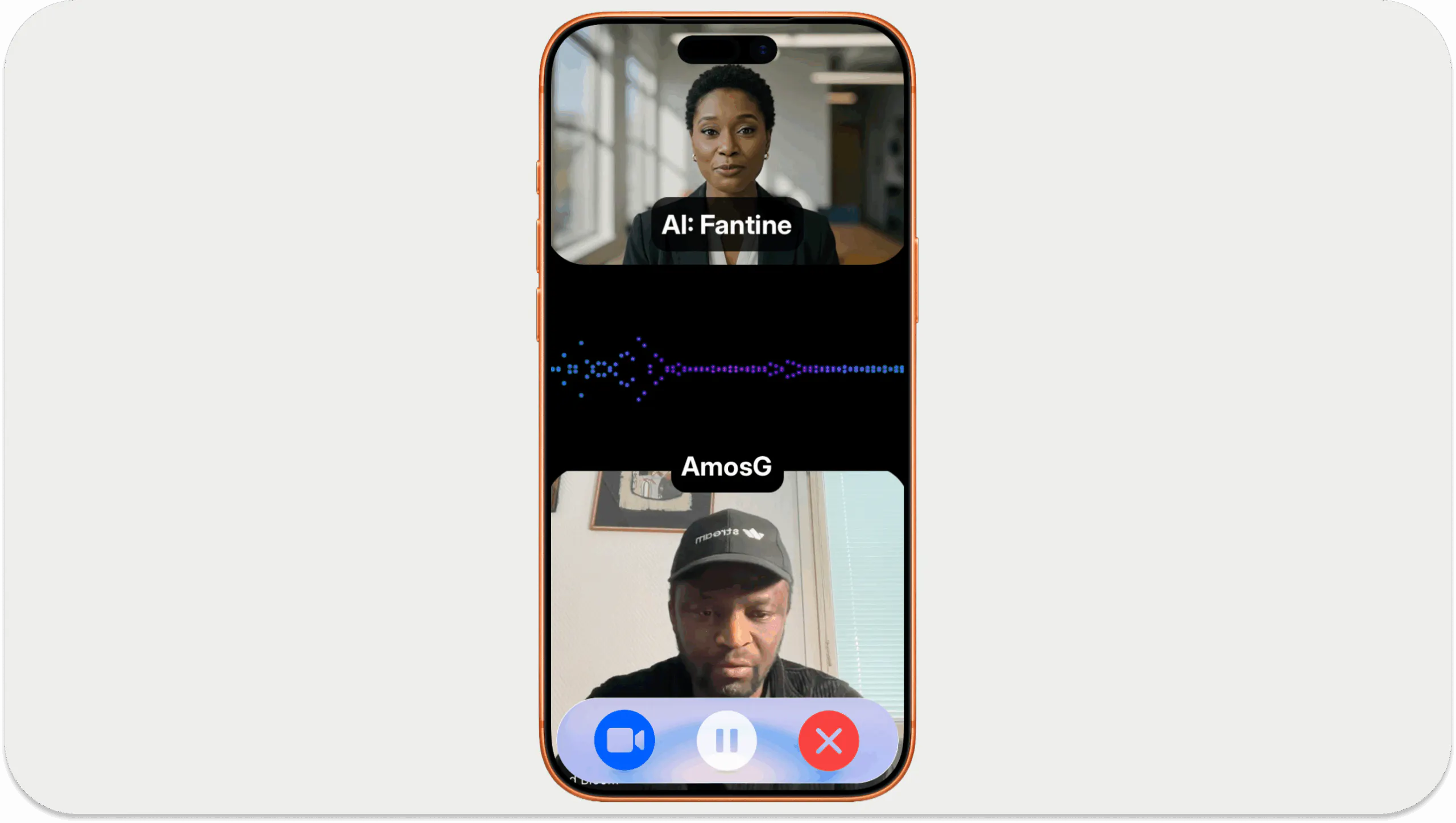
This guide will walk you through how to build a demo (similar to the one above) using this efficient 100M parameters model from Kyutai. The agent listens, transcribes speech, generates a response with an LLM, and speaks back using Pocket TTS, all with low latency and no GPU.
Problems with Current Text-to-Speech AI Models
When creating a custom voice AI pipeline for speech-enabled projects, there are effective, reliable solutions such as ElevenLabs, Deepgram, Inworld, and Cartesia for the text-to-speech (TTS) component. However, the underlying architecture of these AI services uses large language models (LLMs) and cannot run locally on consumer hardware like your laptop.
An open-source and frontier alternative to Pocket TTS is VibeVoice by Microsoft. It consists of 1.5B and 7B-parameter family of models that can run on your laptop’s CPU, but are not as convenient as Pocket TTS with only 100M parameters.
This creates a few practical constraints:
- Mostly 1B+ Parameters: Small TTS models with 1B to about 8B parameters can be used on consumer electronics, but may run more slowly on your device.
- Limited Voice Cloning Support: Voice cloning, the ability of a TTS model to reproduce speech based on a given audio input, is crucial in building speech-enabled apps. However, not all commercial and production-ready models in this category support speech cloning.
- Latency: The larger the parameter size of a TTS model, the higher the computational power it requires. Choosing a larger voice model for your project can result in high latency in the agent/assistant’s responses.
Pocket TTS sidesteps these tradeoffs by keeping the model small while remaining fast enough to run locally on CPU, making it well-suited for low-latency, speech-enabled applications.
Quick Start in Python
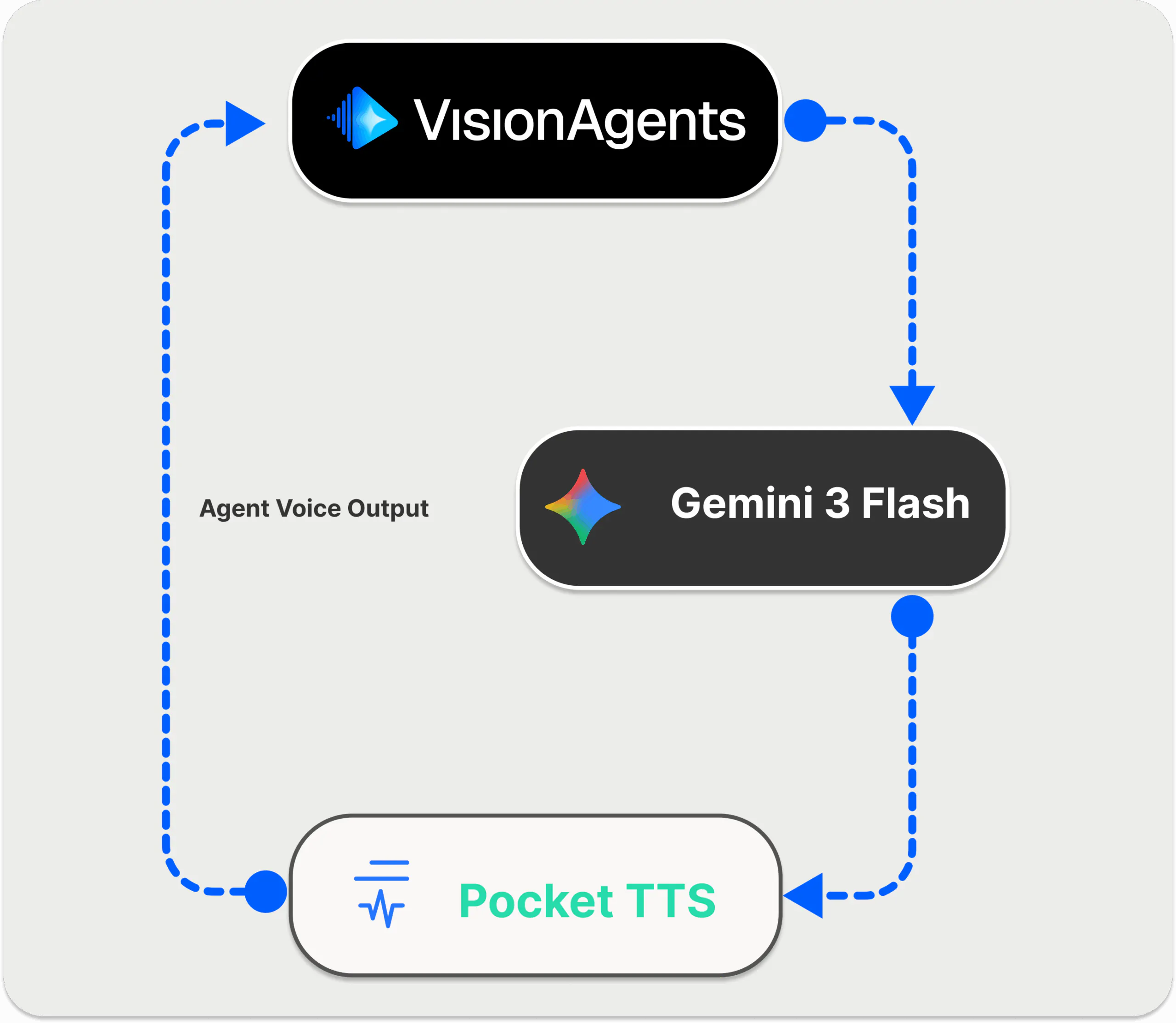
To quickly set up and run our local Pocket TTS-powered agent in Python, let's follow these steps.
Set Up Your Python Environment and Install Vision Agents
Running the demo requires Python 3.13 or later installed on your machine. To integrate Pocket TTS into an existing voice AI pipeline, we will use Vision Agents to orchestrate our LLM (gemini-3-flash-preview), speech-to-text (STT) (Deepgram), and TTS components for a cohesive speech-enabled workflow.
Vision Agents enable developers and enterprise teams to build video, voice, and vision AI applications using an open-source framework, third-party model providers, and telephony services.
Run the commands below in the order shown to configure your Python working environment, install Vision Agents, and get the companion plug-ins up and running.
123456789101112131415161718192021222324252627# 1. Install Python 3.13 or later

# 2. Create a new Python project: Using uv is recommended
uv init pocket-tts-vision-agents-demo

cd pocket-tts-vision-agents-demo

# 3. Create and activate your environment
uv venv .venv
source .venv/bin/activate

# Store the required API credentials
touch .env

# Inside .env
# Stream API credentials
STREAM_API_KEY=...: https://beta.dashboard.getstream.io/signup/
STREAM_API_SECRET=...
EXAMPLE_BASE_URL=https://pronto-staging.getstream.io

# Vision Agents' plugins APIs credentials
DEEPGRAM_API_KEY=...: https://console.deepgram.com/signup # STT
GOOGLE_API_KEY=...: https://aistudio.google.com/api-keys # LLM

# 4. Install Vision Agents and required plugins
uv add vision-agents
uv add "vision-agents[pocket, getstream, deepgram, gemini]"
The Complete Sample Code With Step-by-Step Configuration
In the root of your generated uv project, rename main.py to pocket_tts_example.py and replace its content with this Python script.
123456789101112131415161718192021222324252627282930313233343536373839404142434445464748495051525354555657585960616263646566676869707172737475767778798081828384858687888990919293949596979899100101102103104105106107108109110111112113114115116117118119120121122123124125126127128129130131132133134135136137138139140141142143144145146147148149150151152153154155156157158import asyncio
import logging
from concurrent.futures import ThreadPoolExecutor
from typing import Any, AsyncIterator, Iterator, Literal

import numpy as np
from scipy import signal

from getstream.video.rtc.track_util import AudioFormat, PcmData
from vision_agents.core import User, Agent, cli, tts
from vision_agents.core.agents import AgentLauncher
from vision_agents.core.warmup import Warmable
from vision_agents.plugins import getstream, pocket, deepgram, gemini
from pocket_tts import TTSModel

logger = logging.getLogger(__name__)

Voice = Literal["alba", "marius", "javert", "jean", "fantine", "cosette", "eponine", "azelma"]

class PocketTTS(tts.TTS, Warmable[tuple[TTSModel, Any]]):
    """
    Fixed Pocket TTS that correctly uses predefined voices without voice cloning.
    """

    def __init__(self, voice: Voice = "alba") -> None:
        super().__init__(provider_name="pocket")
        self.voice = voice
        self._model: TTSModel | None = None
        self._voice_state = None
        self._executor = ThreadPoolExecutor(max_workers=4)

    async def on_warmup(self) -> tuple[TTSModel, Any]:
        if self._model is not None and self._voice_state is not None:
            return (self._model, self._voice_state)

        loop = asyncio.get_running_loop()

        logger.info("Loading Pocket TTS model...")
        model = await loop.run_in_executor(self._executor, TTSModel.load_model)
        logger.info("Pocket TTS model loaded")

        # Pass voice NAME directly (not a path) to use predefined embeddings
        logger.info(f"Loading voice state for: {self.voice}")
        voice_state = await loop.run_in_executor(
            self._executor,
            lambda: model.get_state_for_audio_prompt(self.voice),
        )
        logger.info("Voice state loaded")
        return (model, voice_state)

    def on_warmed_up(self, resource: tuple[TTSModel, Any]) -> None:
        self._model, self._voice_state = resource

    async def _ensure_loaded(self) -> None:
        if self._model is None or self._voice_state is None:
            resource = await self.on_warmup()
            self.on_warmed_up(resource)

    async def stream_audio(
        self, text: str, *_, **__
    ) -> PcmData | Iterator[PcmData] | AsyncIterator[PcmData]:
        logger.info(f"🎤 TTS generating audio for: '{text}'")
        await self._ensure_loaded()
        assert self._model is not None
        assert self._voice_state is not None

        model = self._model
        voice_state = self._voice_state

        # Target sample rate for WebRTC compatibility
        target_sample_rate = 48000

        def _generate():
            print(f"[PocketTTS] Generating audio for: '{text}'")
            audio_tensor = model.generate_audio(voice_state, text)
            audio_np = audio_tensor.numpy()
            original_sample_rate = model.sample_rate
            print(f"[PocketTTS] Audio shape: {audio_np.shape}, dtype: {audio_np.dtype}")
            print(f"[PocketTTS] Audio range: min={audio_np.min():.4f}, max={audio_np.max():.4f}")
            print(f"[PocketTTS] Original sample rate: {original_sample_rate}Hz")

            # Resample to 48kHz for WebRTC compatibility
            if original_sample_rate != target_sample_rate:
                num_samples = int(len(audio_np) * target_sample_rate / original_sample_rate)
                audio_resampled = signal.resample(audio_np, num_samples)
                print(f"[PocketTTS] Resampled: {len(audio_np)} -> {len(audio_resampled)} samples ({original_sample_rate}Hz -> {target_sample_rate}Hz)")
            else:
                audio_resampled = audio_np

            # Ensure audio is 1D
            if len(audio_resampled.shape) > 1:
                audio_resampled = audio_resampled.flatten()
                print(f"[PocketTTS] Flattened audio to 1D: {audio_resampled.shape}")

            # Normalize and amplify the audio (in case it's too quiet)
            max_val = np.abs(audio_resampled).max()
            if max_val > 0:
                # Normalize to use 80% of the dynamic range
                audio_normalized = audio_resampled / max_val * 0.8
                print(f"[PocketTTS] Normalized audio: max was {max_val:.4f}, now {np.abs(audio_normalized).max():.4f}")
            else:
                audio_normalized = audio_resampled
                print("[PocketTTS] WARNING: Audio is silent (max=0)")

            pcm16 = (np.clip(audio_normalized, -1.0, 1.0) * 32767.0).astype(np.int16)
            print(f"[PocketTTS] PCM16 samples: {len(pcm16)}, min={pcm16.min()}, max={pcm16.max()}")
            return pcm16, target_sample_rate

        loop = asyncio.get_running_loop()
        samples, sample_rate = await loop.run_in_executor(self._executor, _generate)

        print(f"[PocketTTS] ✅ Audio ready: {len(samples)} samples at {sample_rate}Hz, duration: {len(samples)/sample_rate:.2f}s")
        return PcmData.from_numpy(
            samples, sample_rate=sample_rate, channels=1, format=AudioFormat.S16
        )

    async def stop_audio(self) -> None:
        pass

    async def close(self) -> None:
        await super().close()
        self._executor.shutdown(wait=False)

async def create_agent(**kwargs) -> Agent:
    """Create the agent with Pocket TTS."""
    agent = Agent(
        edge=getstream.Edge(),
        agent_user=User(name="Pocket AI", id="agent"),
        instructions="You are a helpful voice assistant. Keep responses brief and conversational.",
        tts=PocketTTS(voice="jean"),
        stt=deepgram.STT(eager_turn_detection=True),
        llm=gemini.LLM("gemini-3-flash-preview"),
    )
    return agent

async def join_call(agent: Agent, call_type: str, call_id: str, **kwargs) -> None:
    """Join the call and start the agent."""
    await agent.create_user()
    call = await agent.create_call(call_type, call_id)

    logger.info("🤖 Starting Pocket TTS Agent...")

    async with agent.join(call):
        logger.info("Agent joined call, waiting for participant...")

        # Wait for a human participant to join the call
        await agent.wait_for_participant()
        logger.info("Participant joined")

        # Greet the user
        await agent.say("Hello! I'm running Pocket TTS locally. How can I help you?")

        # Keep the agent running to listen and respond
        # The agent automatically handles: STT -> LLM -> TTS via the edge
        await agent.finish()

if __name__ == "__main__":
    cli(AgentLauncher(create_agent=create_agent, join_call=join_call))
In summary, you import getstream from the Vision Agents framework, along with the installed Python plugins pocket, deepgram, and gemini. You then initialize a new multimodal agent with voice, video, vision, and text capabilities using the Agent class in Vision Agents.
With your agent defined, the next step is to configure it with parameters for the various voice components. Finally, you create and join a new video call using Stream Video to enable real-time audio and video communication.
At the root of your project, run uv run pocket_tts_example.py. You can now have voice conversations with the agent, who will respond to you in real time using Pocket TTS.
Note: The above demo integrates an AI avatar with the Pocket TTS voice output. Check out the Vision Agents docs to get started with AI avatars.
How It Works
Although we focused on the Pocket TTS integration with Vision Agents in this tutorial, the multimodal AI pipeline uses four main components to create an agent that uses:
- Pocket TTS for text-to-speech by running the SLM locally on your CPU.
- Deepgram for speech-to-text.
- Gemini as an LL for processing the voice input and output.
- Stream for edge/real-time audio and video communication.
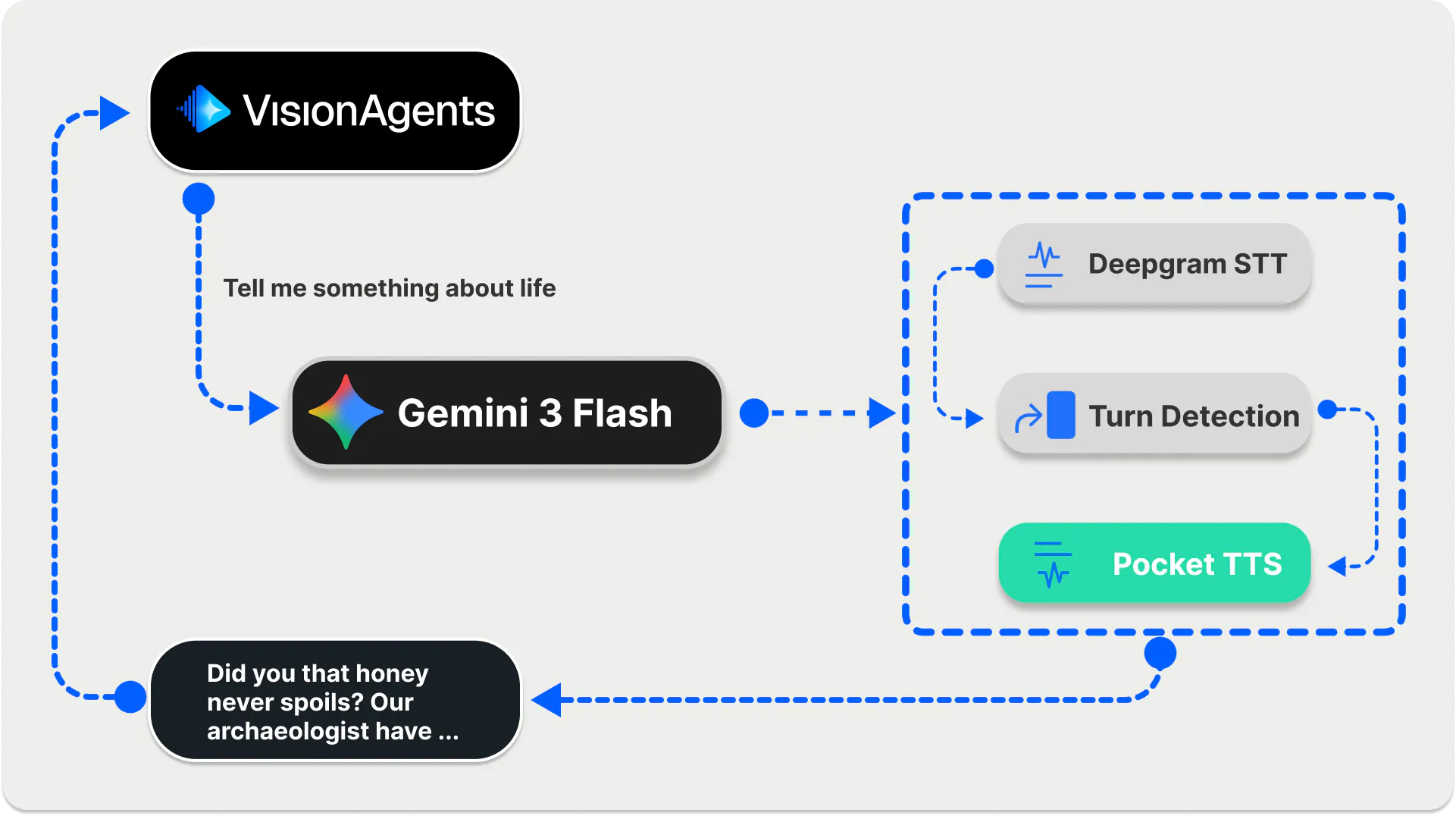
When you run the Python script, the user speaks through the built-in Stream Video integration with Vision Agents. Gemini 3 Flash takes the raw input audio and sends it to the Deepgram STT model. The system uses Deepgram to convert the audio input into transcription. The transcribed message is then sent to Gemini 3 Flash for processing. Finally, Pocket TTS converts the transcribed text back to speech, which users hear as a response from the voice agent.
Benefits of Pocket TTS
Pocket TTS is a fast, lightweight TTS plugin for Vision Agents and runs efficiently on CPU with low latency (~200ms).
- Lightweight and Fast Response: It has only 100M parameters, and it requires no GPU to run.
- Mobile Use Cases: Since it is small, it can easily be implemented for mobile use cases.
- Voice Selection: Offers built-in support.
- Voice Cloning: Reproduce human voices by giving samples of audio input.
Pocket TTS Usage in Vision Agents
You can use the model to build voice experiences across a broader range of use cases, such as voice-enabled home assistants. The code snippet below shows a simple usage of the plugin in Vision Agents.
12345678910from vision_agents.plugins import pocket

# Create TTS with default voice
tts = pocket.TTS()

# Or specify a built-in voice
tts = pocket.TTS(voice="marius")

# Or use a custom voice for cloning
tts = pocket.TTS(voice="path/to/your/voice.wav")
When working with the model, you can choose from a handful of male and female AI voices, including alba (Default voice), marius, javert, jean, fantine, cosette, eponine, and azelma.
Pocket TTS Limitations
Although Pocket TTS runs fast and reliably on CPUs, it lacks multilingual support. At the time of writing this article, the model supported only English.
If you want an open-source alternative to this model for multiple languages, you can use VibeVoice from Microsoft.
Where To Go Next
This article demonstrated one of the many use cases of Pocket TTS in building voice agents. The model is lightweight and suitable for running on both older and newer laptops and mobile devices.
The seamless integration of the Pocket TTS plugin in the latest release of Vision Agents turns your voice, vision, and video projects from prototypes into scalable, production-ready deployments with FastAPI.
Check out the following resources to learn more:
- 👷 Build functional AI apps with Vision Agents in minutes.
- ⭐ Star the repo on GitHub.
- 📖 Read the docs.
- 💬 Join our Discord community for support.
- 🔧 Contribute a plugin.