
Build a Marketplace Voice Shopping Agent with Kimi K2.5 and Vision Agents


A buyer opens your marketplace app and says: "Find me running shoes under $120, size 10, from a seller who ships in two days."
Text chatbots stall on requests like that. They need structured follow-ups, live inventory, and seller comparisons across multiple turns.
A voice agent with tool access handles it naturally.
This tutorial walks through a voice shopping concierge for a fictional multi-seller marketplace called Pronto Market. Kimi K2.5 powers the reasoning and function calling. Deepgram transcribes speech. ElevenLabs speaks the replies. Vision Agents orchestrates the pipeline over Stream's WebRTC edge, so you can test the whole flow in a browser in under 30 minutes.
What You'll Build
A conversational voice agent named Riley that:
- Searches a multi-seller product catalog by query, category, price, and rating
- Compares sellers on ship time, return policy, and reviews
- Adds items to a cart after confirming size and price
- Looks up order status by order ID or email
- Runs in your browser via Stream, using the same CLI flow as the Vision Agents quickstart
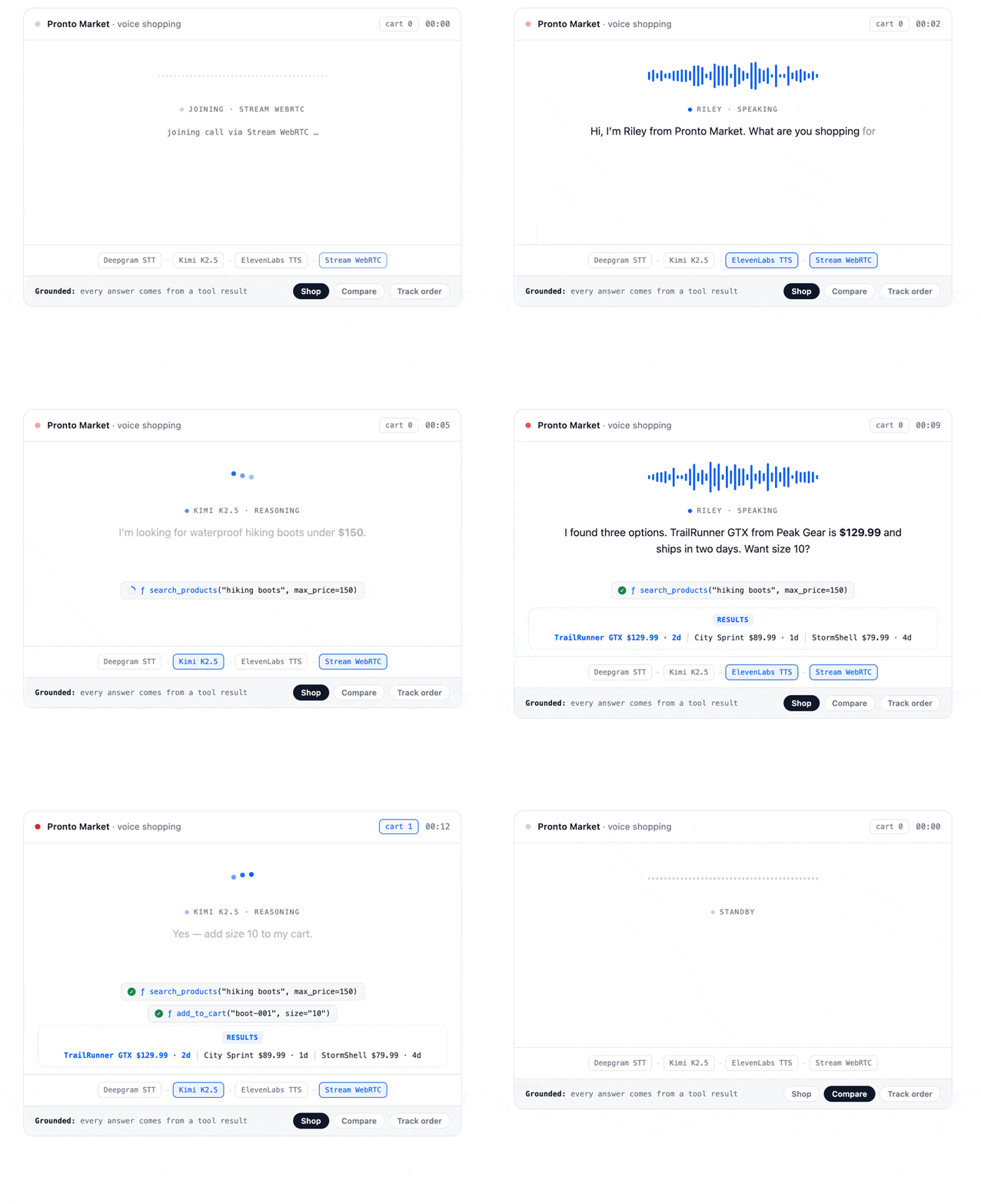
Kimi has no native realtime speech API today, so we use a custom pipeline (STT -> LLM -> TTS) instead of a single speech-to-speech model. That tradeoff buys you two things Kimi excels at: reliable function calling across multi-step shopping flows, and the freedom to swap STT or TTS providers without rewriting your agent.
The catalog and order data live in a local Python module. That means a database, Stripe checkout, and external marketplace API aren't required to get started.
The Stack
| Layer | Choice | Why |
|---|---|---|
| LLM | Kimi K2.5 (kimi-k2.5) |
Strong reasoning, native tool use, 256K context |
| STT | Deepgram | Fast transcription with eager turn detection |
| TTS | ElevenLabs | Natural, retail-friendly voice output |
| Transport | Stream WebRTC | Sub-500ms edge delivery, browser demo out of the box |
| Framework | Vision Agents | Provider-agnostic orchestration, open source |
Audio flows: user speaks -> Deepgram STT -> Kimi K2.5 (with tools) -> ElevenLabs TTS -> user hears the reply.
A note on model versions: This tutorial uses kimi-k2.5, released January 2026. Moonshot has since shipped newer models (k2.6, k2.7) and rotates the k2 series over time. If kimi-k2.5 no longer resolves when you run this, check the Moonshot model list and swap the model string. The code stays the same.
Requirements
You'll need API keys from:
- Moonshot Platform for
MOONSHOT_API_KEY - Deepgram for
DEEPGRAM_API_KEY - ElevenLabs for
ELEVENLABS_API_KEY - Stream for
STREAM_API_KEYandSTREAM_API_SECRET
You'll also need Python 3.12 and uv installed.
Step 1: Scaffold the Project
uv init pronto-voice-shop && cd pronto-voice-shop
uv add "vision-agents[openai,deepgram,elevenlabs,getstream]" python-dotenv
uv add "getstream>=3.4.0,<3.5"
The last line pins the Stream Python SDK. Fresh installs currently resolve getstream 3.5.0, which breaks getstream.Edge() on vision-agents 0.6.x. Pin to 3.4.x until that compatibility issue is fixed upstream.
uv init creates main.py and pyproject.toml. We'll work in two files: catalog.py for the mock data and tools, and agent.py for the agent itself. Rename the generated file:
mv main.py agent.pyCreate a .env file in the project root and add your keys:
# .env
STREAM_API_KEY=your_stream_api_key
STREAM_API_SECRET=your_stream_api_secret
MOONSHOT_API_KEY=your_moonshot_api_key
DEEPGRAM_API_KEY=your_deepgram_api_key
ELEVENLABS_API_KEY=your_elevenlabs_api_key
Vision Agents auto-loads these per plugin via load_dotenv(). MOONSHOT_API_KEY is required. The agent reads it directly in setup_llm() and will not start without it.
Step 2: Add the Mock Marketplace Catalog
Create catalog.py in the project root. This file holds sellers, products, a session cart, and sample orders. Everything is in memory, so the tutorial runs without external services.
# catalog.py

SELLERS: dict[str, dict] = {
    "peak-gear": {
        "name": "Peak Gear Co.",
        "rating": 4.8,
        "return_policy": "30-day free returns",
        "avg_ship_days": 2,
    },
    "trailhead-supply": {
        "name": "Trailhead Supply",
        "rating": 4.5,
        "return_policy": "14-day returns, buyer pays shipping",
        "avg_ship_days": 4,
    },
    "urban-run": {
        "name": "Urban Run",
        "rating": 4.6,
        "return_policy": "45-day returns on unworn items",
        "avg_ship_days": 1,
    },
}

PRODUCTS: list[dict] = [
    {
        "id": "boot-001",
        "name": "TrailRunner GTX",
        "category": "footwear",
        "description": "waterproof hiking boots gore-tex trail",
        "price": 129.99,
        "sizes": ["9", "10", "11"],
        "seller_id": "peak-gear",
        "rating": 4.7,
        "ships_in_days": 2,
    },
    {
        "id": "shoe-001",
        "name": "City Sprint",
        "category": "footwear",
        "description": "daily running shoes breathable mesh",
        "price": 89.99,
        "sizes": ["8", "9", "10", "11"],
        "seller_id": "urban-run",
        "rating": 4.6,
        "ships_in_days": 1,
    },
   {
        "id": "jacket-001",
        "name": "StormShell Rain Jacket",
        "category": "outerwear",
        "description": "waterproof packable rain jacket hiking",
        "price": 79.99,
        "sizes": ["S", "M", "L", "XL"],
        "seller_id": "trailhead-supply",
        "rating": 4.3,
        "ships_in_days": 4,
    },
    {
        "id": "pack-001",
        "name": "Daypack 28L",
        "category": "bags",
        "description": "day hiking backpack hydration compatible",
        "price": 59.99,
        "sizes": ["one-size"],
        "seller_id": "trailhead-supply",
        "rating": 4.2,
        "ships_in_days": 4,
    },
]

ORDERS: list[dict] = [
    {
        "order_id": "ORD-1042",
        "email": "alex@example.com",
        "status": "shipped",
        "tracking": "1Z999AA10123456784",
        "items": [{"product_id": "shoe-005", "size": "10", "quantity": 1}],
        "estimated_delivery": "2026-06-27",
    },
    {
        "order_id": "ORD-1038",
        "email": "jamie@example.com",
        "status": "processing",
        "tracking": None,
        "items": [{"product_id": "boot-001", "size": "11", "quantity": 1}],
        "estimated_delivery": "2026-06-29",
    },
]

CART: list[dict] = []


def _product_by_id(product_id: str) -> dict | None:
    for product in PRODUCTS:
        if product["id"] == product_id:
            return product
    return None


def search_products(
    query: str,
    category: str = "all",
    max_price: float = 500.0,
    min_rating: float = 0.0,
) -> list[dict]:
    query_lower = query.lower()
    results: list[dict] = []

    for product in PRODUCTS:
        if category != "all" and product["category"] != category:
            continue
        if product["price"] > max_price:
            continue
        if product["rating"] < min_rating:
            continue

        haystack = " ".join(
            [
                product["name"],
                product["description"],
                product["category"],
                SELLERS[product["seller_id"]]["name"],
            ]
        ).lower()

        if query_lower in haystack or any(
            word in haystack for word in query_lower.split() if len(word) > 2
        ):
            seller = SELLERS[product["seller_id"]]
            results.append(
                {
                    "id": product["id"],
                    "name": product["name"],
                    "price": product["price"],
                    "sizes": product["sizes"],
                    "seller": seller["name"],
                    "seller_id": product["seller_id"],
                    "rating": product["rating"],
                    "ships_in_days": product["ships_in_days"],
                }
            )

    results.sort(key=lambda item: (-item["rating"], item["ships_in_days"]))
    return results[:5]


def get_seller_info(seller_id: str) -> dict:
    seller = SELLERS.get(seller_id)
    if seller is None:
        return {"error": f"Unknown seller: {seller_id}"}
    return {
        "seller_id": seller_id,
        "name": seller["name"],
        "rating": seller["rating"],
        "return_policy": seller["return_policy"],
        "avg_ship_days": seller["avg_ship_days"],
    }


def add_to_cart(product_id: str, size: str, quantity: int = 1) -> dict:
    product = _product_by_id(product_id)
    if product is None:
        return {"error": f"Product not found: {product_id}"}
    if size not in product["sizes"]:
        return {
            "error": f"Size {size} not available. Available: {product['sizes']}"
        }

    line = {
        "product_id": product_id,
        "name": product["name"],
        "size": size,
        "quantity": quantity,
        "unit_price": product["price"],
        "line_total": round(product["price"] * quantity, 2),
    }
    CART.append(line)

    return {
        "cart_size": len(CART),
        "added": line,
        "cart_total": round(sum(item["line_total"] for item in CART), 2),
    }


def get_order_status(order_id: str = "", email: str = "") -> dict:
    for order in ORDERS:
        if order_id and order["order_id"].lower() == order_id.lower():
            return order
        if email and order["email"].lower() == email.lower():
            return order
return {"error": "No order found. Check the order ID or email and try again."}Step 3: Register Tools on Kimi K2.5
Replace the contents of agent.py with the code below. The setup_llm() function wires Kimi through the OpenAI-compatible Chat Completions API and registers four marketplace tools.
# agent.py
import os

from dotenv import load_dotenv
from vision_agents.core import Agent, AgentLauncher, Runner, User
from vision_agents.plugins import deepgram, elevenlabs, getstream, openai

import catalog

load_dotenv()

MARKETPLACE_INSTRUCTIONS = """\
You are Riley, a voice shopping assistant for Pronto Market, a multi-seller marketplace.

Voice rules:
- One or two short sentences per turn. Max 25 words.
- Ask one clarifying question at a time.
- Before adding to cart, confirm product, size, and price.
- When comparing sellers, mention rating and ship time, not long feature lists.

Use tools to search, compare sellers, update the cart, and check orders. Never invent inventory.
"""


def setup_llm() -> openai.ChatCompletionsLLM:
    llm = openai.ChatCompletionsLLM(
        model="kimi-k2.5",
        base_url="https://api.moonshot.ai/v1",
        api_key=os.environ["MOONSHOT_API_KEY"],
    )

    @llm.register_function(
        description=(
            "Search marketplace products by query, category, max price, "
            "and minimum seller rating"
        )
    )
    async def search_products(
        query: str,
        category: str = "all",
        max_price: float = 500.0,
        min_rating: float = 0.0,
    ) -> list[dict]:
        return catalog.search_products(query, category, max_price, min_rating)

    @llm.register_function(
        description="Get seller profile: rating, return policy, average ship time"
    )
    async def get_seller_info(seller_id: str) -> dict:
        return catalog.get_seller_info(seller_id)

    @llm.register_function(description="Add a product to the buyer's cart")
    async def add_to_cart(product_id: str, size: str, quantity: int = 1) -> dict:
        return catalog.add_to_cart(product_id, size, quantity)

    @llm.register_function(
        description="Look up order status by order ID or buyer email"
    )
    async def get_order_status(order_id: str = "", email: str = "") -> dict:
        return catalog.get_order_status(order_id, email)

    return llm


async def create_agent(**kwargs) -> Agent:
    return Agent(
        edge=getstream.Edge(),
        agent_user=User(name="Riley, Pronto Market", id="agent"),
        instructions=MARKETPLACE_INSTRUCTIONS,
        llm=setup_llm(),
        stt=deepgram.STT(eager_turn_detection=True),
        tts=elevenlabs.TTS(),
    )


async def join_call(agent: Agent, call_type: str, call_id: str, **kwargs) -> None:
    call = await agent.create_call(call_type, call_id)
    async with agent.join(call):
        await agent.simple_response(
            text=(
                "Greet the buyer warmly. You are Riley from Pronto Market. "
                "Ask what they are looking for today."
            )
        )
        await agent.finish()


runner = Runner(AgentLauncher(create_agent=create_agent, join_call=join_call))


if __name__ == "__main__":
    runner.cli()
Kimi K2.5 supports function calling with automatic tool invocation. When a buyer asks about boots under $150, Kimi calls search_products, reads the results, and speaks a short summary back through ElevenLabs. See the Kimi integration docs and function calling guide for more patterns.
Step 4: Run It
Start the agent from the project directory:
uv run agent.py runThe CLI prints a join link. Open it in your browser, allow microphone access, and start talking.
Try this script:
- "I'm looking for waterproof hiking boots under $150."
- "Which seller ships fastest?"
- "Add size 10 to my cart."
- "Where's order ORD-1042?"
Example dialogue:
Riley: Hi, I'm Riley from Pronto Market. What are you shopping for today?
You: Waterproof hiking boots under $150.
Riley: I found three options. TrailRunner GTX from Peak Gear is $129.99, ships in two days. Want size 10?
You: Which seller ships fastest?
Riley: Urban Run ships in one day, but they sell running shoes, not boots. For boots, Peak Gear ships fastest at two days.
That back-and-forth is Kimi chaining tool calls across turns while keeping replies short enough for voice.
From Demo to Production
The mock catalog in catalog.py is a stand-in for your real backend. In production, swap each tool function for calls to your own services:
search_products-> catalog search API (Algolia, Elasticsearch, or your OMS)get_seller_info-> seller profile serviceadd_to_cart-> cart session API (the same endpoints you'd expose to a text agent)get_order_status-> order management system
Text-based agentic commerce is standardizing around protocols like the Agentic Commerce Protocol (ACP) and Google's Universal Commerce Protocol (UCP). Voice fits the same architecture: the input modality changes, but the checkout session, inventory lookup, and order tracking stay the same. Your voice agent calls the same REST or MCP endpoints a chat agent would.
To reach buyers outside the browser:
- Phone: extend this agent with Twilio phone integration
- Mobile app: join the same Stream call from Stream's client SDKs
- Managed hosting: Stream Voice AI runs production voice agents on Stream's global edge with co-located STT, LLM, and TTS. Join the waitlist for early access.
Why Kimi K2.5 for Marketplace Voice
Multi-tool reasoning. A single shopping request often needs search, seller comparison, and cart update in sequence. Kimi K2.5 handles that reliably.
256K context window. You can load full seller policy documents, return FAQs, or category guidelines into the system prompt without setting up RAG first. Useful when marketplace rules vary by seller.
OpenAI-compatible API. Kimi plugs into Vision Agents through openai.ChatCompletionsLLM with a custom base URL. Same pattern works for other OpenAI-compatible providers if you want to benchmark latency or cost.
Room to grow. The same Agent class supports video processors later. A follow-up tutorial could let buyers hold up a product to the camera and ask "do you have this in size 10?"
We like Kimi for marketplace flows because the model stays grounded when tool results come back mid-conversation. It summarizes inventory instead of inventing products, which matters when money is on the line.
A tuning note: Moonshot's published guidance for K2.5 is temperature 1.0 for thinking mode and 0.6 for instant mode, with top_p 0.95. The code above doesn't set temperature, so you get the provider default. If you want shorter, more deterministic replies for voice, start at the instant-mode setting and test from there.
Give it a try, swap in your catalog API, and let Riley handle the voice layer while Kimi does the reasoning.
Star Vision Agents on GitHub if this helped. Pull requests and issue reports welcome.