

H.265 has promised 50% smaller files at the same quality since 2013. In practice, the savings depend heavily on resolution, and the codec's messy patent licensing has slowed adoption enough that a royalty-free alternative (AV1) is already eating into its market share. Here's how the two codecs actually compare, and when each one makes sense.
The quick version: which codec should you use?
If you're here for the answer and don't need the technical background, this table covers the most common scenarios.
| Use case | Recommended codec | Why |
|---|---|---|
| Live streaming to social platforms (Twitch, YouTube Live) | H.264 | Universal support, lower CPU, every platform accepts it |
| VOD library (encode once, play millions of times) | H.265 or AV1 | Bandwidth savings compound with every view |
| 4K or 8K content | H.265 or AV1 | H.264 struggles at these resolutions without massive bitrates |
| WebRTC video calls | H.264 | Guaranteed browser/device support, low latency |
| Surveillance / IP cameras | H.265 | Saves storage on 24/7 recording; most NVRs support it |
| New project with modern device targets | AV1 | Royalty-free, better compression, growing hardware support |
| Legacy device support required | H.264 | Nothing else comes close to H.264's compatibility |
The rest of this article explains why those recommendations hold up.
What H.264 and H.265 actually are
H.264 (also called AVC, Advanced Video Coding) and H.265 (also called HEVC, High Efficiency Video Coding) are video compression standards. They're formal specifications that describe how to shrink raw video into something small enough to stream or store.
Raw 1080p video at 60fps generates roughly 375 MB per second. That's about 1.87 GB for five seconds of footage. Nobody is streaming that. Codecs make video on the internet possible by throwing away data the human eye won't miss.
H.264 was finalized in 2003 and became the dominant codec for essentially everything: YouTube, Blu-ray, streaming services, video conferencing and security cameras. It divides each video frame into macroblocks up to 16×16 pixels and uses motion prediction between frames to eliminate redundancy.
H.265 arrived in 2013 as the official successor. It uses the same basic approach but with larger, more flexible blocks called Coding Tree Units (CTUs) that can range from 4×4 up to 64×64 pixels. Bigger blocks mean the encoder can describe large uniform areas (a blue sky, a white wall) more efficiently. H.265 also improved motion compensation, spatial prediction, and added a new filtering step called sample-adaptive offset filtering.
The net result: H.265 can achieve the same visual quality as H.264 at roughly half the bitrate. That's the headline number. But like most headlines, it needs context.
Compression efficiency: what "50% savings" actually means
The 50% figure comes from the original HEVC specification goals set by ITU-T and ISO/IEC, and lab tests have confirmed it under controlled conditions. But lab conditions aren't production conditions.
Warner Bros. Discovery, one of the largest media companies to adopt H.265 at scale, shared their real-world experience at Streaming Media Connect 2023. Alex Zambelli, Technical Product Manager at WBD, broke down their numbers by resolution:
"When you're looking at HD resolutions and 4K resolutions, it's easy sometimes to see savings between 25 and 40% with HEVC over AVC. But then as you go down in resolution... the bitrate savings end up averaging out probably closer to 15 or 20% over AVC."
— Alex Zambelli, Technical Product Manager, Warner Bros. Discovery
That gap between the theoretical 50% and the real-world 15–40% matters if you're building a business case around bandwidth savings. The compression advantage is real, but it's resolution-dependent. At 4K, H.265 earns its keep. At 720p and below, the gap narrows enough that compatibility costs might outweigh the savings.
Resolution breakdown: where H.265 actually helps
| Resolution | Typical H.265 savings vs H.264 | Notes |
|---|---|---|
| 4K (2160p) | 35–50% | Strongest advantage; large uniform areas benefit from 64×64 CTUs |
| 1080p | 25–40% | Solid gains, especially for high-motion content |
| 720p | 15–25% | Diminishing returns; H.264 is already efficient here |
| 480p and below | 10–20% | Marginal improvement; often not worth the encoding cost |
File size and bitrate comparison
Here's a practical reference for target bitrates at common resolutions. These assume a reasonable quality target (visually transparent or near-transparent) for streaming delivery.
| Resolution | Frame rate | H.264 target bitrate | H.265 target bitrate | Approximate file size (1 hour, H.264) | Approximate file size (1 hour, H.265) |
|---|---|---|---|---|---|
| 480p | 30 fps | 1.5–2.5 Mbps | 1.0–1.5 Mbps | ~1.1 GB | ~0.7 GB |
| 720p | 30 fps | 3.0–5.0 Mbps | 2.0–3.0 Mbps | ~1.8 GB | ~1.1 GB |
| 1080p | 30 fps | 5.0–8.0 Mbps | 3.0–5.0 Mbps | ~2.8 GB | ~1.8 GB |
| 1080p | 60 fps | 6.0–9.0 Mbps | 4.0–6.0 Mbps | ~3.4 GB | ~2.3 GB |
| 4K | 30 fps | 15–25 Mbps | 8–15 Mbps | ~9.0 GB | ~5.2 GB |
| 4K | 60 fps | 25–40 Mbps | 12–20 Mbps | ~14.6 GB | ~7.2 GB |
These are approximate targets for streaming. Professional archival and broadcast encoding typically uses higher bitrates.
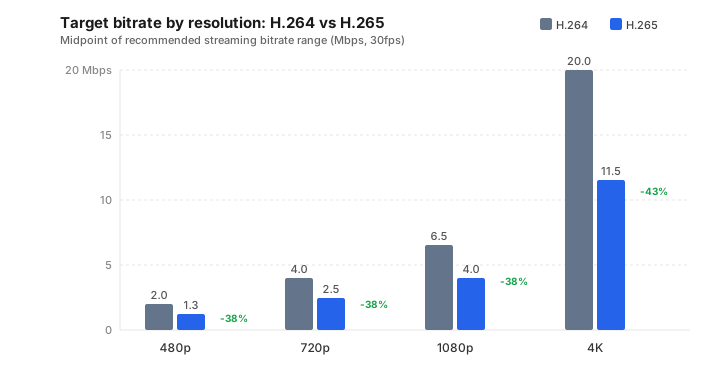
The chart makes the pattern clear: at 4K, the gap between H.264 and H.265 is massive. At 480p, it's barely worth thinking about.
For VOD platforms, the math is straightforward. If you have a library of 10,000 hours of 1080p content, switching from H.264 to H.265 could reduce your storage from roughly 28 TB to 18 TB. At CDN prices, that translates into real money on every view.
Encoding speed and CPU cost
This is the part most comparison articles gloss over, and it's the reason H.265 adoption has been slower than the spec sheet would suggest.
H.265's larger CTUs and more complex prediction algorithms require significantly more processing power to encode. In software encoding (using the open-source x264 and x265 libraries through FFmpeg), H.265 encoding typically runs 2–3× slower than H.264 at comparable preset levels. With the "medium" preset, encoding a 1080p source with x265 can take roughly double the time of x264 on the same hardware.
Benchmark comparisons from independent encoder tests confirm the pattern: x265 produces smaller files than x264 at every quality level, but at a significant time cost. One particularly useful finding from these tests is that x265 at its "ultrafast" preset actually produces better quality output faster than x264 at its "very slow" preset. If you're spending hours squeezing out the last bits of x264 quality, you'd be better off just switching codecs.
Hardware encoding changes the equation
Software encoding isn't the only option. Hardware encoders built into modern GPUs (NVIDIA NVENC, Intel Quick Sync, AMD AMF) can encode H.265 in real time without taxing the CPU. The quality tradeoff used to be significant. Hardware encoders produced noticeably worse output than x264/x265 software encoding. But recent generations have closed that gap considerably.
NVIDIA's RTX 4000 and 5000 series, for instance, include dedicated H.265 and AV1 encoding engines that produce near-software-quality output at 10–20× the speed. If you're encoding for delivery rather than archival preservation, hardware encoding is increasingly viable for both H.264 and H.265.
For cloud-based transcoding at scale, the compute cost gap is closing. WBD's Zambelli addressed this directly at Streaming Media Connect:
"There are certainly higher compute costs for HEVC, though I think the encoders have gotten a lot better over the last several years... We're definitely reaching a point where I think HEVC encoding is going to become cheap enough that it'll almost seem like a free add-on, on top of the AVC encoding."
— Alex Zambelli, Technical Product Manager, Warner Bros. Discovery
Decoding is a different story
The encoding side gets most of the attention, but decoding matters more to end users. Here, H.265 actually has an advantage over what you might expect: while the encoding is harder, the standard was designed so that decoding would be efficient. Most devices manufactured after 2015 include hardware HEVC decoders, which means playback is essentially free from a battery and CPU perspective. For low-latency applications, that decoding efficiency matters.
Compatibility: the actual blocker
If H.265 is technically superior, why isn't it everywhere? Two words: patent licensing.
Browser support
H.264 has essentially universal browser support and has for over a decade. H.265 browser support is more fragmented:
| Browser | H.264 | H.265 | Notes |
|---|---|---|---|
| Chrome | ✅ Full | ⚠️ Partial (v107+) | Requires platform hardware decoder; no software fallback |
| Safari | ✅ Full | ✅ Full (v11+) | Apple has shipped HEVC support since 2017 |
| Firefox | ✅ Full | ⚠️ Partial (v139+) | Added late; requires hardware support |
| Edge | ✅ Full | ⚠️ Partial (v16+) | Requires Windows HEVC extension or hardware support |
"Partial" support means the browser will play H.265 video if the underlying operating system and hardware provide a decoder. On a MacBook with Apple Silicon, Chrome plays H.265 fine. On a Linux desktop without a hardware decoder, it won't.
This "platform-dependent" support model creates a testing headache for developers. With H.264, you can assume it works everywhere. With H.265, you need to detect support at runtime and provide fallbacks.
Device support
Device-side support is much stronger than browser support. Virtually every smartphone, smart TV, set-top box, and GPU manufactured since 2015 includes hardware HEVC decoding. iPhones have recorded video in H.265 by default since the iPhone 7 (2016). The gap is really on the web and in open-source software ecosystems, where the patent situation has created friction.
The patent licensing mess
H.264's licensing is simple: one patent pool (MPEG LA), clear terms, and a cap of $100,000/year for paid streaming services. Free internet video is specifically excluded from content royalties.
H.265's licensing is a different story entirely. Instead of one patent pool, there were three: MPEG LA, HEVC Advance (now Access Advance) and Velos Media. Each had different terms, different pricing and different coverage. Velos didn't even publish their royalty rates publicly. On top of that, roughly two-thirds of the relevant HEVC patents aren't covered by any pool at all, according to analysis by IPWatchdog.
A study by Unified Patents estimated that a fair HEVC license should cost between $0.08 and $0.28 per unit. The actual stacked cost across all three pools was estimated at a minimum of $2.07 per unit, roughly 10× the per-unit cost of H.264. That pricing drove major companies like Google, Amazon, Netflix, and Mozilla to back AV1 as a royalty-free alternative.
Velos Media closed its pool operations in late 2022 when key patent owners (BlackBerry, Ericsson, Panasonic, Sharp, Sony, Qualcomm) left, but the licensing environment remains complex. For small developers building products, H.264's straightforward licensing is often reason enough to stick with it.
When to use H.264
H.264 remains the right choice more often than the marketing around newer codecs would suggest. Pick it when:
- You need universal compatibility. If your video has to play on every browser, every device and every smart TV going back to 2010, nothing else comes close. No runtime codec detection, no fallback logic.
- You're live streaming to Twitch, YouTube Live, or similar platforms. Lower CPU requirements mean you can game and encode at the same time, and every major platform ingests H.264 natively.
- WebRTC video calls. H.264 is mandatory in the WebRTC spec, and H.265 support across browsers is still inconsistent.
- Your content is 1080p or below. The bandwidth savings from H.265 at these resolutions often don't justify the complexity. You're saving maybe 20% on a stream that's already only 5 Mbps.
- Licensing simplicity matters. One patent pool, clear terms, well-understood costs. If you're a startup, H.264 keeps the legal side simple.
When to use H.265
H.265 earns its place in specific scenarios where the compression advantage justifies the added complexity:
- 4K and higher resolution content. At 4K, the bitrate savings are substantial. Netflix, Apple TV+, and Amazon Prime all use HEVC for their 4K catalogs. If you're serving 4K, you probably need H.265 or AV1.
- Large VOD libraries where you encode once and serve millions of views. A 35% bitrate reduction on a 50,000-hour library translates directly to lower CDN costs on every single view.
- Surveillance and IP cameras. 24/7 recording generates enormous footage, and cutting storage requirements in half is significant when you're running dozens of cameras. Most modern NVRs have shipped HEVC support for years.
- Apple ecosystem delivery. iPhones, iPads, Macs, and Apple TVs all include full hardware HEVC decode, and Safari has supported it since version 11. The browser compatibility headaches that plague the open web don't apply here.
- Bandwidth-constrained delivery, like mobile users on metered connections or viewers in regions with slower internet. H.265 can deliver watchable quality at bitrates where H.264 falls apart.
Should you skip H.265 entirely? The AV1 question
Here's the elephant in the room. AV1 is a royalty-free codec backed by the Alliance for Open Media, whose members include Google, Apple, Netflix, Amazon, and Microsoft. It offers compression efficiency that matches or exceeds H.265, with none of the licensing baggage.
Netflix published a detailed breakdown of their AV1 deployment in December 2025. The numbers are hard to ignore:
AV1 now accounts for approximately 30% of all Netflix streaming, making it the platform's second most-used codec. AV1 sessions use one-third less bandwidth than both AVC and HEVC, with 45% fewer buffering interruptions.
— Netflix Technology Blog, December 2025
Netflix also reported that AV1 streaming sessions score 4.3 VMAF points higher than H.264 and 0.9 points higher than HEVC. It doesn't just use less bandwidth. It looks better too.
YouTube also uses AV1 extensively, particularly for high-resolution content. An independent analysis of Netflix's streams found AV1 delivering roughly 48% lower average bitrate than H.264 on real content.
So why not just use AV1 for everything?
Encoding speed is the main blocker. AV1 software encoding (using libaom or SVT-AV1) is still 5–10× slower than H.265. For live streaming, that's a dealbreaker unless you have hardware encoding support. SVT-AV1 has closed the gap significantly at faster presets, but it's still not as fast as x265.
Hardware decode support is growing fast but isn't universal yet. AV1 decoding is available on most devices manufactured since 2022–2023, including Apple M3/A17 Pro chips, recent NVIDIA and Intel GPUs, and newer smart TVs. Netflix reported that 88% of large-screen devices submitted for certification between 2021–2025 supported AV1, which is promising. But the installed base of AV1-capable devices is still smaller than HEVC's.
Real-time streaming is the other gap. Netflix currently uses AV1 only for on-demand content. They've said they're evaluating it for live events, but the encoding complexity makes real-time AV1 challenging without dedicated hardware.
The codec roadmap
| Codec | Released | Compression vs H.264 | Licensing | Status in 2026 |
|---|---|---|---|---|
| H.264 (AVC) | 2003 | Baseline | Single pool (MPEG LA), clear terms | The universal default; not going anywhere |
| H.265 (HEVC) | 2013 | ~50% better | Multiple pools, complex terms | Strong in 4K/device ecosystems, weak on open web |
| AV1 | 2018 | ~50–60% better | Royalty-free | 30% of Netflix; growing fast in browsers |
| H.266 (VVC) | 2020 | ~50% better than HEVC | Patent pools forming | Minimal real-world adoption; may be skipped entirely |
| AV2 | ~2026 | TBD (targeting 30%+ over AV1) | Royalty-free (planned) | In development; Netflix has expressed interest |
H.266 (VVC/Versatile Video Coding) deserves a mention because it exists on paper, but adoption looks unlikely to reach critical mass. It faces the same licensing fragmentation that slowed HEVC, and by the time hardware support materializes, AV2 may already be available. One industry analyst has described VVC as effectively dead on arrival.
FAQ
Is H.264 the same as MP4?
No. MP4 is a container format (technically MPEG-4 Part 14) and H.264 is a codec. The container is the box; the codec is what's inside. An MP4 file can hold video encoded with H.264, H.265, AV1, or other codecs, plus audio tracks, subtitles, and metadata. When someone sends you an "MP4 file," you still don't know which codec was used to encode the video until you inspect it. In FFmpeg you can check with ffprobe -v error -select_streams v:0 -show_entries stream=codec_name -of default=nw=1 input.mp4.
Why isn't H.265 more widely used?
Patent licensing. H.264 has one patent pool with clear, predictable terms. H.265 launched with three separate patent pools (MPEG LA, HEVC Advance, and Velos Media), each charging independently and covering different subsets of the relevant patents. The stacked royalty cost was estimated at roughly 10× what H.264 costs per unit. That fragmentation scared off browser vendors (Chrome and Firefox were slow to add support), pushed major tech companies toward the royalty-free AV1 codec, and left H.265 strongest in closed ecosystems like Apple devices and smart TVs where the licensing is handled at the hardware level.
What does 10-bit mean in H.265/HEVC?
It refers to color depth. Standard 8-bit video can represent 256 shades per color channel (red, green, blue), which gives you about 16.7 million possible colors. 10-bit video bumps that to 1,024 shades per channel, or roughly 1.07 billion colors. In practice, 10-bit encoding reduces visible banding in gradients (like a sunset sky or a dark scene with subtle shadow detail). H.265's Main 10 profile supports 10-bit natively and is built into nearly all hardware decoders, which is one reason HEVC became the standard for HDR content. H.264 has a 10-bit High 10 profile on paper, but hardware support for it is rare, so 10-bit H.264 decoding usually falls back to software.
The bottom line
The H.264 vs H.265 decision in 2026 comes down to what you're building and who needs to watch it.
H.264 is still the safest choice when compatibility matters most. If you're targeting 4K delivery, large VOD libraries or bandwidth-sensitive applications, H.265 delivers real savings, especially if your audience is primarily on native apps and hardware-accelerated devices rather than web browsers.
But if you're building something new today, take a hard look at AV1 before committing to H.265. It matches HEVC's compression without the patent licensing headaches, and Netflix plus YouTube are already betting heavily on it. The encoding speed penalty is real, but it's shrinking fast as hardware encoders catch up.
The most pragmatic approach for most teams: encode in H.264 as your compatibility baseline, add H.265 or AV1 as higher-efficiency tiers for capable devices, and let the client negotiate which stream to pull. That's what Netflix does, and it's hard to argue with their results.