















ChannelMemberList
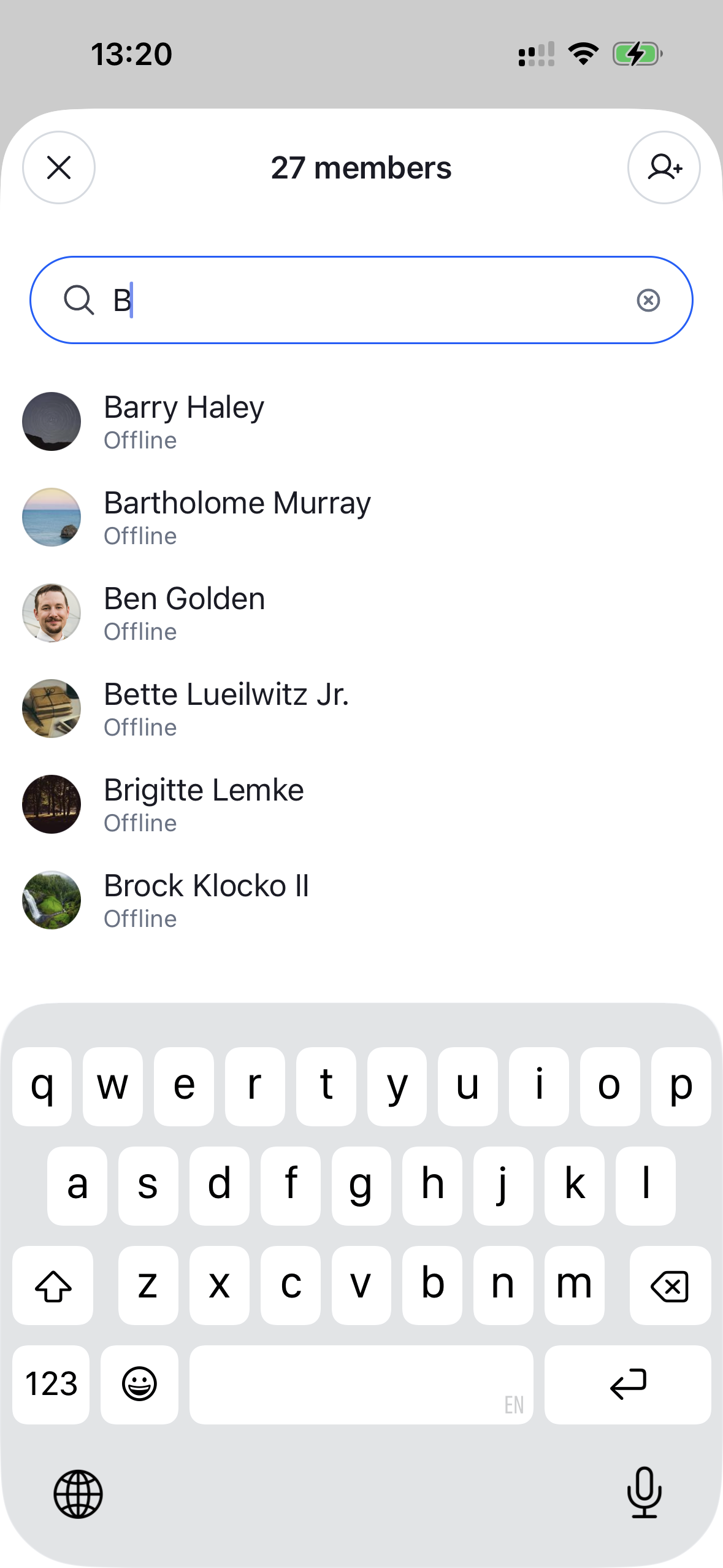
The full, searchable list of a channel's members. It renders a search input over a paginated FlatList of members and opens a per-member actions sheet when a row is tapped. Needs to be wrapped in a ChannelDetailsContextProvider that supplies the channel.
This is the component rendered behind the "view all" entry point of ChannelDetails. Render it yourself to build a custom, full-screen members screen — for example a dedicated navigation route instead of a modal.
Best Practices
- Wrap it in
ChannelDetailsContextProviderso the list can resolve the channel. - Render it as a full-screen route (or any container you control) and supply your own header —
ChannelMemberListno longer ships its own modal chrome. - Customize the per-member actions through
ChannelMemberActionsSheet'sgetChannelMemberActionItemsinstead of rebuilding the sheet. - Override and configure building blocks like
ChannelMemberItemorChannelMemberActionsSheetby wrapping the list inWithComponentswith anoverridesmap.
General Usage
import {
  OverlayProvider,
  Chat,
  ChannelDetailsContextProvider,
  ChannelMemberList,
} from "stream-chat-react-native";

const ChannelMembersScreen = () => {
  return (
    <OverlayProvider>
      <Chat client={client}>
        <ChannelDetailsContextProvider channel={channel}>
          <ChannelMemberList />
        </ChannelDetailsContextProvider>
      </Chat>
    </OverlayProvider>
  );
};
Props
| Prop | Description | Type |
|---|---|---|
additionalFlatListProps |
Override the underlying FlatList props of the list. |
Partial<FlatListProps<ChannelMemberResponse>> |
searchInputProps |
Additional props forwarded to the search input. | SearchInputProps |
searchSource |
A custom ChannelMemberSearchSource used to query and paginate members. Overrides the source created by default (pre-configured to autocomplete by name). |
ChannelMemberSearchSource |
Building blocks
ChannelMemberList renders a ChannelMemberItem per member and opens a ChannelMemberActionsSheet on press. Both are sourced from the components context and can be overridden through WithComponents.
ChannelMemberItem
A single member row. It renders the member's roles as badges via the overridable RoleList/RoleItem components.
| Prop | Description | Type |
|---|---|---|
member * |
The member to render. | ChannelMemberResponse |
getMemberRoles |
Override the roles shown next to the member; returns an array of { key, label }. Defaults to the built-in Owner / Admin / Moderator logic. |
GetMemberRoles |
onPress |
Fired when the row is pressed. | (member: ChannelMemberResponse) => void |
size |
Visual size of the row. 'sm' (default) is a compact row; 'lg' is a profile-style header. |
'sm' | 'lg' |
testID |
Test identifier. | string |
RoleList
The horizontal list of role badges rendered inside ChannelMemberItem. Each badge is rendered by the overridable RoleItem component. Sourced from the components context and overridable through WithComponents.
| Prop | Description | Type |
|---|---|---|
roles * |
The roles to render, as an array of { key, label }. |
RoleLabel[] |
RoleItem
A single role badge (pill). owner roles use the accent (blue) palette; every other role uses the neutral (grey) palette. Colors are themeable via theme.channelDetails.roleItem (ownerBackgroundColor, ownerColor, roleBackgroundColor, roleColor). Sourced from the components context and overridable through WithComponents.
| Prop | Description | Type |
|---|---|---|
role * |
The role to render, as a { key, label } pair. |
RoleLabel |
viewStyle |
Style applied to the badge container, layered over the theme override. | StyleProp<ViewStyle> |
textStyle |
Style applied to the badge label, layered over the theme override. | StyleProp<TextStyle> |
ChannelAddMembersButton
A button that opens the add-members form (ChannelAddMembersForm) in a modal. Useful as a header action on a custom members screen.
| Prop | Description | Type |
|---|---|---|
onPress |
Override the default behavior, which opens the add-members modal. | () => void |
style |
Style forwarded to the underlying Button. |
ButtonProps['style'] |
variant |
Render the button as an icon or a text button. | 'icon' | 'text' |
testID |
Test identifier. | string |
ChannelMemberActionsSheet
Opened when a member is tapped. It renders a ChannelMemberItem (size='lg') header followed by ChannelDetailsActionItem rows.
| Prop | Description | Type |
|---|---|---|
member * |
The member the actions apply to. | ChannelMemberResponse |
onClose * |
Fired when the sheet is closed. | () => void |
visible * |
Controls sheet visibility. | boolean |
getChannelMemberActionItems |
Customize the list of action items rendered in the per-member actions sheet. | GetChannelMemberActionItems |