















Custom Member Actions
This cookbook shows how to customize the per-member actions rendered in the ChannelDetails component.
When a member is tapped, the SDK opens a ChannelMemberActionsSheet whose actions are driven by a single getChannelMemberActionItems callback. It receives the default items the SDK builds for the tapped member plus a context, and returns the final list to render. With it you can extend the defaults (add your own action), narrow them (hide an action), or overwrite them entirely (return a list you build from scratch).
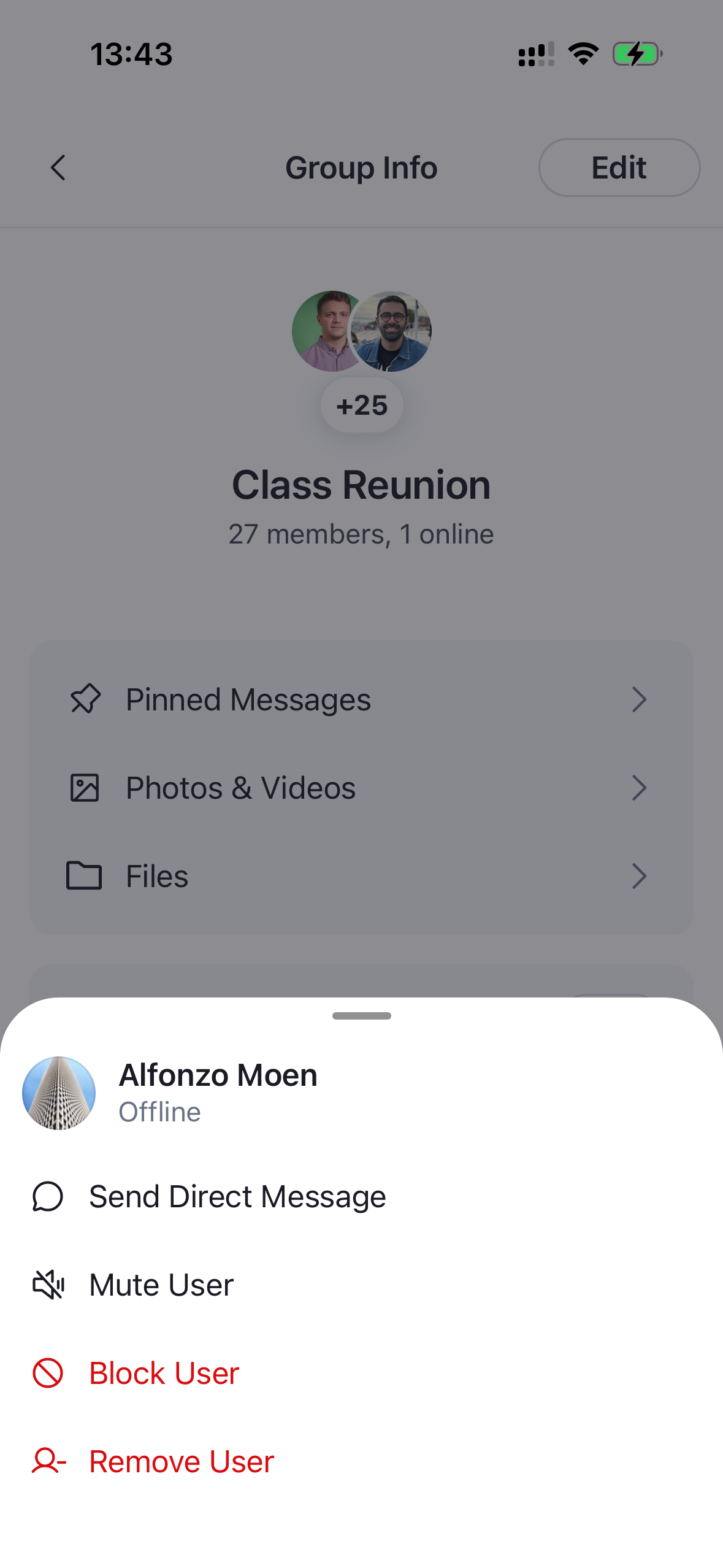
As an example we'll add a Send Direct Message action — the same one the SampleApp ships. This cookbook focuses on providing the action item and dismissing the sheet; the screen the action routes to is your app's concern and is left out.
Best Practices
- Match the
ChannelMemberActionItemshape (action,Icon,id,label,type) so your rows render consistently with the built-in ones. - Reuse
defaultItemsand map/filter over it instead of rebuilding the list — items you leave untouched keep their built-in behavior, including actions added in future SDK versions. - Check
context.isCurrentUserbefore offering peer-only actions (sending a DM to yourself, etc.). - Call
closeModals()fromuseChannelDetailsContext()before you navigate away, so the open actions sheet (and the members modal behind it) dismiss instead of lingering under your new screen. - Override
ChannelMemberActionsSheetwithWithComponents, forward its props, and pass yourgetChannelMemberActionItems— don't rebuild the sheet.
Adding a "Send Direct Message" Action
Build a getChannelMemberActionItems callback that prepends a sendDirectMessage item to defaultItems. The context gives you isCurrentUser to skip the action for yourself, member to read the tapped user, and t for translations. The item's action calls closeModals() and then navigates — the destination screen is up to you and isn't covered here:
import { useCallback } from "react";
import { useNavigation } from "@react-navigation/native";
import {
  GetChannelMemberActionItems,
  useChannelDetailsContext,
} from "stream-chat-react-native";

// Your own icon component that accepts `IconProps`.
import { SendDirectMessage } from "../icons/SendDirectMessage";

const useGetChannelMemberActionItems = () => {
  const navigation = useNavigation();
  const { closeModals } = useChannelDetailsContext();

  return useCallback<GetChannelMemberActionItems>(
    ({ context, defaultItems }) => {
      // Don't offer sending a direct message to yourself.
      if (context.isCurrentUser) {
        return defaultItems;
      }

      const user = context.member.user;

      return [
        {
          action: () => {
            closeModals();
            navigation.navigate("NewDirectMessagingScreen", {
              initialUser: user,
            });
          },
          Icon: SendDirectMessage,
          id: "sendDirectMessage",
          label: "Send Direct Message",
          type: "standard",
        },
        ...defaultItems,
      ];
    },
    [navigation, closeModals],
  );
};
Wire the callback by overriding ChannelMemberActionsSheet through WithComponents. Forward the props the SDK passes in and add your getChannelMemberActionItems. Everything must live inside the ChannelDetailsContextProvider so useChannelDetailsContext() (and therefore closeModals) is available:
import { useCallback } from "react";
import {
  ChannelDetails,
  ChannelDetailsContextProvider,
  ChannelMemberActionsSheet,
  WithComponents,
} from "stream-chat-react-native";

const getChannelMemberActionItems = useGetChannelMemberActionItems();

const MemberActionsSheet = useCallback(
  (props: Parameters<typeof ChannelMemberActionsSheet>[0]) => (
    <ChannelMemberActionsSheet
      {...props}
      getChannelMemberActionItems={getChannelMemberActionItems}
    />
  ),
  [getChannelMemberActionItems],
);

const ChannelDetailsScreen = ({ route, navigation }) => {
  const { channel } = route.params;
  return (
    <ChannelDetailsContextProvider channel={channel}>
      <WithComponents
        overrides={{ ChannelMemberActionsSheet: MemberActionsSheet }}
      >
        <ChannelDetails onBack={() => navigation.goBack()} />
      </WithComponents>
    </ChannelDetailsContextProvider>
  );
};
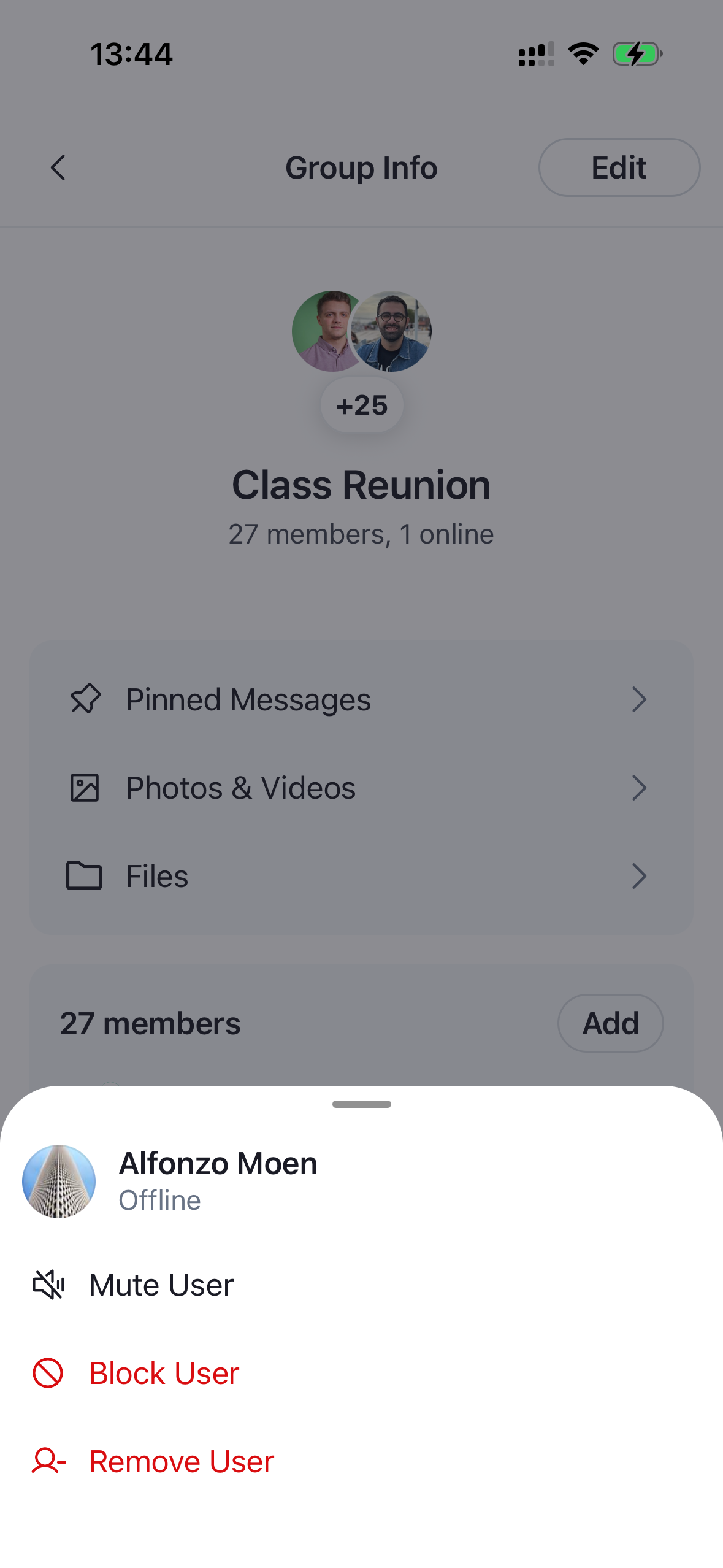
That's it — a Send Direct Message row now appears above the default actions for every member except yourself, and tapping it closes the sheet and routes to your screen.
| Default member actions | With Send Direct Message |
|---|---|
 |
 |
Narrowing the Default Actions
To hide an action, filter defaultItems by id. Each item carries a stable id (muteUser, block, removeMember), so you can drop the ones you don't want. Here we remove the block action:
import { GetChannelMemberActionItems } from "stream-chat-react-native";

const getChannelMemberActionItems: GetChannelMemberActionItems = ({
  defaultItems,
}) => defaultItems.filter((item) => item.id !== "block");
Navigate to a Profile Page
The actions sheet isn't the only way to respond to a member tap. To send the user to a profile screen instead of opening the sheet, override the ChannelMemberItem component and replace its onPress.
import { useNavigation } from "@react-navigation/native";
import {
  ChannelMemberItem,
  ChannelMemberItemProps,
  useChannelDetailsContext,
} from "stream-chat-react-native";

const MemberItem = (props: ChannelMemberItemProps) => {
  const navigation = useNavigation();
  const { closeModals } = useChannelDetailsContext();

  return (
    <ChannelMemberItem
      {...props}
      onPress={(member) => {
        closeModals();
        navigation.navigate("MemberProfileScreen", { member });
      }}
    />
  );
};
Register the override through WithComponents, alongside the ChannelDetailsContextProvider as before:
import {
  ChannelDetails,
  ChannelDetailsContextProvider,
  WithComponents,
} from "stream-chat-react-native";

const ChannelDetailsScreen = ({ route, navigation }) => {
  const { channel } = route.params;
  return (
    <ChannelDetailsContextProvider channel={channel}>
      <WithComponents overrides={{ ChannelMemberItem: MemberItem }}>
        <ChannelDetails onBack={() => navigation.goBack()} />
      </WithComponents>
    </ChannelDetailsContextProvider>
  );
};
Now tapping a member closes the channel details modals and routes to your MemberProfileScreen instead of opening the actions sheet. The profile screen itself is your app's concern and isn't covered here.