


Google just dropped Gemini 3. The impression is it's impressive, and not just with words. The coolest concepts making the rounds are the ones that showcase the fundamental trait of the Gemini family of models: multimodality.
From its inception, the Gemini models have been built different. Unlike GPT-4o or Claude, which bolt vision encoders onto language models through adapter layers, Gemini learned to see, read, and understand simultaneously from day one. This makes it incredibly powerful for a wide range of visual tasks: understanding video, extracting structured data from images, creating designs, and even performing real-time video analysis.
In this post, we want to look at Gemini's vision capabilities from two directions: the technical underpinnings of how the models are built, and how easy it is to put these capabilities into practice for image understanding, video analysis, and structured data extraction.
Why Gemini's Vision is Different
Most multimodal AI follows a predictable pattern: train a vision encoder (like CLIP), train a language model (like GPT), and then glue them together with projection layers or adapters. It works, but it's like teaching someone to read in one room and see in another, then hoping they can combine both skills seamlessly.
Gemini took a different path.
Native Vision
At its core, Gemini doesn't just "support" images; it speaks fluent vision. Instead of bolting a visual encoder onto a text model, Gemini uses a sparse Mixture-of-Experts (MoE) Transformer architecture that was trained from the start to be natively multimodal. When Gemini processes an image, it's not converting pixels to words; it's thinking in a unified high-dimensional space where images, text, and audio all coexist naturally.
This MoE design works like this: a learned gating mechanism looks at each input token and routes it to specific "expert" neural networks. Processing a face? The gate activates experts specialized in facial features and spatial relationships. Reading a chart? Different experts handle the graph structure and numerical patterns. Only a fraction of the model's parameters are activated for any given input, maintaining massive capacity without incurring excessive compute costs.
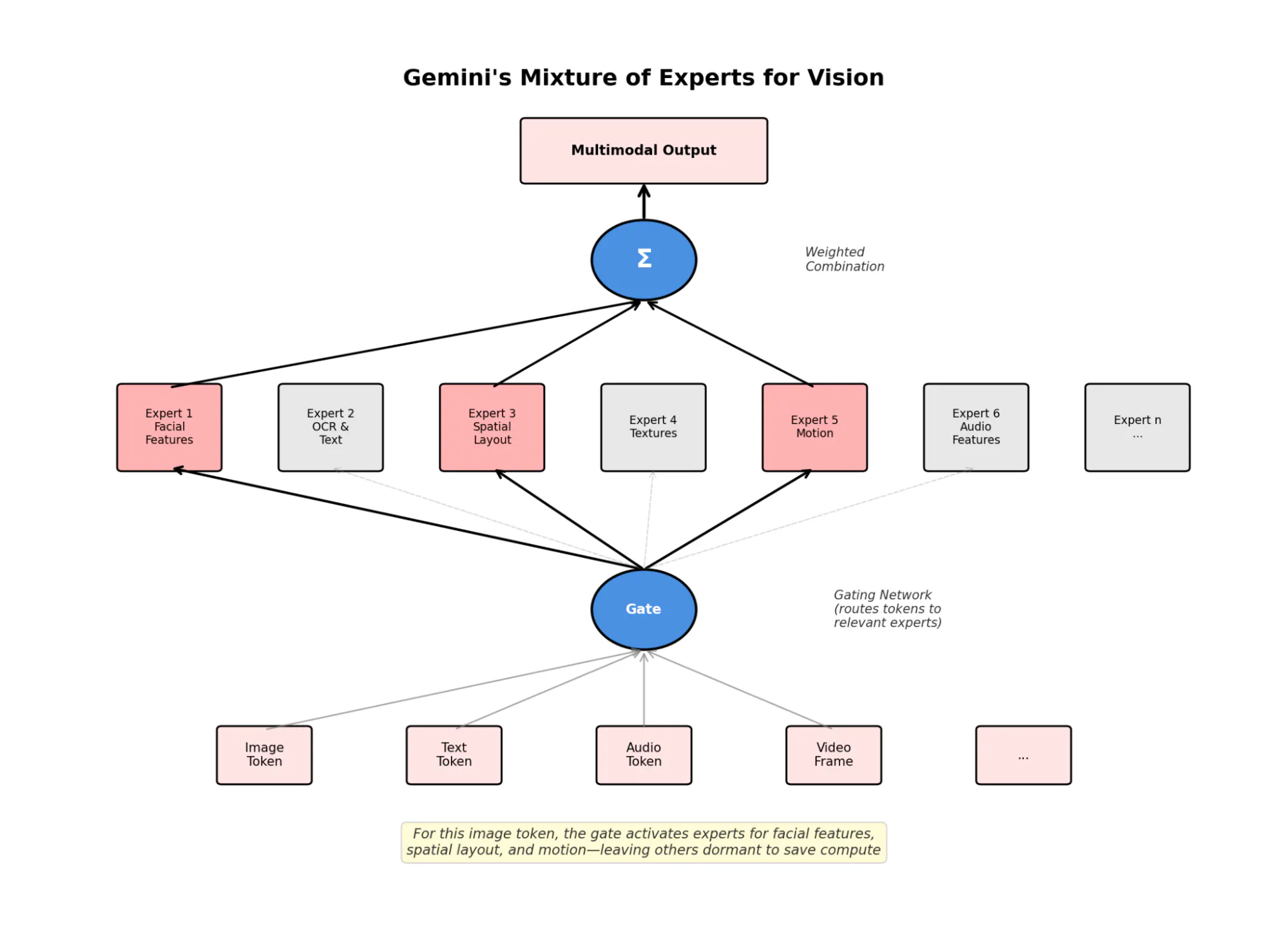
Google's recent research reveals something fascinating: Gemini's internal representations align with human conceptual hierarchies. It doesn't group objects by superficial features like color or texture but instead by semantic meaning. Show it a cat, a tiger, and an orange ball, and it knows the cat and tiger belong together, despite the ball sharing the cat's color. This human-like conceptual mapping is why it excels at "odd-one-out" reasoning that trips up other vision models.
Interleaved Tokenization and a Gigantic Context Window
Gemini doesn't process images, then text, then audio in sequence. It interleaves all modalities as a single stream of tokens, mapping everything to points in that unified embedding space. This means the model can literally read code while looking at a diagram, or analyze speech while watching the speaker's lips move, all in the same forward pass.
The tokenization uses dynamic tiling. Instead of downsampling high-resolution images, they're divided into 768x768 tiles, then each independently tokenized to preserve detail.
Gemini 1.5 Pro has a two-million-token context window. This allows the model to hold an entire feature-length film, a thousand-page PDF, or days of audio in active memory for a single inference pass. Gemini 3 has a paltry one-million-token context window in comparison.
Ring Attention is the feature that allows the models to distribute attention computation across multiple TPUs, maintaining global coherence without the quadratic memory explosion that kills standard transformers. In benchmarks, Gemini achieves >99% recall, finding specific "needles" in massive "haystacks"—like locating a 3-second event in a 10-hour video or a whispered keyword in 107 hours of audio.
Video as Parallel Streams
Image analysis is great, but vision is about more than static pictures. For video, Gemini doesn't just process individual frames; it is thinking in parallel streams of video and audio.
Gemini 3 Pro introduces variable-sequence-length processing, replacing the fixed "Pan and Scan" methods of earlier versions. Instead, you toggle media_resolution to balance quality against token cost:
-
High resolution: 280 tokens per frame for detailed analysis
-
Standard resolution: 258 tokens per frame (default)
-
Low resolution: 70 tokens per frame for cost-sensitive applications
This flexibility matters. Analyzing a yoga posture might only require low resolution to detect motion, while medical imaging demands the highest detail. The model adapts to your needs rather than forcing a one-size-fits-all approach.
The audio stream processes continuously at ~32 tokens per second. But it's not just transcribing audio; it's analyzing raw features like tone, pitch, and background noise. Timestamp tokens anchor everything in time, letting the model cite specific moments (MM:SS) when explaining what it saw.
Using Gemini's Vision AI
How does all this architecture look when you're just calling an API? Like a well-architected API should, with everything abstracted away.
Here we've got code for three core vision AI capabilities:
-
Image analysis that understands complex charts and diagrams
-
Video summarization that processes YouTube videos directly without frame extraction
-
Structured data extraction that converts visual documents into immediately usable JSON. Let's look at each.
Image Analysis: From Pixels to Understanding
The entire image analysis pipeline, all the MoE routing, dynamic tiling, and expert activation, collapses into this:
12345678910111213141516app.post('/analyze',  imageUpload.single('image'),  async  (req,  res)  =>  {
  const  base64Image  =  await  fs.readFile(imagePath)
    .then(buffer  =>  buffer.toString('base64'));

  const  model  =  genAI.getGenerativeModel({  model:  'gemini-3-pro-preview'  });

  const  result  =  await  model.generateContent([
    req.body.prompt  ||  'Describe this image in detail. What do you see?',
    {
      inlineData:  {
        data:  base64Image,
        mimeType:  mimetype
      }
    }
  ]);
});
If we use the benchmark table from the Gemini 3 release post, we can get the model to analyze its analysis:
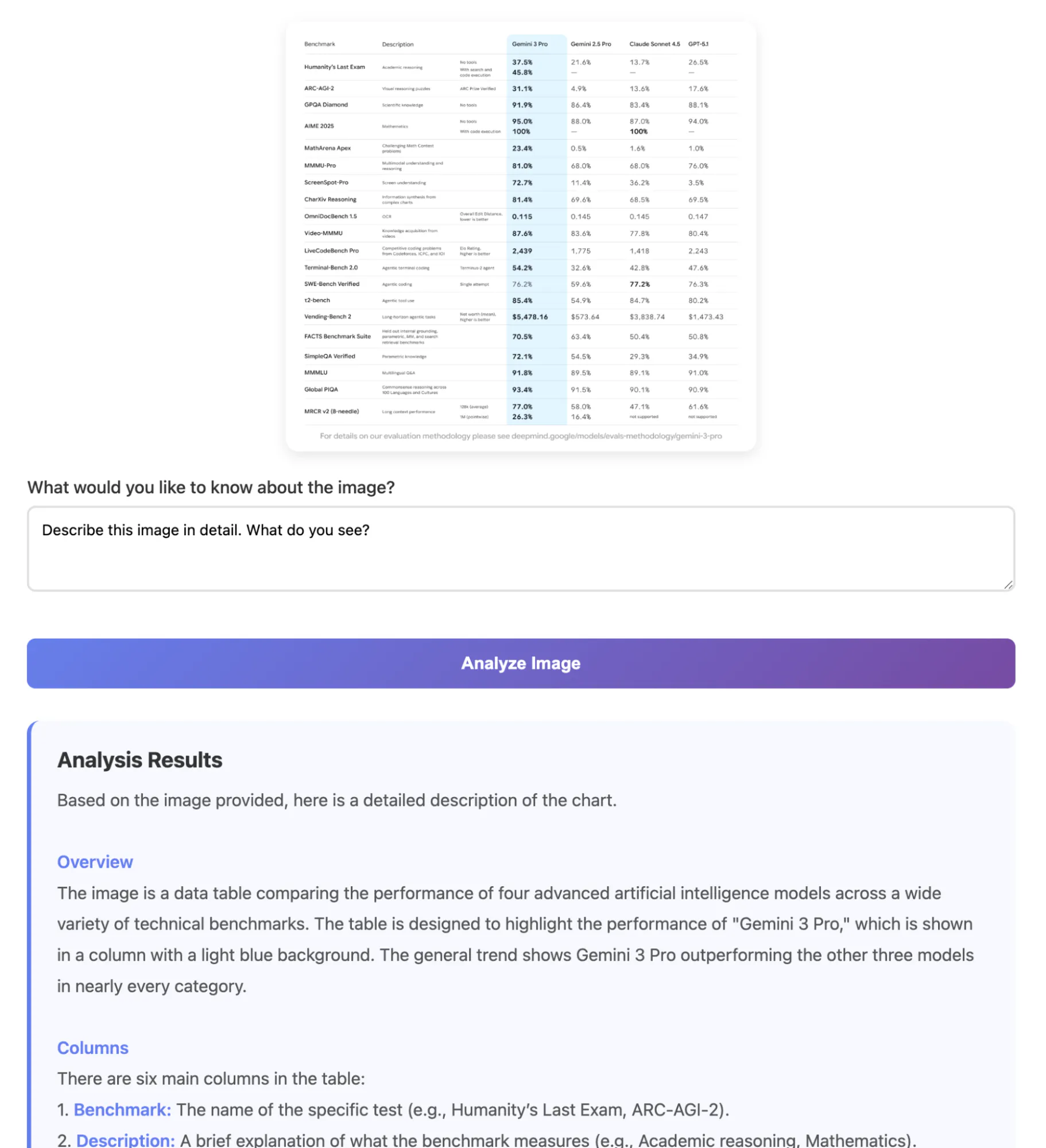
It didn't just extract text. It understood the structure, identified the purpose (highlighting Gemini 3 Pro's performance), recognized the color coding, and even counted that 19 out of 20 benchmarks showed Gemini leading.
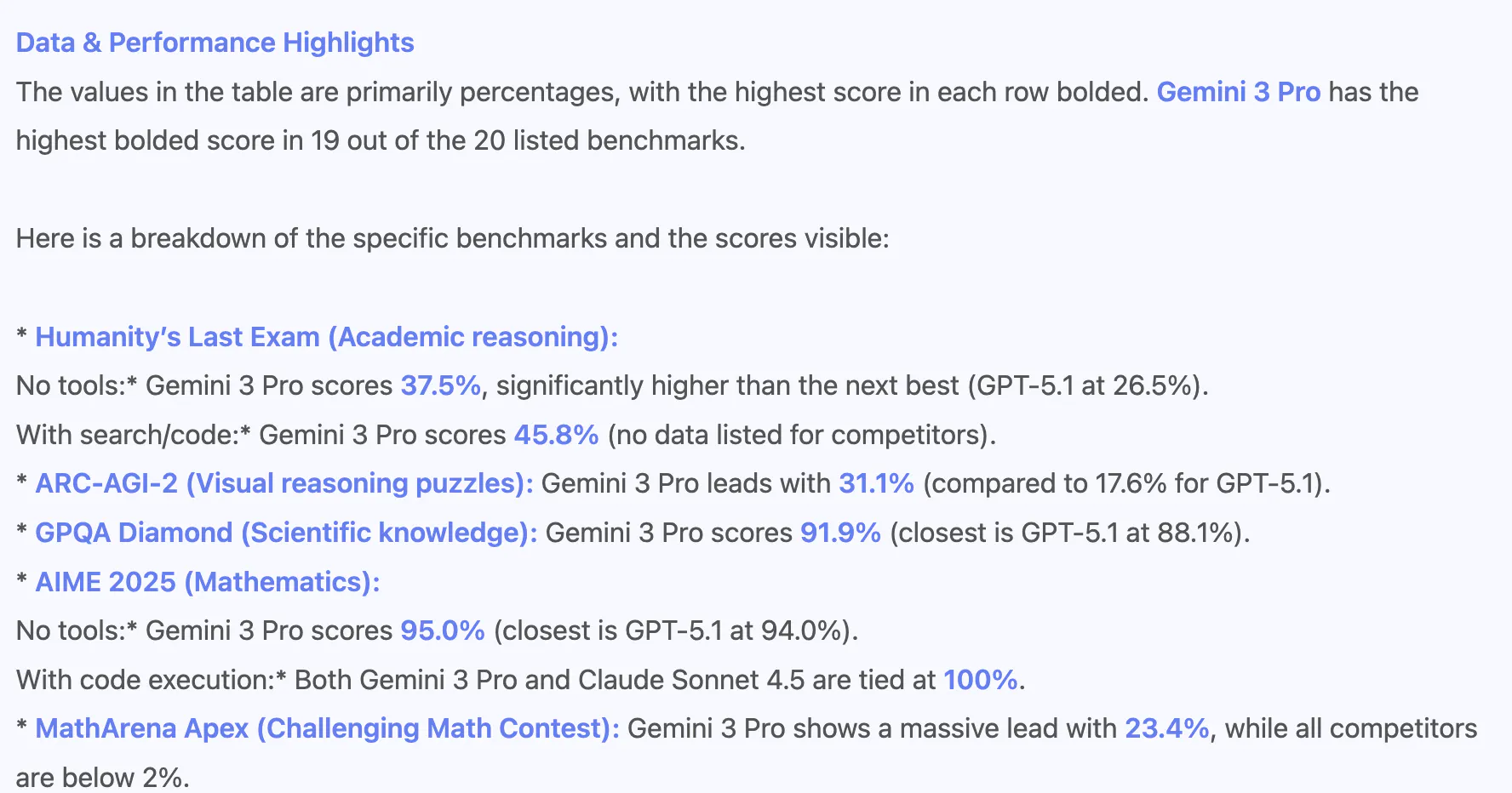
This is the SigLIP encoder and spatial experts working together, preserving both local detail and global context.
YouTube Video Analysis: Temporal Understanding at Scale
The parallel streams processing we discussed earlier? Here's the complete implementation:
1234567891011121314151617app.post('/analyze-video',  async  (req,  res)  =>  {
  const  {  youtubeUrl,  prompt  }  =  req.body;

  const  model  =  genAI.getGenerativeModel({  model:  'gemini-3-pro-preview'  });

  //  Direct  YouTube  URL-no  preprocessing,  no  frame  extraction
  const  videoPart  =  {
    fileData:  {
      fileUri:  youtubeUrl //  Native  YouTube  support
    }
  };

  const  result  =  await  model.generateContent([
    prompt  ||  'Analyze this video comprehensively. Provide a detailed summary...',
    videoPart
  ]);
});
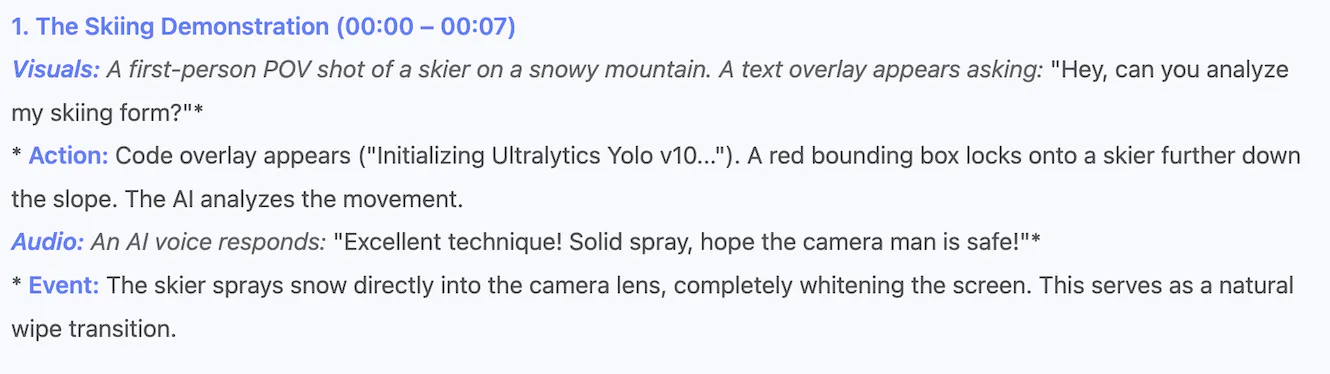
Again, not much. What does it have to say about our "Vision Agents" launch video?
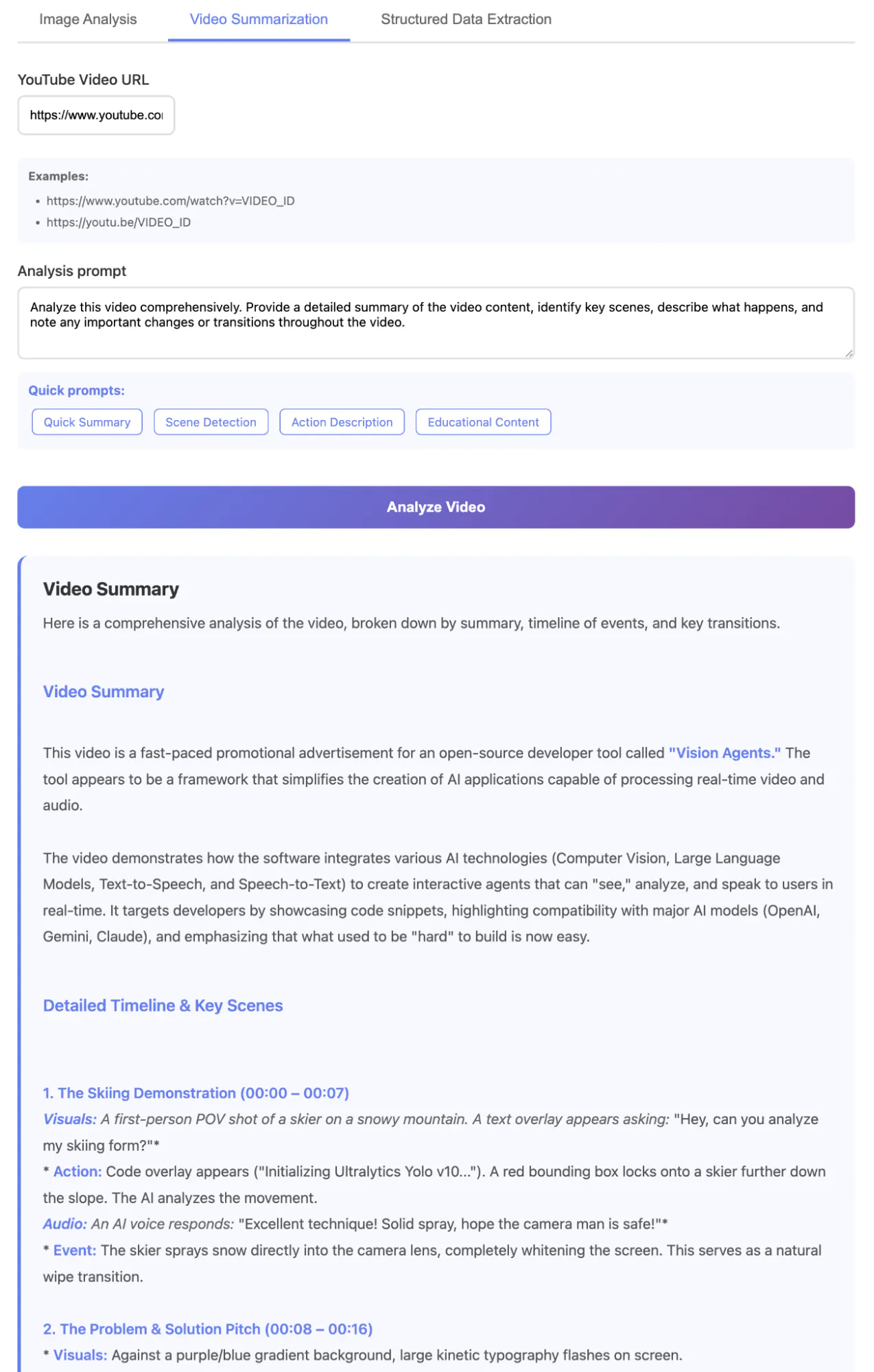
First, some nice technical details:
-
No need to download the video, extract frames with ffmpeg, batch them into manageable chunks, and reconstruct temporal relationships afterward. The model handles the entire video as a unified stream.
-
Since it's Google's model, the YouTube integration is native. You pass a URL, and Gemini fetches the video directly from YouTube's servers, no authentication or download required.
-
The model processes up to 2 hours of video in a single context, maintaining temporal coherence across the entire length. This would require complex windowing strategies with other approaches.
But really, the key point here isn't the technical niceties for the developer; it is the reasoning and understanding abilities it brings to any end user. Beyond just describing the video, it has understood the narrative arc, tracked when code appeared on screen versus marketing copy, identified the transition from problem statement to solution, and even caught the shift in background music that emphasized key moments.
More than transcribing what it sees, it's following the story, understanding the persuasive structure of an advertisement, recognizing that 'Vision Agents' is the product being promoted, and identifying the target audience (developers) from the code snippets and technical language.
Structured Data Extraction: Visual Documents to JSON
Here's where Gemini's unified embedding space eliminates traditional OCR pipelines:
123456789101112131415161718192021222324//  Define  extraction  schemas  for  different  document  types
const  extractionPrompts  =  {
  table:  'Extract all tables from this image and return them as JSON. Format: {"tables": [{"headers": [], "rows": [[]]}]}',

  receipt:  'Extract receipt information and return as JSON. Format: {"merchant": "", "date": "", "total": "", "items": [{"name": "", "price": ""}]}',

  chart:  'Extract data from this chart/graph and return as JSON. Format: {"title": "", "type": "", "data": [{"label": "", "value": ""}]}'
};

//  Configure  model  for  structured  output
const  model  =  genAI.getGenerativeModel({
  model:  'gemini-3-pro-preview',
  generationConfig:  {
    responseMimeType:  'application/json' //  Enforces  JSON  schema
  }
});

const  result  =  await  model.generateContent([
  extractionPrompts[documentType],
  imagePart
]);

//  Direct  JSON  parsing-no  post-processing  needed
const  structuredData  =  JSON.parse(response.text());
When we fed it the same benchmark table, it returned perfectly structured JSON:
12345678910111213141516171819202122232425262728293031323334353637383940414243444546{
  "table_metadata":  {
    "title":  "Benchmark Comparison",
    "models_compared":  [
      "Gemini 3 Pro",
      "Gemini 2.5 Pro",
      "Claude Sonnet 4.5",
      "GPT-5.1"
    ],
    "footer_note":  "For details on our evaluation methodology please see deepmind.google/models/evals-methodology/gemini-3-pro"
  },
  "benchmarks":  [
    {
      "name":  "Humanity's Last Exam",
      "description":  "Academic reasoning",
      "results":  [
        {
          "condition":  "No tools",
          "Gemini 3 Pro":  "37.5%",
          "Gemini 2.5 Pro":  "21.6%",
          "Claude Sonnet 4.5":  "13.7%",
          "GPT-5.1":  "26.5%"
        },
        {
          "condition":  "With search and code execution",
          "Gemini 3 Pro":  "45.8%",
          "Gemini 2.5 Pro":  "---",
          "Claude Sonnet 4.5":  "---",
          "GPT-5.1":  "---"
        }
      ]
    },
    {
      "name":  "ARC-AGI-2",
      "description":  "Visual reasoning puzzles",
      "results":  [
        {
          "condition":  "ARC Prize Verified",
          "Gemini 3 Pro":  "31.1%",
          "Gemini 2.5 Pro":  "4.9%",
          "Claude Sonnet 4.5":  "13.6%",
          "GPT-5.1":  "17.6%"
        }
      ]
    },
...
The model correctly identified the table structure, preserved numerical formatting, noted special markers (asterisks), and even recognized which column was highlighted.
Think about what this allows for? The initial image analysis of the benchmark data above was excellent for human reading, but this structured extraction enables programmatic analysis. You could pipe this JSON directly into a visualization library to generate charts, feed it into a database for trend analysis, or use it as input for another AI model to identify patterns.
The structured format means no regex parsing, no string manipulation, no brittle extraction rules. Imagine doing this across thousands of research papers, financial reports, or medical records, automatically building queryable databases from visual documents that were previously locked in PDF prisons.
Beyond Batch Processing with Real-Time Video
Gemini's architecture enables real-time video AI that watches, understands, and responds in the moment. This is where the sparse MoE design and efficient tokenization really pay off.
Here's a golf coach that watches your swing in real-time and provides immediate feedback:
123456789101112131415161718from  vision_agents.core  import  User,  Agent
from  vision_agents.plugins  import  getstream,  ultralytics,  gemini

agent  =  Agent(
    edge=getstream.Edge(), #  Low-latency  video  transport
    agent_user=User(name="AI golf coach"),
    instructions="Read @golf_coach.md", #  Domain  expertise
    llm=gemini.Realtime(fps=10), #  Process  10  frames  per  second
    processors=[ultralytics.YOLOPoseProcessor(model_path="yolo11n-pose.pt")],
)

#  Join  a  video  call  and  start  watching
call  =  agent.edge.client.video.call("default",  str(uuid4()))
with  await  agent.join(call):
    await  agent.llm.simple_response(
        text="Say hi. After the user does their golf swing offer helpful feedback."
    )
    await  agent.finish() #  Run  until  call  ends
The agent is processing live video at 10 FPS while simultaneously running YOLO pose detection for body position tracking. The visual stream and pose data flow into Gemini's multimodal context in real-time.
In real-time mode, parallel streams allow Gemini to process audio and video at 10 FPS:
-
Visual tokens: 258 tokens × 10 frames = 2,580 tokens/second
-
Audio tokens: 32 tokens/second (continuous)
-
Pose overlay: ~50 tokens/second (YOLO annotations)
-
Total bandwidth: ~2,660 tokens/second
The MoE architecture is what makes this viable. For a golf swing, the gating network activates experts for motion tracking, spatial relationships, and biomechanics while keeping text and audio experts largely dormant. Only some of the model's parameters fire for each frame, maintaining sub-100ms latency despite its massive capacity.
This example also combines specialized models (YOLO) with Gemini to go beyond just video analysis:
1processors=[ultralytics.YOLOPoseProcessor(model_path="yolo11n-pose.pt")]
YOLO runs at native video speed, extracting 17 key body points per frame: shoulders, elbows, wrists, hips, knees. This structured data streams into Gemini alongside the raw video. The model sees both:
-
The actual pixels (what the swing looks like)
-
The pose skeleton (precise joint positions and angles)
This dual input allows for much better analysis. Instead of just "your form needs work," the coach can say: "Your left shoulder drops below parallel 5 seconds in. Keep it level through the turn. See how your weight shifts early? That's causing the slice."
This domain knowledge is added to the model through specific instructions that load detailed coaching expertise:
123456789101112#  Golf  Swing  Coaching  Guide

##  Grip
The  grip  is  the  player's  only  connection  to  the  club...
Too  tight  creates  stiffness  and  an  open  face  at  impact;
too  loose  risks  loss  of  control.

##  Transition  and  Sequencing
The  downswing  starts  with  a  bump  of  the  hips  toward
the  target,  not  a  lunge  of  the  shoulders.  Proper
sequencing-lower  body  first,  torso  second,  arms  last-
creates  lag  and  power.
This injected knowledge shapes how Gemini interprets what it sees. The model applies these principles to visual input in real time, comparing the user's swing against proper form.
The Token Economics of Live Processing
At 10 FPS, an hour of coaching consumes:
-
Video: ~9.3M tokens
-
Audio: ~115k tokens
-
Pose data: ~180k tokens
-
Total: ~9.6M tokens
At $0.30/million tokens, that's about $2.88 per hour of real-time coaching. Compare that to a human golf instructor at $100-200/hour, and the economics become compelling for democratizing expert instruction.
This pattern of combining fast detection models with a comprehensive understanding extends far beyond golf:
1234567891011#  Physical  therapy  with  form  correction
processors=[ultralytics.YOLOPoseProcessor()]
instructions="Read @physical_therapy_protocols.md"

#  Drone  surveillance  with  object  tracking
processors=[ultralytics.YOLOProcessor(model_path="yolo11n.pt")]
instructions="Read @security_monitoring.md"

#  Manufacturing  QC  with  defect  detection
processors=[custom.DefectDetector()]
instructions="Read @quality_standards.md"
The key point is that Gemini doesn't replace specialized models. Instead, it works with them. Here, YOLO provides the precision while Gemini provides the reasoning. The specialized model says "elbow at 47 degrees." Gemini explains why that matters and what to do about it.
Frequently Asked Questions
1. How does Gemini handle video and long-form multimodal context?
Gemini processes video as parallel streams. Visual frames sampled at configurable FPS (1-10) and continuous audio at 32 tokens/second. The 2 million token context window for Gemini 1.5 allows it to hold up to 2 hours of high-resolution video in memory, maintaining temporal coherence across the entire length through timestamp tokens that anchor events in time.
2. What are Gemini's API input and token size limitations?
Images compress to 258 tokens by default, with dynamic tiling for high-resolution images creating multiple 768x768 tiles. Video consumes ~18,000 tokens per minute at standard settings (1 FPS, default resolution). The context limits are 2M tokens for Gemini 1.5 Pro and 1M for Gemini 3 Pro.
3. How do I choose between Gemini Pro and Flash for visual reasoning?
Use Pro for complex reasoning tasks requiring deep analysis—legal documents, medical imaging, or multi-step logic. Choose Flash (~$0.35/M tokens, 163 tokens/sec) for high-volume applications where speed matters more than nuance—real-time video processing, bulk document classification, or production deployments where latency is critical.
4. How can developers integrate Gemini with external analytics pipelines?
Gemini's structured output mode (responseMimeType: 'application/json') returns clean JSON that pipes directly into downstream systems. For batch processing, use Vertex AI's BigQuery integration to run inference via SQL across thousands of videos. For real-time applications, combine Gemini with specialized models (like YOLO) through frameworks like Vision Agents.
5. How do you evaluate reasoning accuracy across long video inputs?
Start with known benchmarks like Video-MME where Gemini achieves 75% accuracy without subtitles. For custom applications, create test sets with specific temporal queries ("what happened 30 seconds before X?") to verify the model maintains coherence. Monitor whether responses cite accurate timestamps and track any degradation in recall accuracy as video length increases.
Time to Build Something Visual
Gemini's vision capabilities are a fundamental rethinking of how AI sees and understands the world. The native multimodal architecture, massive context windows, and clear API design combine to make previously impossible applications suddenly trivial to build. Whether you're analyzing hours of video, extracting structured data from complex documents, or building real-time coaching systems, the heavy lifting happens behind a clean API surface.
Want to build real-time video AI applications like the golf coach example? Check out Vision Agents, an open-source framework that simplifies the creation of AI agents that can see, hear, and respond in real time. It handles the complex orchestration of video streams, LLMs, and specialized models so you can focus on building your application.