


There's an obvious tendency to reach for the latest proprietary model when you need advanced AI. These are the frontier models after all, and thus deemed the “best.” But best really depends on what you're optimizing for.
Proprietary APIs charge per request. For video workloads, that means per frame, and costs compound fast. They also require uploading your data to third-party servers, which may be a non-starter for sensitive footage. And latency adds up when you're making round-trip API calls for every frame of a video stream through infrastructure you don’t control.
Open source visual models, like DeepSeek-VL and InternVL3, offer a different tradeoff. DeepSeek‑VL2 is a Mixture-of-Experts VLM, while InternVL3‑78B is built on vision transformer–multilayer perceptron-LLM mix. With these models, developers have full weight access and licensing that permits commercial use. Run them locally or on your own cloud infrastructure, and you get predictable costs, full data privacy, and the ability to optimize for your specific latency requirements.
Here, we want to walk you through each model, where they sit in terms of functionality and benchmarks, and how you can build and deploy each model in production scenarios.
DeepSeek-VL2: OCR and Document Understanding
DeepSeek-VL2 is a vision-language model released in December 2024 by DeepSeek AI, the Chinese lab known for training competitive models at a fraction of typical costs. It's the successor to their original DeepSeek-VL and builds on DeepSeekMoE-27B for its language backbone. The model is open source and commercially usable, with weights available on Hugging Face.
The architecture uses Mixture-of-Experts (MoE), which activates only a subset of parameters per forward pass. The full model has 27 billion total parameters but activates just 4.5 billion at inference time. This makes it efficient to run while still competing with much larger models on document-centric tasks.
DeepSeek released three variants:
- Tiny (1.0B activated)
- Small (2.8B activated - the one we’ll use here)
- Full model (4.5B activated)
Where DeepSeek-VL2 excels is in text extraction. On OCRBench, it scores 834 compared to GPT-4o's 736. For document question answering, it reaches 93.3% on DocVQA, edging past GPT-4o's 92.8%. It also handles charts and scientific diagrams well, scoring 86.0% on ChartQA. DeepSeek‑VL2 uses 384×384 tiling (plus a global thumbnail). Its default tiling grid uses up to 9 local tiles, expanded to up to 18 local tiles in InfoVQA evaluation for extreme aspect ratios.
Here, we’ll use it for a task it should perform well: PDF text extraction and translation.
InternVL3: Multimodal Reasoning and Video
InternVL3 is a vision-language model released in April 2025 by OpenGVLab, the general vision research group at Shanghai AI Laboratory. It's the third generation in the InternVL family, which began as a CVPR 2024 oral paper positioning itself as an open-source alternative to GPT-4V. The models are open source and available on Hugging Face in sizes ranging from 1B to 78B parameters.
What sets InternVL3 apart is its training approach. Most vision-language models start with a pre-trained text-only LLM and bolt on vision capabilities through additional training stages. InternVL3 uses what the team calls "Native Multimodal Pre-Training," where vision and language are learned together from the start. The flagship 78B model pairs a 6B-parameter vision encoder (InternViT) with a 72.7B Qwen2.5 language model, but crucially, the multimodal training actually improves text performance compared to the base Qwen2.5.
Where InternVL3 pulls ahead is reasoning. On MMMU, the standard benchmark for multimodal understanding, it scores 72.2 versus GPT-4o's 70.7. The gap widens on MathVista: 79.0 versus 63.8. For video understanding, it scores 79.5 on MLVU, well ahead of GPT-4o's 64.6 on the same benchmark.
We'll use InternVL3 for the video analysis example, where its native support for multi-frame reasoning and long context windows matter most.
Deploying DeepSeek-VL2 and InternVL3
These models need serious hardware. InternVL3-8B requires 24GB of VRAM, which rules out most consumer GPUs. The larger variants (38B, 78B) need multiple A100s. DeepSeek-VL2-Small needs 40GB. Unless you have a workstation with an RTX 4090 or access to on-prem servers, you're looking at cloud GPUs.
| Model | Min VRAM | Typical Hardware |
|---|---|---|
| InternVL3-8B | 24GB | A10G, RTX 4090 |
| InternVL3-38B | 160GB | 2x A100 80GB |
| DeepSeek-VL2-Tiny | 10GB | RTX 4080, A10G |
| DeepSeek-VL2-Small | 40GB | A100 80GB |
Modal, Lambda Labs, and Together.ai are all good fits for this workload.
Here, we’ll use Modal. With Modal, you define your inference functions in Python, Modal handles containerization and GPU provisioning, and you pay per second of compute. No idle instances burning money overnight.
How the Deployment Works
The modal_app.py file defines two model classes: InternVL3Model for video and image analysis, DeepSeekVL2Model for document OCR. The key to avoiding slow cold starts is baking model weights into the container image at build time. Otherwise, you'd wait for a 30GB download on every new container.
The following snippet from modal_app.py shows how this works. The image.run_function() call executes the download function during the Docker image build, storing the weights in the image itself. Then the @app.cls decorator configures the runtime: which GPU to use, timeouts, and how long to keep the container alive between requests.
123456789101112131415161718# Model weights are downloaded once during image build
image_with_internvl = image.run_function(
    download_internvl3,
    gpu="A10G",
    timeout=3600,
)

@app.cls(
    image=image_with_internvl,
    gpu="A100",
    timeout=600,
    scaledown_window=300,  # keep container warm for 5 min
)
class InternVL3Model:
    @modal.enter()
    def load_model(self):
        # Load into GPU memory when container starts
        self.model = AutoModel.from_pretrained(...)
The @modal.enter() decorator marks a method that runs once when the container starts, not on every request. This is where the model gets loaded into GPU memory. Combined with scaledown_window=300, containers stay warm for 5 minutes after the last request, so subsequent calls skip both the cold start and model loading.
To deploy, first, install Modal and authenticate:
12pip install modal
modal setup
Then deploy the app to Modal's infrastructure:
1modal deploy modal_app.py
This creates two HTTP endpoints you can call from anywhere. The first uses InternVL3 for image analysis:
123curl -X POST "https://YOUR_USERNAME--vision-reasoning-analyze.modal.run" \
    -H "Content-Type: application/json" \
    -d '{"image_url": "https://example.com/photo.jpg", "prompt": "What plants are in this image?"}'
The second uses DeepSeek-VL2 for document extraction:
123curl -X POST "https://YOUR_USERNAME--vision-reasoning-extract.modal.run" \
    -H "Content-Type: application/json" \
    -d '{"image_url": "https://example.com/invoice.png", "output_format": "invoice"}'
For local development, modal run lets you test without deploying. This still executes on Modal's GPUs, but doesn't create persistent endpoints:
12345# Test image analysis
modal run modal_app.py --image-path photo.jpg --prompt "Describe this"

# Test document extraction
modal run modal_app.py --document invoice.pdf --extract
Modal charges per second of GPU time:
| GPU | Per Hour | Typical Image (5s) | 100 Video Frames |
|---|---|---|---|
| A10G | $1.10 | $0.0015 | $0.15 |
| A100 80GB | $4.97 | $0.0069 | $0.69 |
The A10G handles InternVL3-8B and DeepSeek-VL2-Tiny. For the larger models or faster throughput, use the A100. Cold starts add 30-60 seconds on the first request; the scaledown_window setting keeps containers warm to avoid this on subsequent calls.
Text Extraction and Translation with DeepSeek-VL2
DeepSeek-VL2's OCR capabilities extend beyond English. The model handles multilingual documents well, and we can chain extraction with translation in a single pipeline. This is useful for invoices, contracts, or technical documents in languages you don't read.
We'll walk through extracting and translating a German invoice to English.
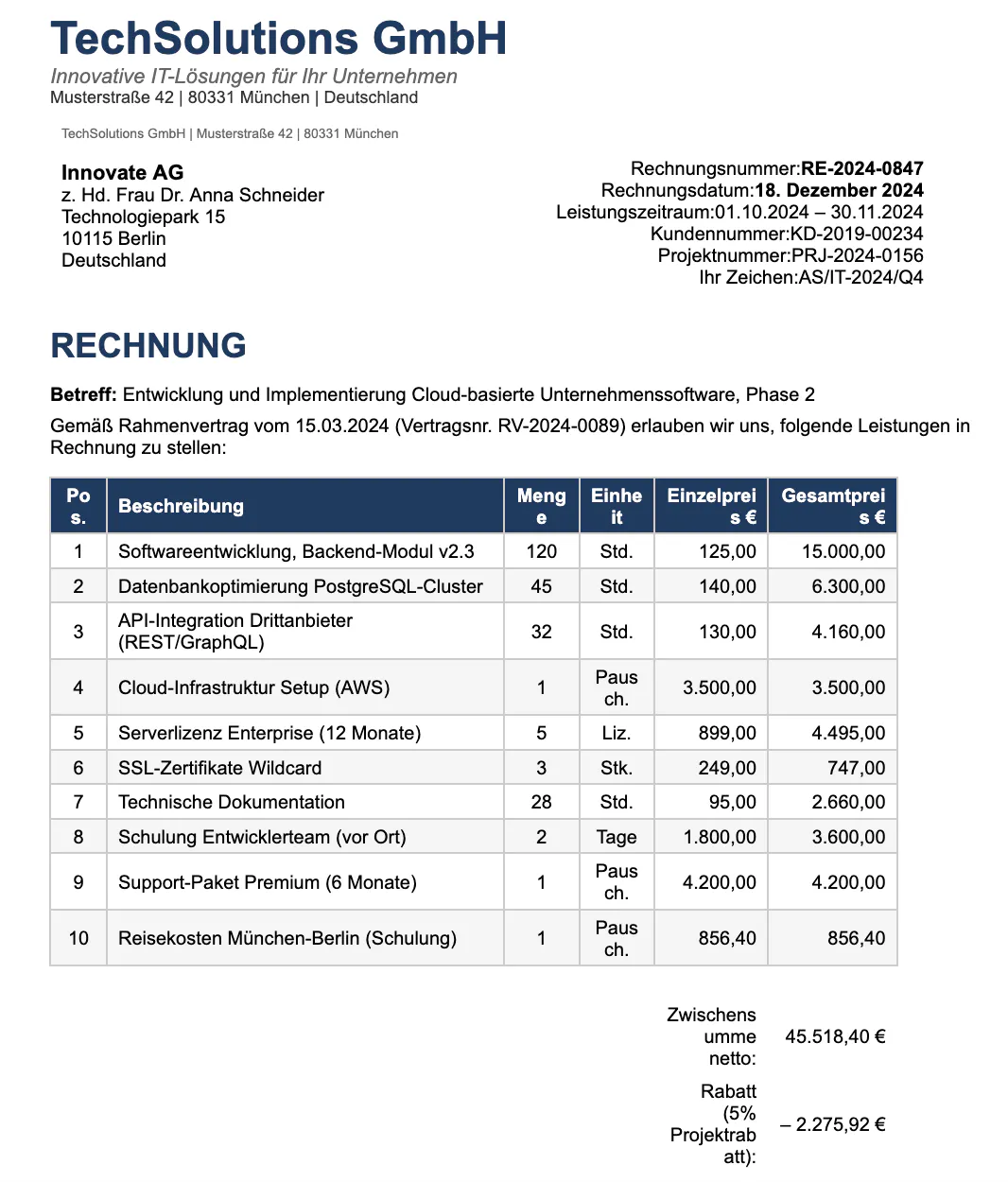
This is a two-page invoice from a German IT consulting firm. It includes line items for software development, cloud infrastructure, and training services, along with payment terms and bank details. The document uses standard German business formatting with VAT calculations.
Running the Extraction
The Modal deployment includes translation support out of the box. The --translate-to flag triggers a two-step pipeline: first OCR, then translation. The --output-pdf flag renders the translated text back into a PDF you can share or archive.
123456modal run modal_app.py \
    --document Rechnung_RE-2024-0847.pdf \
    --extract \
    --output-format text \
    --translate-to English \
    --output-pdf translated.pdf
This renders each PDF page as an image, runs OCR to extract the German text, translates it to English, and saves the result as a new PDF.
How the Translation Pipeline Works
The DeepSeekVL2Model class in modal_app.py handles this in two steps. The extract_text method is the entry point: it runs OCR on the image, then optionally passes the result through a translation step. Separating these concerns produces cleaner output than asking the model to OCR and translate simultaneously.
12345678910111213141516171819202122@modal.method()
def extract_text(self, image_bytes: bytes, translate_to: str = None) -> str:
    """Extract all text from a document image, optionally translating."""
    from PIL import Image
    import pillow_heif
    import io

    pillow_heif.register_heif_opener()

    img = Image.open(io.BytesIO(image_bytes)).convert("RGB")

    # Step 1: Extract text (OCR)
    extracted = self._generate(
        img,
        "Extract all text from this document image. Preserve the layout and formatting as much as possible."
    )

    # Step 2: Translate if requested (text-only pass)
    if translate_to:
        return self._translate_text(extracted, translate_to)

    return extracted
The _generate helper handles the actual inference call. DeepSeek-VL2 uses a conversation format where images are referenced with <image> tags in the prompt. The prepare_inputs_embeds method fuses the image embeddings with text embeddings before passing them to the language model for generation.
123456789101112131415161718192021222324252627282930313233def _generate(self, img, prompt: str) -> str:
    """Internal helper to run generation with DeepSeek-VL2."""
    import torch

    conversation = [
        {"role": "<|User|>", "content": f"<image>\n{prompt}", "images": [img]},
        {"role": "<|Assistant|>", "content": ""},
    ]

    inputs = self.processor(
        conversations=conversation,
        images=[img],
        force_batchify=True,
    ).to("cuda", dtype=torch.bfloat16)

    with torch.no_grad():
        input_embeds = self.model.prepare_inputs_embeds(**inputs)
        outputs = self.model.language.generate(
            inputs_embeds=input_embeds,
            attention_mask=inputs.attention_mask,
            pad_token_id=self.processor.tokenizer.eos_token_id,
            bos_token_id=self.processor.tokenizer.bos_token_id,
            eos_token_id=self.processor.tokenizer.eos_token_id,
            max_new_tokens=2048,
            do_sample=False,
            use_cache=True,
            repetition_penalty=1.1,
        )

    return self.processor.tokenizer.decode(
        outputs[0].cpu().tolist(),
        skip_special_tokens=True,
    ).strip()
For translation, we take the extracted text and run a second pass through the language model. DeepSeek-VL2's architecture requires an image input even for text-only tasks, so we create a minimal 64x64 white placeholder. The prompt explicitly instructs the model to translate everything, including headers and technical terms, and to output only the translation without preamble.
12345678910111213141516def _translate_text(self, text: str, target_language: str) -> str:
    """Translate extracted text using the language model."""
    import torch
    from PIL import Image

    # DeepSeek-VL2 requires an image, so we create a minimal white image
    dummy_img = Image.new("RGB", (64, 64), color="white")

    prompt = f"""Translate the following text to {target_language}.
Translate everything: headers, labels, technical terms, descriptions.
Output ONLY the {target_language} translation, nothing else.

Text:
{text}"""

    # ... same generation code as above
This two-step approach (extract then translate) produces better results than asking the model to do both simultaneously. The OCR step can focus on accurately reading the document, and the translation step can focus on natural phrasing in the target language.
The translated result looks like this:
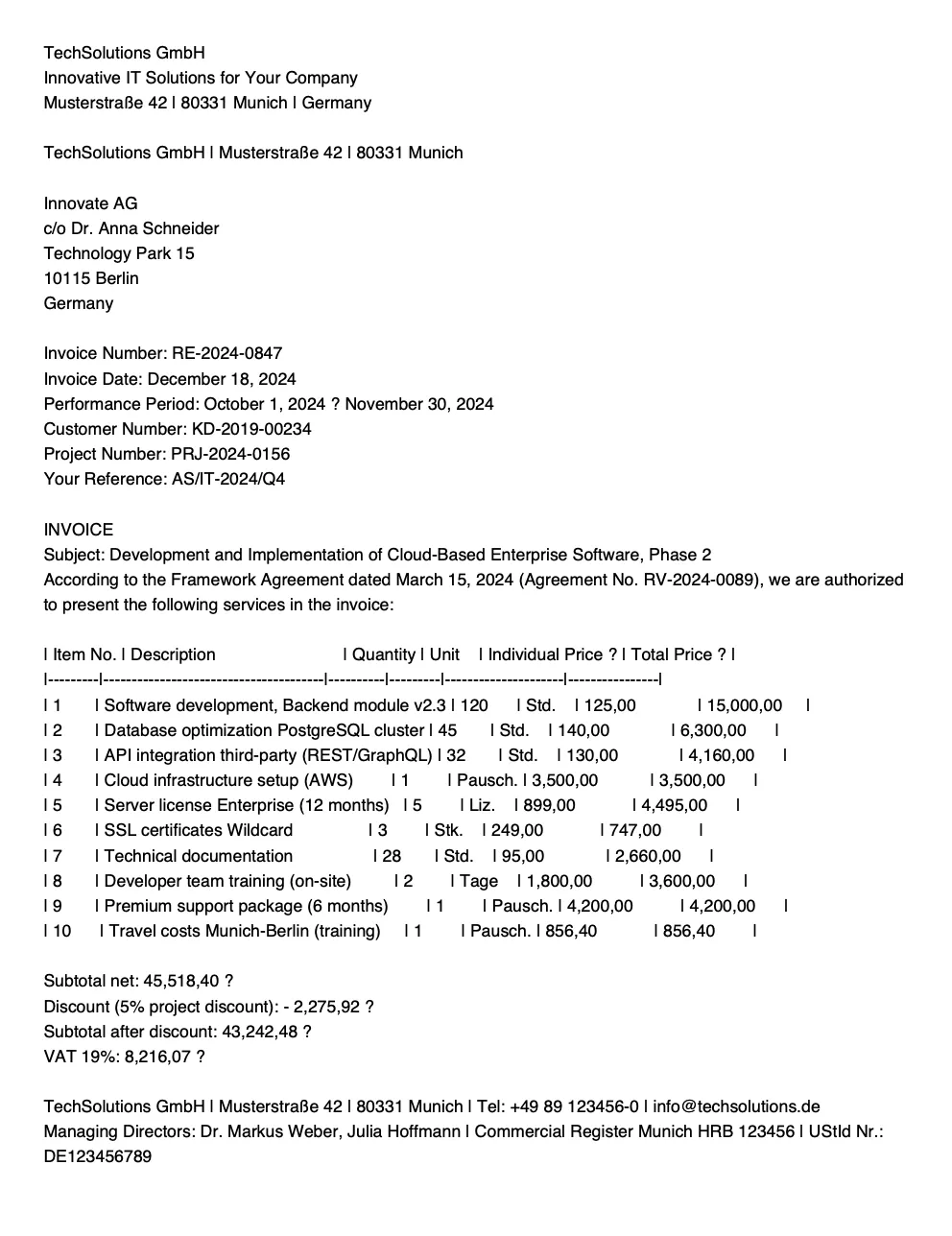
We’ve obviously lost the styling, but the translation preserves the document structure: headers, line items with quantities and prices, payment terms, and legal notes. Technical terms like "PostgreSQL-Cluster" and "REST/GraphQL" pass through unchanged, while business language ("Zahlungsbedingungen" → "Payment terms", "Verwendungszweck" → "Purpose of use") translates naturally.
For documents with multiple pages, extract_document iterates through each page and processes them independently. PyMuPDF (fitz) renders each page to a PNG image, which then goes through the same OCR and translation pipeline. The function caps processing at 10 pages to avoid runaway costs on large documents.
12345678910111213141516171819202122232425262728@app.function(image=image_with_deepseek, gpu="A10G", timeout=600)
def extract_document(
    document_bytes: bytes,
    output_format: str = "json",
    translate_to: str = None,
) -> dict:
    # Check if it's a PDF
    is_pdf = document_bytes[:4] == b'%PDF'

    if is_pdf:
        doc = fitz.open(stream=document_bytes, filetype="pdf")
        results = []

        for page_num in range(min(len(doc), 10)):  # Limit to 10 pages
            page = doc[page_num]
            pix = page.get_pixmap(matrix=fitz.Matrix(2, 2))  # 2x zoom for clarity
            img_bytes = pix.tobytes("png")

            model = DeepSeekVL2Model()
            if output_format == "text":
                text = model.extract_text.remote(img_bytes, translate_to)
            else:
                text = model.extract_structured.remote(img_bytes, output_format, translate_to)

            results.append({"page": page_num + 1, "content": text})

        doc.close()
        return {"pages": results, "total_pages": len(results)}
The fitz.Matrix(2, 2) applies 2x zoom when rendering the PDF to image, which improves OCR accuracy on documents with small text. For dense documents with fine print, you might increase this to 3x, though that increases processing time.
You can also extract structured data (JSON) and translate the field values. This is useful for feeding invoice data into accounting systems that expect English. The model extracts fields like vendor name, line items, and totals into a predictable schema while translating the text content.
12345modal run modal_app.py \
    --document Rechnung_RE-2024-0847.pdf \
    --extract \
    --output-format invoice \
    --translate-to English
The extract_structured method adds a translation instruction to the extraction prompt. By appending this instruction after the JSON schema, the model knows to translate string values while preserving the structure and numeric fields.
12345678910111213lang_instruction = ""
if translate_to:
    lang_instruction = f"\nIMPORTANT: All text values in the JSON must be translated to {translate_to}."

prompt = f"""Extract invoice data from this image.
Return JSON with:
{{
  "vendor_name": "",
  "invoice_number": "",
  "invoice_date": "",
  ...
}}
Return ONLY valid JSON. Use null for missing fields.{lang_instruction}"""
This returns structured JSON with translated descriptions, making it straightforward to integrate with downstream systems.
Video Analysis with InternVL3
Video analysis with VLMs follows a simple pattern: sample frames, run inference on each, and optionally fuse results across time. The challenge is balancing frame rate against cost and latency.
The core use case is identifying objects as they pass a camera. In a factory, this might be widgets on a conveyor belt that need classification or defect detection. In agriculture, it could be plants moving through a greenhouse scanner to assess health. In retail, products passing a checkout camera for automated inventory. The pattern is the same: extract frames, ask the model what it sees, aggregate results.
We'll demonstrate with a simple example: identifying houseplants in a video panning across a shelf.
The video shows a slow pan across several potted plants. This mimics the kind of footage you'd get from a fixed camera watching items move past, just with the camera moving instead of the objects.
Running the Analysis
The Modal deployment exposes video analysis through the analyze_video function. The --prompt argument tells the model what to look for. For plant identification, we ask it to list everything it sees across the frames.
123modal run modal_app.py \
    --video-path plants.mp4 \
    --prompt "List all the plants visible in this video. Identify each by common name."
Output:
Analyzed 12 frames
The plants in the video are a cactus, a pothos, a peace lily, a string of pearls, and a jade plant.
The model processes 12 frames sampled from the video and returns a consolidated answer. It correctly identifies five distinct plants despite them appearing across different frames at different times.
Frame Extraction
Before the model can analyze anything, we need to pull frames from the video. The analyze_video function in modal_app.py handles this using OpenCV. It calculates which frames to sample based on the video's frame rate and the desired interval, then converts each to a JPEG for efficient transfer to the model.
123456789101112131415161718192021222324252627282930313233343536373839@app.function(image=image_with_internvl, gpu="A100", timeout=1800)
def analyze_video(
    video_bytes: bytes,
    prompt: str = "Describe what happens in this video.",
    sample_interval: float = 2.0,
    max_frames: int = 12,
) -> dict:
    import tempfile
    import cv2
    from PIL import Image
    import io

    with tempfile.NamedTemporaryFile(suffix=".mp4", delete=False) as f:
        f.write(video_bytes)
        video_path = f.name

    cap = cv2.VideoCapture(video_path)
    fps = cap.get(cv2.CAP_PROP_FPS)
    frame_interval = max(1, int(fps * sample_interval))

    frames = []
    frame_count = 0

    while len(frames) < max_frames:
        ret, frame = cap.read()
        if not ret:
            break

        if frame_count % frame_interval == 0:
            frame_rgb = cv2.cvtColor(frame, cv2.COLOR_BGR2RGB)
            img = Image.fromarray(frame_rgb)

            buf = io.BytesIO()
            img.save(buf, format="JPEG", quality=85)
            frames.append(buf.getvalue())

        frame_count += 1

    cap.release()
The sample_interval parameter controls the tradeoff between coverage and cost. At 2.0 seconds, a 30-second video yields 15 frames. For fast-moving objects on a conveyor belt, you might drop to 0.5 seconds. For a slow pan across stationary plants, 2 seconds is plenty.
Multi-Frame Reasoning
InternVL3's strength is reasoning across multiple images simultaneously. Rather than analyzing each frame in isolation and aggregating text results, we send all frames to the model at once. This lets it understand that the cactus in frame 3 and the cactus in frame 5 are the same plant, not two different cacti.
The analyze_frames method on InternVL3Model handles the batched inference. Each frame gets preprocessed into tiles using InternVL3's dynamic resolution system, then all tiles are concatenated into a single tensor. The prompt labels each frame so the model understands temporal order.
1234567891011121314151617181920212223242526272829303132333435363738394041@modal.method()
def analyze_frames(self, frame_bytes_list: list[bytes], prompt: str) -> str:
    """Analyze multiple video frames together (A100 has enough memory)."""
    from PIL import Image
    import pillow_heif
    import torch
    import io

    pillow_heif.register_heif_opener()

    # Process each frame
    all_pixel_values = []
    num_patches_list = []

    for frame_bytes in frame_bytes_list:
        img = Image.open(io.BytesIO(frame_bytes)).convert("RGB")
        pixel_values = self._preprocess_image(img, max_num=6)
        all_pixel_values.append(pixel_values)
        num_patches_list.append(pixel_values.shape[0])

    # Combine all frames
    combined_pixels = torch.cat(all_pixel_values, dim=0).to(torch.bfloat16).cuda()

    # Build prompt with frame labels
    prompt_parts = []
    for i, num_patches in enumerate(num_patches_list):
        frame_tokens = '<image>' * num_patches
        prompt_parts.append(f'Frame {i+1}: {frame_tokens}')
    prompt_parts.append(f'\n{prompt}')
    question = '\n'.join(prompt_parts)

    generation_config = dict(max_new_tokens=1024, do_sample=False)

    response = self.model.chat(
        self.tokenizer,
        combined_pixels,
        question,
        generation_config,
    )

    return response
The max_num=6 parameter limits each frame to 6 tiles during preprocessing. This keeps memory usage reasonable when processing 12 frames. For single-image analysis, you might use 12 tiles for higher resolution, but with video the tradeoff favors more frames over more detail per frame.
Image Preprocessing
InternVL3 uses dynamic resolution, meaning it adapts to each image's aspect ratio rather than forcing everything to a square. The _preprocess_image method splits the image into tiles, each 448x448 pixels, and adds a thumbnail of the full image for global context.
123456789101112131415161718192021222324def _preprocess_image(self, image, max_num=12):
    """Preprocess image for InternVL3 using dynamic resolution."""
    import torchvision.transforms as T
    from torchvision.transforms.functional import InterpolationMode
    import torch

    IMAGENET_MEAN = (0.485, 0.456, 0.406)
    IMAGENET_STD = (0.229, 0.224, 0.225)

    def build_transform(input_size):
        return T.Compose([
            T.Lambda(lambda img: img.convert('RGB') if img.mode != 'RGB' else img),
            T.Resize((input_size, input_size), interpolation=InterpolationMode.BICUBIC),
            T.ToTensor(),
            T.Normalize(mean=IMAGENET_MEAN, std=IMAGENET_STD)
        ])

    # ... aspect ratio calculation and tiling logic ...

    transform = build_transform(input_size=448)
    images = dynamic_preprocess(image, image_size=448, use_thumbnail=True, max_num=max_num)
    pixel_values = [transform(img) for img in images]
    pixel_values = torch.stack(pixel_values)
    return pixel_values
The tiling approach preserves detail that would be lost if we simply resized to a fixed dimension. For video frames showing small objects (like plants on a distant shelf, or widgets on a belt), this detail preservation matters.
The plant identification example is a toy version of a pattern that applies broadly. The key variables are:
- What you're looking for: Change the prompt. For quality control, you might ask, "Identify any defects or damage visible on the products." For inventory, "List each product type and count how many of each appear."
- How fast things move: Adjust
sample_interval. Fast conveyor belts need sub-second sampling. A camera watching foot traffic might use 5-second intervals. - How much detail you need: Adjust
max_numin preprocessing. If you need to read small labels or detect hairline cracks, increase tile count. If you just need to classify object types, fewer tiles suffice.
Here's how you might adapt the pipeline for widget inspection on a manufacturing line:
123modal run modal_app.py \
    --video-path conveyor.mp4 \
    --prompt "Examine each widget passing on the conveyor belt. For each one, note: (1) widget type, (2) orientation (upright/tilted/fallen), (3) any visible defects (scratches, dents, discoloration). List problems that would require rejection."
The model returns a structured assessment you could parse and feed into a quality control system. For production use, you'd wrap this in a VideoAnalyzer class, adding callbacks for real-time alerting and structured JSON output for anomaly tracking.
Frequently Asked Questions
- What is the difference between DeepSeek-VL2 and InternVL3?
DeepSeek-VL2 and InternVL3 are open-source vision-language models optimized for different workloads. DeepSeek-VL2 excels at OCR, document understanding, and structured data extraction, while InternVL3 is designed for multimodal reasoning, multi-image tasks, and video analysis. Choosing between them depends on whether your primary need is document processing or visual reasoning across frames.
- Can you run DeepSeek-VL2 and InternVL3 locally or on your own cloud?
Both models can be deployed on-prem or in your own cloud environment. Developers commonly run them on A10G or A100 GPUs using platforms like Modal, which allows per-second billing without managing long-running GPU instances.
- What hardware is required to run DeepSeek-VL2 and InternVL3?
DeepSeek-VL2-Tiny can run on GPUs with as little as 10GB of VRAM, while DeepSeek-VL2-Small typically requires around 40GB. InternVL3-8B requires approximately 24GB of VRAM, and larger variants need multi-GPU setups such as dual A100s.
- Are DeepSeek-VL2 and InternVL3 cheaper than proprietary vision models?
Yes. Because both models are open source and self-hosted, you avoid per-request and per-frame API pricing common with proprietary models. Costs are limited to GPU compute, making pricing predictable for large-scale OCR or video workloads.
- How does InternVL3 handle video analysis?
InternVL3 analyzes videos by sampling frames and reasoning across them in a single multimodal context. This allows it to track objects over time, identify recurring entities, and answer questions that depend on temporal understanding rather than single images.
- Are DeepSeek-VL2 and InternVL3 open source for commercial use?
Yes. Both models are released with licenses that allow commercial usage, making them viable alternatives to proprietary vision APIs for production applications.
DeepSeek-VL2 for Documents, InternVL3 for Reasoning
DeepSeek-VL2 and InternVL3 represent different design philosophies that excel in different domains.
DeepSeek-VL2's MoE architecture and OCR-focused training make it the better choice for document extraction, multilingual text, and structured data parsing. InternVL3's native multimodal pre-training gives it an edge on reasoning tasks, video understanding, and scenarios where you need to track objects or understand spatial relationships across frames.
The decision framework is straightforward:
| If you need to... | Use |
|---|---|
| Extract text from documents, invoices, receipts | DeepSeek-VL2 |
| Translate documents while preserving structure | DeepSeek-VL2 |
| Analyze video streams or multi-frame sequences | InternVL3 |
| Answer complex reasoning questions about images | InternVL3 |
| Identify or track objects over time | InternVL3 |
Both models run on the same infrastructure. The Modal deployment in this guide gives you HTTP endpoints for both, so you can route requests to whichever model fits the task. For batch processing, the cost difference between them is negligible compared to the accuracy gains from picking the right tool.
The code is available in this repo. The modal_app.py file is self-contained and ready to deploy. For local development or custom pipelines, the src/ modules provide the same functionality with more flexibility.
A few directions to explore from here:
- Fine-tuning: Both models support LoRA fine-tuning if your domain has specific vocabulary or document formats that the base models struggle with. A day of training on a few hundred examples can substantially improve accuracy on niche tasks.
- Hybrid pipelines: Nothing stops you from using both models in sequence. Run InternVL3 to identify regions of interest in a complex scene, then crop and send those regions to DeepSeek-VL2 for detailed text extraction.
- Edge deployment: If latency or connectivity is a constraint, both models have smaller variants (DeepSeek-VL2-Tiny at 1B activated parameters, InternVL3-1B) that can run on consumer GPUs or even high-end edge devices with TensorRT optimization.
The gap between proprietary and open-source vision-language models has narrowed considerably. For many production workloads, especially those involving sensitive data, predictable costs, or domain-specific requirements, these open models aren't just alternatives. They're the better choice.