
 React
React iOS
iOS Android
 Flutter
 Angular
 JavaScript
 Unity
Unity Unreal
 Node
Node Python
 Ruby
Ruby PHP
PHP Java
Java .NET
.NET Go
Go REST
RESTimport {
Channel,
ShareLocationDialog,
GeolocationMapProps,
ShareLocationDialogProps,
ShareGeolocationMapProps,
} from "stream-chat-react";
import "leaflet/dist/leaflet.css";
import { MapContainer, Marker, Popup, TileLayer } from "react-leaflet";
const GeolocationMap = ({ latitude, longitude }: GeolocationMapProps) => {
return (
<MapContainer
center={[latitude, longitude]}
zoom={13}
style={{ height: "300px", width: "100%" }}
>
<TileLayer url="https://{s}.tile.openstreetmap.org/{z}/{x}/{y}.png" />
<Marker position={[latitude, longitude]}>
<Popup>You are here</Popup>
</Marker>
</MapContainer>
);
};
const ShareGeolocationMap = ({
geolocationPositionError,
loadingLocation,
latitude,
longitude,
restartLocationWatching,
}: ShareGeolocationMapProps) => {
if (loadingLocation) {
return <div>Loading location...</div>;
}
if (!latitude || !longitude || geolocationPositionError) {
return (
<div>
<div>Could not retrieve the geolocation position.</div>
<button onClick={restartLocationWatching}>Retry</button>
</div>
);
}
return <GeolocationMap latitude={latitude} longitude={longitude} />;
};
const shareDurations = [60 * 1000, 60 * 60 * 1000, 8 * 60 * 60 * 1000];
const CustomShareLocationDialog = (props: ShareLocationDialogProps) => (
<ShareLocationDialog
{...props}
GeolocationMap={ShareGeolocationMap}
shareDurations={shareDurations}
/>
);
const App = () => {
return (
// ...
<Channel ShareLocationDialog={CustomShareLocationDialog}>
{/* ... */}
</Channel>
// ...
);
};Location Sharing
The SDK supports end-to-end location sharing:
- Creation of a message with shared location (static or live)
- Rendering of a message with shared location
- Showing the latest message preview in the channel list
- Managing the reporting of live locations to the server
Best Practices
- Request geolocation only after explicit user intent.
- Provide clear UI for live vs. static location sharing.
- Keep map rendering optional to reduce bundle size.
- Always offer a stop-sharing control for live locations.
- Handle geolocation errors with retry and fallback states.
Sharing a Location
Location sharing is done by sending a message with a shared_location payload. There are two options:
messageComposer.sendLocation()sends a location-only message (no text or files).messageComposer.locationComposer.setData()attaches location data to the current composition.
The SDK ships with ShareLocationDialog, which handles both scenarios. The dialog opens when a user picks the Location option from AttachmentSelector.
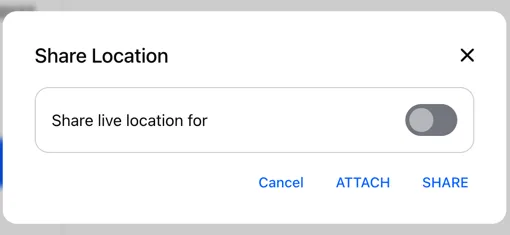
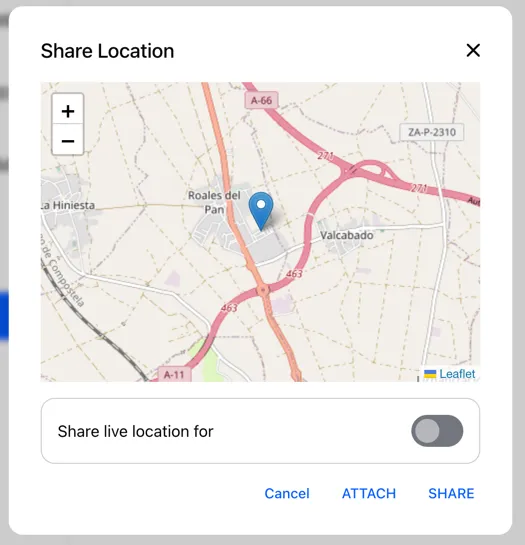
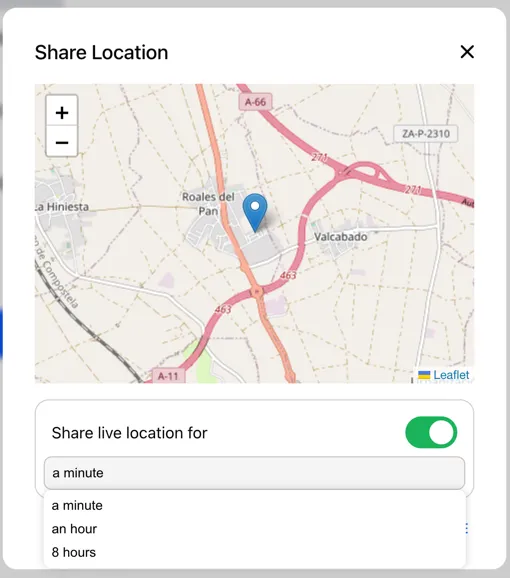
To render a map in the dialog, pass a component to GeolocationMap. The example below uses react-leaflet. You can also customize the share duration options.
Location Attachment Preview
You can override the location preview attached to the message composer:
import {
  AttachmentPreviewList,
  AttachmentPreviewListProps,
  GeolocationPreviewProps,
} from "stream-chat-react";

const CustomGeolocationPreview = (props: GeolocationPreviewProps) => {
  // custom implementation
};
const CustomAttachmentPreviewList = (props: AttachmentPreviewListProps) => (
  <AttachmentPreviewList
    {...props}
    GeolocationPreview={CustomGeolocationPreview}
  />
);

const App = () => {
  return (
    // ...
    <Channel AttachmentPreviewList={CustomAttachmentPreviewList}>
      {/* ... */}
    </Channel>
    // ...
  );
};
Rendering a Location Message
Location messages render as attachments. The shared location UI is rendered by Geolocation, which you can override like other attachment components. The example below swaps in a map renderer.
import {
  Attachment,
  AttachmentProps,
  Channel,
  Geolocation,
  GeolocationProps,
  GeolocationMapProps,
} from "stream-chat-react";
import "leaflet/dist/leaflet.css";
import { MapContainer, Marker, Popup, TileLayer } from "react-leaflet";

const GeolocationMap = ({ latitude, longitude }: GeolocationMapProps) => {
  return (
    <MapContainer
      center={[latitude, longitude]}
      zoom={13}
      style={{ height: "300px", width: "100%" }}
    >
      <TileLayer url="https://{s}.tile.openstreetmap.org/{z}/{x}/{y}.png" />
      <Marker position={[latitude, longitude]}>
        <Popup>You are here</Popup>
      </Marker>
    </MapContainer>
  );
};

const CustomGeolocation = (props: GeolocationProps) => (
  <Geolocation {...props} GeolocationMap={GeolocationMap} />
);

const CustomAttachment = (props: AttachmentProps) => (
  <Attachment {...props} Geolocation={CustomGeolocation} />
);

const App = () => {
  return (
    // ...
    <Channel Attachment={CustomAttachment}>{/* ... */}</Channel>
    // ...
  );
};
Users can stop live location sharing directly from the attachment:
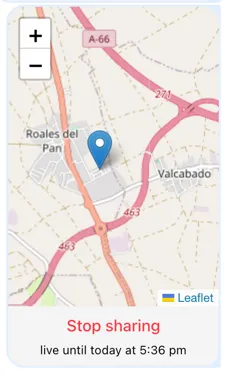
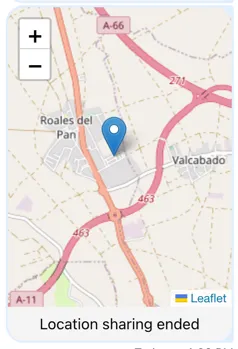
Static location attachments show the location at a specific point in time.
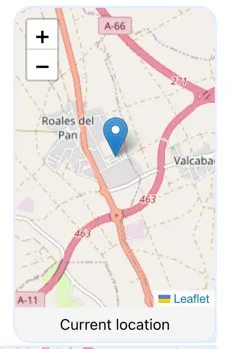
Reporting Live Location Updates
Live updates are managed by LiveLocationManager, initialized via useLiveLocationSharingManager. Call the hook once in your app:
import { LiveLocationManagerConstructorParameters } from "stream-chat";
import { useLiveLocationSharingManager } from "stream-chat-react";

// retrieves the current position when emitted by watchPosition subscription
const watchLocationNormal: LiveLocationManagerConstructorParameters["watchLocation"] =
  (handler) => {
    const watch = navigator.geolocation.watchPosition((position) => {
      handler({
        latitude: position.coords.latitude,
        longitude: position.coords.longitude,
      });
    });

    return () => navigator.geolocation.clearWatch(watch);
  };

// retrieves the current position every 5 seconds
const watchLocationTimed: LiveLocationManagerConstructorParameters["watchLocation"] =
  (handler) => {
    const timer = setInterval(() => {
      navigator.geolocation.getCurrentPosition((position) => {
        handler({
          latitude: position.coords.latitude,
          longitude: position.coords.longitude,
        });
      });
    }, 5000);

    return () => {
      clearInterval(timer);
    };
  };

const Component = () => {
  useLiveLocationSharingManager({
    client: chatClient,
    getDeviceId,
    watchLocation: watchLocationNormal,
  });
};
The manager registers, unregisters, and reports the live location returned by watchLocation.