















Pin indicator
A pinned message shows a "Pinned by" line above its bubble, and its row in the list is highlighted:
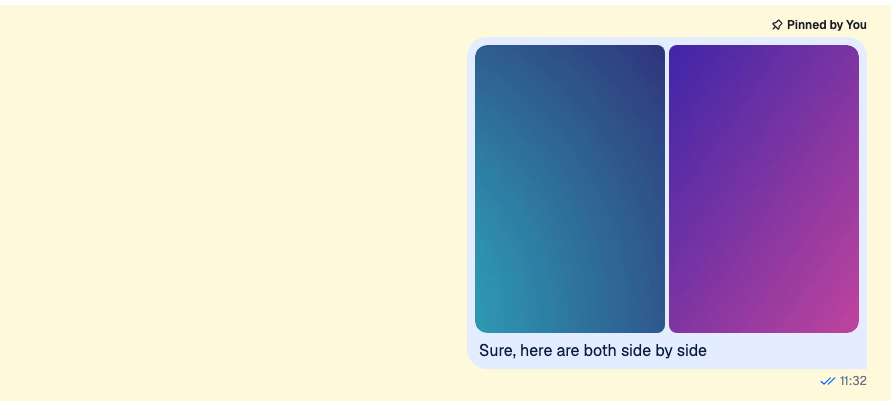
This recipe changes how a pin looks, first with CSS only, then with a component of your own that shows when the message was pinned and lets the user unpin it. How pinning works, and the list of a channel's pinned messages, are on Pinned messages.
Best practices
- Restyle the default indicator with CSS when only its look changes. A pinned message gets the class
str-chat__message--pinned, and the indicator rendersstr-chat__message-pin-indicator. - Replace
PinIndicatorwhen the indicator needs more data or an action. It renders inside the message, so it can readuseMessageContext(). - Keep the
str-chat__message-pin-indicatorclass on your component's root. The message's grid uses it to place the indicator above the bubble. - Offer Unpin only to users with the
pin-messagecapability. The SDK doesn't check it for pinning, and the server rejects the request from a user without it. - Keep the indicator to one short line, so it doesn't push the message content around.
Custom pin indicator
CSS based solution
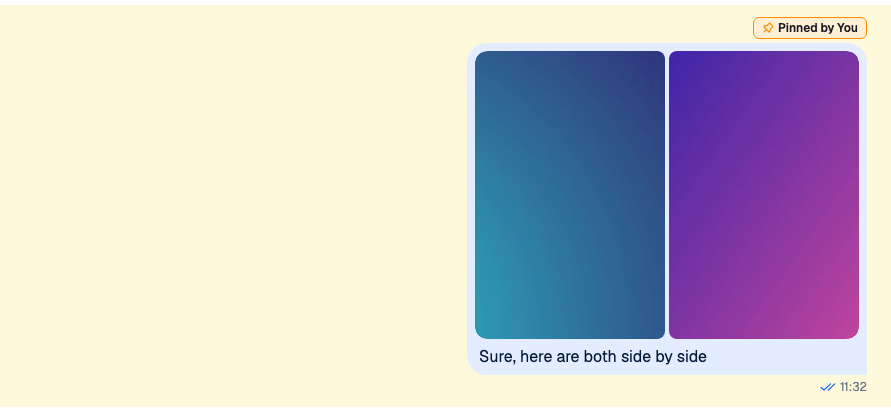
The default indicator is an icon and a label inside str-chat__message-pin-indicator__content. These rules turn it into a chip with an orange border:
.str-chat__message--pinned
  .str-chat__message-pin-indicator
  .str-chat__message-pin-indicator__content {
  width: fit-content;
  padding: 2px 8px;
  border: 1px solid darkorange;
  border-radius: 6px;
  background-color: papayawhip;
}

.str-chat__message--pinned
  .str-chat__message-pin-indicator__content
  .str-chat__message-pin-indicator__icon {
  color: darkorange;
}
Load the file after the SDK's stylesheet, or put the rules in a layer after the SDK's, as Theming → CSS layers shows. Otherwise the SDK's rules, which are as specific, win.
The icon takes the text color, so color on its wrapper colors it. The highlighted row comes from the list item around a pinned message, which paints --str-chat__background-core-highlight behind it.
Component based solution
CSS can't add information. This indicator says who pinned the message and on which day, shows when the pin expires, and has an Unpin button:
import type { PropsWithChildren } from "react";
import { convertTimestampToDate } from "stream-chat";
import {
  useChatContext,
  useMessageContext,
  useUserRole,
  WithComponents,
} from "stream-chat-react";
import "./PinnedByIndicator.css";

const PinnedByIndicator = () => {
  const { client } = useChatContext();
  const { handlePin, message } = useMessageContext();
  const { canPin } = useUserRole(message);

  if (!message.pinned) return null;

  const pinnedBy = message.pinned_by;
  const pinnedByName =
    pinnedBy?.id === client.user?.id
      ? "you"
      : (pinnedBy?.name ?? pinnedBy?.id ?? "someone");
  const pinnedAt = convertTimestampToDate(message.pinned_at);
  const expiresAt = convertTimestampToDate(message.pin_expires);

  return (
    <div className="str-chat__message-pin-indicator pinned-by">
      <span>
        📌 Pinned by {pinnedByName}
        {pinnedAt && ` on ${pinnedAt.toLocaleDateString()}`}
      </span>
      {expiresAt && (
        <span className="pinned-by__expiry">
          until {expiresAt.toLocaleString()}
        </span>
      )}
      {canPin && (
        <button className="pinned-by__unpin" onClick={handlePin} type="button">
          Unpin
        </button>
      )}
    </div>
  );
};

// Declared once, so WithComponents gets the same object on every render.
const overrides = { PinIndicator: PinnedByIndicator };

export const WithPinnedByIndicator = ({ children }: PropsWithChildren) => (
  <WithComponents overrides={overrides}>{children}</WithComponents>
);.pinned-by {
display: flex;
align-items: center;
gap: 8px;
font-size: 12px;
}
.pinned-by__expiry {
color: #6b7280;
}
.pinned-by__unpin {
padding: 0;
border: 0;
background: none;
color: #005fff;
cursor: pointer;
}Wrap the channel in WithPinnedByIndicator:
import type { Channel as StreamChannel } from "stream-chat";
import { Channel, MessageComposer, MessageList } from "stream-chat-react";
import { WithPinnedByIndicator } from "./PinnedByIndicator";

export const PinnedChannel = ({ channel }: { channel: StreamChannel }) => (
  <WithPinnedByIndicator>
    <Channel channel={channel}>
      <MessageList />
      <MessageComposer />
    </Channel>
  </WithPinnedByIndicator>
);
How it works:
- The default
MessageUIrenders thePinIndicatorkey above the bubble of every message withmessage.pinned, and passes the message asmessage.PinnedByIndicatorreads it fromMessageContextinstead, together withhandlePin. pinned_by,pinned_atandpin_expiresare on the message. The timestamps are nanosecond numbers, soconvertTimestampToDateturns them into dates; Data conventions explains why.useUserRole(message).canPinis the user'spin-messagecapability in the channel. Without it, the button isn't rendered.- Clicking Unpin calls
handlePin, which unpins a pinned message. The indicator disappears at once, and comes back if the request fails.
The indicator only renders where the default MessageUI does. A custom message UI renders whatever it wants for a pinned message.
Read more
- Pinned messages hides the Pin action from users who can't pin.
- Actions replaces the Pin action with one that asks for confirmation.
- Permissions reference lists the
pin-messagecapability and the roles that have it.