















Troubleshooting
This page collects common problems and what causes them. Coming from v14? Many problems after an upgrade are covered in Upgrade to v15.
Context providers
The SDK's components share values through React context, so a component reads the client, the channel or the message from the provider above it. How components connect to state lists which component provides what.
A hook whose provider is required throws when it's used outside that provider, and the error names the provider:
useChatContext was called outside of Chat. Make sure the component calling useChatContext is rendered within <Chat>.Move the component inside the provider. The usual cases are a custom message UI rendered outside a message list, and a loading or empty state rendered outside Chat. useChannel() throws outside a Channel or a Thread, and so do the hooks built on it, such as useMessageComposerController(). A component that renders both inside and outside a channel reads useChannelInstanceContext() instead, which returns {} outside a Channel. Context hooks that throw has an example.
A channel shows no messages
Channel doesn't load its channel. A channel that isn't loaded renders as an empty channel, with no error, because nothing failed. Check channel.initialized. Channels from ChannelList arrive loaded. A channel you get from client.channel() may not be, so watch it before you pass it to Channel:
const opened = await client.channel("messaging", "support").watch();channel is a required prop, and <Channel> without a channel throws. While no channel is selected, render ChannelPlaceholder in its place. The Channel component shows both.
A thread renders nothing, or throws
Thread shows the thread passed as its thread prop. <Thread /> without one throws, in Chrome with TypeError: Cannot read properties of undefined (reading 'channel'). Pass the thread, and render its parts as children:
import type { Thread as StreamThread } from "stream-chat";
import {
  MessageComposer,
  MessageList,
  Thread,
  ThreadHeader,
} from "stream-chat-react";

export const ThreadPanel = ({ thread }: { thread: StreamThread }) => (
  <Thread thread={thread}>
    <ThreadHeader />
    <MessageList />
    <MessageComposer />
  </Thread>
);
Get the thread from client.threads.ensure({ channel, parentMessage }), not new Thread(). With ChatView, render ThreadSlot instead: it passes the thread in its slot to Thread.
Thread also renders nothing until the thread has its parent message, and nothing when replies are turned off for the channel type. See The Thread component.
Clicking a channel or a thread does nothing
The channel list and the replies button don't open anything themselves. They call openChannel() and openThread() from useWorkspaceNavigation(), and a layout decides where the channel or thread goes. Without a layout, those calls do nothing, and the first call of each logs a console warning that no workspace navigation is provided.
- Without
ChatView, keep the selected channel in your own state and pass it toChannel. Navigation shows how. - With
ChatView, passlayoutstogether withviews. Withoutlayouts, each view has a single slot that holds its list, so a channel or a thread has nowhere to open. Declarelayoutsoutside the component: given a new array,ChatViewstarts its layout again and closes everything open. See Views and slots.
A channel list shows the first page and never updates
A ChannelPaginator stays current only while it's registered on client.channelManager, which routes events into the lists it holds. A paginator that's only passed to ChannelList loads its first page, and then never adds, moves or removes a channel when messages arrive:
client.channelManager.insertPaginator({ paginator });Remove it with client.channelManager.removePaginator(paginator) when the list goes away. Registering paginators explains both.
A component re-renders too often, or misses changes
useStateStore follows three rules, and each mistake shows a different symptom:
- A selector defined inline is a new function on every render, so the hook unsubscribes and subscribes again each time. Define it at module scope, or wrap it in
useCallbackwhen it needs a prop. - A selector that returns the slice itself, such as
(state) => state.members, compiles but misses changes. Return an object with fixed keys:(state) => ({ members: state.members }). - A selector that maps or filters builds a new array on every run, so the component re-renders on every change to the store. Select the fields as they are and compute from them in the component.
import type { ChannelStateData } from "stream-chat";
import { useChannel, useStateStore } from "stream-chat-react";

// Declared at module scope, so the hook subscribes once.
const typingSelector = (state: ChannelStateData) => ({ typing: state.typing });

export const TypingCount = () => {
  const channel = useChannel();
  const { typing } = useStateStore(channel.state, typingSelector);
  return <span>{Object.keys(typing).length}</span>;
};
Getters such as channel.state.members and composer.quotedMessage return the value at the moment you read them, and don't tell you when it changes, so a component that reads them doesn't re-render. The useStateStore rules explains each rule.
A command is sent as plain text
A user picks giphy from the command suggestions, types cats, and sends. The message arrives as the plain text cats, with no GIF. The composer sends a picked command without its name unless four command middlewares put it back, and stream-chat-react doesn't install them. Install them in the composer setup function, as Install the command middlewares shows. A command typed in full, such as /giphy cats, works without them.
Translations stopped applying
In v15 a translation key is a namespaced identifier, such as messageComposer.sendButton.send.ariaLabel, not the English copy. A dictionary still keyed on v14 keys never matches, and the SDK renders its English copy, with no error. Rename the keys, and type the dictionary as TranslationDictionary so TypeScript flags any you missed. See Localization in the upgrade guide.
Dates show "Invalid Date"
Timestamps from the server are nanosecond numbers. A date library, or new Date(), reads a number as milliseconds, so dayjs(message.created_at) renders "Invalid Date". Convert first, with nsToDate() or convertTimestampToDate() from stream-chat. Timestamps lists the helpers.
User roles and permission policies
If a user can do something they shouldn't, or can't do something they should, check their roles and the channel type's permissions.
Every channel has a type, such as livestream, messaging, team, gaming or commerce, set when the channel is created. Each type comes with a default permission policy, which you can change. A policy allows or denies a role access to an action. For example, the admin role is allowed to create a channel and to ban a user.
The UI reads the result as the user's capabilities in the channel: useChannelCapabilities() returns them, and components hide what the user can't do. Change permissions on the server, not in the UI. See Permission policies and the Permissions reference.
You can change the permission policies of a channel type in the Stream Dashboard. You can also make a user an admin or a moderator through the API, but only from your server.
Watching channels
Watching a channel loads it and subscribes this connection to its events: new messages, member changes, typing and the rest.
Channel.watch()creates the channel if it doesn't exist, loads it and watches it. Calling it again is safe, even from several places at once: it sends a request only when the channel isn't loaded yet, or when you pass options it wasn't watched with. To refresh a watched channel, callChannel.reload().Channel.create()creates the channel without watching it.Channel.query()loads the channel without watching it, unless you passwatch: true.
See watch and query.
"No connection id is available"
Watching a channel and subscribing to presence are both server-side subscriptions, and the server keys them to your WebSocket by its connection id. A request carrying either is therefore held until the handshake has produced one, rather than sent to a server that would answer 200 and register nothing.
Most of the time you never see this: the request waits, the socket connects, and the request goes out. The error appears only when no amount of waiting would help, because there is no socket and none is being opened:
No connection id is available: there is no WebSocket connection, and none is being established. A request that watches a channel or subscribes to presence needs one. Call `client.connectUser()` if no user is connected, or `client.openConnection()` if the socket was closed with `client.closeConnection()`.Two situations reach it. No user was connected, which in tests usually means a fixture that fakes a connected user without a connection. Or the socket was closed on purpose with client.closeConnection(), the usual path when a mobile app goes to the background, and nothing has reopened it.
A request that's waiting can be abandoned. The abort signal you pass reaches the wait, not only the HTTP call:
const controller = new AbortController();
client.queryChannels({ filter_conditions: {} }, { signal: controller.signal });
controller.abort();
A query that asks for neither a watch nor presence is never held, so it works while the socket is down:
client.queryChannels({ filter_conditions: {}, presence: false, watch: false });See Connection for reading the socket's status directly.
Watcher vs member
A watcher is a user subscribed to a channel's updates, such as new messages. Watching doesn't need membership: a user who isn't a member can watch a livestream channel, for example.
A member belongs to the channel, and usually has more permissions than a user who isn't one. For example, the default permissions of the messaging type let members read and write in the channel, and receive push notifications.
Livestream best practices
A livestream chat is hard on the browser: users stay for hours, and messages, reactions and attachments keep arriving. The UI has to keep up with that stream for the whole session.
VirtualizedMessageList is built for this. It renders only the messages in the viewport, and updates what it renders as the user scrolls. Memory stays low, and the page stays fast even after thousands of messages.
This section covers the settings that keep the virtualized list smooth under heavy traffic. For the channel type and server settings, see the livestream best practices of the API.
Use the virtualized list
VirtualizedMessageList takes the place of MessageList:
import {
  Channel,
  MessageComposer,
  VirtualizedMessageList,
} from "stream-chat-react";
import type { Channel as StreamChannel } from "stream-chat";

export const LivestreamChat = ({ channel }: { channel: StreamChannel }) => (
  <Channel channel={channel}>
    <VirtualizedMessageList />
    <MessageComposer />
  </Channel>
);
It looks like the regular list. Not all of their props are the same, though: see VirtualizedMessageList.
Turn off the smooth scroll to new messages
By default, VirtualizedMessageList scrolls to a new message with the "smooth" scroll behavior. That works for a moderately busy chat, but it can't keep up with more than two or three messages a second. "auto" scrolls to the latest message at once:
<VirtualizedMessageList stickToBottomScrollBehavior="auto" />Set the default item height
The list measures the messages it has rendered, and estimates the size of the others. To reduce the recalculations, set defaultItemHeight in additionalVirtuosoProps to the height of a usual one-line message. Measure the list item around it, the .str-chat__li element, with your browser's element inspector:
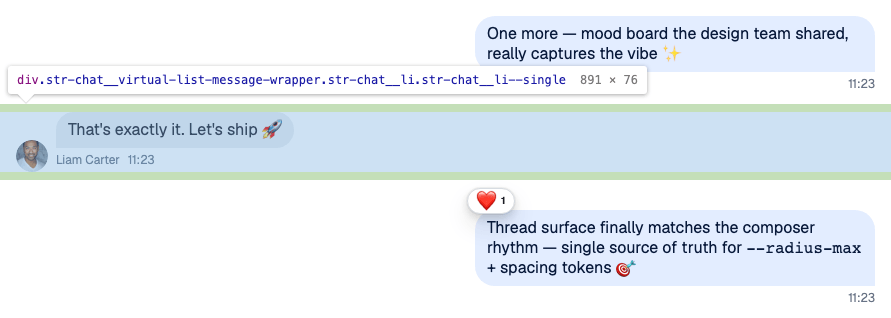
The message above is 76px tall, with the default styles. The list doesn't group messages by default, so every one-line message has that height:
<VirtualizedMessageList additionalVirtuosoProps={{ defaultItemHeight: 76 }} />Avoid vertical margins on messages
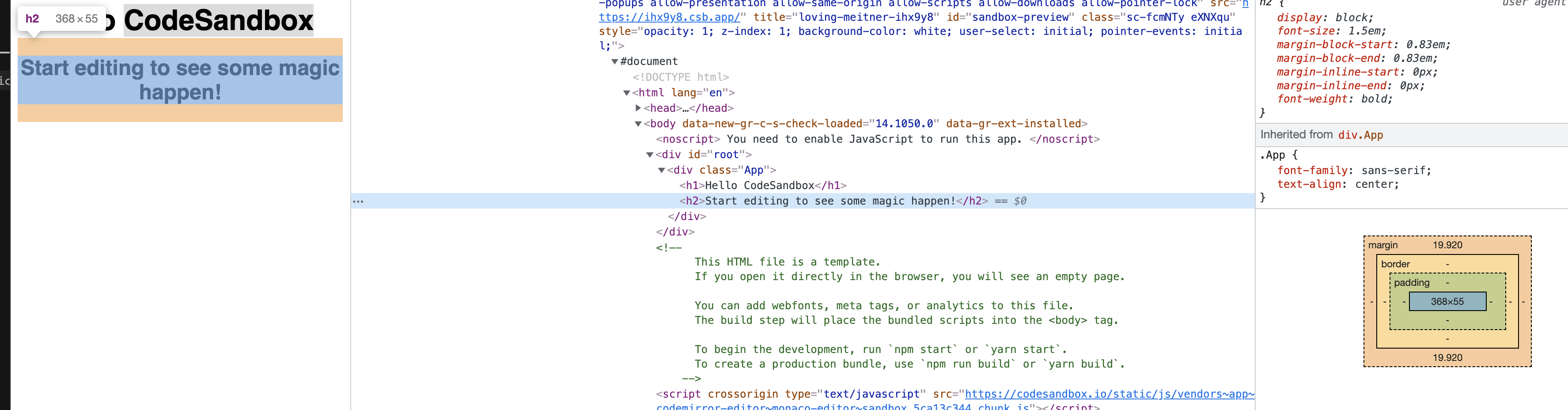
The list measures each message's outermost element with getBoundingClientRect, which doesn't include CSS margins. Margins are hard to measure in the first place, because they collapse. If a custom message UI has vertical margins that change its height, the list can blink or render empty areas.
Look for orange gaps between the messages in your element inspector. In this example, headings have margins:
Choose a lighter Giphy version
This isn't specific to the virtualized list, but it saves your users' bandwidth. Attachment shows the fixed_height version of a GIF by default. A Giphy attachment carries these versions: fixed_height, fixed_height_downsampled, fixed_height_still, fixed_width, fixed_width_downsampled, fixed_width_still and original. The Giphy image object describes each one. To use another, set giphyVersion through an Attachment wrapper. fixed_height_downsampled keeps the size and loads fewer frames:
import type { PropsWithChildren } from "react";
import {
  Attachment,
  type AttachmentProps,
  WithComponents,
} from "stream-chat-react";

const LightGiphyAttachment = (props: AttachmentProps) => (
  <Attachment {...props} giphyVersion="fixed_height_downsampled" />
);

// Declared outside the component, so WithComponents gets the same object on every render.
const overrides = { Attachment: LightGiphyAttachment };

export const WithLightGiphy = ({ children }: PropsWithChildren) => (
  <WithComponents overrides={overrides}>{children}</WithComponents>
);
It applies to the GIFs Attachment renders. Quoted messages, in the composer and in the message list, are rendered outside Attachment, so they keep the default version.
Keep reactions from changing the message height
With a custom message UI, make sure that adding a reaction doesn't make the message taller. The chats of Twitch and Telegram are good examples. The list then looks steadier, and jumps less under heavy traffic.