















Voice Recording Attachment
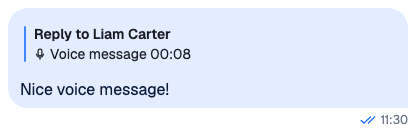
VoiceRecording renders an attachment of type voiceRecording. In a message it renders VoiceRecordingPlayer, which plays the recording; when Attachment gets isQuoted, it renders QuotedVoiceRecording, a short summary. Voice recordings and audio playback explains recording, sending and playback.
Best practices
- Replace it through the
VoiceRecordingprop ofAttachment, and register thatAttachmentas theAttachmentoverride.VoiceRecordinghas no override key of its own. - Render the player inside
Channel,ThreadorWithAudioPlayback. Outside them there is no audio player to use, and it renders nothing. - Render it inside a message. The player is identified by the message and the file, so two messages with the same file get separate players.
- Read the recording's metadata under
custom, as the table below shows. - Make small visual changes with CSS before replacing the components.
Attachment payload
| Field | Type | What the SDK does with it |
|---|---|---|
type |
string |
Always "voiceRecording". isVoiceRecordingAttachment() from stream-chat checks it. |
asset_url |
string |
The file the player plays. While the upload runs, the player plays the local file. |
title |
string |
The audio player's title. Recordings made in the composer are named audio_recording_<date>.<extension>. |
custom.duration |
number |
The length in seconds. The player counts it down as the time left. |
custom.file_size |
number |
The size in bytes, shown when there is no duration. |
custom.mime_type |
string |
The file type. The player checks that the browser can play it, and QuotedVoiceRecording picks its file icon from it. |
custom.waveform_data |
number[] |
Amplitudes between 0 and 1, drawn as the waveform. |
In stream-chat, the type is VoiceRecordingAttachment.
VoiceRecordingPlayer
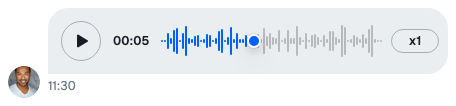
The player shows, from start to end:
- a play button;
- the time left, which is the whole length before playback starts. While the recording uploads, the upload progress shows instead, and without a duration, the file size;
- the waveform,
WaveProgressBar. Clicking or dragging on it seeks, and the bars before the position are highlighted; - the speed button,
PlaybackRateButton, which shows the speed, such asx1, and moves to the next one on each click, back to the first after the last. It's disabled when the browser can't play the file type.
| Prop | Type | Default | Description |
|---|---|---|---|
attachment |
Attachment |
required | The voice recording. |
playbackRates |
number[] |
[1, 1.5, 2] |
The speeds the speed button moves through. The first one is the starting speed. |
QuotedVoiceRecording
It shows the length, or the file size when there is no duration, and a file icon for the type. It has no player.
| Prop | Type | Default | Description |
|---|---|---|---|
attachment |
Attachment |
required | The voice recording. |
The SDK's own quoted message doesn't render attachments. When the quoted message has no text, it shows "Voice message" and the length, from the translation key messageComposer.quotedMessagePreview.voiceMessage.label.
VoiceRecording
| Prop | Type | Default | Description |
|---|---|---|---|
attachment |
Attachment |
required | The voice recording. |
isQuoted |
boolean |
false |
Renders QuotedVoiceRecording instead of the player. |
UI fallbacks
| Missing | What shows instead |
|---|---|
custom.duration |
The file size, in the player and in QuotedVoiceRecording. |
custom.waveform_data |
No waveform. The player keeps its play and speed buttons. |
title |
The translation of common.voiceMessage.label, "Voice message", becomes the audio player's title. The default player doesn't display the title; a player bar built on useActiveAudioPlayer() can. |
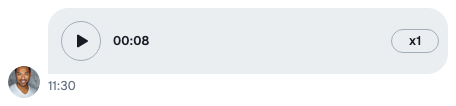
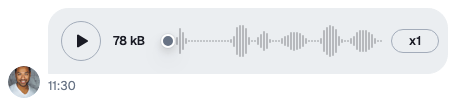
To change the fallback title, translate common.voiceMessage.label; see Localization.
Default components customization
Wrap Attachment, pass it your own VoiceRecording, and register the wrapper as the Attachment override. This one keeps the default player with two speeds:
import type { AttachmentProps, VoiceRecordingProps } from "stream-chat-react";
import {
  Attachment,
  QuotedVoiceRecording,
  VoiceRecordingPlayer,
} from "stream-chat-react";

const playbackRates = [1, 2];

const TwoSpeedVoiceRecording = ({
  attachment,
  isQuoted,
}: VoiceRecordingProps) =>
  isQuoted ? (
    <QuotedVoiceRecording attachment={attachment} />
  ) : (
    <VoiceRecordingPlayer
      attachment={attachment}
      playbackRates={playbackRates}
    />
  );

// Register as the Attachment override: <WithComponents overrides={{ Attachment: TwoSpeedAttachment }}>
export const TwoSpeedAttachment = (props: AttachmentProps) => (
  <Attachment {...props} VoiceRecording={TwoSpeedVoiceRecording} />
);
For a player of your own, build it on useAudioPlayer(), as A player of your own shows. The SDK's parts are exported for it: PlayButton, WaveProgressBar, PlaybackRateButton, DurationDisplay and FileSizeIndicator.
Related hooks
| Hook | Returns |
|---|---|
useAudioPlayer(options) |
the audio player for a src and a requester, from the nearest Channel, Thread or WithAudioPlayback; undefined outside them |
useActiveAudioPlayer() |
the player that started playing most recently, if any |
useAttachmentUploadState(attachment) |
the attachment's upload state, which the player uses to show the progress |
Playback explains the audio players and their state.