















Entity lifecycle
The client keeps channels, threads and messages in memory while something uses them. This page says what counts as using one, how your code keeps a channel, when the client lets go of a channel, and what your code must do then.
How to get these objects in the first place is on Shared entities.
How the client keeps entities
Channels, threads and messages each live in a store with one object per id, so every part of the app gets the same object. Lists and other parts of the SDK hold the entities they use, and an entity stays while anything holds it. When it leaves its store, the next request for its id creates a new object.
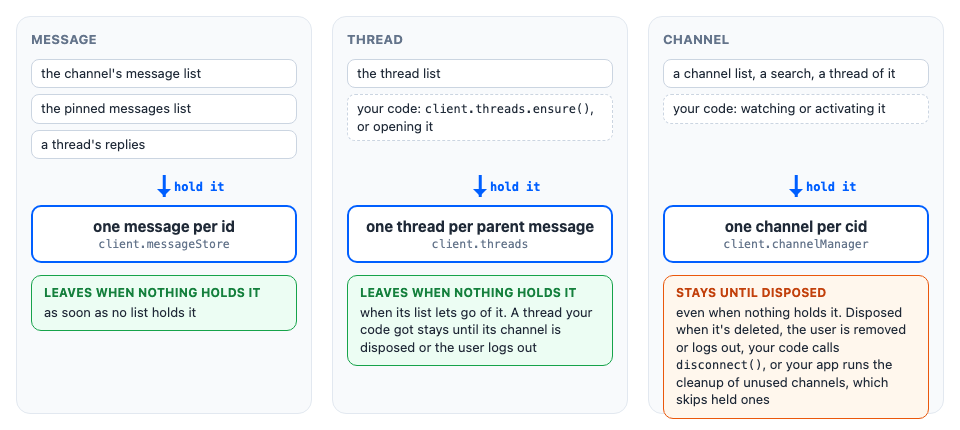
Only channels need anything from your code. The rest of the page is about them.
What keeps an entity in memory
- A message is kept while a message list holds it. A list holds every message in the pages it has loaded, whether the UI renders them or not, so scrolling back to them needs no request. It lets go of them when it's reset, for example by a reload, when its channel is disposed, and, if you set
maxLoadedItems, when its newest messages grow past that cap and it drops the oldest. A message that several lists hold, such as a pinned one, stays until the last of them lets go. Loading it after that fetches it from the server. - A channel is kept from the moment the client has it until it's disposed: for example, when it's deleted, when the current user is removed from it, or when the app's cleanup of unused channels runs while nothing uses it. A channel counts as used while:
- it's watched, or was watched until the connection dropped;
- it's active: your code called
Channel.activate(), as described below; - a query for it is waiting for its response;
- a channel list shows it;
- the client keeps one of its threads (see below);
- the results of an active channel or message search include it;
- a composer for editing one of its messages is cached.
- A thread is kept for the rest of the session once your code gets it with
client.threads.ensure()or opens it. A thread that's only in the thread list is kept while the list shows it. When its channel is disposed, the client drops its threads too.
Keeping a channel in memory
The SDK's lists, threads and components keep the channels they use. Your own code keeps a channel in one of two ways, depending on whether the user sees it:
- Watch it when your code needs the channel kept and current, but doesn't show it. A watched channel counts as used, so the cleanup of unused channels skips it, and it receives the channel's events.
Channel.stopWatching()ends both. - Activate it while a screen of your own shows it, without the SDK's components. An active channel is kept too, and the client treats it as one the user is looking at, as described below.
// When the channel's screen opens:
const release = channel.activate();

// When it closes:
release();
While a channel is active:
- the cleanup of unused channels skips it;
- after a reconnect, the client reloads it with
Channel.reload(), so messages sent while the user was offline appear. A channel that was watched but isn't active isn't reloaded. It's watched again when a channel list reloads a first page that holds it, or when an event mentions it (see Connection); - a channel list loading a page doesn't replace the messages it has loaded, because
Channel.reload()keeps them current.
That's why activation is for a channel on screen: one that stays active after its screen closes still costs a reload after every reconnect, and channel lists no longer refresh its messages. Channel.activate() doesn't turn events on or off: a watched channel gets its events either way.
Activations are counted. Each call returns its own release function, and the channel stays active until every one of them has been called. Calling a release function a second time does nothing.
Threads work the same way: Thread.activate() returns a release function, and the client reloads active threads after a reconnect. An active thread also marks new replies read as they arrive, so activate a thread only while it's shown.
Either way, this matters only if the app runs the cleanup, ChannelManager.releaseUnusedChannels(). Without it, the client keeps every channel it has until it's disposed.
Cleaning up unused channels
The client never drops a channel just because nothing shows it any more. In a long session that opens many channels, from search, deep links and notifications, memory keeps growing.
The cleanup of unused channels runs only when your app calls client.channelManager.releaseUnusedChannels(): neither the client nor the UI components run it on their own. Call it when the app is done with what it showed, for example after the user closes a search screen:
client.channelManager.releaseUnusedChannels();It removes, in this order:
- every channel that was disposed, whatever still refers to it;
- every channel nothing uses, by the list in What keeps an entity in memory, and disposes it.
A channel your code still uses but that nothing in that list keeps is disposed too, so watch or activate it first; see Keeping a channel in memory. A disposed channel is finished: to use it again, get a new object with client.channel() and load it.
Disposal
A disposed channel object is finished: it no longer gets events, and its methods that talk to the server throw. The client disposes a channel when it's deleted, when the current user is removed from it, when the user logs out, when the cleanup of unused channels drops it, or when your code calls Channel.disconnect().
What this means for your code:
- Drop your references to it. A channel your code keeps, for example in a map or in state, can be disposed under it. To use it again, for example after the user is added back, call
client.channel(): it returns a new object for the same cid. - Close what shows it.
channel.pendingDisposalturnstrueinchannel.state, so subscribe to it. In aChatViewlayout, the layout can close it for you; see Disposed channels.
const unsubscribe = channel.state.subscribeWithSelector(
  ({ pendingDisposal }) => ({ pendingDisposal }),
  ({ pendingDisposal }) => {
    // The channel was deleted, or the user can't see it any more.
    if (pendingDisposal) closeChannelScreen(channel.cid);
  },
);
If you dispose a channel yourself, call Channel.stopWatching() before Channel.disconnect(): Channel.disconnect() sends no request, so the server keeps watching until the WS connection ends. The channel also stays in channel lists until your app next runs the cleanup of unused channels.
Superseded channels
A channel created from its members, without an id, can turn out to exist already.
Example
The user opens a direct message with Bob with client.channel("messaging", { members }). While their query is waiting, an event brings the same conversation, and the client keeps it under its real cid. When the user's query answers with that cid, the object the client already keeps stays. It takes the server's answer and the messages the user was sending. If the user's object was active and the other one wasn't, it also takes what they were typing.
The user's object is now superseded:
channel.supersededByis the object that replaced it. It's inchannel.state, and it's set only once.- The superseded object gets no events, and its
watchStatusis"notWatching". - The client doesn't dispose it before logout, because the app may still use it.
Your code must switch to the replacement. Channel.watch() does it for you, because it resolves with the replacement. Here userId is the connected user's id:
import type { Channel } from "stream-chat";

const openDirectMessage = async (otherUserId: string): Promise<Channel> => {
  const channel = client.channel("messaging", {
    members: [{ user_id: userId }, { user_id: otherUserId }],
  });

  // Resolves with the object to use: this one, or the one that superseded it.
  return channel.watch();
};
A channel that's already on screen can follow supersededBy:
const unsubscribe = channel.state.subscribeWithSelector(
  ({ supersededBy }) => ({ supersededBy }),
  ({ supersededBy }) => {
    if (supersededBy) showChannel(supersededBy);
  },
);
Once nothing uses the superseded object, call Channel.disconnect() on it.