















How the SDK is built
The SDK has two layers. This page follows one action through both of them: a user opens a channel and sends a message. It ends with the rule that follows from it: which layer to change for what.
The two layers
- State lives in
stream-chat. Channels, threads, channel lists, message lists and message composers are objects, and each keeps its data in stores that anything can subscribe to. You configure these objects throughclient.config. None of this depends on React. - UI lives in
stream-chat-react. Its components subscribe to those stores withuseStateStore, render what they hold, and call methods on the objects when the user acts. You replace any component throughWithComponents.
The UI has an optional part, the layout: stream-chat-react/slot-layout, with ChatView at its root. It decides where a channel or a thread opens. Without it, the app renders Channel and Thread where it wants them.
One action through the layers
The user has the app from the Quick start open: a channel list, and a ChatView with a channel slot. They open "Design" and send "Hello". Step through what happens in each layer:
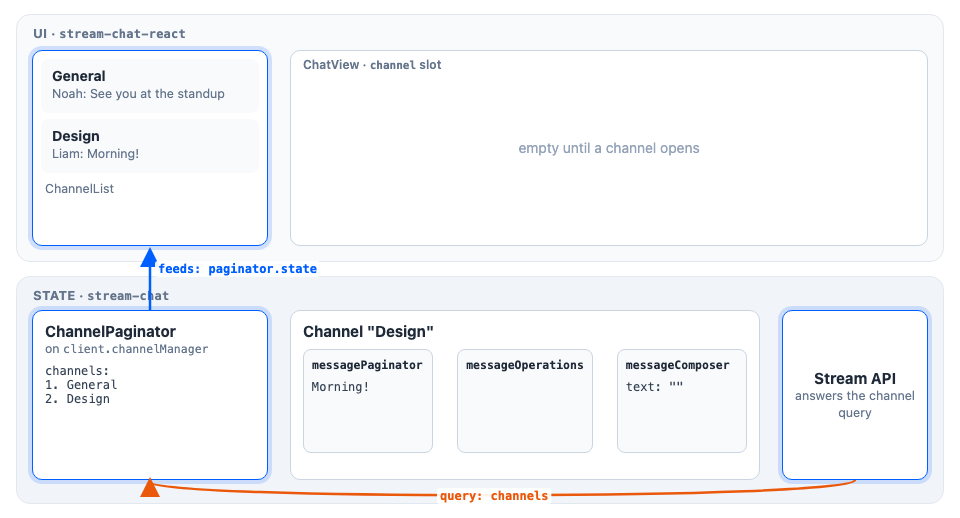
ChannelPaginator loads the channels from the Stream API with a channel query, and feeds them to ChannelList: the list subscribes to paginator.state and renders a row for each channel. The paginator is registered on client.channelManager, which keeps it up to date as events arrive.
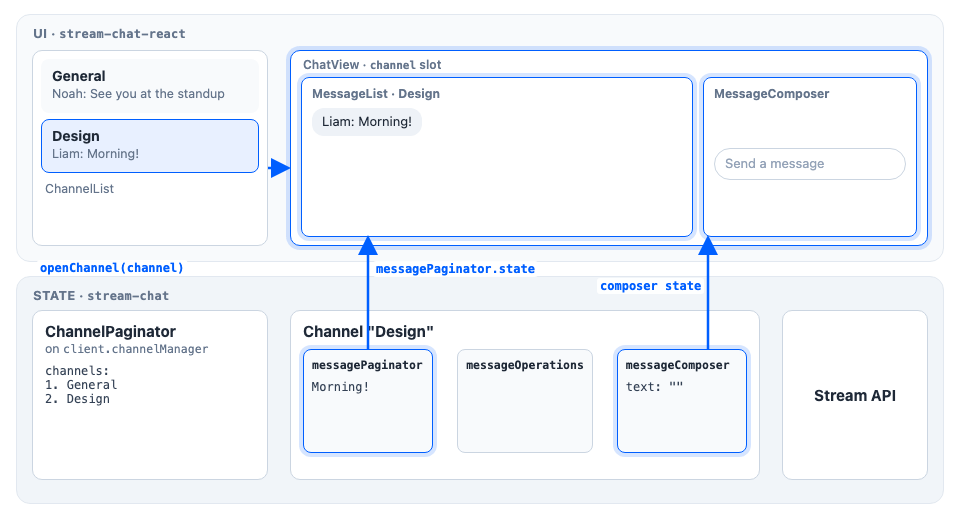
Clicking "Design" calls openChannel(channel) from useWorkspaceNavigation(). ChatView puts the channel in the channel slot, and ChannelSlot renders a Channel for it. Inside it, MessageList subscribes to channel.messagePaginator and renders its messages, and MessageComposer renders from channel.messageComposer. Without a layout, the app renders Channel itself, as in Show one channel.
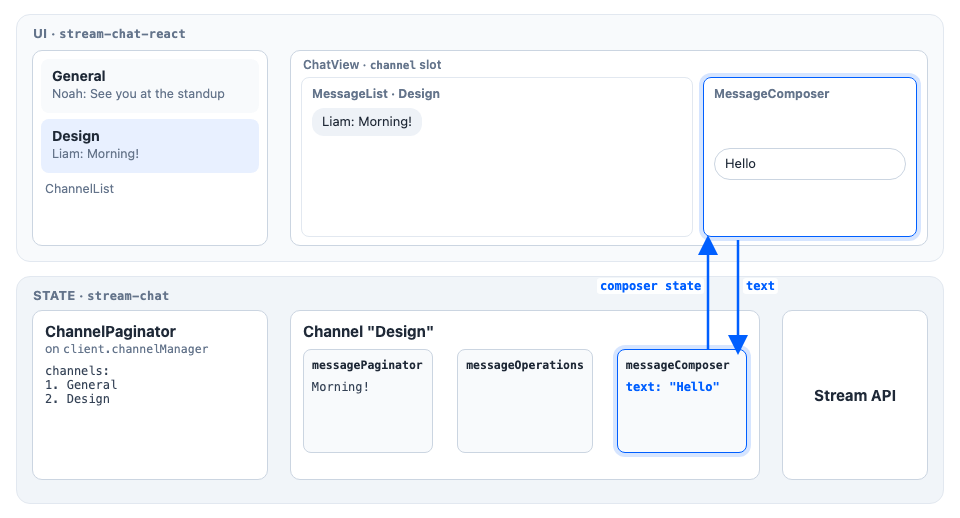
Typing in MessageComposer writes the text into channel.messageComposer, and the composer UI renders the composer's state back.
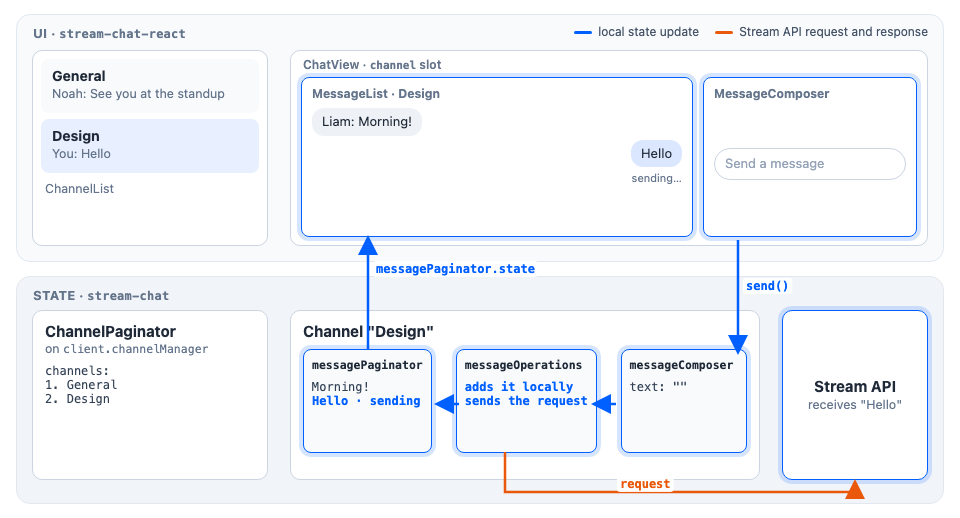
Pressing Enter calls MessageComposer.send(), which hands the message to channel.messageOperations. Two paths follow. The local one (blue) adds the message to messagePaginator at once, marked as sending, so MessageList shows it right away. The other (orange) sends the request to the Stream API, through channel.requestHandlers.sendMessageRequest in client.config if you set one. The composer is cleared.
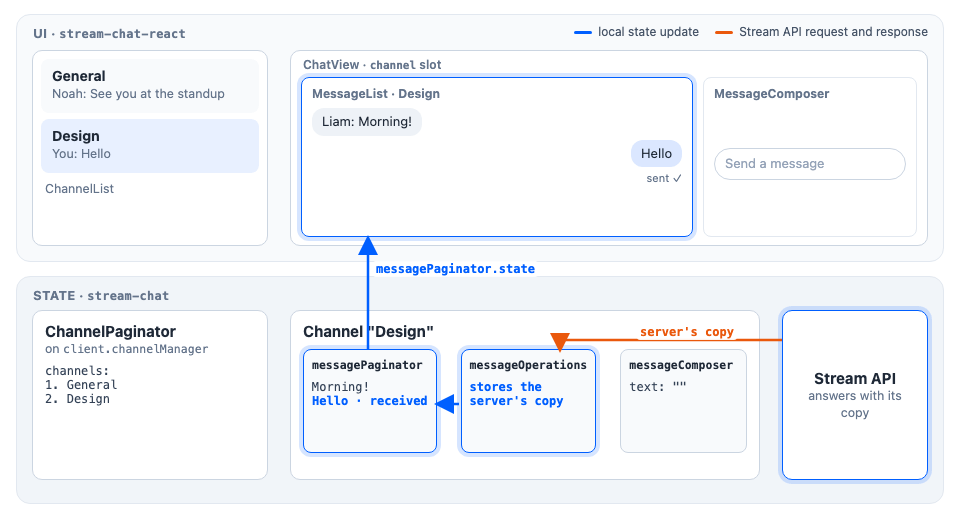
The API answers with its copy of the message. messageOperations stores it in messagePaginator in place of the local one, marked as received, and MessageList re-renders it as sent. If the request fails, the message is marked failed instead.
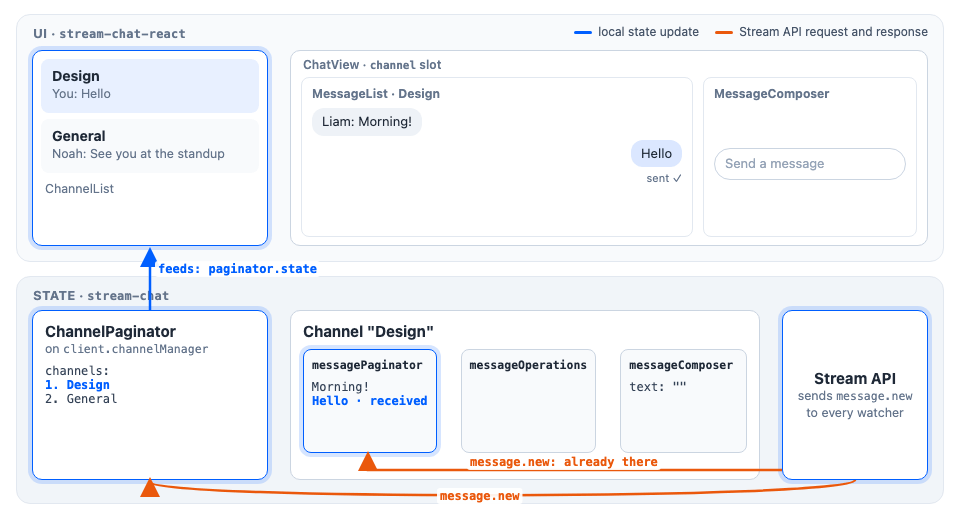
The API also sends message.new to every client watching the channel, this one included. The channel ingests the message into messagePaginator, where it's already present, so nothing changes there, and your own message doesn't count as unread. The channel manager re-inserts "Design" into its paginators, which sort by last message, so it moves to the top and ChannelList re-renders in that order.
The UI rendered and placed things; the state layer loaded the data, sent the message and updated the stores. In a thread, the same steps run on thread.messagePaginator, thread.messageComposer and thread.messageOperations, and the send still goes through the channel's request handler.
The rule
Change behaviour in the state layer. Change appearance and placement in the UI layer.
- Behaviour is what the objects do: what they load, what they send and what they allow. Change it through
client.config: configuration values, request handlers, and setup functions that add composer middleware. The change applies wherever the object is used: in the SDK's components, in your own components, and in channels and threads alike. - Appearance is what a component renders. Replace the component through
WithComponents, or change the CSS variables. - Placement is where a channel or a thread opens. Declare the slots in
ChatView'slayouts, and render them withChannelSlot,ThreadSlot, orSlotwithslotRenderers.
Two examples:
- Turning on drafts is behaviour: set
messageComposer.drafts.enabledinclient.config. It reaches every message composer, in channels and threads, including a composer UI of your own, because it configures the composer objects, not a component. - Changing the date separator is appearance: pass a
DateSeparatoroverride toWithComponents. Every message list below it renders yours.
Where each layer is taught
- State. The State section explains how the objects hold data, load it, keep it current and change it. Start with Reactive state. Channel list paginators cover channel lists, and Message composer and Message operations cover writing and sending. Configuration covers
client.config. - UI. The UI section explains how components read state and how to change any of them, for example through Theming, Localization and Actions. The props of every component are in the Component reference, starting with Chat.
- Layout. The UI section's Layout pages, starting with Workspace with ChatView, explain where channels and threads open and how users move between them. The APIs are in the Component reference: Slot layout, ChatView components and Workspace navigation API.