















Voice recordings and audio playback
A voice recording is a message the user records in the composer. This page covers recording, how a recording is encoded and sent, and how the SDK plays voice recordings and audio files.
What users get
The user's composer is empty, so a microphone button sits where the send button would be. They click it, and the browser asks for the microphone. While they speak, the composer turns into a recorder with a timer and a live waveform. They can pause, listen to what they have so far, and resume, or cancel to throw the recording away. When they complete it, the recording uploads and goes out as a message.
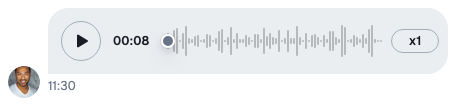
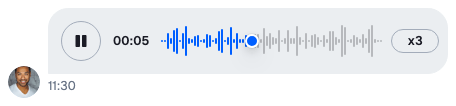
In the message list, the recording plays in a player with a play button, the waveform, the time left and a speed button (x1, x1.5, x2). Clicking or dragging on the waveform seeks. A reply that quotes it shows "Voice message" and its length, when the quoted message has no text.
Only one recording or audio file plays at a time: starting another pauses the first. Switching to another channel stops what was playing in the one the user left.
How it works across the layers
- State. A voice recording is an attachment of type
voiceRecording. The composer uploads and sends it like any other attachment, so the upload settings and a custom upload function apply to it. See Attachments and uploads. - UI.
MessageComposerrecords through the browser'sMediaRecorderand turns the recording into an attachment.VoiceRecordingrenders it in the message list. Playback runs through audio players thatChat,ChannelandThreadprovide. - Layout. Not involved, except that a channel and a thread each scope their own playback.
The attachment
A voice recording carries these fields. The metadata is under custom, like every attachment's own data:
| Field | Holds |
|---|---|
type |
always "voiceRecording" |
asset_url |
the uploaded file |
title |
the file name. The default player doesn't display it. |
custom.duration |
the length in seconds. When it's missing, the player shows the file size instead. |
custom.file_size |
the size in bytes |
custom.mime_type |
the file type, such as audio/wav |
custom.waveform_data |
amplitudes between 0 and 1, drawn as the waveform. Without it, no waveform shows. |
Recording
- With
audioRecordingEnabled,MessageComposercreates a recorder. The composer shows the record button,StartRecordingAudioButton, when it's empty, nothing is being edited, no command is active, and the browser can record. - Clicking it starts recording, and the browser asks for the microphone the first time. When access was denied, a callout next to the button renders
RecordingPermissionDeniedNotification. - While a recording is running,
AudioRecordertakes the composer's place. Its controls pause and resume, cancel, and complete the recording. When it's paused, the user can play back what was recorded so far. - The browser records WebM, or MP4 in Safari. A WebM recording is encoded as WAV at 16 kHz by default, or as MP3 with the MP3 encoder (see below). An MP4 recording is kept as it is.
- Completing the recording turns it into a
voiceRecordingattachment and uploads it with the composer's attachment manager. Then the composer sends it at once. WithasyncMessagesMultiSendEnabledonMessageComposer, it stays in the composer instead, shown above the input byVoiceRecordingPreviewSlot, and goes out with the text and files when the user sends.
recordingController in useMessageComposerContext() exposes the recorder to your own components: the recorder itself, recordingState, permissionState, the finished recording, and completeRecording().
Playback
All audio in the SDK, voice recordings and audio file attachments alike, plays through one audio element that Chat keeps. A player that starts takes the element over and pauses the one that held it. That's why only one plays at a time, across channels and threads, and why playback works on iOS, which lets an element play from code only after a user gesture has started it.
Channel and Thread each provide a pool of players, WithAudioPlayback, scoped to their channel or thread. When the channel or thread changes, or the component unmounts, the pool stops and discards its players. A thread opened beside its channel has a pool of its own, and closing the thread stops its audio.
A component asks its pool for a player with useAudioPlayer({ src, requester, ... }). The same src and requester give back the same player, so a message scrolled out of a virtualized list and back keeps its progress. The player's state is a store, audioPlayer.state, and its methods control playback: AudioPlayer.play(), AudioPlayer.pause(), AudioPlayer.stop(), AudioPlayer.togglePlay(), AudioPlayer.seek() and AudioPlayer.increasePlaybackRate(). The state holds isPlaying, secondsElapsed, progressPercent, durationSeconds, currentPlaybackRate, playbackRates, canPlayRecord and playbackError. AudioPlayer.seek() takes the pointer's clientX and the progress bar element, the way a click handler gets them. useActiveAudioPlayer() returns the player that started playing most recently, and keeps returning it while it's paused.
Turning it on or off
Recording is off by default. Turn it on for each composer you render:
import { MessageComposer } from "stream-chat-react";

export const ComposerWithRecording = () => (
  <MessageComposer audioRecordingEnabled />
);
A thread's composer needs the prop too. Recordings are uploaded, so uploads must be allowed in the channel: see Turning it on or off on Attachments and uploads. The record button also needs navigator.mediaDevices, which browsers offer only on HTTPS and localhost.
Playback needs nothing: Channel and Thread provide it.
Encoding recordings as MP3
WAV files are large. The stream-chat-react/mp3-encoder entry point encodes recordings as MP3 at 128 kbps instead. It runs on @breezystack/lamejs, an optional peer dependency of stream-chat-react, so install it first:
npm install @breezystack/lamejsThen pass the encoder to MessageComposer through audioRecordingConfig:
import type { CustomAudioRecordingConfig } from "stream-chat-react";
import { MessageComposer } from "stream-chat-react";
import { encodeToMp3 } from "stream-chat-react/mp3-encoder";

// Declared once: a new object on every render would create a new recorder each time.
const audioRecordingConfig: CustomAudioRecordingConfig = {
  transcoderConfig: { encoder: encodeToMp3 },
};

export const ComposerWithMp3Recording = () => (
  <MessageComposer
    audioRecordingConfig={audioRecordingConfig}
    audioRecordingEnabled
  />
);
encodeToMp3 loads @breezystack/lamejs with a dynamic import the first time it encodes, so bundlers can keep it out of your main bundle. It applies to WebM recordings; Safari's MP4 recordings are sent as they are.
An encoder is any function (file: File, sampleRate: number) => Promise<Blob>, so you can pass one of your own. transcoderConfig.sampleRate sets the rate it receives, 16000 by default.
Customizing
Playback speeds
VoiceRecordingPlayer takes the speeds its button cycles through. Pass them from a VoiceRecording of your own, and give that to Attachment:
import type { Channel as StreamChannel } from "stream-chat";
import type { AttachmentProps, VoiceRecordingProps } from "stream-chat-react";
import {
  Attachment,
  Channel,
  MessageComposer,
  MessageList,
  QuotedVoiceRecording,
  VoiceRecordingPlayer,
  WithComponents,
} from "stream-chat-react";

const playbackRates = [1, 1.5, 2, 3];

const CustomVoiceRecording = ({ attachment, isQuoted }: VoiceRecordingProps) =>
  isQuoted ? (
    <QuotedVoiceRecording attachment={attachment} />
  ) : (
    <VoiceRecordingPlayer
      attachment={attachment}
      playbackRates={playbackRates}
    />
  );

const CustomAttachment = (props: AttachmentProps) => (
  <Attachment {...props} VoiceRecording={CustomVoiceRecording} />
);

const overrides = { Attachment: CustomAttachment };

export const ChannelWithFastPlayback = ({
  channel,
}: {
  channel: StreamChannel;
}) => (
  <WithComponents overrides={overrides}>
    <Channel channel={channel}>
      <MessageList />
      <MessageComposer audioRecordingEnabled />
    </Channel>
  </WithComponents>
);
To change the "Voice message" fallback title, translate the key common.voiceMessage.label. See Localization.
The recorder
Three override keys replace the recording UI: StartRecordingAudioButton, AudioRecorder and RecordingPermissionDeniedNotification. A recorder of your own reads recordingController:
import {
  MediaRecordingState,
  MessageComposer,
  useMessageComposerContext,
  WithComponents,
} from "stream-chat-react";

const SimpleAudioRecorder = () => {
  const { recordingController } = useMessageComposerContext();
  const { completeRecording, recorder, recordingState } = recordingController;
  if (!recorder) return null;

  const paused = recordingState === MediaRecordingState.PAUSED;

  return (
    <div className="simple-audio-recorder">
      <button onClick={() => recorder.cancel()} type="button">
        Cancel
      </button>
      <button
        onClick={() => (paused ? recorder.resume() : recorder.pause())}
        type="button"
      >
        {paused ? "Resume" : "Pause"}
      </button>
      <button onClick={completeRecording} type="button">
        Send
      </button>
    </div>
  );
};

const overrides = { AudioRecorder: SimpleAudioRecorder };

export const ComposerWithSimpleRecorder = () => (
  <WithComponents overrides={overrides}>
    <MessageComposer audioRecordingEnabled />
  </WithComponents>
);
RecordingPermissionDeniedNotification receives permissionName. The callout around it closes on its own; the component gets no close callback. Message composer UI lists the composer's other override keys.
A player of your own
useAudioPlayer works in any component under Channel, Thread or WithAudioPlayback. This voice recording renders as a single button that plays and shows the seconds played:
import type { Attachment as StreamAttachment } from "stream-chat";
import { isVoiceRecordingAttachment } from "stream-chat";
import type {
  AttachmentProps,
  AudioPlayer,
  AudioPlayerState,
  VoiceRecordingProps,
} from "stream-chat-react";
import {
  Attachment,
  useAudioPlayer,
  useMessageContext,
  useStateStore,
} from "stream-chat-react";

const playerSelector = ({ isPlaying, secondsElapsed }: AudioPlayerState) => ({
  isPlaying,
  secondsElapsed,
});

const PlayerButton = ({ audioPlayer }: { audioPlayer: AudioPlayer }) => {
  const { isPlaying, secondsElapsed } = useStateStore(
    audioPlayer.state,
    playerSelector,
  );

  return (
    <button onClick={audioPlayer.togglePlay} type="button">
      {isPlaying ? "Pause" : "Play"} {Math.round(secondsElapsed)}s
    </button>
  );
};

const getDuration = (attachment: StreamAttachment) =>
  isVoiceRecordingAttachment(attachment)
    ? attachment.custom.duration
    : undefined;

const CompactVoiceRecording = ({ attachment }: VoiceRecordingProps) => {
  const { message } = useMessageContext();
  const audioPlayer = useAudioPlayer({
    durationSeconds: getDuration(attachment),
    requester: message.id,
    src: attachment.asset_url,
    title: attachment.title,
  });

  return audioPlayer ? <PlayerButton audioPlayer={audioPlayer} /> : null;
};

export const CompactAttachment = (props: AttachmentProps) => (
  <Attachment {...props} VoiceRecording={CompactVoiceRecording} />
);
Register CompactAttachment as the Attachment override, as in the playback speeds example. PlayButton, WaveProgressBar, PlaybackRateButton and DurationDisplay are the SDK's own parts, if you want to build from them.
Outside Channel and Thread, wrap your audio UI in WithAudioPlayback. Inside a Chat, it shares the one audio element, so it still plays one sound at a time. Pass playbackScope to stop its players when that value changes.
A player that stays visible
useActiveAudioPlayer() returns the player that started playing most recently, so a bar at the top of the channel can keep control after the user scrolls away from the message. Call it inside Channel, Thread or WithAudioPlayback; outside them it returns undefined. Under one Chat, every pool reports the same player, so a bar in the channel also controls a recording playing in the thread.
import type { AudioPlayerState } from "stream-chat-react";
import { useActiveAudioPlayer, useStateStore } from "stream-chat-react";

const nowPlayingSelector = ({ isPlaying }: AudioPlayerState) => ({ isPlaying });

const NowPlayingControls = ({
  audioPlayer,
}: {
  audioPlayer: NonNullable<ReturnType<typeof useActiveAudioPlayer>>;
}) => {
  const { isPlaying } = useStateStore(audioPlayer.state, nowPlayingSelector);

  return (
    <div className="now-playing">
      <span>{audioPlayer.title}</span>
      <button onClick={audioPlayer.togglePlay} type="button">
        {isPlaying ? "Pause" : "Play"}
      </button>
      <button onClick={audioPlayer.stop} type="button">
        Stop
      </button>
    </div>
  );
};

export const NowPlaying = () => {
  const audioPlayer = useActiveAudioPlayer();
  return audioPlayer ? <NowPlayingControls audioPlayer={audioPlayer} /> : null;
};
Render NowPlaying inside Channel, for example above the MessageList.
Reference
- Voice Recording Attachment:
VoiceRecording,VoiceRecordingPlayerandQuotedVoiceRecording. - Audio Recorder: the recorder's components and
recordingController. - MessageComposer:
audioRecordingEnabled,audioRecordingConfigandasyncMessagesMultiSendEnabled. - Attachments: the
Attachmentprops. - Entry points and CSS files: the
mp3-encoderentry point.