# Pin indicator
> **Info:** This is release candidate documentation for **Stream Chat React SDK v15**. For the latest stable version, see the [latest version (v14)](https://getstream.io/chat/docs/sdk/react/).
A pinned message shows a "Pinned by" line above its bubble, and its row in the list is highlighted:
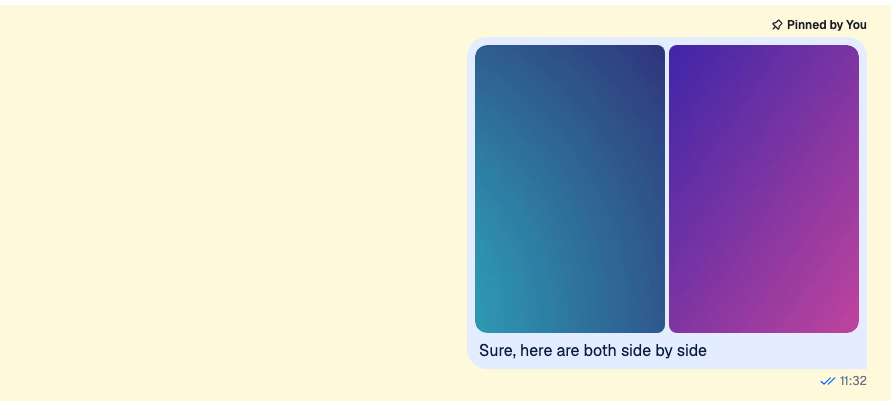
This recipe changes how a pin looks, first with CSS only, then with a component of your own that shows when the message was pinned and lets the user unpin it. How pinning works, and the list of a channel's pinned messages, are on [Pinned messages](https://getstream.io/chat/docs/sdk/react/v15/features/messaging/pinned-messages/).
## Best practices
- Restyle the default indicator with CSS when only its look changes. A pinned message gets the class `str-chat__message--pinned`, and the indicator renders `str-chat__message-pin-indicator`.
- Replace `PinIndicator` when the indicator needs more data or an action. It renders inside the message, so it can read `useMessageContext()`.
- Keep the `str-chat__message-pin-indicator` class on your component's root. The message's grid uses it to place the indicator above the bubble.
- Offer Unpin only to users with the `pin-message` capability. The SDK doesn't check it for pinning, and the server rejects the request from a user without it.
- Keep the indicator to one short line, so it doesn't push the message content around.
## Custom pin indicator
### CSS based solution
The default indicator is an icon and a label inside `str-chat__message-pin-indicator__content`. These rules turn it into a chip with an orange border:
```css title="src/pin-indicator.css"
.str-chat__message--pinned
.str-chat__message-pin-indicator
.str-chat__message-pin-indicator__content {
width: fit-content;
padding: 2px 8px;
border: 1px solid darkorange;
border-radius: 6px;
background-color: papayawhip;
}
.str-chat__message--pinned
.str-chat__message-pin-indicator__content
.str-chat__message-pin-indicator__icon {
color: darkorange;
}
```
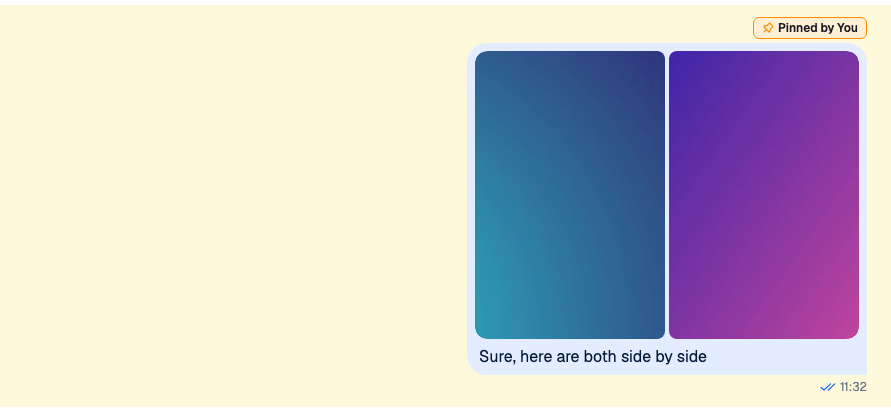
Load the file after the SDK's stylesheet, or put the rules in a layer after the SDK's, as [Theming → CSS layers](https://getstream.io/chat/docs/sdk/react/v15/ui/customizing/theming/#css-layers) shows. Otherwise the SDK's rules, which are as specific, win.
The icon takes the text color, so `color` on its wrapper colors it. The highlighted row comes from the list item around a pinned message, which paints `--str-chat__background-core-highlight` behind it.
### Component based solution
CSS can't add information. This indicator says who pinned the message and on which day, shows when the pin expires, and has an Unpin button:
```tsx label="React" title="src/PinnedByIndicator.tsx"
import type { PropsWithChildren } from "react";
import { convertTimestampToDate } from "stream-chat";
import {
useChatContext,
useMessageContext,
useUserRole,
WithComponents,
} from "stream-chat-react";
import "./PinnedByIndicator.css";
const PinnedByIndicator = () => {
const { client } = useChatContext();
const { handlePin, message } = useMessageContext();
const { canPin } = useUserRole(message);
if (!message.pinned) return null;
const pinnedBy = message.pinned_by;
const pinnedByName =
pinnedBy?.id === client.user?.id
? "you"
: (pinnedBy?.name ?? pinnedBy?.id ?? "someone");
const pinnedAt = convertTimestampToDate(message.pinned_at);
const expiresAt = convertTimestampToDate(message.pin_expires);
return (
📌 Pinned by {pinnedByName}
{pinnedAt && ` on ${pinnedAt.toLocaleDateString()}`}
{expiresAt && (
until {expiresAt.toLocaleString()}
)}
{canPin && (
)}
);
};
// Declared once, so WithComponents gets the same object on every render.
const overrides = { PinIndicator: PinnedByIndicator };
export const WithPinnedByIndicator = ({ children }: PropsWithChildren) => (
{children}
);
```
```css label="CSS" title="src/PinnedByIndicator.css"
.pinned-by {
display: flex;
align-items: center;
gap: 8px;
font-size: 12px;
}
.pinned-by__expiry {
color: #6b7280;
}
.pinned-by__unpin {
padding: 0;
border: 0;
background: none;
color: #005fff;
cursor: pointer;
}
```
Wrap the channel in `WithPinnedByIndicator`:
```tsx title="src/PinnedChannel.tsx"
import type { Channel as StreamChannel } from "stream-chat";
import { Channel, MessageComposer, MessageList } from "stream-chat-react";
import { WithPinnedByIndicator } from "./PinnedByIndicator";
export const PinnedChannel = ({ channel }: { channel: StreamChannel }) => (
);
```
How it works:
1. The default `MessageUI` renders the `PinIndicator` key above the bubble of every message with `message.pinned`, and passes the message as `message`. `PinnedByIndicator` reads it from `MessageContext` instead, together with `handlePin`.
2. `pinned_by`, `pinned_at` and `pin_expires` are on the message. The timestamps are nanosecond numbers, so `convertTimestampToDate` turns them into dates; [Data conventions](https://getstream.io/chat/docs/sdk/react/v15/state/state-and-entities/data-conventions/#timestamps) explains why.
3. `useUserRole(message).canPin` is the user's `pin-message` capability in the channel. Without it, the button isn't rendered.
4. Clicking Unpin calls `handlePin`, which unpins a pinned message. The indicator disappears at once, and comes back if the request fails.
The indicator only renders where the default `MessageUI` does. A [custom message UI](https://getstream.io/chat/docs/sdk/react/v15/recipes/message/custom-message/) renders whatever it wants for a pinned message.
### Read more
- [Pinned messages](https://getstream.io/chat/docs/sdk/react/v15/features/messaging/pinned-messages/#turning-it-on-or-off) hides the Pin action from users who can't pin.
- [Actions](https://getstream.io/chat/docs/sdk/react/v15/ui/customizing/actions/#adding-removing-and-replacing-actions) replaces the Pin action with one that asks for confirmation.
- [Permissions reference](https://getstream.io/chat/docs/javascript/permissions-reference/) lists the `pin-message` capability and the roles that have it.
---
For the most recent version of this documentation, visit [https://getstream.io/chat/docs/sdk/react/v15/recipes/message/pin-indicator/](https://getstream.io/chat/docs/sdk/react/v15/recipes/message/pin-indicator/).