















StreamMessageSearchListView
StreamMessageSearchListView displays a paginated list of message search results spanning all channels a user has access to. It pairs with StreamMessageSearchListController to manage queries and pagination. See the pub.dev documentation for the full API reference.
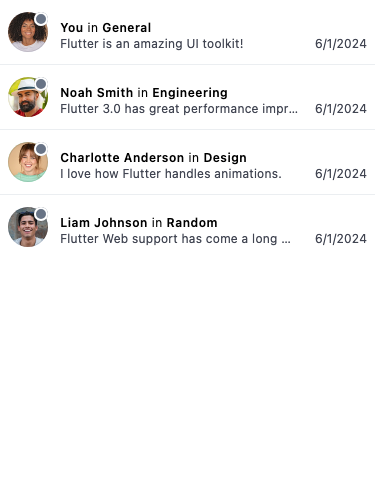
Background
Users in Stream Chat can have several channels and it can get hard to remember which channel has the
message they are searching for. As such, there needs to be a way to search for a message across multiple
channels. This is where StreamMessageSearchListView comes in.
Make sure to check the StreamMessageSearchListController documentation for more information on how to use the controller to manipulate the StreamMessageSearchListView.
Basic Example
While the StreamMessageListView is tied to a certain StreamChannel, a StreamMessageSearchListView is not.
class StreamMessageSearchPage extends StatefulWidget {
  const StreamMessageSearchPage({
    super.key,
    required this.client,
  });

  final StreamChatClient client;

  @override
  State<StreamMessageSearchPage> createState() => _StreamMessageSearchState();
}

class _StreamMessageSearchState extends State<StreamMessageSearchPage> {
  late final _controller = StreamMessageSearchListController(
    client: widget.client,
    limit: 20,
    filter: Filter.in_(
      'members',
      [StreamChat.of(context).user!.id],
    ),
    searchQuery: 'your query here',
  );

  @override
  void dispose() {
    _controller.dispose();
    super.dispose();
  }

  @override
  Widget build(BuildContext context) => Scaffold(
        body: StreamMessageSearchListView(
          controller: _controller,
        ),
      );
}
Adding a search entry point to the channel list
A common pattern is to place a search icon in the trailing slot of StreamChannelListHeader. Tapping it navigates to a dedicated message-search screen:
StreamChannelListHeader(
  trailing: IconButton(
    icon: const Icon(Icons.search),
    onPressed: () => Navigator.push(
      context,
      MaterialPageRoute(builder: (_) => const MessageSearchScreen()),
    ),
  ),
)
Customize The Result Tiles
You can use your own widget for the result items using the itemBuilder parameter.
StreamMessageSearchListView(
  // ...
  itemBuilder: (context, responses, index, defaultWidget) {
    return Text(responses[index].message.text);
  },
),