















StreamMessageListView
StreamMessageListView renders the scrollable list of messages for a channel, handling pagination, unread indicators, floating date dividers, thread separators, and scroll-to-bottom behavior out of the box. See the pub.dev documentation for the full API reference.
Background
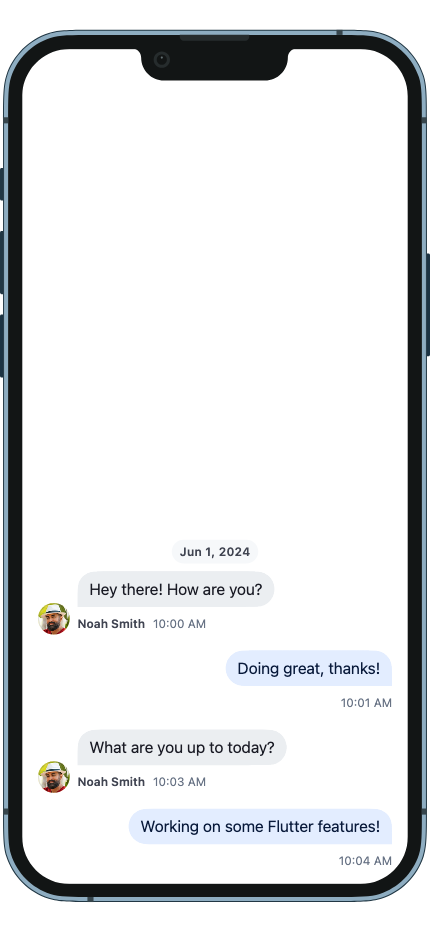
Every channel can contain a list of messages sent by users inside it. The StreamMessageListView widget
displays the list of messages inside a particular channel along with possible attachments and
other message attributes (if the message is pinned for example). This sets it apart from the StreamMessageSearchListView
which may not contain messages only from a single channel and is used to search for messages across
many.
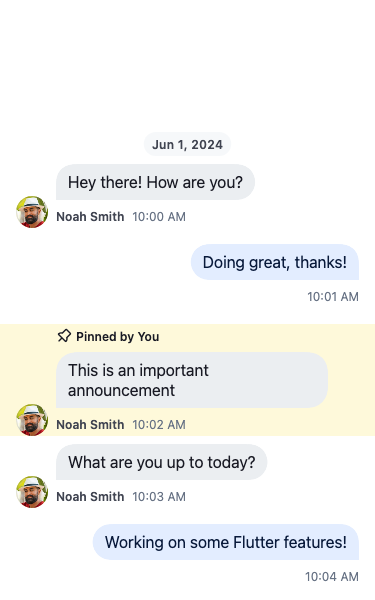
A pinned message keeps its place in the conversation, marked with who pinned it and a highlighted background:
Basic Example
The StreamMessageListView shows the list of messages of the current channel. It has inbuilt support for
common messaging functionality: displaying and editing messages, adding / modifying reactions, support
for quoting messages, pinning messages, and more.
An example of how you can use the StreamMessageListView is:
class ChannelPage extends StatelessWidget {
  const ChannelPage({
    super.key,
  });

  @override
  Widget build(BuildContext context) {
    return Scaffold(
      appBar: const StreamChannelHeader(),
      body: Column(
        children: <Widget>[
          Expanded(
            child: StreamMessageListView(),
          ),
          const StreamMessageComposer(),
        ],
      ),
    );
  }
}
Enable Threads
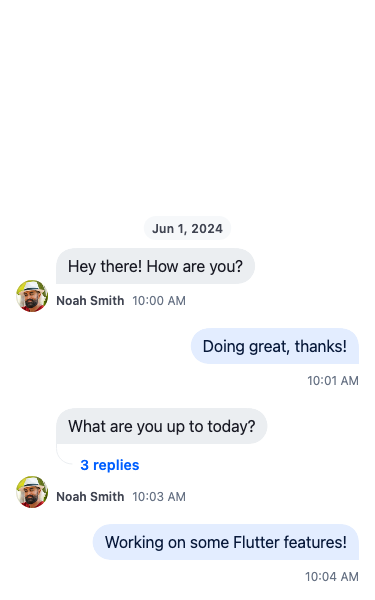
Threads are made of a parent message and replies linked to it. To enable threading, the SDK requires you
to supply a threadBuilder which will supply the page when the thread is clicked.
StreamMessageListView(
    threadBuilder: (_, parentMessage) {
        return ThreadPage(
            parent: parentMessage,
        );
    },
),
The StreamMessageListView itself can render the thread by supplying the parentMessage parameter.
StreamMessageListView(
    parentMessage: parent,
),
Building Custom Messages
You can also supply your own implementation for displaying messages using the messageBuilder parameter.
To customize the existing implementation, look at the StreamMessageItem documentation instead.
messageBuilder only runs for regular messages — system, ephemeral, and moderated messages are routed to their dedicated builders before they reach this callback. Use the typed builders below for those cases, and use messageBuilder to tweak how regular messages render:
StreamMessageListView(
  builders: StreamMessageListViewBuilders(
    // Intercepted before messageBuilder.
    systemMessage: (context, message) => MyCustomSystemMessage(message: message),
    ephemeralMessage: (context, message) => MyCustomEphemeralMessage(message: message),
  ),
  // Runs only for regular messages.
  messageBuilder: (context, message, defaultProps) {
    // Poll messages are still regular-type — branch on the embedded field.
    if (message.poll case final poll?) {
      return MyPollMessage(message: message, poll: poll);
    }

    // Customize props on the default item.
    return StreamMessageItem.fromProps(
      props: defaultProps.copyWith(
        actionsBuilder: (context, actions) => [...actions, myAction],
      ),
    );
  },
),
To fully replace the default item, return your own widget instead of StreamMessageItem.fromProps(...). Note that any list-level callbacks (see below) are delivered through defaultProps, so you must wire them yourself when you replace the item.
Swipe to Reply
Enable swipe-to-reply gestures on messages using the swipeToReply flag inside StreamMessageListViewConfiguration:
StreamMessageListView(
  config: StreamMessageListViewConfiguration(
    swipeToReply: true,
  ),
),
When enabled, users can swipe a message to trigger the reply action. The swipe gesture is disabled for deleted and failed messages.
Auto-Scroll on New Messages
By default the list scrolls to the newest message when the current user sends one, or when someone else's message arrives while the newest message is already visible at the bottom. It deliberately does not yank the view down while you are reading back through history.
Choose a different behaviour with autoScrollPolicy:
StreamMessageListView(
  config: StreamMessageListViewConfiguration(
    autoScrollPolicy: StreamAutoScrollPolicy.disabled,
  ),
),| Policy | Scrolls to the newest message when… |
|---|---|
StreamAutoScrollPolicy.whenOwnMessageOrAtBottom |
The current user sends one, or another user's arrives while already at the bottom. The default. |
StreamAutoScrollPolicy.whenAtBottom |
Already at the bottom, regardless of who sent it. |
StreamAutoScrollPolicy.disabled |
Never. Scrolling is entirely yours to drive, e.g. through scrollController. |
For anything finer-grained, StreamAutoScrollPolicy.custom takes a resolver that receives a StreamAutoScrollDetails — the message, the currentUser, whether the list isAtBottom, and a convenience isOwnMessage — and returns a StreamAutoScrollBehavior of none, jump, or animate:
// Jump instantly for your own messages, animate for everyone else's,
// and stay put while reading history.
StreamAutoScrollBehavior _resolveAutoScroll(StreamAutoScrollDetails details) {
  if (details.isOwnMessage) return StreamAutoScrollBehavior.jump;
  if (details.isAtBottom) return StreamAutoScrollBehavior.animate;
  return StreamAutoScrollBehavior.none;
}

StreamMessageListView(
  config: const StreamMessageListViewConfiguration(
    autoScrollPolicy: StreamAutoScrollPolicy.custom(_resolveAutoScroll),
  ),
),
Hoist the resolver to a top-level function or a field rather than allocating a closure in build, so equal configurations keep comparing as equal.
Setting a Default Configuration for the Whole App
config applies to one widget. To set the defaults for every StreamMessageListView in the app, pass a StreamMessageListViewConfiguration through StreamChat.configData:
StreamChat(
  client: client,
  configData: StreamChatConfigurationData(
    messageListViewConfiguration: const StreamMessageListViewConfiguration(
      autoScrollPolicy: StreamAutoScrollPolicy.whenAtBottom,
      swipeToReply: true,
    ),
  ),
  child: MyApp(),
)
A config passed directly to a widget wins over the app-wide default.
Loading & Empty States
The StreamMessageListView provides built-in skeleton loading and empty state components:
- Skeleton loading: While messages are loading, a shimmer animation shows placeholder message bubbles. Customize via
builders.loading. - Empty state: When no messages exist, a centered prompt is shown. Customize via
builders.empty.
StreamMessageListView(
  builders: StreamMessageListViewBuilders(
    loading: (context) => const MyCustomLoadingWidget(),
    empty: (context) => const MyCustomEmptyState(),
  ),
),
The default components are StreamMessageListSkeletonLoading and StreamMessageListEmptyState.
Floating Date Divider
The message list displays a floating date divider that shows the date of the currently visible messages as the user scrolls. The divider fades when it approaches an inline date separator to avoid visual overlap.
List-Level Callbacks
These callbacks are forwarded to all messages in the list, eliminating the need to set them per-message:
StreamMessageListView(
  onEditMessageTap: (message) => _editMessage(message),
  onReplyTap: (message) => _replyToMessage(message),
  onUserAvatarTap: (user) => _showUserProfile(user),
  onReactionsTap: (message) => _showReactions(message),
  onQuotedMessageTap: (message) => _scrollToMessage(message),
  onMessageLinkTap: (message, url) => _openLink(url),
  onMentionTap: (mention) {
    if (mention case StreamUserMention(:final user)) _showUserProfile(user);
    // else: handle @channel / @here / role / group — see the Mentions docs.
  },
),
These callbacks are delivered to the default message item via defaultProps. If you fully replace the item in messageBuilder (returning your own widget instead of StreamMessageItem.fromProps(...)), you must wire each callback manually. The simplest preservation pattern is to build the default item from props and override only what you need:
messageBuilder: (context, message, defaultProps) {
  return StreamMessageItem.fromProps(
    props: defaultProps.copyWith(
      // Your overrides here — the list-level callbacks on defaultProps are kept.
      swipeToReply: false,
    ),
  );
},