















Mentions
Introduction
The StreamMessageComposer widget supports five mention variants out of the box. Typing @ followed by a name opens the mention autocomplete and the SDK surfaces every variant for which the current user has the required channel capability.
| Mention kind | Token | Notifies |
|---|---|---|
| User | @<name> |
A single user. |
| Channel | @channel |
Every member of the channel. |
| Here | @here |
Members of the channel who are currently online. |
| Role | @<role> |
Every channel member with the matching role. |
| Group | @<group> |
Every member of a named user group on the channel. |
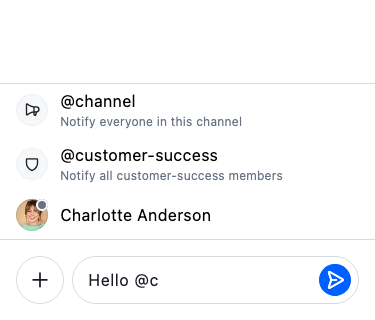
@<user> mentions work out of the box. The broadcast (@channel, @here), role, and user-group variants are gated on dashboard permissions — see the next section.
Enabling the broadcast, role, and group variants
Each non-user variant is gated by a channel capability that the SDK reads off Channel.ownCapabilities. Until the matching capability is granted to the sender's role on the channel type, the variant is filtered out of the suggestion list.
| Channel capability | Dashboard permission | Enables |
|---|---|---|
notify-channel |
NotifyChannel |
@channel |
notify-here |
NotifyHere |
@here |
notify-role |
NotifyRole |
@<role> |
notify-group |
NotifyGroup |
@<group> |
Open the Stream Dashboard, pick your app, then navigate to Chat Messaging → Roles & Permissions. Select the role you want to grant the capability to (for example channel_member) and the scope of the channel type that should allow it (for example messaging), then enable the relevant permissions.
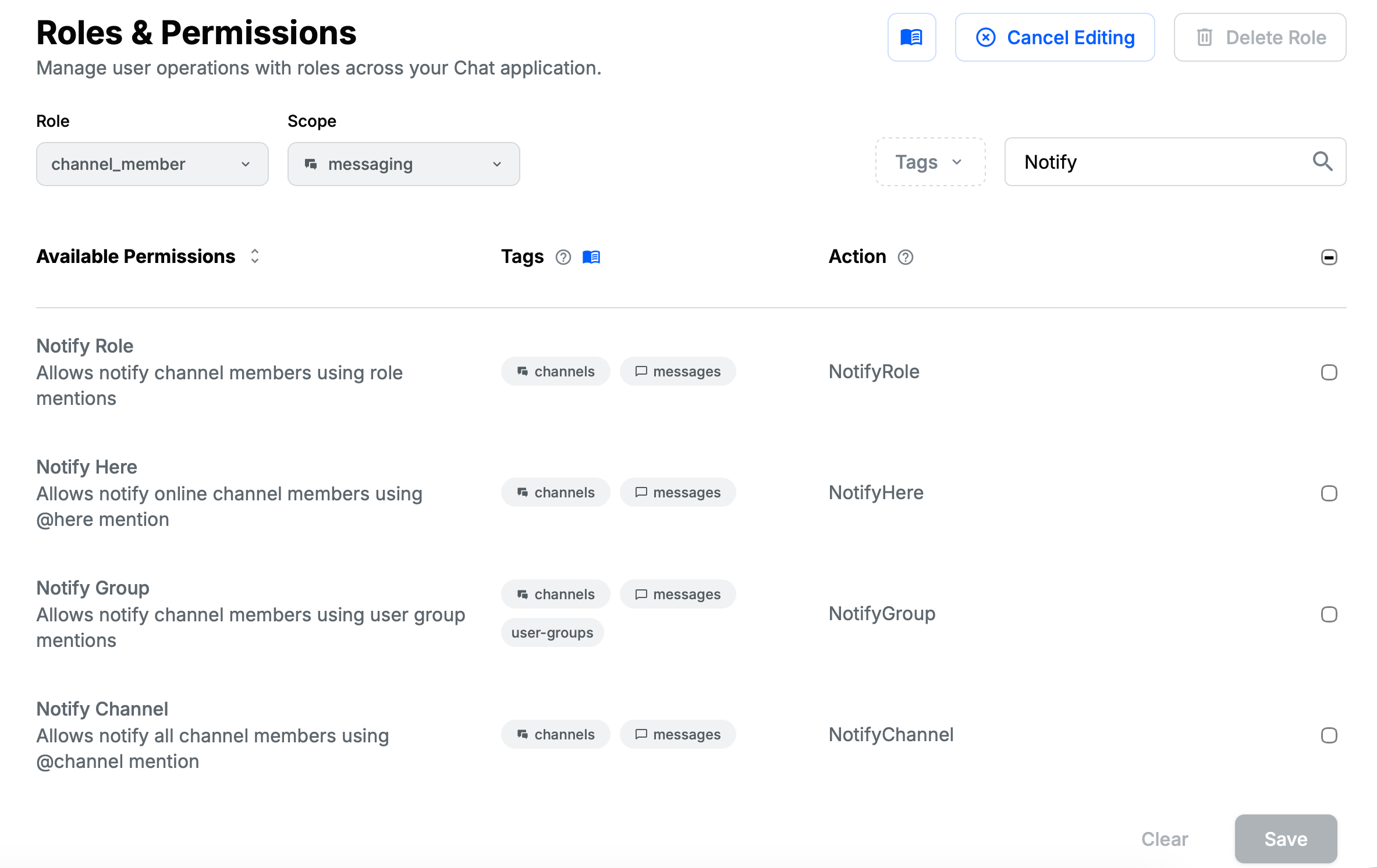
User-group mentions additionally require user groups to be defined for your app via the User Groups API. Role mentions resolve against the roles defined under Chat Messaging → Roles & Permissions in the same dashboard.
StreamMessageComposer reads these capabilities from Channel.ownCapabilities. If you change permissions on the dashboard while the app is running, the new variants only appear after the channel is re-watched.
Message composer
The message composer integrates with the mention autocomplete via StreamMentionAutocompleteOptions, which surfaces the variants the current user is allowed to send and reports taps back through per-variant callbacks. Use the subsections below to handle taps, customise the suggestion rows, or migrate from the legacy user-mention tile builder.
Handling taps on autocomplete options
StreamMentionAutocompleteOptions exposes one tap callback per variant. When you let StreamMessageComposer build the default mention overlay these are already wired — you only need to override them when running your own autocomplete options widget (for example, inside a customAutocompleteTriggers entry — see Autocomplete Triggers).
| Callback | Type | Fires when |
|---|---|---|
onMentionUserTap |
ValueSetter<User> |
A user row is tapped. |
onMentionChannelTap |
VoidCallback |
The @channel row is tapped. |
onMentionHereTap |
VoidCallback |
The @here row is tapped. |
onMentionRoleTap |
ValueSetter<Role> |
A role row is tapped. |
onMentionUserGroupTap |
ValueSetter<UserGroup> |
A user-group row is tapped. |
Each callback needs to do two things:
- Record the mention on the message composer controller, so the sent message carries the mention metadata (
mentionedUsers,mentionedChannel,mentionedHere,mentionedRoles,mentionedGroups). Without this step the sent message has the token in itstextbut no structured mention payload, and the server won't dispatch a notification. - Insert the autocomplete token into the text via
StreamAutocomplete.of(context).acceptAutocompleteOption(...).
The snippet below mirrors what StreamMessageComposer does internally and is the canonical pattern when you run your own autocomplete options widget. controller is the StreamMessageComposerController you are already passing to the message composer.
StreamMentionAutocompleteOptions(
  query: query,
  channel: channel,
  onMentionUserTap: (user) {
    controller.addMentionedUser(user);
    StreamAutocomplete.of(context).acceptAutocompleteOption(user.name);
  },
  onMentionChannelTap: () {
    controller.mentionedChannel = true;
    StreamAutocomplete.of(context).acceptAutocompleteOption('channel');
  },
  onMentionHereTap: () {
    controller.mentionedHere = true;
    StreamAutocomplete.of(context).acceptAutocompleteOption('here');
  },
  onMentionRoleTap: (role) {
    controller.addMentionedRole(role);
    StreamAutocomplete.of(context).acceptAutocompleteOption(role.name);
  },
  onMentionUserGroupTap: (group) {
    controller.addMentionedUserGroup(group);
    StreamAutocomplete.of(context).acceptAutocompleteOption(group.name);
  },
)The message composer also strips the structured mention back out if the matching token disappears from the text before the message is sent (e.g. the user backspaces the @channel token). You don't need to undo addMentioned… calls yourself.
Customising the autocomplete options
Every row in the autocomplete list is a StreamMentionItem. The default rendering switches on the runtime type of StreamMentionItemProps.mention and produces a per-variant tile (StreamUserMention, StreamChannelMention, StreamHereMention, StreamRoleMention, StreamGroupMention). To replace one or more variants, register a StreamMentionItemBuilder — a typedef for StreamComponentBuilder<StreamMentionItemProps> — that returns a custom widget for the variants you care about and falls back to DefaultStreamMentionItem for the rest.
import 'package:flutter/material.dart';
import 'package:stream_chat_flutter/stream_chat_flutter.dart';

/// A [StreamMentionItemBuilder] that customizes ONLY the `@channel`
/// broadcast item and falls back to the default rendering for every other
/// mention kind (here / role / group / user).
Widget customChannelMentionItem(
  BuildContext context,
  StreamMentionItemProps props,
) {
  if (props.mention is! StreamChannelMention) {
    // Defer to the built-in renderer for non-channel mentions.
    return DefaultStreamMentionItem(props: props);
  }

  return Material(
    color: Colors.deepPurple.shade50,
    child: InkWell(
      onTap: props.onTap,
      child: const Padding(
        padding: EdgeInsets.symmetric(horizontal: 12, vertical: 12),
        child: Row(
          children: [
            Icon(Icons.campaign, color: Colors.deepPurple, size: 20),
            SizedBox(width: 12),
            Expanded(
              child: Column(
                crossAxisAlignment: CrossAxisAlignment.start,
                children: [
                  Text(
                    '@channel',
                    style: TextStyle(
                      fontWeight: FontWeight.w600,
                      color: Colors.deepPurple,
                    ),
                  ),
                  Text(
                    'Notify everyone in this channel',
                    style: TextStyle(fontSize: 12, color: Colors.deepPurple),
                  ),
                ],
              ),
            ),
          ],
        ),
      ),
    ),
  );
}
The builder can be wired in two equivalent ways.
Globally via the component factory
Pass it to streamChatComponentBuilders under the mentionItem slot on the StreamChat widget. Every StreamMessageComposer and StreamMentionAutocompleteOptions in the tree picks it up automatically.
StreamChat(
  client: client,
  componentBuilders: StreamComponentBuilders(
    extensions: streamChatComponentBuilders(
      mentionItem: customChannelMentionItem,
    ),
  ),
  child: HomeScreen(),
)
Per-instance via mentionItemBuilder
Pass the builder to mentionItemBuilder on a single StreamMessageComposer (or directly on StreamMentionAutocompleteOptions). The instance-level builder overrides any globally-registered one for that one message composer.
StreamMessageComposer(
  mentionItemBuilder: customChannelMentionItem,
)
When both are set, mentionItemBuilder wins. When neither is set, the SDK falls back to DefaultStreamMentionItem, so you can always return that builder explicitly to opt back into the SDK rendering for a given variant.
Migrating from userMentionsTileBuilder
Previous SDK versions exposed a single user-mention tile builder — userMentionsTileBuilder on StreamMessageComposer and mentionsTileBuilder on StreamMentionAutocompleteOptions. Both are now deprecated and are honoured only for the user-mention row when no mentionItemBuilder is supplied — neither can render the broadcast, role, or user-group variants.
Migrate by moving the existing tile widget into a StreamMentionItemBuilder:
// Before
StreamMessageComposer(
  userMentionsTileBuilder: (context, user) => MyCustomUserTile(user: user),
)

// After
StreamMessageComposer(
  mentionItemBuilder: (context, props) {
    if (props.mention case StreamUserMention(:final user)) {
      return MyCustomUserTile(user: user);
    }
    return DefaultStreamMentionItem(props: props);
  },
)
Message list
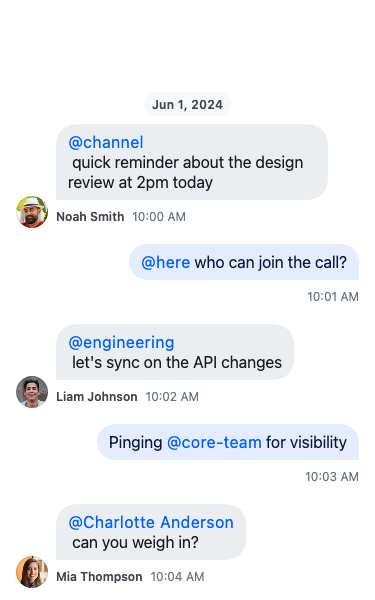
When a sent message containing one or more mentions is rendered in StreamMessageListView, every mention token becomes a tappable, themable inline element. Use the subsections below to react to taps on rendered mentions or restyle each variant.
Handling taps on rendered mentions
StreamMessageListView exposes a single onMentionTap callback that fires for every mention kind and receives a typed StreamMention subclass carrying the looked-up payload (StreamUserMention.user, StreamGroupMention.userGroup, StreamRoleMention.role, or no payload for StreamChannelMention / StreamHereMention). Switch on the runtime type to route each variant.
StreamMessageListView(
  onMentionTap: (mention) {
    switch (mention) {
      case StreamUserMention(:final user):
        openUserProfile(user);
      case StreamRoleMention(:final role):
        openRoleInfo(role);
      case StreamGroupMention(:final userGroup):
        openGroupInfo(userGroup);
      case StreamChannelMention():
      case StreamHereMention():
        // Broadcast mentions — usually a no-op.
        break;
    }
  },
)
The same onMentionTap parameter is exposed on StreamMessageItem if you embed it directly without StreamMessageListView.
The legacy onUserMentionTap callback (void Function(User user)) is still honoured for user-mention rows when onMentionTap is not set, but it cannot dispatch the other four variants — migrate to onMentionTap and switch on StreamUserMention to keep handling user taps.
Customising the appearance of each variant
Rendered mention tokens are styled by StreamMessageTextStyle on the message item theme. Each variant has its own text style, foreground colour, and background colour, and falls back to the umbrella mentionStyle / mentionColor / mentionBackgroundColor when its per-kind override is not set.
| Variant | Per-kind style fields |
|---|---|
| User | mentionUserStyle, mentionUserColor, mentionUserBackgroundColor |
@channel / @here |
mentionBroadcastStyle, mentionBroadcastColor, mentionBroadcastBackgroundColor |
| Role | mentionRoleStyle, mentionRoleColor, mentionRoleBackgroundColor |
| Group | mentionGroupStyle, mentionGroupColor, mentionGroupBackgroundColor |
| All variants | mentionStyle, mentionColor, mentionBackgroundColor (used when no per-kind value is set) |
Apply the styles globally by passing a custom StreamMessageItemThemeData to the StreamTheme extension wired into your ThemeData:
MaterialApp(
  theme: ThemeData(
    extensions: [
      StreamTheme.light(
        messageItemTheme: StreamMessageItemThemeData(
          text: StreamMessageTextStyle.from(
            mentionUserColor: Colors.indigo,
            mentionBroadcastColor: Colors.deepOrange,
            mentionBroadcastBackgroundColor: Colors.deepOrange.shade50,
            mentionRoleColor: Colors.purple,
            mentionGroupColor: Colors.teal,
          ),
        ),
      ),
    ],
  ),
  // …
)