















Channel
StreamChannel is an InheritedWidget that provides a Channel instance to its subtree. Every screen that shows channel content (message list, header, composer) must be wrapped in a StreamChannel.
Find the pub.dev documentation here
Setting up a channel screen
The typical pattern is to wrap the destination page with StreamChannel when navigating from a channel list. StreamChannelPage is a ready-made channel screen, so the whole destination is two widgets:
StreamChannelListView(
  controller: _controller,
  onChannelTap: (channel) => Navigator.push(
    context,
    MaterialPageRoute(
      builder: (_) => StreamChannel(
        channel: channel,
        child: const StreamChannelPage(),
      ),
    ),
  ),
)
StreamChannelPage wires up a StreamChannelHeader, a StreamMessageListView and a StreamMessageComposer inside a StreamScaffold, and handles the plumbing between them that you would otherwise write yourself:
- Reply and edit actions focus the composer and load the message into it.
- Tapping a thread reply opens a
StreamThreadPage. - A typing indicator sits just above the composer, lifting correctly whether the composer is docked or floating.
It expects a StreamChannel ancestor, which is what the snippet above provides.
Its constructor is deliberately small:
| Parameter | Description |
|---|---|
onBackPressed |
Replaces the header back button's default pop. Leave null to keep popping. |
onChannelAvatarPressed |
Called when the default channel avatar in the header's trailing slot is pressed. |
initialScrollIndex |
Initial scroll index for the message list. |
initialAlignment |
Initial scroll alignment for the message list. |
Everything else is customized through the component factory and the global configuration, which reach inside the page because the components resolve them themselves — see Customizing the ready-made pages below.
Building the screen yourself
If you need control the ready-made page doesn't expose, compose the same widgets directly. Each is independent, so you can lay them out however your design requires, and all of them read the channel from StreamChannel.of(context) — no wiring needed to hand it to them:
class ChannelPage extends StatelessWidget {
  const ChannelPage({super.key});

  @override
  Widget build(BuildContext context) {
    return Scaffold(
      appBar: const StreamChannelHeader(),
      body: Column(
        children: [
          const Expanded(child: StreamMessageListView()),
          const StreamMessageComposer(),
        ],
      ),
    );
  }
}
Note that a plain Scaffold gives you a docked layout only. For a floating header and composer, use StreamScaffold instead — see Floating and docked chrome.
Accessing the channel in custom widgets
Use StreamChannel.of(context) to read the current channel anywhere inside the subtree:
final channel = StreamChannel.of(context).channel;
final state = channel.state; // ChannelClientState
Channel.state (a ChannelClientState) is where reactive data lives, exposing unread counts, pinned messages, typing users, and more.
Initial message loading
By default, StreamChannel loads the most recent messages when it mounts. Pass initialMessageId to load the channel starting at a specific message (for example, when navigating from a push notification):
StreamChannel(
  channel: channel,
  initialMessageId: notification.messageId,
  child: const ChannelPage(),
)
Default constructor vs StreamChannel.value
StreamChannel ships two constructors with different semantics:
StreamChannel(...)— the default. Initializes the channel and positions the loaded message window on mount (jumping toinitialMessageId, the last-read marker, or the latest message). Use this on the main channel-page route.StreamChannel.value(...)— provides the sameChannelto the subtree without repositioning the loaded window. Use this when wrapping a sub-route or overlay just for context access — for example a thread page, channel info screen, long-press modal, attachment viewer, or any nested route that should not re-run channel positioning and overwrite what the parent route already loaded.
// Main channel route — positions the window.
Navigator.push(
  context,
  MaterialPageRoute(
    builder: (_) => StreamChannel(
      channel: channel,
      child: const ChannelPage(),
    ),
  ),
);

// Sub-route that needs the same channel context but should not reposition.
Navigator.push(
  context,
  MaterialPageRoute(
    builder: (_) => StreamChannel.value(
      channel: channel,
      child: const ChannelInfoPage(),
    ),
  ),
);
Loading and error states
While the channel initializes, StreamChannel shows a loading indicator; if initialization fails it shows an error state. Both defaults are themed, localized, and connection-aware — a failure caused by having no internet reads differently from a slow connection or a server error, and the error state comes with a Try Again button already wired up.
Override either one per widget:
StreamChannel(
  channel: channel,
  loadingBuilder: (context) => const MyChannelSkeleton(),
  errorBuilder: (context, error, stackTrace) => MyChannelError(
    error: error,
    onRetry: StreamChannel.of(context).retry,
  ),
  child: const ChannelPage(),
)
StreamChannelState.retry() re-runs the initialization and rebuilds, so a load that failed on a flaky network can recover without rebuilding the route. It is the action to wire into a custom errorBuilder.
To set these once for every StreamChannel beneath a point in the tree — rather than repeating them on each route — wrap that subtree in DefaultStreamChannelBuilders:
DefaultStreamChannelBuilders(
  loadingBuilder: (context) => const MyChannelSkeleton(),
  errorBuilder: (context, error, stackTrace) => MyChannelError(
    error: error,
    onRetry: StreamChannel.of(context).retry,
  ),
  child: MyApp(),
)
A builder passed directly to a StreamChannel wins over the inherited default, and the built-in states are used when neither supplies one.
Threads
StreamChannelPage already opens a StreamThreadPage when the user taps into a thread, so if you use it you get thread navigation for free and can skip this section.
StreamThreadPage is the thread equivalent of StreamChannelPage: a StreamThreadHeader, a StreamMessageListView scoped to the parent message, and a composer that addresses new messages to the thread. It takes the parent message and, like the channel page, expects a StreamChannel ancestor:
Navigator.push(
  context,
  MaterialPageRoute(
    builder: (_) => StreamChannel.value(
      channel: channel,
      child: StreamThreadPage(parent: parentMessage),
    ),
  ),
);
Use StreamChannel.value here rather than the default constructor — a thread is a sub-route that should not reposition the message window the channel route already loaded. See Default constructor vs StreamChannel.value above.
| Parameter | Description |
|---|---|
parent |
The thread's parent message. Required. |
onViewInChannelTap |
Called when the user taps "View in channel". |
onBackPressed |
Replaces the header back button's default pop. |
initialScrollIndex, initialAlignment |
Initial scroll position for the reply list. |
The composer is omitted automatically when the parent message is deleted.
Building a thread page yourself
Thread pages should be wrapped in a dedicated StreamChannel (or use StreamMessageListView's built-in thread support via the parentMessage parameter). The composition mirrors the regular channel page — StreamThreadHeader instead of StreamChannelHeader, and StreamMessageListView(parentMessage: parent) to scope the list:
class ThreadPage extends StatefulWidget {
  const ThreadPage({super.key, required this.parent});

  final Message parent;

  @override
  State<ThreadPage> createState() => _ThreadPageState();
}

class _ThreadPageState extends State<ThreadPage> {
  late final StreamMessageComposerController _composerController;

  @override
  void initState() {
    super.initState();
    // Seeding the controller with parentId puts the composer in thread mode —
    // outgoing messages are posted as replies to widget.parent.
    _composerController = StreamMessageComposerController(
      message: Message(parentId: widget.parent.id),
    );
  }

  @override
  void dispose() {
    _composerController.dispose();
    super.dispose();
  }

  @override
  Widget build(BuildContext context) {
    return Scaffold(
      appBar: StreamThreadHeader(parent: widget.parent),
      body: Column(
        children: [
          Expanded(child: StreamMessageListView(parentMessage: widget.parent)),
          StreamMessageComposer(messageComposerController: _composerController),
        ],
      ),
    );
  }
}
See the Thread List documentation for details on listing threads.
Customizing the ready-made pages
StreamChannelPage and StreamThreadPage take few parameters on purpose. Customization goes through the two mechanisms the components already resolve themselves, so it reaches inside the pages without them having to forward anything.
Swap components with streamChatComponentBuilders, passed to StreamChat.componentBuilders:
StreamChat(
  client: client,
  componentBuilders: StreamComponentBuilders(
    extensions: streamChatComponentBuilders(
      // Applies to the messages the page's list renders.
      messageItem: (context, props) => DefaultStreamMessageItem(
        props: props.copyWith(maxWidth: 320),
      ),
      // Applies to the page's composer.
      messageComposer: (context, props) => DefaultStreamMessageComposer(
        props: props.copyWith(disableAttachments: true),
      ),
    ),
  ),
  child: MyApp(),
)messageItem, messageComposer, quotedMessage, mentionItem, the attachment builders, mediaGallery and videoPlayer all apply. See Customizing Widgets for the full slot list.
Change list behavior — swipeToReply, highlightInitialMessage, autoScrollPolicy and the rest — through StreamChatConfigurationData.messageListViewConfiguration on StreamChat.configData, as described under Setting a Default Configuration for the Whole App.
What you cannot reach from these pages
Two groups of customizations have no component-factory entry, so needing any of them means composing StreamMessageListView and the header directly instead of using the ready-made page:
- The list-level slots on
StreamMessageListViewBuilders:header,footer,dateDivider,floatingDateDivider,threadSeparator,scrollToBottomButton,empty,loading, anderror. StreamChannelHeader's title, subtitle and actions, andStreamThreadHeader's title and actions.
Floating and docked chrome
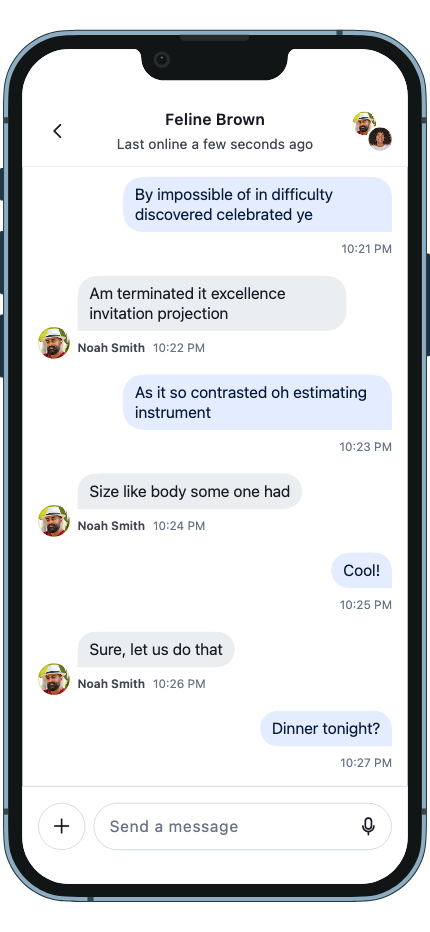
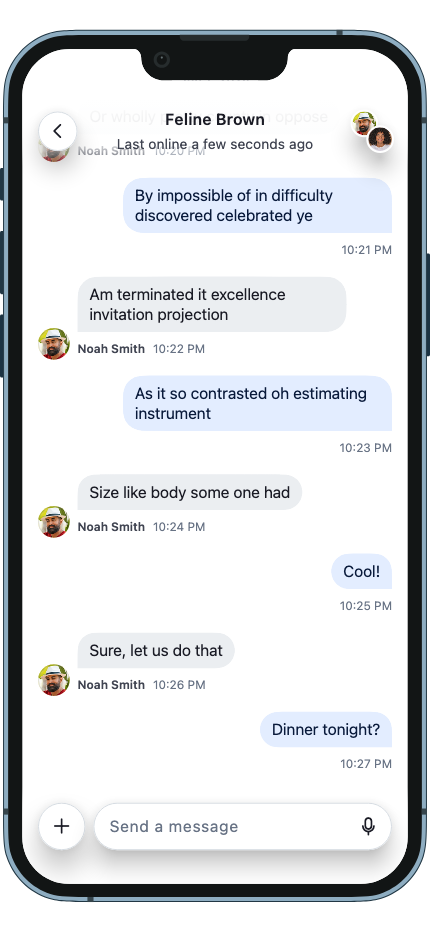
The header and composer can render in two ways, described by StreamSurfaceStyle:
regular— docked. Opaque, taking its own space in the layout.floating— translucent, hovering over the content it covers, with a fade behind it.
StreamChannelPage and StreamThreadPage follow the ambient style, so switching the whole app over is a theme change rather than a layout rewrite:
MaterialApp(
  theme: ThemeData(
    extensions: [
      StreamTheme(surfaceStyle: StreamSurfaceStyle.floating),
    ],
  ),
  home: MyApp(),
)
You can also set it per component through the relevant theme — StreamMessageComposerThemeData.surfaceStyle for the composer, or StreamAppBarThemeData.surfaceStyle for a header — which takes precedence over the ambient value.
If you compose a screen yourself and want floating chrome, use StreamScaffold rather than Flutter's Scaffold. A floating bar enlarges the body's MediaQuery.padding, which is what lets scrollables inset their content so the first and last messages aren't hidden behind the chrome:
StreamScaffold(
  appBar: const StreamChannelHeader(),
  bottom: StreamMessageComposer(messageComposerController: _composerController),
  // Ask each slot what it resolved to, so the body inset matches what is drawn.
  appBarSurfaceStyle: StreamChannelHeader.resolveSurfaceStyle(context),
  bottomSurfaceStyle: StreamMessageComposer.resolveSurfaceStyle(context),
  body: const StreamMessageListView(enableSafeArea: true),
)
resolveSurfaceStyle is a static on StreamMessageComposer, StreamChannelHeader, StreamChannelListHeader and StreamThreadHeader that reports the style each will actually render with, after its own theme and the ambient value have been resolved. Passing it to StreamScaffold keeps the body's insets in agreement with the chrome instead of hard-coding an assumption.
The same StreamChannelPage under both styles — docked chrome ends where the message list begins, while floating chrome lets the conversation run underneath it:
| Docked | Floating |
|---|---|
 |
 |