















Message Actions
Introduction
Message actions appear in an overlay when you long-press a message.
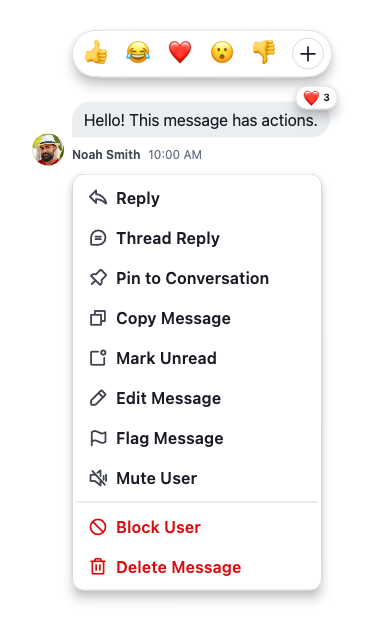
By default, the SDK renders the following message actions, in this order, when channel permissions and message state allow them:
- Reply
- Thread reply
- Pin / Unpin
- Copy message
- Mark unread
- Edit message
- Flag message
- Mute / Unmute user
- Block / Unblock user
- Delete message
Most actions are gated by channel capabilities or message state:
- Edit and Delete are available on your own messages, and to users whose channel role grants the
update-any-messageordelete-any-messagecapability. - Reply requires the
quote-messagecapability; Thread reply requiressend-replyand is hidden when the message is already inside a thread. - Pin / Unpin requires the
pin-messagecapability and is hidden for messages with restricted visibility. - Copy is shown only when the message has non-empty text.
- Mark unread is shown on other users' messages when read events are enabled on the channel.
- Flag, Mute / Unmute, and Block / Unblock target the message's sender, so they don't appear on your own messages. Mute / Unmute additionally requires the channel's
mutesconfig to be enabled.
Two conditional actions sit outside this list and are surfaced only when the message state requires them: Resend (on sending or update failures) and Hard delete (after a delete failure). Bounced/moderated messages have their own action set — Send anyway, Edit, Delete.
StreamContextMenuAction
Message actions are now rendered as StreamContextMenuAction<T> widgets (from stream_core_flutter), which are self-rendering and support two dispatch mechanisms:
value— when tapped inside a popup route, pops the route with this value, then callsonTapif providedonTap— aVoidCallback?for inline usage or additional side effects after route dismissal
Adding a Custom Action via actionsBuilder
Use actionsBuilder on StreamMessageItemProps to append or modify actions:
StreamMessageListView(
  messageBuilder: (context, message, defaultProps) {
    return StreamMessageItem.fromProps(
      props: defaultProps.copyWith(
        actionsBuilder: (context, defaultActions) => [
          ...defaultActions,
          StreamContextMenuAction(
            leading: const Icon(Icons.star),
            label: const Text('Favourite'),
            onTap: () => _favourite(message),
          ),
        ],
      ),
    );
  },
)
Removing a Default Action
Filter the defaultActions list to remove specific actions:
actionsBuilder: (context, defaultActions) => [
  ...defaultActions.where((a) => a.props.value is! DeleteMessage),
]
App-wide Custom Actions via Component Factory
To apply actions changes across the entire app, use StreamComponentFactory:
StreamChat(
  client: client,
  componentBuilders: StreamComponentBuilders(
    extensions: streamChatComponentBuilders(
      messageItem: (context, props) {
        return DefaultStreamMessageItem(
          props: props.copyWith(
            actionsBuilder: (context, defaultActions) {
              return StreamContextMenuAction.partitioned(
                items: [
                  ...defaultActions,
                  StreamContextMenuAction(
                    leading: Icon(context.streamIcons.info),
                    label: const Text('Info'),
                    onTap: () => showInfo(props.message),
                  ),
                ],
              );
            },
          ),
        );
      },
    ),
  ),
  child: MyApp(),
)
Destructive Actions
Use the .destructive constructor for actions that should be styled as destructive:
StreamContextMenuAction<MessageAction>.destructive(
  value: DeleteMessage(message: message),
  leading: Icon(context.streamIcons.delete),
  label: const Text('Delete'),
)
Grouping Actions with Separators
Helper methods automatically insert StreamContextMenuSeparator widgets between items:
// Insert a separator between every item
StreamContextMenuAction.separated(items: actions)

// Group into normal / destructive sections with separator between them
StreamContextMenuAction.partitioned(items: actions)

// Custom sections
StreamContextMenuAction.sectioned(sections: [normalActions, destructiveActions])
showStreamDialog
Use showStreamDialog<T> instead of showDialog when presenting Stream modals. It re-wraps StreamChatTheme across the route boundary and applies a consistent transition:
final action = await showStreamDialog<MessageAction>(
  context: context,
  builder: (_) => StreamMessageActionsModal(
    message: message,
    messageWidget: messageWidget,
    messageActions: [
      StreamContextMenuAction<MessageAction>(
        value: CopyMessage(message: message),
        leading: Icon(context.streamIcons.copy),
        label: Text(context.translations.copyMessageLabel),
        onTap: () => _copyMessage(message),
      ),
    ],
  ),
);

if (action is CopyMessage) _copyMessage(action.message);
StreamMessageActionsModal
StreamMessageActionsModal.messageActions accepts a List<Widget>. Handle dispatch via onTap on each action or by awaiting the dialog return value.
StreamContextMenu and StreamContextMenuSeparator
For custom inline action menus, use StreamContextMenu as a themed container:
StreamContextMenu(
  children: [
    StreamContextMenuAction<MessageAction>(
      value: reply,
      label: const Text('Reply'),
    ),
    const StreamContextMenuSeparator(),
    StreamContextMenuAction<MessageAction>.destructive(
      value: delete,
      label: const Text('Delete'),
    ),
  ],
)