















StreamMessageItem
StreamMessageItem renders a single message in the list, including its text, attachments, reactions, reply counts, sender avatar, and timestamps. It is built around a component factory pattern. The default item is composed of named sub-components. The whole item can be replaced via the messageItem factory slot; quoted-message rendering via quotedMessage; and the leading (avatar), header (pinned/reminder annotations), and footer (username, timestamp, status) can each be replaced independently via the messageLeading, messageHeader, and messageFooter factory slots. See the pub.dev documentation for the full API reference.
Background
StreamMessageItem is a thin shell widget that renders a single message, including its attachments, reactions, sender avatar, timestamp, and other metadata.
The widget is built around a centralized component factory pattern. This enables app-wide message customization without repeating configuration on every widget. The default item is composed of named sub-components. Each of the following factory slots can be replaced independently without touching the whole item:
messageItem— replace the entire message widgetquotedMessage— replace quoted-message renderingmessageLeading— replace the author avatar shown beside the bubblemessageHeader— replace the pinned/reminder annotations above the bubblemessageFooter— replace the username, timestamp, and sending-status row below the bubble
Key types:
StreamMessageItem— thin shell, resolves theStreamComponentFactoryand delegates renderingStreamMessageItemProps— plain data class holding all configuration, supportscopyWith()DefaultStreamMessageItem— default rendering implementation, composes the sub-components belowStreamMessageLeading— author avatar beside the bubble; collapses automatically whenmessage.useris nullStreamMessageContent— bubble, attachments, text, reactions, thread repliesStreamMessageHeader— pinned/reminder annotations displayed above the bubbleStreamMessageFooter— username, timestamp, sending status, edited indicatorStreamMessageReactions— clustered reaction chips around the bubbleStreamMessageText— markdown-rendered message text
Sub-Components
DefaultStreamMessageItem is composed of named sub-components:
| Sub-component | Description |
|---|---|
DefaultStreamMessageItem |
Top-level default renderer; composes all sub-components |
StreamMessageLeading |
Author avatar beside the bubble; collapses when no user |
StreamMessageContent |
Bubble, attachments, text, reactions, thread replies |
StreamMessageHeader |
Pinned/reminder annotations above the bubble |
StreamMessageFooter |
Username, timestamp, sending status, edited indicator |
StreamMessageReactions |
Clustered reaction chips around the bubble |
StreamMessageText |
Markdown-rendered message text |
StreamMessageDeleted |
Deleted message placeholder |
StreamMessageSendingStatus |
Delivery status icon |
Basic Example
StreamMessageItem is primarily used inside StreamMessageListView. The messageBuilder callback receives StreamMessageItemProps as defaultProps — a plain data class holding the resolved configuration — and expects a widget in return:
class ChannelPage extends StatelessWidget {
  const ChannelPage({super.key});

  @override
  Widget build(BuildContext context) {
    return Scaffold(
      body: StreamMessageListView(
        messageBuilder: (context, message, defaultProps) {
          // Build the default widget (goes through component factory)
          return StreamMessageItem.fromProps(props: defaultProps);
        },
      ),
    );
  }
}
Per-List Customization
Use StreamMessageItemProps.copyWith() to adjust specific properties for a single list:
StreamMessageListView(
  messageBuilder: (context, message, defaultProps) {
    return StreamMessageItem.fromProps(
      props: defaultProps.copyWith(
        actionsBuilder: (context, actions) => [...actions, myAction],
      ),
    );
  },
),
Or replace the message widget entirely with your own:
StreamMessageListView(
  messageBuilder: (context, message, defaultProps) {
    return MyCustomMessageWidget(message: message);
  },
),
For a practical example, here is how to wrap messages with a custom swipe-to-reply gesture:
StreamMessageListView(
  messageBuilder: (context, message, defaultProps) {
    final defaultWidget = StreamMessageItem.fromProps(props: defaultProps);

    if (message.isDeleted || message.state.isFailed) return defaultWidget;

    final alignment = StreamMessageLayout.alignmentDirectionalOf(context);
    final isEnd = alignment == AlignmentDirectional.centerEnd;

    return Swipeable(
      key: ValueKey(message.id),
      direction: isEnd ? SwipeDirection.endToStart : SwipeDirection.startToEnd,
      swipeThreshold: 0.2,
      onSwiped: (_) => onReply(message),
      child: defaultWidget,
    );
  },
)
App-wide Customization
To apply customizations across the entire app, use the componentBuilders parameter on StreamChat:
StreamChat(
  client: client,
  componentBuilders: StreamComponentBuilders(
    extensions: streamChatComponentBuilders(
      messageItem: (context, props) {
        return DefaultStreamMessageItem(
          props: props.copyWith(
            actionsBuilder: (context, defaultActions) {
              return [
                ...defaultActions,
                StreamContextMenuAction(
                  leading: const Icon(Icons.star),
                  label: const Text('Favourite'),
                  onTap: () => _favourite(props.message),
                ),
              ];
            },
          ),
        );
      },
    ),
  ),
  child: const MyHomePage(),
)
For subtree-scoped overrides, wrap that subtree with StreamComponentFactory directly:
StreamComponentFactory(
  builders: StreamComponentBuilders(
    extensions: streamChatComponentBuilders(
      messageItem: (context, props) => MySpecialMessage(props: props),
    ),
  ),
  child: const ChatDetailScreen(),
)
Customizing Leading, Header, and Footer
The leading (avatar), header (annotations), and footer (username/timestamp/status) slots can each be replaced
independently — you do not need to override the whole message item. Each slot receives a Props data class
and has a matching Default… widget you can fall back to:
| Slot | Props class | Default widget | Replaces |
|---|---|---|---|
messageLeading |
StreamMessageLeadingProps |
DefaultStreamMessageLeading |
Author avatar beside the bubble |
messageHeader |
StreamMessageHeaderProps |
DefaultStreamMessageHeader |
Pinned / reminder annotations above the bubble |
messageFooter |
StreamMessageFooterProps |
DefaultStreamMessageFooter |
Username, timestamp, sending status row |
Register any combination of slots via streamChatComponentBuilders:
StreamChat(
  client: client,
  componentBuilders: StreamComponentBuilders(
    extensions: streamChatComponentBuilders(
      // Swap just the avatar.
      messageLeading: (context, props) =>
          MyPresenceAvatar(user: props.message.user),

      // Add a custom annotation while keeping the default header.
      messageHeader: (context, props) =>
          DefaultStreamMessageHeader(props: props),

      // Replace the timestamp row entirely.
      messageFooter: (context, props) =>
          MyCustomFooter(message: props.message),
    ),
  ),
  child: MyApp(),
)
Each slot is independently overridable — none require touching messageItem.
Custom Attachment Builders
Register custom attachment builders globally via StreamChatConfigurationData:
class LocationAttachmentBuilder extends StreamAttachmentWidgetBuilder {
  @override
  bool canHandle(
    Message message,
    Map<String, List<Attachment>> attachments,
  ) {
    final locationAttachments = attachments['location'];
    return locationAttachments != null && locationAttachments.isNotEmpty;
  }

  @override
  Widget build(
    BuildContext context,
    Message message,
    Map<String, List<Attachment>> attachments,
  ) {
    final attachment = attachments['location']!.first;
    return LocationMapWidget(
      latitude: attachment.extraData['latitude'] as double,
      longitude: attachment.extraData['longitude'] as double,
    );
  }
}

StreamChat(
  client: client,
  configData: StreamChatConfigurationData(
    attachmentBuilders: [
      LocationAttachmentBuilder(),
    ],
  ),
  child: MyHomePage(),
)
Custom builders provided to attachmentBuilders are prepended to the default set automatically — you do not need to spread StreamAttachmentWidgetBuilder.defaultBuilders(...) yourself. The SDK merges your builders with the defaults per-message at render time.
You can also override attachment builders for a single message via StreamMessageItemProps.attachmentBuilders, which has the same semantics scoped to that message.
Replacing a built-in attachment type (e.g. image):
Custom builders are prepended to the default list automatically by the widget, so a builder whose canHandle matches type: 'image' takes over before the SDK's default image renderer. Here is an example that replaces the built-in single-image attachment with a custom rounded widget:
class MyImageAttachmentBuilder extends StreamAttachmentWidgetBuilder {
  @override
  bool canHandle(
    Message message,
    Map<String, List<Attachment>> attachments,
  ) {
    final images = attachments['image'];
    return images != null && images.isNotEmpty;
  }

  @override
  Widget build(
    BuildContext context,
    Message message,
    Map<String, List<Attachment>> attachments,
  ) {
    final attachment = attachments['image']!.first;
    final imageUrl = attachment.imageUrl ?? attachment.thumbUrl ?? attachment.assetUrl;
    return ClipRRect(
      borderRadius: BorderRadius.circular(12),
      child: imageUrl != null
          ? Image.network(imageUrl, fit: BoxFit.cover)
          : const SizedBox(width: 200, height: 150),
    );
  }
}

// Register globally — takes priority over the SDK default:
StreamChat(
  client: client,
  configData: StreamChatConfigurationData(
    attachmentBuilders: [
      MyImageAttachmentBuilder(),
    ],
  ),
  child: MyHomePage(),
)
To override only for a single message, use StreamMessageItemProps.attachmentBuilders in your messageBuilder:
StreamMessageListView(
  messageBuilder: (context, message, defaultProps) {
    return StreamMessageItem.fromProps(
      props: defaultProps.copyWith(
        attachmentBuilders: [
          MyImageAttachmentBuilder(),
        ],
      ),
    );
  },
)
Callbacks
StreamMessageListView(
  onMessageLinkTap: (message, url) => launchUrl(Uri.parse(url)),
  onMentionTap: (mention) {
    if (mention case StreamUserMention(:final user)) showProfile(user);
    // else: handle @channel / @here / role / group — see the Mentions docs.
  },
  onQuotedMessageTap: (quotedMessage) => scrollToMessage(quotedMessage.id),
)
Theming
Theming is controlled via StreamTheme, a Flutter ThemeExtension registered in ThemeData.extensions. Use StreamMessageItemThemeData to configure structural styling (visibility, layout, bubble colors, and text):
MaterialApp(
  theme: ThemeData(
    extensions: [
      StreamTheme(
        messageItemTheme: StreamMessageItemThemeData(
          // Hide the avatar except on the bottom message of a stack
          avatarVisibility: StreamMessageLayoutProperty.resolveWith(
            (p) => switch (p.stackPosition) {
              StreamMessageStackPosition.bottom ||
              StreamMessageStackPosition.single =>
                StreamVisibility.visible,
              _ => StreamVisibility.gone,
            },
          ),
          // Always show metadata (timestamp, username)
          metadataVisibility: StreamMessageLayoutVisibility.all(
            StreamVisibility.visible,
          ),
        ),
      ),
    ],
  ),
)
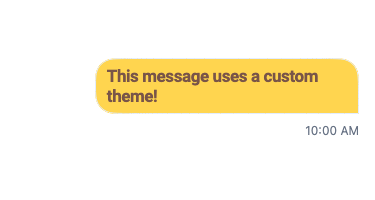
To scope an override to a subtree, wrap with StreamMessageItemTheme directly. bubble and text carry the message's own colors, and the .from constructors apply one value to every message:
StreamMessageItemTheme(
  data: StreamMessageItemThemeData(
    bubble: StreamMessageBubbleStyle.from(
      backgroundColor: Colors.amber.shade300,
    ),
    text: StreamMessageTextStyle.from(
      textColor: Colors.brown,
      textStyle: const TextStyle(fontWeight: FontWeight.bold),
    ),
  ),
  child: StreamMessageListView(controller: controller),
)
Customizing Text
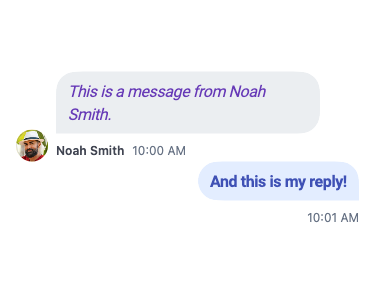
StreamMessageTextStyle.from above styles every message the same way. For placement-aware styling (different style for incoming vs. outgoing messages), build the style directly — every field takes a StreamMessageLayoutProperty, so color and weight can both follow the alignment:
StreamTheme(
  messageItemTheme: StreamMessageItemThemeData(
    text: StreamMessageTextStyle(
      textColor: StreamMessageLayoutProperty.resolveWith((p) {
        final isEnd = p.alignment == StreamMessageAlignment.end;
        return isEnd ? Colors.indigo : Colors.deepPurple;
      }),
      textStyle: StreamMessageLayoutProperty.resolveWith((p) {
        final isEnd = p.alignment == StreamMessageAlignment.end;
        return isEnd
            ? const TextStyle(fontSize: 16, fontWeight: FontWeight.bold)
            : const TextStyle(fontSize: 16, fontStyle: FontStyle.italic);
      }),
    ),
  ),
)
For advanced text rendering (for example, adding hashtag support), use the component factory to replace StreamMessageText. The hashtag example below uses the flutter_markdown package to render hashtags as tappable links:
// Register a custom StreamMessageText replacement via the component factory
class HashtagMessageText extends StatelessWidget {
  const HashtagMessageText({super.key, required this.message});

  final Message message;

  @override
  Widget build(BuildContext context) {
    final messageTheme = StreamMessageItemTheme.of(context);

    final text = _replaceHashtags(message.text)?.replaceAll('\n', '\\\n');
    if (text == null) return const SizedBox();

    return MarkdownBody(
      data: text,
      onTapLink: (link, href, title) {
        // Handle hashtag tap
      },
      styleSheet: MarkdownStyleSheet.fromTheme(Theme.of(context)).copyWith(
        p: TextStyle(color: messageTheme.text?.textColor?.resolve(StreamMessageLayout.of(context))),
        a: TextStyle(color: messageTheme.text?.linkColor?.resolve(StreamMessageLayout.of(context))),
      ),
    );
  }

  static String? _replaceHashtags(String? text) {
    if (text == null) return null;
    final exp = RegExp(r'\B#\w\w+');
    var result = text;
    for (final match in exp.allMatches(text)) {
      result = result.replaceAll(
        '${match.group(0)}',
        '[${match.group(0)}](hashtag:${match.group(0)?.replaceAll(' ', '')})',
      );
    }
    return result;
  }
}