















Inline Replies
Inline replies (also called quoted messages) let users reply to a specific message. The quoted message appears as a preview inside the reply, visually linking it to the original.
How it works
When a user long-presses a message and taps "Reply", the composer enters quote-reply mode. The selected message is shown as a preview above the input field. When sent, the new message contains a quotedMessageId reference, and StreamMessageItem renders the quote preview inline.
Enabling replies
Inline replies are enabled by default. The "Reply" action appears in the message actions menu as long as the message belongs to a channel where the current user has permission to send messages.
Swipe to reply
The SDK ships first-class swipe support for replies. It is disabled by default — opt in via the swipeToReply flag on StreamMessageListViewConfiguration:
StreamMessageListView(
  config: StreamMessageListViewConfiguration(
    swipeToReply: true,
  ),
  onReplyTap: (message) => _reply(message),
)
A few things to know about the gesture:
onReplyTapis required. Even withswipeToReply: true, the gesture is suppressed unlessonReplyTapis provided (either onStreamMessageListViewitself, or per-message viamessageBuilder). The callback is what actually puts the composer into quote-reply mode — typically by settingcomposerController.quotedMessage = message.- Suppressed for deleted and failed messages. Swipe is intentionally disabled for messages in those states, regardless of the config flag.
- Per-message override. To enable or disable the gesture for a single message, set
swipeToReplyondefaultProps.copyWith(...)insidemessageBuilder.
Customizing the quoted message preview in the composer
Replying puts the composer into quote mode, which renders the original message above the input:
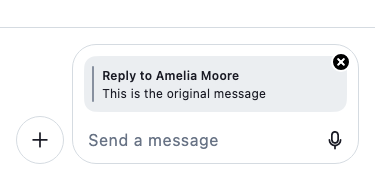
The easiest way to customize only the reply preview widget is to override messageComposerReplyAttachment on StreamComponentBuilders. The StreamMessageComposerReplyAttachment widget checks this builder slot before falling back to its default rendering, so you can target just that piece without touching the surrounding header or the composer itself.
StreamComponentFactory(
  builders: StreamComponentBuilders(
    messageComposerReplyAttachment: (context, props) {
      return MyCustomReplyAttachment(props: props);
    },
  ),
  child: MyApp(),
)
The props object is a StreamMessageComposerReplyAttachmentProps and exposes title, subtitle, thumbnail, direction (StreamReplyDirection.incoming / .outgoing), and onRemovePressed.
If you need broader control, you can replace the entire messageComposerInputHeader (which renders the quoted message preview, attachment list, and OG link preview together) or the full messageComposer:
StreamComponentFactory(
  builders: StreamComponentBuilders(
    extensions: streamChatComponentBuilders(
      messageComposerInputHeader: (context, props) => MyCustomComposerInputHeader(props: props),
      messageComposer: (context, props) => MyCustomComposer(props: props),
    ),
  ),
  child: MyApp(),
)
Scrolling to the quoted message
Tapping a quoted message preview scrolls the list to the original message. This behavior is built into StreamMessageListView and requires no additional configuration. To handle the tap yourself, use onQuotedMessageTap via messageBuilder:
StreamMessageListView(
  messageBuilder: (context, message, defaultProps) {
    return StreamMessageItem.fromProps(
      props: defaultProps.copyWith(
        onQuotedMessageTap: (quotedMessage) {
          // custom navigation or scroll logic
        },
      ),
    );
  },
)
Programmatic control
To enter quote-reply mode programmatically (for example, from a custom action button), use the StreamMessageComposerController:
final composerController = StreamMessageComposerController();

// Quote a message
composerController.quotedMessage = message;

// Clear the quoted message
composerController.clearQuotedMessage();