















StreamChannelListView
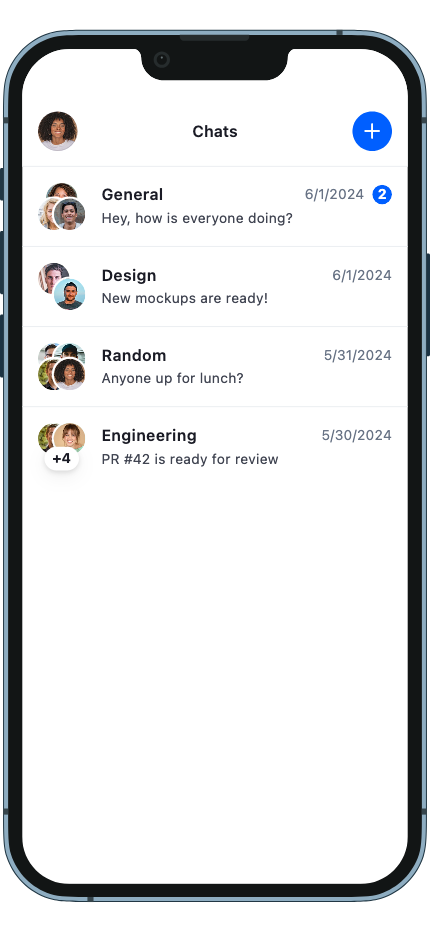
StreamChannelListView is the primary widget for displaying a scrollable, paginated list of channels. It pairs with StreamChannelListController to fetch, filter, and sort channels in real time, and handles loading, empty, and error states out of the box. See the pub.dev documentation for the full API reference.
Background
Channels are fundamental elements of Stream Chat and constitute shared spaces which allow users to message each other.
1:1 conversations and groups are both examples of channels, albeit with some (distinct/non-distinct) differences. Displaying the list of channels that a user is a part of is a pattern present in most messaging apps.
The StreamChannelListView widget allows displaying a list of channels to a user. By default, this is NOT
ONLY the channels that the user is a part of. This section goes into setting up and using a StreamChannelListView
widget.
Make sure to check the StreamChannelListController documentation for more information on how to use the controller to manipulate the StreamChannelListView.
Basic Example
Here is a basic example of the StreamChannelListView widget. It consists of the main widget itself, a StreamChannelListController to control the list of channels and a callback to handle the tap of a channel.
class ChannelListPage extends StatefulWidget {
  const ChannelListPage({
    super.key,
    required this.client,
  });

  final StreamChatClient client;

  @override
  State<ChannelListPage> createState() => _ChannelListPageState();
}

class _ChannelListPageState extends State<ChannelListPage> {
  late final _controller = StreamChannelListController(
    client: widget.client,
    filter: Filter.in_(
      'members',
      [StreamChat.of(context).currentUser!.id],
    ),
    channelStateSort: const [SortOption<ChannelState>.desc('last_message_at')],
  );

  @override
  void dispose() {
    _controller.dispose();
    super.dispose();
  }

  @override
  Widget build(BuildContext context) => Scaffold(
        body: RefreshIndicator(
          onRefresh: _controller.refresh,
          child: StreamChannelListView(
            controller: _controller,
            onChannelTap: (channel) => Navigator.push(
              context,
              MaterialPageRoute(
                builder: (_) => StreamChannel(
                  channel: channel,
                  child: const ChannelPage(),
                ),
              ),
            ),
          ),
        ),
      );
}Filtering, sorting, and pagination are configured on the StreamChannelListController, not on the view. See Filtering and Sorting on the controller docs for the full list of options.
Channel List Item (StreamChannelListItem)
Each row in the list is rendered by StreamChannelListItem. It resolves the channel's avatar, name, last-message preview, unread count, and timestamp. It also shows draft previews when a channel has a saved draft.
| Parameter | Type | Description |
|---|---|---|
channel |
Channel |
The channel to display |
onTap |
GestureTapCallback? |
Called when the row is tapped |
onLongPress |
GestureLongPressCallback? |
Called on long-press |
selected |
bool |
Highlights the row (e.g. in a multi-select flow) |
StreamChannelListItem(
  channel: channel,
  onTap: () => openChannel(channel),
)
Customizing the Channel List Item
The primary way to customize channel list items for a single list is via the itemBuilder parameter on StreamChannelListView. Use it to replace the default row widget entirely — you have access to the full channel list, the current index, and the default tile widget:
StreamChannelListView(
  controller: _controller,
  itemBuilder: (context, channels, index, defaultTile) {
    final channel = channels[index];
    return StreamChannelListItem(
      channel: channel,
      onTap: () => openChannel(channel),
      leading: StreamChannelAvatar(channel: channel),
      title: Text(channel.name ?? ''),
      subtitle: Text(channel.lastMessageAt?.toString() ?? ''),
    );
  },
),
For app-wide customization (across the entire widget tree rather than a single list), use StreamComponentFactory with the channelListItem slot:
StreamComponentFactory(
  builders: StreamComponentBuilders(
    extensions: streamChatComponentBuilders(
      channelListItem: (context, props) => StreamChannelListTile(
        avatar: StreamChannelAvatar(channel: props.channel),
        title: Text(props.channel.name ?? ''),
        subtitle: Text(props.channel.lastMessageAt?.toString() ?? ''),
        onTap: props.onTap,
        onLongPress: props.onLongPress,
        selected: props.selected,
      ),
    ),
  ),
  child: MyApp(),
)
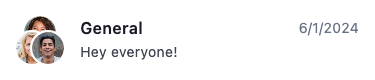
StreamChannelListTile is the low-level presentational component that renders pre-resolved slot values without any channel-specific logic. A single row resolves to an avatar, the channel name, the last message, and its timestamp:
Theming Channel List Items
Use StreamChannelListItemThemeData to style list items globally:
StreamChatTheme(
  data: StreamChatThemeData(
    channelListItemTheme: StreamChannelListItemThemeData(
      titleStyle: const TextStyle(fontWeight: FontWeight.bold),
      subtitleStyle: const TextStyle(color: Colors.grey),
      timestampStyle: const TextStyle(fontSize: 12),
    ),
  ),
  child: MyApp(),
)
To scope a theme override to a subtree, wrap with StreamChannelListItemTheme directly:
StreamChannelListItemTheme(
  data: StreamChannelListItemThemeData(
    titleStyle: const TextStyle(color: Colors.blue),
  ),
  child: StreamChannelListView(controller: _controller),
)
Mute and Pin Attribute Icons
The position of the mute and pin attribute icons is controlled via StreamChannelListItemThemeData.attributePosition. Set it globally through StreamChatThemeData.channelListItemTheme:
StreamChatTheme(
  data: StreamChatThemeData(
    channelListItemTheme: StreamChannelListItemThemeData(
      attributePosition: AttributePosition.trailingBottom,
    ),
  ),
  child: MyApp(),
)
AttributePosition |
Behavior |
|---|---|
.inlineTitle |
Icon shown next to the channel name (default) |
.trailingBottom |
Icon shown in the bottom-right trailing area |
Swipe Actions
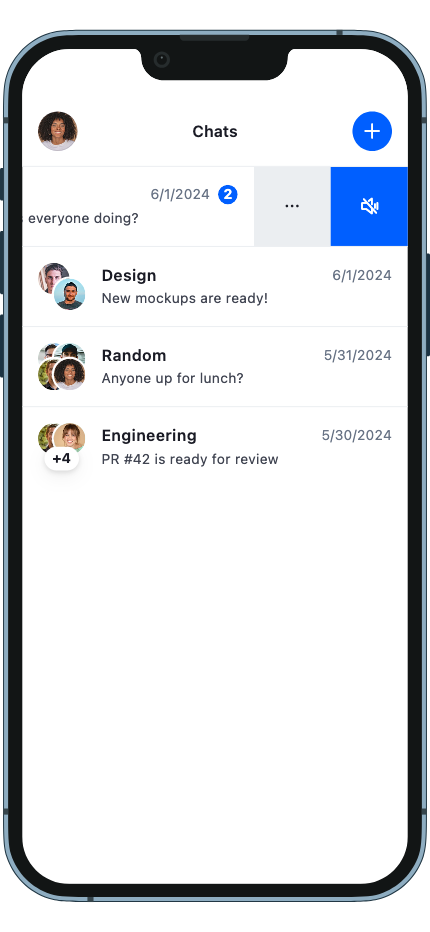
Swipe actions let users perform quick operations on a channel row by swiping. Common examples include viewing channel info and muting or unmuting a channel.
Adding swipe actions with a package
For swipe-to-reveal actions on each channel row, combine StreamChannelListView's itemBuilder with the flutter_slidable package — it handles the gesture and animation, while itemBuilder lets you wrap each tile.
Add the dependency:
dependencies:
  flutter_slidable: ^3.1.1
Example: info and mute actions
The following example adds two swipe actions to each channel row: one to open the channel info sheet, and one to toggle mute on the channel.
import 'package:flutter_slidable/flutter_slidable.dart';
import 'package:stream_chat_flutter/stream_chat_flutter.dart';

SlidableAutoCloseBehavior(
  child: StreamChannelListView(
    controller: _controller,
    itemBuilder: (context, channels, index, defaultTile) {
      final channel = channels[index];
      final colorScheme = StreamTheme.of(context).colorScheme;
      return StreamBuilder<bool>(
        stream: channel.isMutedStream,
        initialData: channel.isMuted,
        builder: (context, snapshot) {
          final isMuted = snapshot.data ?? false;
          return Slidable(
            groupTag: 'channels-actions',
            endActionPane: ActionPane(
              extentRatio: 0.4,
              motion: const BehindMotion(),
              children: [
                CustomSlidableAction(
                  backgroundColor: colorScheme.backgroundSurfaceSubtle,
                  onPressed: (_) {
                    showStreamSheet<void>(
                      context: context,
                      builder: (sheetContext, scrollController) => Column(
                        mainAxisSize: MainAxisSize.min,
                        children: [
                          StreamSheetHeader(title: Text(channel.name ?? '')),
                          // ... your channel info content
                        ],
                      ),
                    );
                  },
                  child: const Icon(Icons.more_horiz),
                ),
                CustomSlidableAction(
                  backgroundColor: colorScheme.accentPrimary,
                  foregroundColor: Colors.white,
                  onPressed: (_) async {
                    if (isMuted) {
                      await channel.unmute();
                    } else {
                      await channel.mute();
                    }
                  },
                  child: Icon(
                    isMuted ? Icons.volume_up : Icons.volume_off,
                    color: Colors.white,
                  ),
                ),
              ],
            ),
            child: defaultTile,
          );
        },
      );
    },
  ),
)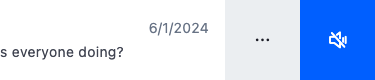
SlidableAutoCloseBehavior automatically closes any open action pane when the user taps elsewhere or scrolls the list. groupTag ensures only one row is open at a time.
Available channel actions
| Action | Method |
|---|---|
| Mute | channel.mute() |
| Unmute | channel.unmute() |
| Hide | channel.hide() |
| Delete | channel.delete() |
| Mark as read | channel.markRead() |