















Localization
The Stream Chat React SDK uses i18next via the Streami18n class to translate UI components. The Stream Chat API also supports automatic translation of chat messages; learn more.
Supported Languages
The library provides built-in translations for the following languages:
- English (en) - default
- Dutch (nl)
- French (fr)
- German (de)
- Hindi (hi)
- Italian (it)
- Japanese (ja)
- Korean (ko)
- Portuguese (pt)
- Russian (ru)
- Spanish (es)
- Turkish (tr)
Best Practices
- Set
defaultLanguageas a fallback, not the primary language. - Prefer
Streami18nwhen you want UI text without auto-translating messages. - Keep translation overrides minimal and versioned with the SDK.
- Always update
aria/labels alongside visible text for accessibility. - Validate language detection behavior against real browser locales.
To change the default language without creating a Streami18n instance, pass defaultLanguage to Chat on app load. The snippet below switches English → Italian.
const defaultLanguage = "it";

<Chat client={client} defaultLanguage={defaultLanguage}>
  ...
</Chat>;
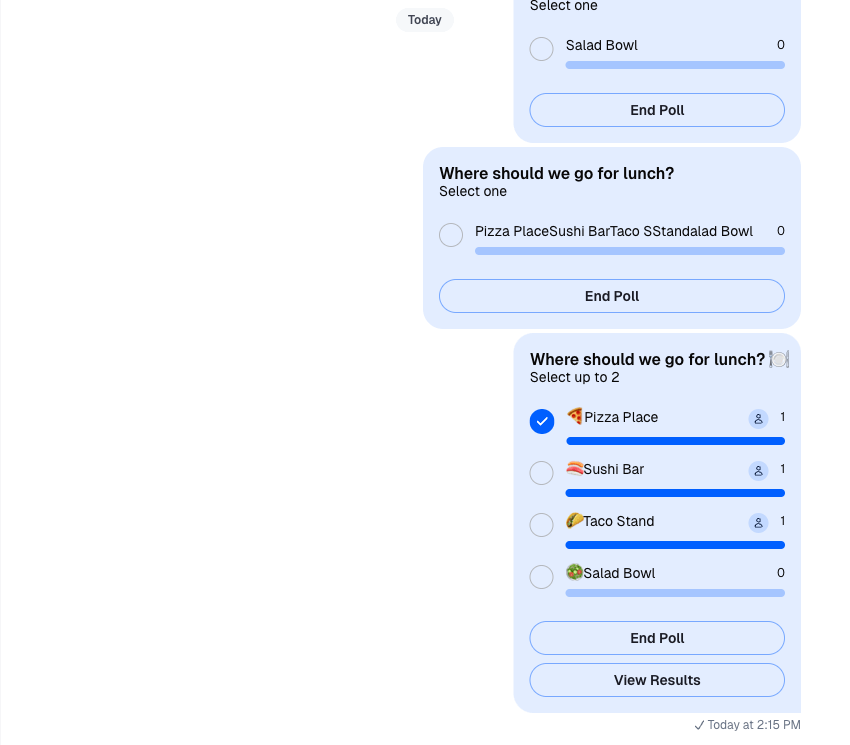
The following screenshots show the state of the UI components in the app before and after setting the defaultLanguage to Italian.
Default language not specified:
Default language set to Italian:
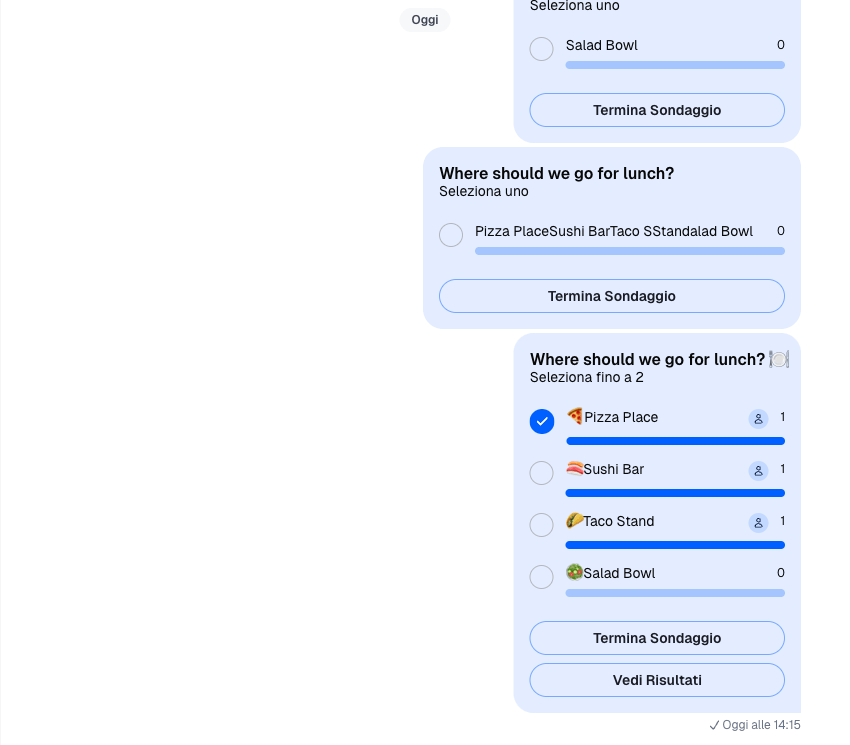
defaultLanguage is a fallback. If the user’s browser language is supported, the SDK will render that instead. For example, if defaultLanguage is Italian but the browser is Spanish, the UI renders Spanish.
Enable Localization
There are two ways to set the user’s language. The simpler approach is to set language in connectUser when the app mounts.
client.connectUser({ id: userId, language: "es" }, userToken);If auto translation is enabled, setting language on connectUser will also auto-translate messages. If that’s not desired, use a Streami18n instance instead.
Create a Streami18n Instance
You can also create a Streami18n instance and pass it to Chat. The example below sets Spanish.
const i18nInstance = new Streami18n({ language: "es" });

<Chat client={client} i18nInstance={i18nInstance}>
  ...
</Chat>;
Override Default Translations
Taking it one step further, the below example shows how to override the default text values built into the components.
const i18nInstance = new Streami18n({
  language: "es",
  translationsForLanguage: {
    "Nothing yet...": "Nada!", // default is 'Nada aun...'
  },
});

<Chat client={client} i18nInstance={i18nInstance}>
  ...
</Chat>;
To completely override a language, provide custom translations via translationsForLanguage. Your file must include all keys from the default file.
import esUpdated from "path/to/esUpdated.json";

const i18nInstance = new Streami18n({
  language: "es",
  translationsForLanguage: esUpdated,
});

<Chat client={client} i18nInstance={i18nInstance}>
  ...
</Chat>;
If you don’t pass Streami18n, the SDK detects the browser language. If supported (built-in or custom), it becomes the user’s language; otherwise the UI falls back to English.
All available translations are found on GitHub and the JSON objects can be imported from the library.
import { esTranslations } from 'stream-chat-react';
TranslationContext
The TranslationContext stores the resulting values and allows children of the Chat component to auto translate library text based on the connected user's set languages.
You can access TranslationContext values by calling the useTranslationContext hook.
Basic Usage
Pull values from TranslationContext with the useTranslationContext hook:
const { t } = useTranslationContext();

<div className="message">{t("This message will be translated.")}</div>;
Values
| Value | Description | Type |
|---|---|---|
t |
Function that translates text into the connected user's set language. | function |
tDateTimeParser |
Function that parses date times. Defaults to Day.js. |
function |
userLanguage |
Value that sets the connected user's language, such as en, fr, or ru, which auto-translates text fields in the library. Defaults to en. |
string |
Overriding ARIA labels
ARIA labels that are used for interactive elements are also subject to localization. Translation keys for ARIA labels are prefixed by aria/:
import { useTranslationContext } from "stream-chat-react";

const Component = () => {
  const { t } = useTranslationContext();
  return <button aria-label={t("aria/Send")}>📨</button>;
};
To override the default translations, add an aria-prefixed key to the translationsForLanguage object:
const i18nInstance = new Streami18n({
  language: "en",
  translationsForLanguage: {
    "aria/Send": "Send Message",
  },
});

<Chat client={client} i18nInstance={i18nInstance}>
  {/* ... */}
</Chat>;
Add a Language
In the following example, we will demonstrate how to add translation support for an additional language not currently supported
by the component library. We will add translations for Simplified Chinese, which uses language code zh, by following these
steps:
- Create a JSON file in your project (ex:
zh.jsonif creating a translation file for Simplified Chinese) - Copy the content of an existing translation file
- Change the values to your desired translations
- Register the translation file and set the new language
- Pass as a prop to the
Chatcomponent
The setLanguage method on the class instance of Streami18n is asynchronous, so it's response needs to be
awaited before the language translations can be updated.
We can initialize the instance dynamically:
import zhTranslation from "path/to/zh.json";

const i18nInstance = new Streami18n();

const App = () => {
  const [languageLoaded, setLanguageLoaded] = useState(false);

  useEffect(() => {
    const loadLanguage = async () => {
      i18nInstance.registerTranslation("zh", zhTranslation);
      await i18nInstance.setLanguage("zh");
      setLanguageLoaded(true);
    };

    loadLanguage();
  }, []);

  if (!languageLoaded) return null;

  return (
    <Chat client={client} i18nInstance={i18nInstance}>
      ...
    </Chat>
  );
};
Or we can have a pre-configured Streami18n instance:
import zhTranslation from 'path/to/zh.json';

const i18nInstance = new Streami18n({
  language: 'zh',
  translationsForLanguage: zhTranslation,
  dayjsLocaleConfigForLanguage: {
    // see the next section about Datetime translations
    months: [...],
    monthsShort: [...],
    calendar: {
      sameDay: ...'
    }
  }
});

const App = () => {
  return (
    <Chat client={client} i18nInstance={i18nInstance}>
      ...
    </Chat>
  );
};
Datetime translations
The SDK components use Dayjs internally by default to format dates and times. It has locale support being a lightweight alternative to Momentjs with the same modern API. Dayjs provides locale config for plenty of languages.
You can either provide the Dayjs locale config while registering language with Streami18n (either via constructor or registerTranslation()) or you can provide your own Dayjs or Momentjs instance to Streami18n constructor, which will be then used internally (using the language locale) in components.
The dayjsLocaleConfigForLanguage object is a union of configuration objects for Dayjs calendar plugin and Dayjs locale configuration(examples are available in Dayjs default locale configurations)
- Via language registration
const i18n = new Streami18n({
 language: 'nl',
 dayjsLocaleConfigForLanguage: {
   months: [...],
   monthsShort: [...],
   calendar: {
     sameDay: ...'
   }
 }
});
Similarly, you can add locale config for Momentjs while registering translation via registerTranslation function.
const i18n = new Streami18n();

i18n.registerTranslation(
 'mr',
 {
   'Nothing yet...': 'काहीही नाही  ...',
   '{{ firstUser }} and {{ secondUser }} are typing...': '{{ firstUser }} आणि {{ secondUser }} टीपी करत आहेत ',
 },
 {
   months: [...],
   monthsShort: [...],
   calendar: {
     sameDay: ...'
   }
 }
);- Provide your own
Momentjsobject
import 'moment/locale/nl';
import 'moment/locale/it';
// or if you want to include all locales
import 'moment/min/locales';

import Moment from moment

const i18n = new Streami18n({
 language: 'nl',
 DateTimeParser: Moment
})- Provide your own Dayjs object
import Dayjs from "dayjs";

import "dayjs/locale/nl";
import "dayjs/locale/it";
// or if you want to include all locales
import "dayjs/min/locales";

const i18n = new Streami18n({
  language: "nl",
  DateTimeParser: Dayjs,
});
If you would like to stick with english language for dates and times in Stream components, you can set disableDateTimeTranslations to true.
Timezone location
To display date and time in different than machine's local timezone, provide the timezone parameter to the Streami18n constructor. The timezone value has to be a valid timezone identifier string. If no timezone parameter is provided, then the machine's local timezone is applied.
import { Streami18n } from "stream-chat-react";

const streamI18n = new Streami18n({ timezone: "Europe/Prague" });
If you are using moment as your datetime parser engine and want to start using timezone-located datetime strings, then we recommend to use moment-timezone instead of moment package. Moment Timezone will automatically load and extend the moment module, then return the modified instance. This will also prevent multiple versions of moment being installed in a project.
import type momentTimezone from "moment-timezone";
import { Streami18n } from "stream-chat-react";

const i18n = new Streami18n({
  DateTimeParser: momentTimezone,
  timezone: "Europe/Prague",
});
Translating Messages
Stream Chat provide the ability to run users' messages through automatic translation. While machine translation is never perfect it can enable two users to communicate with each other without speaking the same language. For more information, see the full guide to adding automatic translation.
Diacritics and Transliteration
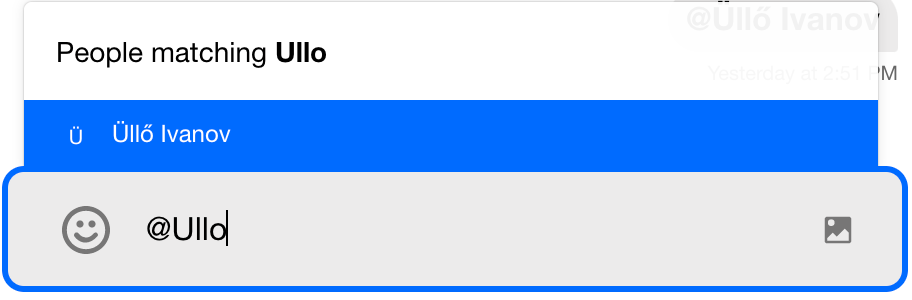
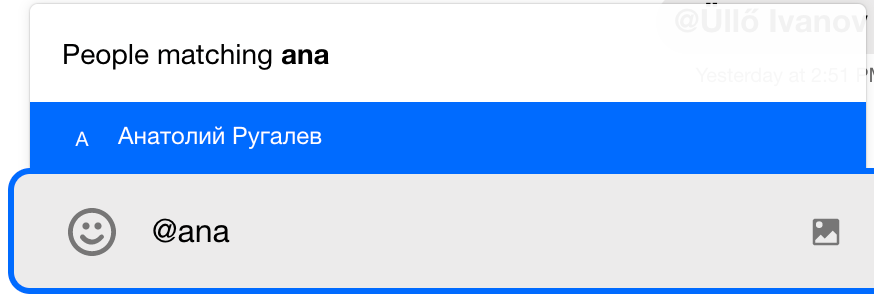
Searching for users when utilizing the '@' mentions command supports diacritics and, optionally, transliteration. To add transliteration to your search functionality, provide a transliterate function (for example one built with Transliterate) via the transliterate option of MentionsSearchSourceOptions in stream-chat. It is applied to the search query. Diacritics support is available by default.
Streami18n API Reference
The Streami18n class wraps i18next and provides a set of values and methods.
Class Constructor Options
| Option | Description | Type | Default |
|---|---|---|---|
| DateTimeParser | custom date time parser | function | Day.js |
| dayjsLocaleConfigForLanguage | internal Day.js config object and calendar locale config object | object | 'enConfig' |
| debug | enables i18n debug mode | boolean | false |
| disableDateTimeTranslations | disables translation of date times | boolean | false |
| language | connected user's language | string | 'en' |
| logger | logs warnings/errors | function | () => |
| parseMissingKeyHandler | function executed, when a key is not found among the translations | function | (key: string, defaultValue?: string) => string; |
| translationsForLanguage | overrides existing component text | object | |
| timezone | valid timezone identifier string (https://en.wikipedia.org/wiki/List_of_tz_database_time_zones) | string | undefined |
parseMissingKeyHandler
The default implementation returns the default value provided to the translator function, for example the component below will display string 'hello' if the key 'some-key' is not found among the translations for a given language:
import { useTranslationContext } from "stream-chat-react";

const Component = () => {
  const { t } = useTranslationContext("useCommandTrigger");

  return <div>{t("some-key", { defaultValue: "hello" })}</div>;
};
The custom handler may log missing key warnings to the console in the development environment:
import { Streami18n, Streami18nOptions } from "stream-chat-react";

const parseMissingKeyHandler: Streami18nOptions["parseMissingKeyHandler"] = (
  key: string,
  defaultValue?: string,
) => {
  console.warn(`Streami18n: Missing translation for key: ${key}`);
  return defaultValue ?? key;
};

const i18nInstance = new Streami18n({ parseMissingKeyHandler });
Translation Builder
The TranslationBuilder is a Streami18n service that allows to convert objects (for example notification objects) into translated strings. Conversion is performed by so-called translator functions with the following signature:
(params: { key: string; value: string; t: TFunction; options: O }) =>
  string | null;
Translator functions are grouped into translation topics. Translation topic is an abstraction of translation process between the input data and the translated string. The predefined topics are:
notification- implemented withNotificationTranslationTopic
NotificationTranslationTopic
The NotificationTranslationTopic registers translators for each notification type. Currently, there are translators for the following notification types:
api:attachment:upload:failedapi:poll:create:failedvalidation:attachment:upload:blocked
Custom notification translators can be registered as follows:
import { Streami18n } from "stream-chat-react";
import type {
  NotificationTranslatorOptions,
  Translator,
} from "stream-chat-react";

const customNotificationTranslators: Record<
  string,
  Translator<NotificationTranslatorOptions>
> = {
  "api:message:send:failed": ({ key, value, options: { notification }, t }) => {
    // executing custom logic
  },
};
const i18nInstance = new Streami18n();
i18nInstance.translationBuilder.registerTranslators(
  "notification",
  customNotificationTranslators,
);
Custom TranslationBuilder Topics
TranslationBuilder topic is a class that implements a translate() method and extends the abstract class TranslationTopic. What differs one translation topic from another is the options parameter that the translate() method expects and that represents the input data to be translated. The options parameter allows to pass the custom data from the translation function t down to the topic and its translator functions.
const defaultTranslators = {
  key1: translatorFn1,
  key2: translatorFn2,
};

export class CustomTranslationTopic extends TranslationTopic<NotificationTranslatorOptions> {
  constructor({ i18next, translators }: TranslationTopicOptions) {
    super({ i18next, translators: defaultTranslators });
  }

  translate = (
    value: string,
    key: string,
    options: { customValue?: CustomValue },
  ) => {
    const { customValue } = options;
    if (!customValue) return value;
    const translator =
      customValue.identifier && this.translators.get(customValue.identifier);
    if (!translator) return value;
    return translator({ key, options, t: this.i18next.t, value }) || value;
  };
}
The topic can be registered via translationBuilderTopics option of Streami18n constructor:
const translationBuilderTopics = {
  custom: CustomTranslationTopic,
};
const i18nInstance = new Streami18n({ translationBuilderTopics });
The keys in the translationBuilderTopics object in the example, are used to index the topic internally by Streami18n. We declare that the topic custom should be applied to a given translation key as follows:
{
  "translationBuilderTopic/customTopic": "{{value, custom}}"
}
The function t would then perform a lookup for key "translationBuilderTopic/customTopic":
t("translationBuilderTopic/customTopic", { customValue });Upon receiving string "{{value, custom}}" it will be determined that topic indexed under name "custom" should be passed object { customValue } to its translate() method as a third argument called options.
translate = (value: string, key: string, options: { customValue?: CustomValue }) => {
  ...
}
The notation "{{value, custom}}" says: pass the translation value to topic indexed under the name "custom".
Class Instance Methods
getAvailableLanguages
Returns an array of language code strings corresponding to available languages.
const availableLanguages = streami18n.getAvailableLanguages();geti18Instance
Returns the instance of i18next used within the Streami18n instance.
const i18nInstance = streami18n.geti18Instance();getTranslations
Returns the current translation dictionaries for all languages.
const translations = streami18n.getTranslations();getTranslators
Asynchronous function that returns the current translator functions.
const { t, tDateTimeParser } = await streami18n.getTranslators();registerTranslation
Allows you to register a custom translation, which overrides an existing translation for the given language. The third parameter, which is an optional Day.js locale, is structured the same as dayjsLocaleConfigForLanguage.
Review the enTranslations JSON file exported from stream-chat-react for a current list of translation keys.
streami18n.registerTranslation("es", {
  "Nothing yet...": "Nada!",
});
Parameters
| Name | Type | Required |
|---|---|---|
| language | string | ✔️ |
| translation | object | ✔️ |
| customDayjsLocale | object |
setLanguage
Asynchronous function that changes the current language and returns a new translation function.
If not initialized, undefined will be returned. If the language fails to update, the current translation function will be returned.
const t = await streami18n.setLanguage("nl");Parameters
| Name | Type | Required |
|---|---|---|
| language | string | ✔️ |