
 React
React iOS
iOS Android
 Flutter
 Angular
 JavaScript
 Unity
Unity Unreal
 Node
Node Python
 Ruby
Ruby PHP
PHP Java
Java .NET
.NET Go
Go REST
RESTimport { StreamChat } from "stream-chat";
import { Chat, ChannelList, WithComponents } from "stream-chat-react";
import { Search } from "stream-chat-react/experimental";
const Component = () => (
<Chat client={client}>
<WithComponents overrides={{ Search }}>
<ChannelList
// Enable search in ChannelList
showChannelSearch={true}
// Optional: Additional search props
additionalChannelSearchProps={{
// Clear search on click outside
clearSearchOnClickOutside: true,
// Custom placeholder
placeholder: "Search channels, messages and users...",
// Custom debounce time for search
debounceMs: 500,
}}
/>
</WithComponents>
</Chat>
);Search
The React SDK’s default search is handled by ChannelSearch, but it has limitations:
- You can’t easily change what’s searched or which endpoints are used (logic lives in the
useChannelSearchhook, with limited customization via prop callbacks). - UI customization requires replacing the entire
ChannelSearchcomponent.
The experimental Search component addresses this by:
- Using a
SearchControllerfor customizable search logic. - Allowing UI component customization via
ComponentContextandWithComponents.
Best Practices
- Use the experimental
Searchonly if defaultChannelSearchis insufficient. - Keep search sources scoped to your use case to avoid noisy results.
- Memoize
SearchControllerinstances to prevent reset churn. - Use
FilterBuilderfor dynamic filters instead of manual query hacks. - Re-test search UI after SDK upgrades due to experimental changes.
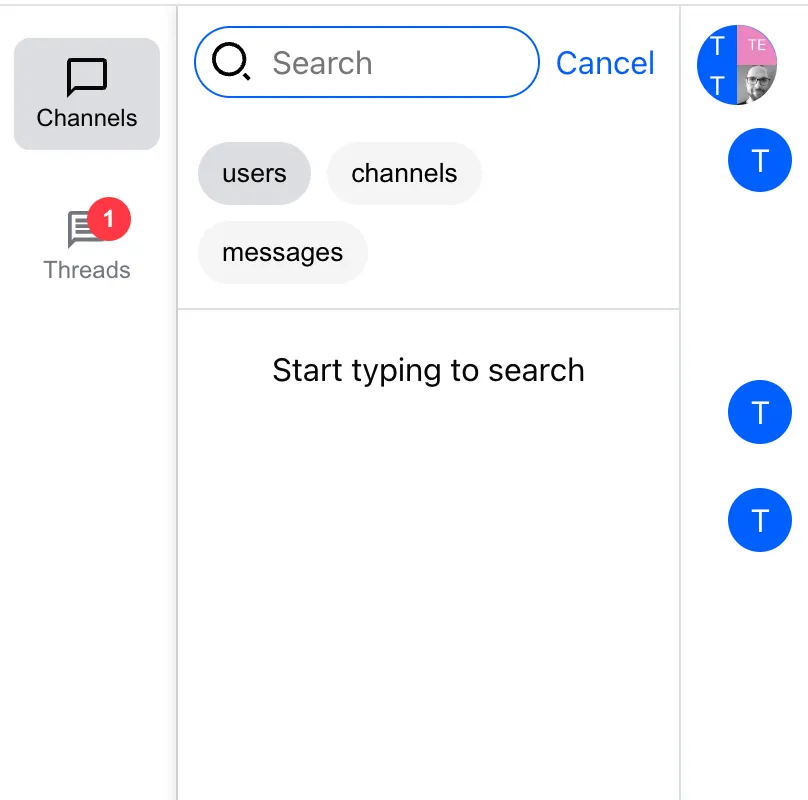
Basic Usage
To replace the rendering of ChannelSearch by Search, import it from the experimental package and create a ComponentContext override around the ChannelList that will render Search:
Search Data Management
Search state is managed by the reactive SearchController class (exported by stream-chat). It uses search sources for data retrieval and pagination. The default sources are:
ChannelSearchSource- queries channels bynamepartially matching the search queryUserSearchSource- queries users bynameoridpartially matching the search queryMessageSearchSource- queries messages and corresponding channels by messagetextpartially matching the search query
Customizing Search Data Retrieval
You can customize the existing sources or add new ones for custom entities.
In the example below we demonstrate how to add a new custom search source. The pattern is however applicable to overriding the default search sources. Specifically, each new search source class has to implement abstract methods query and filterQueryResults. Also, the class should declare type attribute so that the SearchController can keep the source mapping.
import { useMemo } from "react";
import {
  BaseSearchSource,
  ChannelSearchSource,
  MessageSearchSource,
  SearchController,
  SearchSourceOptions,
  UserSearchSource,
} from "stream-chat";
import { Chat, useCreateChatClient, WithComponents } from "stream-chat-react";
import {
  DefaultSearchResultItems,
  Search,
  SearchSourceResultList,
} from "stream-chat-react/experimental";

// declare the type of item that is stored in the array by the search source
type X = { x: string };

// declare the custom search source
class XSearchSource extends BaseSearchSource<X> {
  // search source type is necessary
  readonly type = "X";

  constructor(options?: SearchSourceOptions) {
    super(options);
  }

  // the query method will always receive the searched string
  protected async query(searchQuery: string) {
    return searchQuery.length > 1
      ? { items: [{ x: "hi" }] }
      : { items: [{ x: "no" }] };
  }

  // we can optionally manipulate the retrieved page of items
  protected filterQueryResults(items: X[]): X[] {
    return items;
  }
}

// we need a custom component to display the search source items
const XSearchResultItem = ({ item }: { item: X }) => <div>{item.x}</div>;

// and we tell the component that renders the resulting list, what components it can use to display the items
const customSearchResultItems = {
  ...DefaultSearchResultItems,
  X: XSearchResultItem,
};

const CustomSearchResultList = () => (
  <SearchSourceResultList SearchResultItems={customSearchResultItems} />
);

const App = () => {
  const chatClient = useCreateChatClient({
    apiKey,
    tokenOrProvider: userToken,
    userData: { id: userId },
  });

  // create a memoized instance of SearchController
  const searchController = useMemo(
    () =>
      chatClient
        ? new SearchController({
            sources: [
              new XSearchSource(),
              new ChannelSearchSource(chatClient),
              new UserSearchSource(chatClient),
              new MessageSearchSource(chatClient),
            ],
          })
        : undefined,
    [chatClient],
  );

  if (!chatClient) return <>Loading...</>;

  return (
    <Chat client={chatClient} searchController={searchController}>
      <WithComponents
        overrides={{
          Search,
          SearchSourceResultList: CustomSearchResultList,
        }}
      >
        {/*  ....*/}
      </WithComponents>
    </Chat>
  );
};
You can override query parameters like filters, sort, or searchOptions by assignment:
const { searchController } = useChatContext();

const usersSearchSource = searchController.getSource("users");
usersSearchSource.filters = {
  ...usersSearchSource.filters,
  myCustomField: "some-value",
};
Search Request Dynamic Filter Building
It is possible to build request filters dynamically as of stream-chat@9.17.0.
Default search sources include FilterBuilder instances for dynamic filter building.
The default search sources count with at least one filter builder:
ChannelSearchSourcehas a single FilterBuilder instance, that can be accessed withchannelSearchSource.filterBuilderUserSearchSourcehas a single FilterBuilder instance, that can be accessed withuserSearchSource.filterBuilderMessageSearchSourcehas three FilterBuilder instances as three different filters has to be built. These can be accessed as:a.
messageSearchSource.messageSearchChannelFilterBuilder- builds filters for the first argument toclient.search()b.
messageSearchSource.messageSearchFilterBuilder- builds filters for the second argument toclient.search()c.
messageSearchSource.channelQueryFilterBuilder- builds filters for the first argument toclient.queryChannels()(retrieves the channels corresponding to the messages returned fromclient.search())
It is possible to define the custom filter config at the search source initiation. In that case, we need to create SearchController instance too. Alongside initialFilterConfig we can define initialContext, which represents custom fields that we want to have available at the filter build time. Besides the custom context fields, every search source counts with field searchQuery as a part of the filter builder context.
We can register filter generators via initialFilterConfig as follows:
- register the configuration object under a key that will allow us to target that filter builder
- determine whether the filter is enabled at the beginning
- determine the generator logic
It is important to note that the generator functions should:
- return the partial filter object that is internally merged into the resulting filter or
nullwhich would signal the partial from the given generator should to be ignored
An example would be
// generic type determines the custom fields for the filter builder context available in the generator functions
new ChannelSearchSource<{ archived: boolean }>(
  //... previous args
  {
    // initial context does not contain searchQuery as that is handled by the search source at the runtime
    initialContext: { archived: false },
    initialFilterConfig: {
      memberUserName: {
        // 1. register the configuration object under a key
        enabled: true, // 2. determine whether the filter is enabled at the beginning
        // the archived custom context property is available along with the default searchQuery
        generate: (
          { archived, searchQuery }, // 3. determine the generator logic
        ) =>
          searchQuery
            ? {
                "member.user.name": { $autocomplete: searchQuery },
              }
            : null,
      },
      //...  other filters for ChannelSearchSource
    },
  },
);
An example of creating a SearchController with custom filter generator configuration could look as follows:
const useCustomSearchController = (chatClient: StreamChat | null) => {
  // create a memoized instance of SearchController
  return useMemo(
    () =>
      chatClient
        ? new SearchController({
            sources: [
              new ChannelSearchSource<{ archived: boolean }>(
                chatClient,
                {}, // default search options are kept, but the empty object has to be provided due to positional arguments
                {
                  initialContext: { archived: false },
                  initialFilterConfig: {
                    archived: {
                      enabled: true,
                      generate: ({ archived }) => ({
                        archived,
                      }),
                    },
                    memberUserName: {
                      enabled: true,
                      generate: ({ searchQuery }) =>
                        searchQuery
                          ? {
                              "member.user.name": {
                                $autocomplete: searchQuery,
                              },
                            }
                          : null,
                    },
                    custom_loading_places_country_codes: {
                      enabled: false,
                      generate: ({ searchQuery }) =>
                        searchQuery
                          ? {
                              // custom property has to be declared
                              custom_loading_places_country_codes: {
                                $in: [searchQuery],
                              },
                            }
                          : null,
                    },
                  },
                },
              ),
              new UserSearchSource(
                chatClient,
                {}, // default search options are kept, but the empty object has to be provided due to positional arguments
                {
                  //   again custom initialContext and (or) initialFilterConfig
                },
              ),
              new MessageSearchSource<{
                // context definition for each filter builder
                messageSearchChannelContext: { a: string };
                messageSearchContext: { b: string };
                channelQueryContext: { c: string };
              }>(
                client,
                {}, // default search options are kept, but the empty object has to be provided due to positional arguments
                {
                  messageSearchChannelFilterBuilder: {
                    initialContext: { a: "messageSearchChannelFilterBuilder" },
                    initialFilterConfig: {
                      custom: {
                        enabled: true,
                        generate: ({ searchQuery, a }) =>
                          searchQuery
                            ? { name: { $autocomplete: searchQuery + a } }
                            : null,
                      },
                    },
                  },
                  messageSearchFilterBuilder: {
                    initialContext: { b: "messageSearchFilterBuilder" },
                    initialFilterConfig: {
                      text: {
                        enabled: true,
                        generate: ({ searchQuery, b }) =>
                          searchQuery ? { text: searchQuery + b } : null,
                      },
                    },
                  },
                  channelQueryFilterBuilder: {
                    initialContext: { c: "channelQueryFilterBuilder" },
                    initialFilterConfig: {
                      cid: {
                        enabled: true,
                        generate: ({ cids, c }) =>
                          cids
                            ? { cid: { $in: cids.concat([c as string]) } }
                            : null,
                      },
                    },
                  },
                },
              ),
            ],
          })
        : undefined,
    [chatClient],
  );
};
See our guide on declaring custom fields for entities like channels, messages, attachments etc.
It is possible to disable or enable back the individual filter generators:
const searchSource = new ChannelSearchSource(client);

// disables the default filter called name
searchSource.filterBuilder.disableFilter("name");
// enables the default filter called name
searchSource.filterBuilder.enableFilter("name");
It is possible to adjust the filter context
const searchSource = new ChannelSearchSource(client);

// Merges the archived key with the rest of the context. Existing key is overidden.
searchSource.filterBuilder.updateContext({ archived: true });
And finally putting it all together within a React component, we can see that searchSource.filterBuilder.context and searchSource.filterBuilder.filterConfig are reactive. That means we can subscribe and react to context being updated or filters being enabled / disabled:
import {
  ChannelFilters,
  ChannelSearchSource,
  ChannelSearchSourceFilterBuilderContext,
  FilterBuilderGenerators,
} from "stream-chat";
import { useSearchContext, useStateStore } from "stream-chat-react";

const contextSelector = ({
  archived,
}: ChannelSearchSourceFilterBuilderContext<{ archived: boolean }>) => ({
  archived,
});

const filterGeneratorEnablementSelector = (
  generators: FilterBuilderGenerators<
    ChannelFilters,
    ChannelSearchSourceFilterBuilderContext<{
      archived: boolean;
    }>
  >,
) => ({
  custom_loading_places_country_codes:
    generators.custom_loading_places_country_codes.enabled,
});

const SearchSourceFilterButton = () => {
  // activates individual search sources
};

export const SearchResultsHeader = () => {
  const { searchController } = useSearchContext();
  const channelSearchSource = (searchController.getSource("channels") ??
    {}) as ChannelSearchSource<{ archived: boolean }>;
  const { archived } = useStateStore(
    channelSearchSource.filterBuilder?.context,
    contextSelector,
  );
  const { custom_loading_places_country_codes } = useStateStore(
    channelSearchSource.filterBuilder?.filterConfig,
    filterGeneratorEnablementSelector,
  );

  return (
    <div
      className="str-chat__search-results-header"
      data-testid="search-results-header"
    >
      <div
        className="str-chat__search-results-header__filter-source-buttons"
        data-testid="filter-source-buttons"
      >
        {searchController.sources.map((source) => (
          <SearchSourceFilterButton
            key={`search-source-filter-button-${source.type}`}
            source={source}
          />
        ))}
        <label>
          Archived
          <input
            onClick={() =>
              channelSearchSource?.filterBuilder.updateContext({
                archived: !archived,
              })
            }
            type="checkbox"
            value={archived.toString()}
          />
        </label>
        <label>
          custom_loading_places_country_codes
          <input
            onClick={() =>
              custom_loading_places_country_codes
                ? channelSearchSource?.filterBuilder.disableFilter(
                    "custom_loading_places_country_codes",
                  )
                : channelSearchSource?.filterBuilder.enableFilter(
                    "custom_loading_places_country_codes",
                  )
            }
            type="checkbox"
            value={custom_loading_places_country_codes.toString()}
          />
        </label>
      </div>
    </div>
  );
};
Search UI Components And Their Customization
The default search UI components can be overridden through ComponentContext, using the default component names. There are branch components that render other components and leaf components that render the markup.
Search
The top-level component for rendering SearchBar and SearchResults
SearchBar
A leaf component that handles the message input value
SearchResults
The top-level component for displaying search results for one or more search sources.
SearchResultsPresearch
The default component rendered by SearchResults when input value is an empty string - the pre-search state.
SearchResultsHeader
Rendered by SearchResults.The default component renders tags that determine what search source results will be displayed.
SearchSourceResults
Rendered by SearchResults. The component renders the UI components for specific search source listing:
SearchSourceResultsHeader- the default component does not render any markup. Can be used to add information about the source which items are being rendered in the listing below.SearchSourceResultsEmpty- rendered instead ofSearchSourceResultListSearchSourceResultList- renders items for a given search source
SearchSourceResultList
This is a child component of SearchSourceResults component. Renders a list of items in an InfiniteScrollPaginator component. Allows to specify React components for rendering search source items of a given type.
SearchSourceResultListFooter- component rendered at the bottom ofSearchSourceResultList. The default component informs user that more items are being loaded (SearchSourceResultsLoadingIndicator) or that there are no more items to be loaded.SearchSourceResultsLoadingIndicator- rendered bySearchSourceResultListFooter
Contexts
SearchContext
The main container component, Search, provides SearchContext to child components.
directMessagingChannelType
The type of channel to create on user result select, defaults to messaging. This is just a forwarded value of Search component's directMessagingChannelType prop.
| Type | Default |
|---|---|
| string | 'messaging' |
disabled
Sets the input element into disabled state. This is just a forwarded value of Search component's disabled prop.
| Type |
|---|
| boolean |
exitSearchOnInputBlur
Clear search state / search results on every click outside the search input. By default, the search UI is not removed on input blur. This is just a forwarded value of Search component's exitSearchOnInputBlur prop.
| Type |
|---|
| boolean |
placeholder
Custom placeholder text to be displayed in the search input. This is just a forwarded value of Search component's placeholder prop.
| Type |
|---|
| string |
searchController
Instance of the SearchController class that handles the data management. This is just a forwarded value of Chat component's searchController prop. The child components can access the searchController state in a reactive manner.
import {
  SearchSourceResults,
  SearchResultsHeader,
  SearchResultsPresearch,
  useSearchContext,
  useStateStore,
} from "stream-chat-react";
import type { SearchControllerState } from "stream-chat";

const searchControllerStateSelector = (nextValue: SearchControllerState) => ({
  activeSources: nextValue.sources.filter((s) => s.isActive),
  isActive: nextValue.isActive,
  searchQuery: nextValue.searchQuery,
});

export const SearchResults = () => {
  const { searchController } = useSearchContext();
  const { activeSources, isActive, searchQuery } = useStateStore(
    searchController.state,
    searchControllerStateSelector,
  );

  return isActive ? (
    <div>
      <SearchResultsHeader />
      {!searchQuery ? (
        <SearchResultsPresearch activeSources={activeSources} />
      ) : (
        activeSources.map((source) => (
          <SearchSourceResults key={source.type} searchSource={source} />
        ))
      )}
    </div>
  ) : null;
};
SearchSourceContext
SearchSourceResults renders SearchSourceContext. It provides the search source instance for the specified type. Child components can access the instance's reactive state to render data:
import {
  useSearchSourceResultsContext,
  useStateStore,
} from "stream-chat-react";
import type { SearchSourceState } from "stream-chat";

const searchSourceStateSelector = (value: SearchSourceState) => ({
  hasMore: value.hasMore,
  isLoading: value.isLoading,
});

const Component = () => {
  const { searchSource } = useSearchSourceResultsContext();
  const { hasMore, isLoading } = useStateStore(
    searchSource.state,
    searchSourceStateSelector,
  );

  return (
    <div>
      {isLoading ? (
        <div>Is loading</div>
      ) : !hasMore ? (
        <div>All results loaded</div>
      ) : null}
    </div>
  );
};On this page: