
 React
React iOS
iOS Android
 Flutter
 Angular
 JavaScript
 Unity
Unity Unreal
 Node
Node Python
 Ruby
Ruby PHP
PHP Java
Java .NET
.NET Go
Go REST
REST<MessageInput audioRecordingEnabled />Audio Recorder
Enable audio recording on MessageInput to record voice messages:
Once enabled, MessageInput renders StartRecordingAudioButton.

Best Practices
- Request microphone access only when users opt in to recording.
- Use MP3 encoding when file size or bandwidth is a concern.
- Keep recording UI minimal so users can start/stop quickly.
- Consider
asyncMessagesMultiSendEnabledfor multi-attachment workflows. - Handle permission-denied states with clear recovery guidance.
You can replace StartRecordingAudioButton via Channel context:
<Channel StartRecordingAudioButton={CustomComponent}>Clicking the recording button swaps the composer UI for the AudioRecorder UI.

You can replace the default AudioRecorder via Channel context:
<Channel AudioRecorder={CustomComponent}>Browser permissions
Microphone permission changes are observed. If permission is 'denied' when the user starts recording, the RecordingPermissionDeniedNotification dialog is shown.
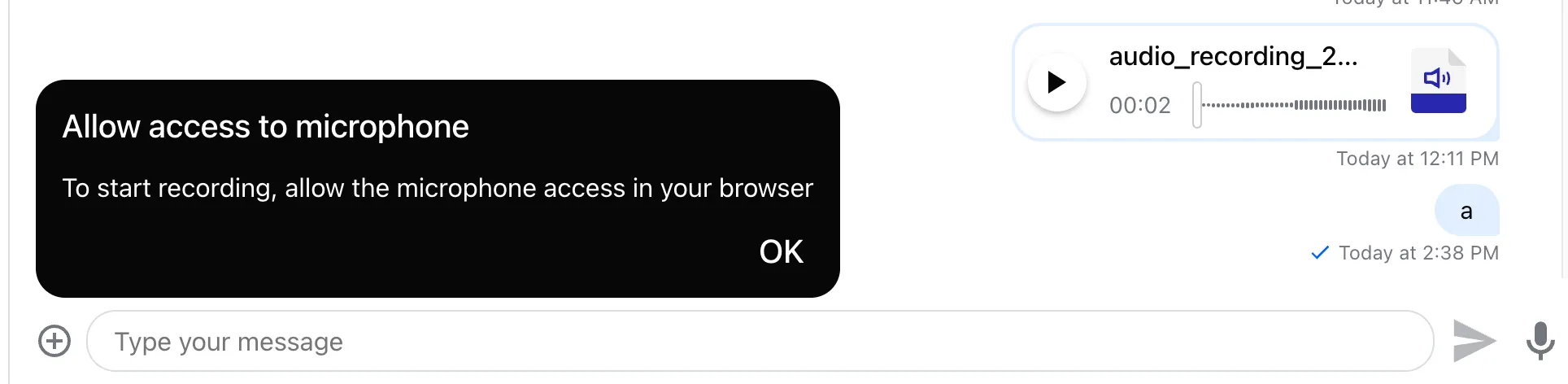
You can customize that dialog via Channel context:
<Channel RecordingPermissionDeniedNotification={CustomComponent}>Custom encoding
By default, recordings are encoded as audio/wav. To reduce size, you can use the MP3 encoder based on lamejs:
- Install
@breezystack/lamejs(a peer dependency ofstream-chat-react).
npm install @breezystack/lamejsyarn add @breezystack/lamejs- Import the MP3 encoder as a plugin:
import { useMemo } from "react";
import { MessageInput } from "stream-chat-react";
import { encodeToMp3 } from "stream-chat-react/mp3-encoder";

const Component = () => {
  /**
   See why memoizing props matters:
   - https://www.epicreact.dev/memoization-and-react
   - https://react.dev/reference/react/useMemo
  */
  const audioRecordingConfig = useMemo(
    () => ({ transcoderConfig: { encoder: encodeToMp3 } }),
    [],
  );
  return <MessageInput focus audioRecordingConfig={audioRecordingConfig} />;
};
Audio recorder states
AudioRecorder switches between these states:
1. Recording state
The recording can be paused or stopped.
2. Paused state
The recording can be stopped or resumed.

3. Stopped state
The recording can be played back before it is sent.

At any time, the user can cancel and return to the composer via the bin icon.
The message sending behavior
The recording uploads when recording is completed (stop + confirm).
Sending behavior for the recording attachment is controlled by asyncMessagesMultiSendEnabled on MessageInput.
<MessageInput asyncMessagesMultiSendEnabled audioRecordingEnabled />Behavior by asyncMessagesMultiSendEnabled:
asyncMessagesMultiSendEnabled value | Impact |
|---|---|
false (default) | Sends immediately after upload; submits a no-text message with a single voice recording attachment. |
true | Sends when the user clicks SendMessage. |
Enabling asyncMessagesMultiSendEnabled lets users record multiple voice messages or add text/attachments before sending.
Audio recorder controller
Components consuming MessageInputContext can access the recording state via recordingController:
import { useMessageInputContext } from "stream-chat-react";

const Component = () => {
  const {
    recordingController: {
      completeRecording,
      permissionState,
      recorder,
      recording,
      recordingState,
    },
  } = useMessageInputContext();
};
The controller exposes the following API:
| Property | Description |
|---|---|
completeRecording | Stops recording, uploads it, and submits the message if asyncMessagesMultiSendEnabled is disabled. |
permissionState | One of the values for microphone permission: 'granted', 'prompt', 'denied' |
recorder | Instance of MediaRecorderController that exposes the API to control the recording states (start, pause, resume, stop, cancel) |
recording | Generated attachment of type voiceRecording. This is available once the recording is stopped. |
recordingState | One of the values 'recording', 'paused', 'stopped'. Useful to reflect the changes in recorder state in the UI. |