








High Fidelity (Hi-Fi) Audio
For scenarios like live music, karaoke, podcasts, or professional streaming, you may want to deliver audio that sounds natural and unprocessed. The Android SDK exposes one public switch for that: the audio bitrate profile.
HiFi mode
HiFi mode is the MUSIC_HIGH_QUALITY audio bitrate profile. It is an all-in-one switch. The SDK does not expose the individual capture knobs to your app. Calling setAudioBitrateProfile is what moves every stage together so voice processing and music cannot disagree.
Use a voice profile when people are talking. Use music when you need the microphone to pass through what is in the room (an instrument, a speaker, a backing track) instead of treating it as speech.
The SDK supports three profiles:
AUDIO_BITRATE_PROFILE_VOICE_STANDARD_UNSPECIFIED: the default. Standard voice calls with processing on.AUDIO_BITRATE_PROFILE_VOICE_HIGH_QUALITY: the same processing as the default. A higher voice bitrate applies only when the SFU names one for this profile. Otherwise it uses the same negotiated cap as the default (typically around 64 kbps).AUDIO_BITRATE_PROFILE_MUSIC_HIGH_QUALITY: HiFi mode. Processing off, higher bitrate, regular microphone capture.
You can set the profile before joining or on a running call. Before join, the pipeline is built from the profile when the call starts. After join, the SDK applies the same stages to the live capture path. If nothing has published audio yet, those stages are remembered and applied when the first audio track is created.
What the SDK changes between voice and music modes
Voice profiles keep the device on the telephony capture path: the path that cancels echo and suppresses noise. That path is what makes a meeting intelligible. It is also what destroys music. Several layers do it independently (Stream's noise-cancellation processor (Krisp), WebRTC's software APM, Android's built-in NS and AEC, and on some vendors the VoIP graph selected by MODE_IN_COMMUNICATION). Turning off only one of them is not enough.
Music therefore steps off that path entirely:
| Stage | Voice | Music | Why |
|---|---|---|---|
| Stream noise-cancellation processor (Krisp) | Restored to whatever it was before music (left alone if you never entered music) | Off | This processor is the dominant suppressor when it is configured. Leaving it on makes every other change inaudible. |
| Platform (hardware) noise suppressor | On | Off | The built-in Android NS is attached to the recording session and gates non-speech. |
| Platform (hardware) acoustic echo canceller | On | Off | Same session-level effect as hardware NS. Music turns both off together. |
| WebRTC software audio processing (AEC, NS, AGC, high-pass filter) | On | Off | These constraints are fixed when the audio source is created. Mid-call, the SDK rebuilds the source and moves the live sender onto the new track. |
| Capture audio source | VOICE_COMMUNICATION |
MIC |
VOICE_COMMUNICATION opens the platform VoIP graph. MIC is the ordinary record path. |
| Audio mode | MODE_IN_COMMUNICATION |
MODE_NORMAL |
Some vendors pick the VoIP capture chain from the audio mode, not from the source. Mode and source have to move together, mode first. |
| Maximum publish bitrate | The bitrate the SFU negotiated for voice (typically around 64 kbps) | The bitrate the SFU offers for music (typically around 128 kbps) | The SFU is not asked to renegotiate mid-call. The SDK moves the live sender's ceiling instead. |
Costs of music mode
- Treat music as a headphones setting. Echo cancellation is off. On speakerphone, the room plays back into the microphone and everyone else hears echo.
- Brief gap in captured audio on a mid-call switch that changes software processing. The source and track are rebuilt. The call itself is not interrupted and there is no renegotiation.
Allow HiFi audio on the call type
HiFi audio is allowed by default on the livestream call type.
On other call types, turn on Allow HiFi audio in the Stream Dashboard under Video & Audio > Call Types > [call type] > Settings.
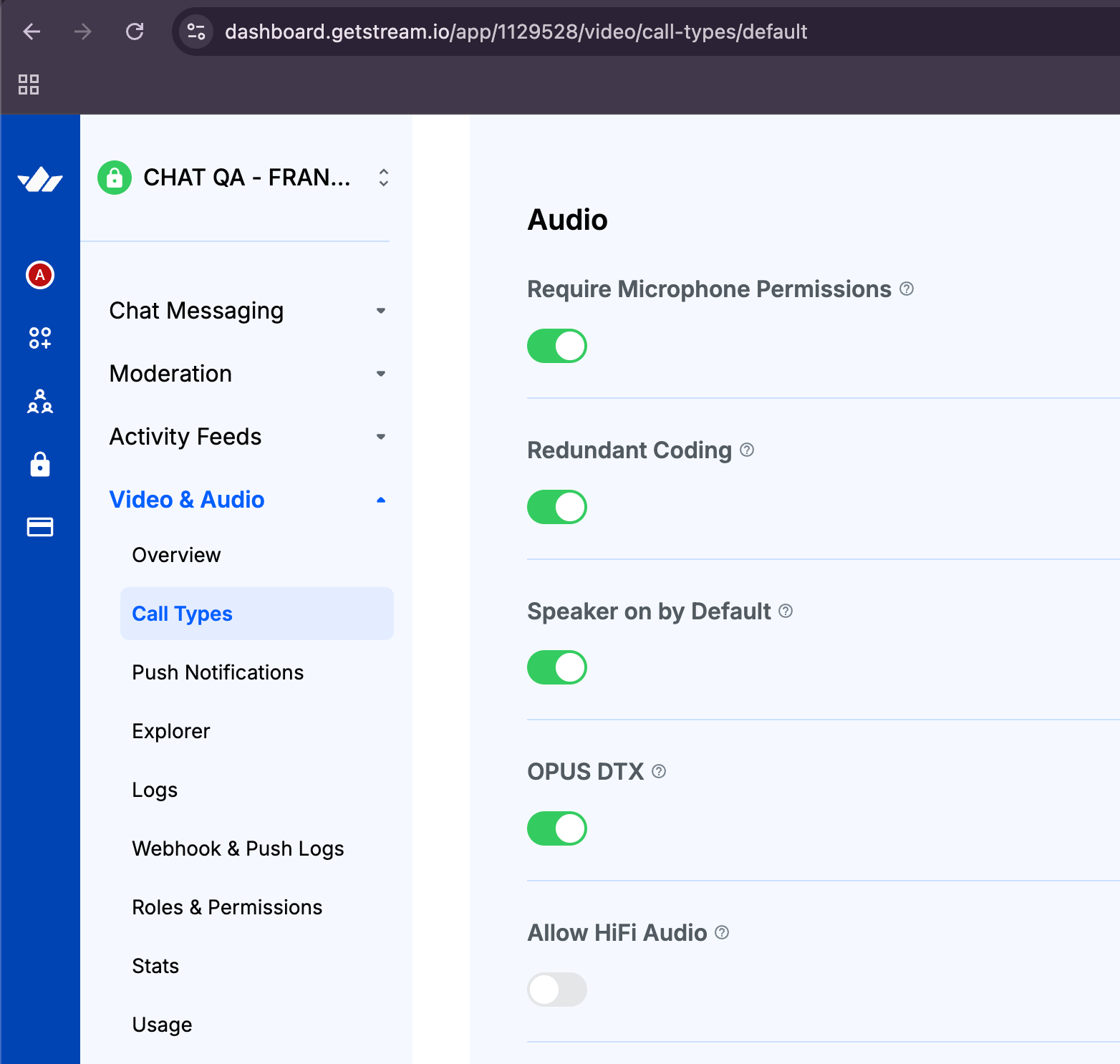
setAudioBitrateProfile fails if this setting is off, both before join and mid-call. The flag gates every profile, including switching back to voice. Do not call the API just to initialise a toggle on a call type that does not allow HiFi. The default is already voice.
Setting the audio bitrate profile
The only public APIs are on call.microphone:
| API | Role |
|---|---|
suspend fun setAudioBitrateProfile(profile): Result<Unit> |
Apply a profile. This is the only way to change HiFi vs voice. |
val audioBitrateProfile: StateFlow<AudioBitrateProfile> |
The profile that is actually in force. Bind your toggle to this. |
import stream.video.sfu.models.AudioBitrateProfile

val result = call.microphone.setAudioBitrateProfile(
    AudioBitrateProfile.AUDIO_BITRATE_PROFILE_MUSIC_HIGH_QUALITY,
)

result.onSuccess {
    // The profile is in force. audioBitrateProfile has moved.
}.onFailure { error ->
    // HiFi is off in the dashboard, settings could not be fetched, or a live
    // stage refused. error.message names the stages that did not move.
}
Switching back to voice (this also requires Allow HiFi audio):
call.microphone.setAudioBitrateProfile(
    AudioBitrateProfile.AUDIO_BITRATE_PROFILE_VOICE_STANDARD_UNSPECIFIED,
)
Result.success means the profile took. Result.failure means it did not: the dashboard setting is off, call settings could not be loaded, or a live stage refused. In the last case the exception message lists the stages that are still on the previous profile (for example hardware noise suppressor, capture audio source). The SDK puts those stages back, and audioBitrateProfile stays where it was so a toggle bound to it snaps back.
Observing the current profile
import androidx.lifecycle.compose.collectAsStateWithLifecycle
import stream.video.sfu.models.AudioBitrateProfile

val profile by call.microphone.audioBitrateProfile.collectAsStateWithLifecycle()
val isMusic =
    profile == AudioBitrateProfile.AUDIO_BITRATE_PROFILE_MUSIC_HIGH_QUALITY
Before joining
Nothing is capturing or publishing yet, so there is no live stage to move. Success means the profile will be used when the call joins. The SFU picks the bitrate at join.
val result = call.microphone.setAudioBitrateProfile(
    AudioBitrateProfile.AUDIO_BITRATE_PROFILE_MUSIC_HIGH_QUALITY,
)
if (result.isSuccess) {
    call.join()
}
On a running call
The same call applies each stage to the live pipeline. You can switch into music when a performer starts playing, and back to voice when they stop, without rejoining.
If audio has never been published (for example the user joined muted and has not unmuted), there is no sender yet. Those stages are not treated as failures. The requests are kept and applied when the first audio track is created. Mute after publishing is different: the sender stays, so the live stages still have to apply.
For a Compose control that already wires this API, see HiFi audio toggle.
Stereo playback
HiFi mode changes capture. Stereo playback is a separate speaker setting: USAGE_MEDIA instead of the default USAGE_VOICE_COMMUNICATION.
Before joining the call
Configure the audio usage when building the client with CallServiceConfigRegistry:
val callServiceConfigRegistry = CallServiceConfigRegistry()
callServiceConfigRegistry.register(CallType.Default.name) {
    setAudioUsage(AudioAttributes.USAGE_MEDIA)
}

val streamVideo = StreamVideoBuilder(
    context = context,
    apiKey = apiKey,
    user = user,
    token = token,
    callServiceConfigRegistry = callServiceConfigRegistry,
).build()
After joining the call
val success = call.speaker.setAudioUsage(AudioAttributes.USAGE_MEDIA)USAGE_VOICE_COMMUNICATION is mono. USAGE_MEDIA enables stereo playback, which is what you want for music and high-quality listening.