React
React iOS
iOS Android
 Flutter
 JavaScript
 Unity
Unity ESP32
ESP32 Platform
 Vision Agents
import { useEffect, useState } from "react";
import { StreamVideoParticipant } from "@stream-io/video-react-sdk";
const useIsTrackUnmuted = (participant: StreamVideoParticipant) => {
const audioStream = participant.audioStream;
const [unmuted, setUnmuted] = useState(() => {
const track = audioStream?.getAudioTracks()[0];
return !!track && !track.muted;
});
useEffect(() => {
const track = audioStream?.getAudioTracks()[0];
if (!track) return;
setUnmuted(!track.muted);
const handler = () => setUnmuted(!track.muted);
track.addEventListener("mute", handler);
track.addEventListener("unmute", handler);
return () => {
track.removeEventListener("mute", handler);
track.removeEventListener("unmute", handler);
};
}, [audioStream]);
return unmuted;
};Audio Connecting Indicator
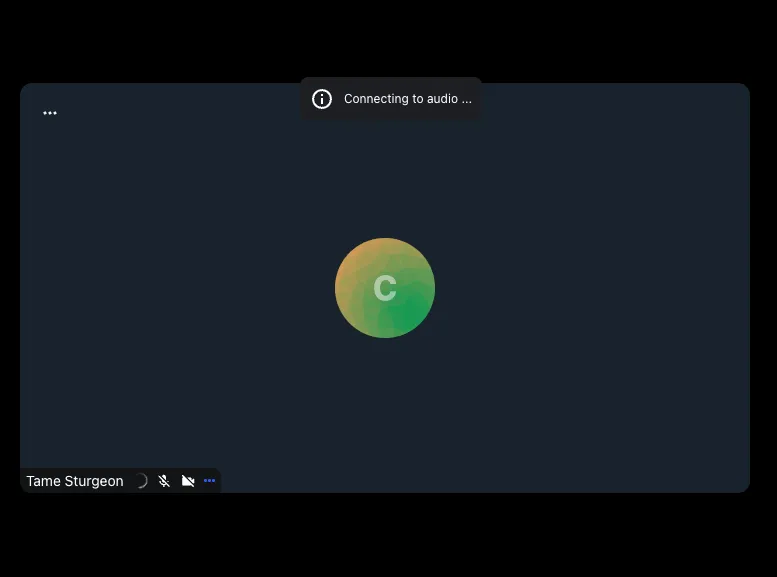
Detect when a participant's audio track is published but not yet producing data, and show a loading indicator until the connection is ready.
Some browsers may fire the `unmute` event earlier than expected, before actual media data arrives. This makes the event best suited for informational UI like loading indicators rather than as a precise signal for media readiness.
Best Practices
- Show the indicator only when the participant has an audio track. Don't confuse "connecting" with "muted by choice."
- Use a subtle loading indicator rather than an intrusive banner.
- Dismiss the notification automatically once the track starts producing audio.
Detecting track muted state
The browser fires mute and unmute events on a MediaStreamTrack when it starts or stops receiving media data. Create a hook that listens to these events:
Enhancing the participant label
In the Custom Label cookbook we showed how to create a custom ParticipantDetails component. We can enhance it by combining hasAudio with the hook above to show an audio connecting indicator next to the participant's name.
import {
  hasAudio,
  useParticipantViewContext,
} from "@stream-io/video-react-sdk";

const ParticipantDetails = () => {
  const { participant } = useParticipantViewContext();

  const hasAudioTrack = hasAudio(participant);
  const isAudioTrackUnmuted = useIsTrackUnmuted(participant);

  const isAudioConnecting = hasAudioTrack && !isAudioTrackUnmuted;

  return (
    <div title={participant.name}>
      <span>{participant.name}</span>
      {isAudioConnecting && <span>Connecting to audio...</span>}
    </div>
  );
};
Now we can pass this custom ParticipantViewUI component down to our call layout components or directly to ParticipantView as described in the ParticipantView customizations guide.