








Participant Labels
Showing participant info is an important part of the calling experience, and can have different design variations.
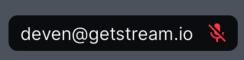
By default, the SDK shows the name of the participant with white color, in a black DecoratedBox with opacity 0.5.
Additionally, it also displays an audio indicator at the end by default.
Customising the participant label
You can change the TextStyle and alignment of the label using the participantLabelTextStyle and participantLabelAlignment parameters
of the StreamCallParticipant widget respectively:
StreamCallContainer(
  // ...
  callContentWidgetBuilder: (
    BuildContext context,
    Call call,
  ) {
    return StreamCallContent(
      call: call,
      callParticipantsWidgetBuilder: (
        BuildContext context,
        Call call,
      ) {
        return StreamCallParticipants(
          call: call,
          callParticipantBuilder: (
            BuildContext context,
            Call call,
            CallParticipantState participantState,
          ) {
            return StreamCallParticipant(
              call: call,
              participant: participantState,
              participantLabelAlignment: Alignment.centerLeft,
              participantLabelTextStyle: const TextStyle(
                fontWeight: FontWeight.bold,
              ),
            );
          },
        );
      },
    );
  },
),