
 React
React iOS
iOS Android
 Flutter
 JavaScript
 Unity
Unity ESP32
ESP32 Platform
 Vision Agents
try {
await call.join();
} catch (err) {
setError(err); // handle error
}Troubleshooting
This section covers common integration issues that prevent calls from establishing.
Connection issues
Invalid tokens, network issues, or firewalls can prevent WebSocket connections. Always handle call.join() rejections:
The SDK retries up to three times with exponential backoff. Customize or disable retries:
try {
  await call.join({ maxJoinRetries: 1 }); // disable retries
} catch (err) {
  setError(err); // handle error
}
Connection issues during calls (network switching, poor signal) trigger automatic reconnection. See Network Disruption guide.
Expired tokens
Tokens have expiry dates. Verify token contents at jwt.io.
Provide a tokenProvider when creating StreamVideoClient to automatically refresh expired tokens.
Wrong secret for token generation
Tokens from docs won't work - they're generated with demo app secrets. Generate tokens using your app secret from the dashboard.
Verify token signatures at jwt.io. For development, generate tokens here. Production requires backend token generation.
User-token mismatch
Ensure the token matches the user ID provided to StreamVideoClient.
Ringing call issues
Issues typically manifest as missing incoming call screens or failed notification delivery.
Members of a call
You cannot call yourself. Members must be different users who have connected to Stream at least once (required for device registration and notification delivery).
Reusing a call id
Call IDs can be reused for joining, but ringing only works once per ID. For ringing calls, use unique IDs (e.g., UUIDs).
Push notification integration issues
Troubleshooting steps:
- Verify no connection issues (see above)
- Confirm push provider names match
setPushConfigconfiguration - Check Webhook & Push Logs in Stream dashboard for failures
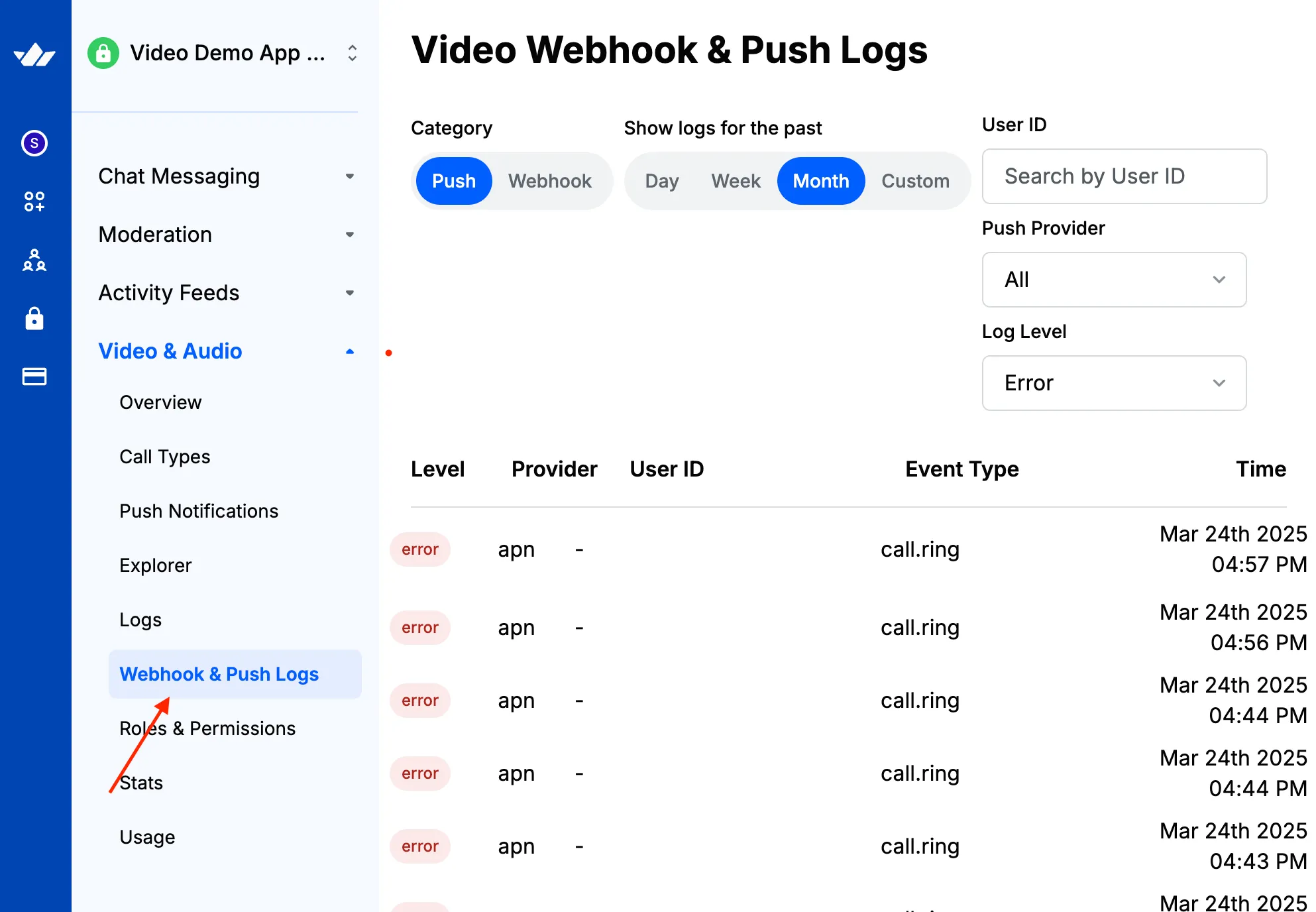
- Navigate to Webhook & Push Logs for Video & Audio.
- Then filter with log level: "error" with your desired time frame. You should see a list like below.
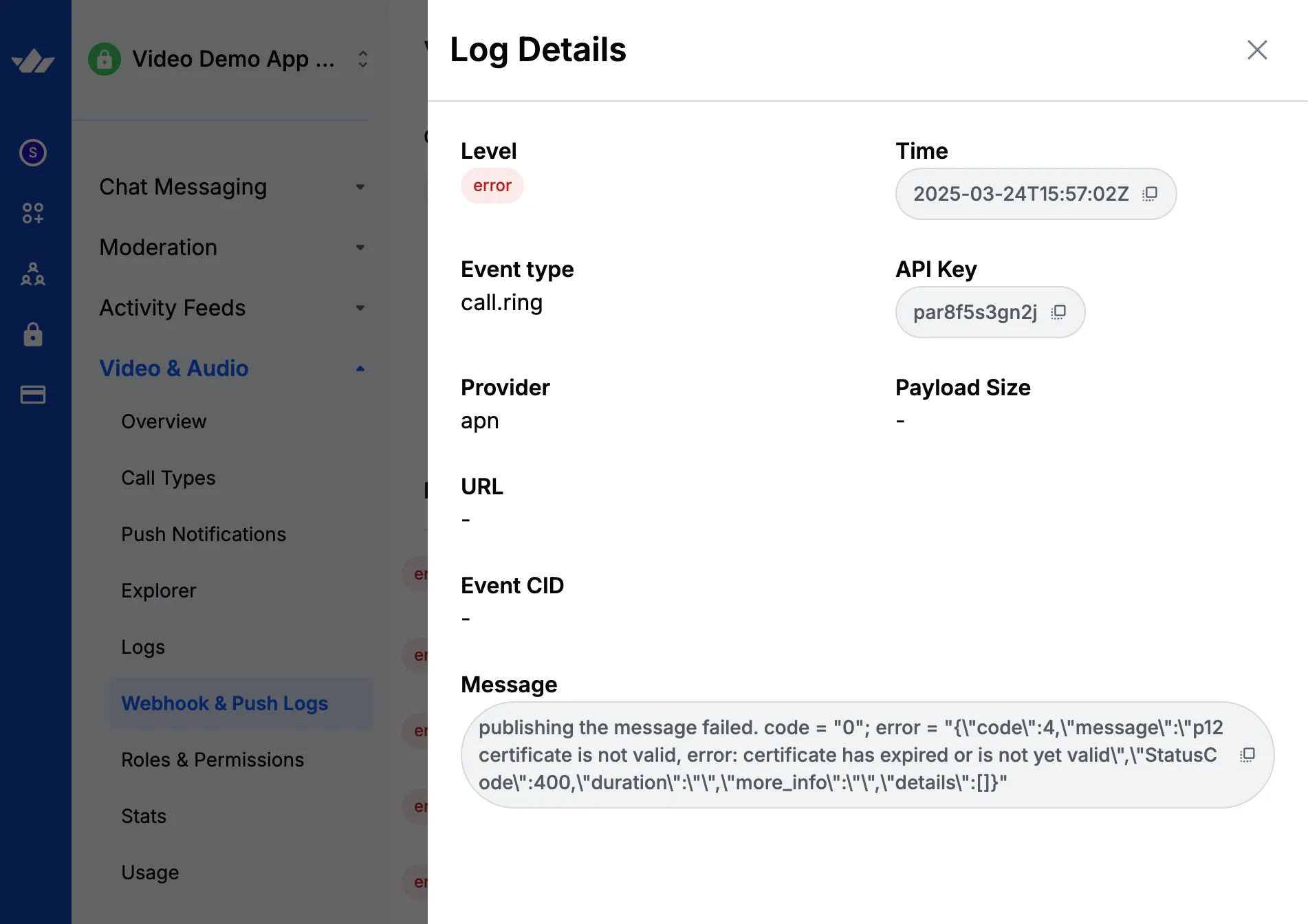
- Tap on a row item, then you should see the corresponding error message as in the example below.
- Use unique call IDs for ringing calls
- Mount
StreamVideoat root level for early event listening - Use
StreamVideoClient.getOrCreateInstance()instead ofnew StreamVideoClient()
During development, you may be facing a situation where push notification is shown but its events like accepting or rejecting a call don't work. This is because, during hot module reloading the global event listeners may get de-registered. To properly test during development, make sure that you fully restart the app or test in release mode without the metro packager.
iOS specific
- Disable Do Not Disturb and other focuses that block CallKit
- Verify VoIP certificate matches dashboard bundle ID
- Confirm app uses correct bundle ID
- Add Push Notifications Capability in Xcode
- Enable background modes: processing, remote-notification, voip
- Test with third-party VoIP notification service
Note that if you have failed to report a VoIP notification to CallKit, the operating system may stop sending you notifications. In those cases, you need to re-install the app and try again.
Android specific
- Grant notification permissions
- Disable Do Not Disturb
- Check OS battery/performance settings (e.g., Deep Clear on OnePlus) that block killed-app notifications
Logging
SDK logging
Enable verbose logging for debugging call flows. Default level is warn. Options: trace, debug, info, error.
import { StreamVideoClient, Logger } from "@stream-io/video-react-native-sdk";

const client = StreamVideoClient.getOrCreateInstance({
  apiKey,
  token,
  user,
  options: {
    logLevel: "info",
  },
});
WebRTC behaviour logging
Enable native WebRTC logs for debugging media packets and peer connections. View in Android Studio or Xcode.
iOS
import stream_react_native_webrtc

override func application(_ application: UIApplication, didFinishLaunchingWithOptions launchOptions: [UIApplication.LaunchOptionsKey : Any]? = nil) -> Bool {
  let options = WebRTCModuleOptions.sharedInstance()
  options.enableMultitaskingCameraAccess = true
  options.loggingSeverity = .verbose

  // the rest
}
#import "WebRTCModuleOptions.h"
- (BOOL)application:(UIApplication *)application didFinishLaunchingWithOptions:(NSDictionary *)launchOptions
{
WebRTCModuleOptions *options = [WebRTCModuleOptions sharedInstance];
options.loggingSeverity = RTCLoggingSeverityVerbose;
// the rest
}Android
import com.oney.WebRTCModule.WebRTCModuleOptions
import org.webrtc.Logging

override fun onCreate() {
  val options: WebRTCModuleOptions = WebRTCModuleOptions.getInstance()
  options.loggingSeverity = Logging.Severity.LS_VERBOSE

  // the rest
}
Common Errors
Error: "Illegal State: call.join() shall be called only once"
call.join() invoked multiple times, often from component re-renders. Ensure single invocation.
iOS Silent Mode / Audio Not Playing
Audio may not play on iOS when the device is in silent mode.
Android: Incoming calls not ringing when app is in background/killed
Common fixes:
Use singleton client:
const client = StreamVideoClient.getOrCreateInstance({
  apiKey,
  user,
  token,
});
Mount
<StreamVideo>at app root levelVerify Firebase: FCM handlers, background handler, permissions (POST_NOTIFICATIONS, FOREGROUND_SERVICE)
Grant runtime notification permission on Android 13+
Enable notification channels in system settings
Manually launch force-stopped apps - system limitation blocks push until user interaction. See Ringing Setup guide.
Android: CallKeep doesn't work for ringing
CallKeep is iOS-only. Android uses FCM, Notifee, full-screen intents, and foreground service. See Ringing Setup guide.
Platform-Specific Issues
iOS Simulator Limitations
iOS Simulator lacks camera/microphone support. Test on physical devices.
Android Battery Drain
Causes: background calls, persistent WebSocket connections, idle foreground services.
End calls when backgrounding:
useEffect(() => {
  const subscription = AppState.addEventListener("change", (state) => {
    if (state === "background" && !isInCall) {
      client.disconnectUser();
    }
  });

  return () => subscription.remove();
}, [isInCall]);
Run foreground services only during active calls. See Keeping Call Alive.
On this page: