
 React
React iOS
iOS Android
 Flutter
 JavaScript
 Unity
Unity Platform
 Python AI
yarn add @stream-io/node-sdkSession Timers
Session timers limit maximum call duration. Configure session timers for individual calls or call types. When the timer reaches zero, the call ends automatically - ideal for paid appointments.
Best Practices
- Display remaining time - Show countdown clearly to all participants
- Warn before timeout - Alert users before the session ends
- Allow extensions - Let authorized users extend if needed
- Handle timeout gracefully - Clean up resources when session ends
This guide integrates a session timer into a telemedicine app with:
- Two users: medical specialist and patient
- 1-hour appointment duration
- Specialist can extend if necessary
Prerequisites
Application setup requirements:
- User roles -
specialistandpatientroles - Call type -
appointmentwith 1-hour maximum duration - Test users -
dr-lecterandbill - Test call -
appointmenttype call
Use the server-side Node.js SDK for setup. Install it:
npm install @stream-io/node-sdkCreate the setup script:
import { StreamClient, VideoOwnCapability } from "@stream-io/node-sdk";

const apiKey = "REPLACE_WITH_API_KEY";
const secret = "REPLACE_WITH_SECRET";
const client = new StreamClient(apiKey, secret);

async function main() {
  // 1. Roles for a medical specialist (`specialist`) and a patient:
  await client.createRole({ name: "specialist" });
  await client.createRole({ name: "patient" });

  // 2. Call type with the maximum duration of 1 hour:
  await client.video.createCallType({
    name: "appointment",
    grants: {
      specialist: [
        VideoOwnCapability.JOIN_CALL,
        VideoOwnCapability.SEND_AUDIO,
        VideoOwnCapability.SEND_VIDEO,
        // These capabilities are required to change session duration:
        VideoOwnCapability.UPDATE_CALL,
        VideoOwnCapability.UPDATE_CALL_SETTINGS,
      ],
      patient: [
        VideoOwnCapability.JOIN_CALL,
        VideoOwnCapability.SEND_AUDIO,
        VideoOwnCapability.SEND_VIDEO,
      ],
    },
    settings: {
      limits: {
        // 3600 seconds = 1 hour
        max_duration_seconds: 3600,
      },
    },
  });

  // 3. Two test users:
  await client.upsertUsers({
    users: {
      "dr-lecter": {
        id: "dr-lecter",
        name: "Dr. Hannibal Lecter",
        role: "specialist",
      },
      bill: {
        id: "bill",
        name: "Buffalo Bill",
        role: "patient",
      },
    },
  });

  // 4. Test call:
  await client.video.call("appointment", "test-call").create({
    data: {
      members: [{ user_id: "dr-lecter" }, { user_id: "bill" }],
      created_by_id: "dr-lecter",
    },
  });
}

main();
Run the script:
npx ts-node script.tsVerify in the dashboard under Call Types and Roles & Permissions.
For a video calling application starting point, see the Video Calling Tutorial.
Basic application setup:
import {
  Call,
  CallContent,
  StreamCall,
  StreamVideo,
  StreamVideoClient,
} from "@stream-io/video-react-native-sdk";
import React, { useState, useEffect } from "react";
import { ActivityIndicator, SafeAreaView, StyleSheet } from "react-native";

const client = new StreamVideoClient({
  apiKey: "REPLACE_WITH_API_KEY",
  user: {
    /* one of the test users */
    id: "bill",
    name: "Buffalo Bill",
  },
  token: "REPLACE_WITH_USER_TOKEN",
});

const RootContainer = (props: React.PropsWithChildren<{}>) => {
  return <SafeAreaView style={styles.container}>{props.children}</SafeAreaView>;
};

const callId = "test-call";

const App = () => {
  const [call, setCall] = useState<Call>();

  useEffect(() => {
    const newCall = client.call("appointment", callId);
    newCall
      .join()
      .then(() => setCall(newCall))
      .catch(() => console.error("Failed to join the call"));

    return () => {
      newCall.leave().catch(() => console.error("Failed to leave the call"));
    };
  }, []);

  if (!call) {
    return (
      <RootContainer>
        <ActivityIndicator size={"large"} />
      </RootContainer>
    );
  }

  return (
    <RootContainer>
      <StreamVideo client={client}>
        <StreamCall call={call}>
          <CallContent />
        </StreamCall>
      </StreamVideo>
    </RootContainer>
  );
};

const styles = StyleSheet.create({
  container: {
    backgroundColor: "black",
    flex: 1,
    justifyContent: "center",
  },
});

export default App;
Override default call duration (requires update call and call settings permissions):
newCall.join({
  data: {
    settings_override: {
      limits: {
        max_duration_seconds: 7200,
      },
    },
  },
});
Session Timer Component
After joining, check session.timer_ends_at for the auto-end timestamp.
Countdown component implementation:
import { useCallStateHooks } from "@stream-io/video-react-native-sdk";
import { StyleSheet, Text, View } from "react-native";

const useSessionTimer = () => {
  const { useCallSession } = useCallStateHooks();
  const session = useCallSession();
  const [remainingMs, setRemainingMs] = useState(Number.NaN);

  useEffect(() => {
    if (!session?.timer_ends_at) {
      return;
    }
    const timeEndAtMillis = new Date(session.timer_ends_at).getTime();
    const handle = setInterval(() => {
      setRemainingMs(timeEndAtMillis - Date.now());
    }, 500);
    return () => clearInterval(handle);
  }, [session?.timer_ends_at]);

  return remainingMs;
};

function convertMillis(milliseconds: number) {
  // Calculate the number of minutes and seconds
  const minutes = Math.floor(milliseconds / 60000);
  const seconds = ((milliseconds % 60000) / 1000).toFixed(0);

  // Format the output
  return `${minutes} mins:${seconds.padStart(2, "0")} secs`;
}

const SessionTimer = () => {
  const remainingMs = useSessionTimer();
  return (
    <View style={styles.sessionTimer}>
      <Text style={styles.sessionTimerText}>{convertMillis(remainingMs)}</Text>
    </View>
  );
};

const styles = StyleSheet.create({
  sessionTimer: {
    top: 0,
    left: 0,
    right: 0,
    backgroundColor: "white",
  },
  sessionTimerText: {
    color: "black",
    fontSize: 24,
    textAlign: "center",
  },
});
Add the component inside StreamCall for a countdown in the call UI:
<StreamVideo client={client}>
  <StreamCall call={call}>
    <SessionTimer />
    <CallContent />
  </StreamCall>
</StreamVideo>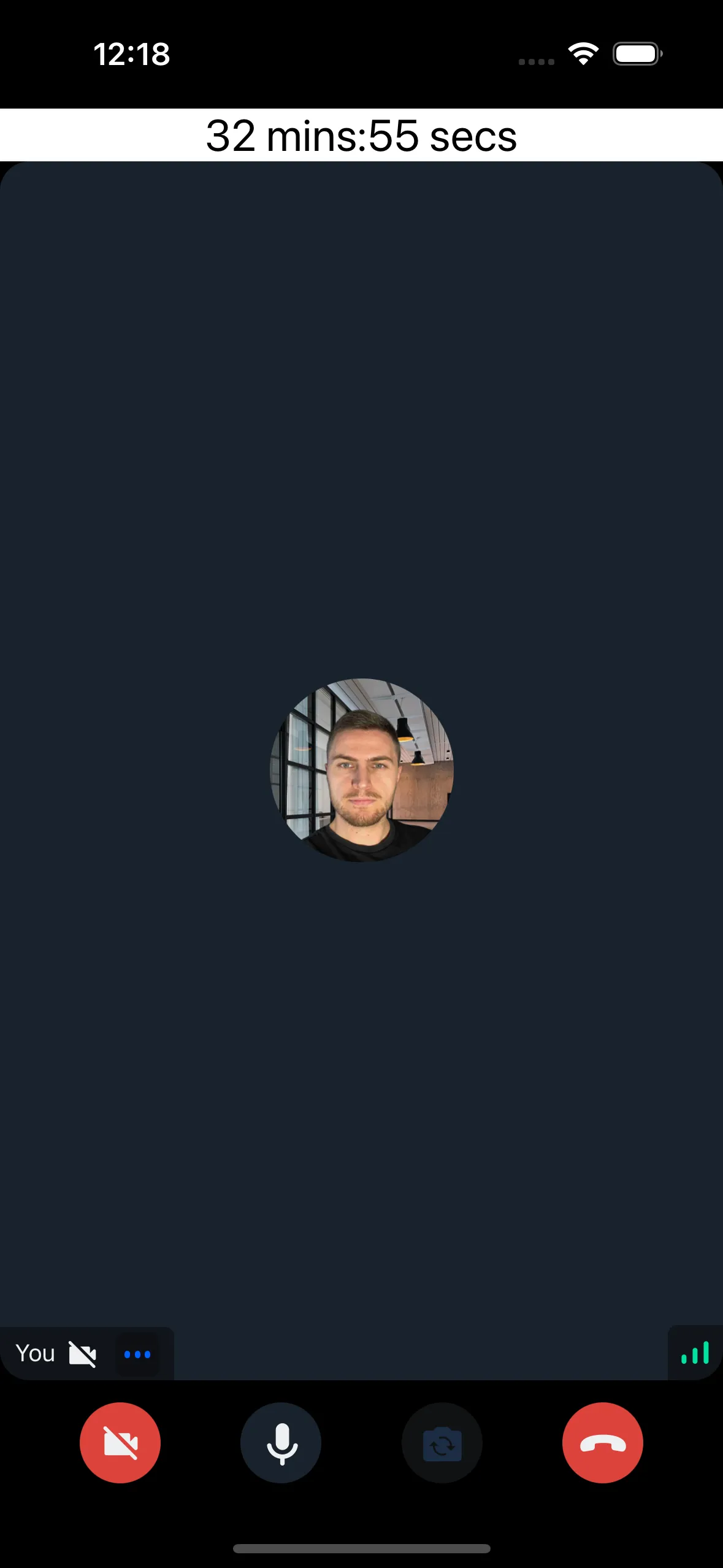
Adding Alerts
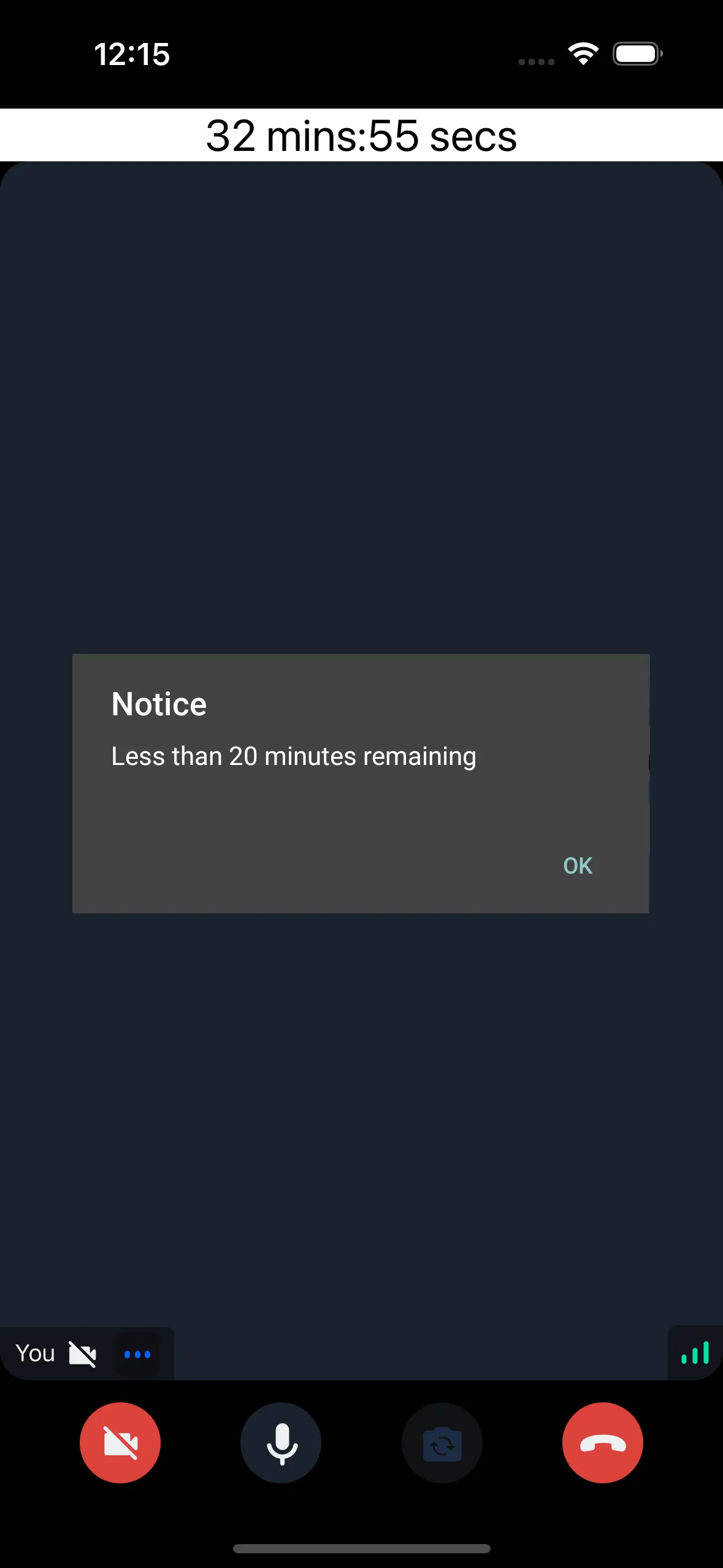
Add an alert twenty minutes before session end:
import { Alert } from "react-native";

const useSessionTimerAlert = (remainingMs: number, thresholdMs: number) => {
  const didAlert = useRef(false);

  useEffect(() => {
    if (!didAlert.current && remainingMs < thresholdMs) {
      Alert.alert(
        "Notice",
        `Less than ${thresholdMs / 60000} minutes remaining`,
      );
      didAlert.current = true;
    }
  }, [remainingMs, thresholdMs]);
};

const SessionTimer = () => {
  const remainingMs = useSessionTimer();
  useSessionTimerAlert(remainingMs, 20 * 60 * 1000);
  return (
    <View style={styles.sessionTimer}>
      <Text style={styles.sessionTimerText}>{convertMillis(remainingMs)}</Text>
    </View>
  );
};
Show an alert when time elapses:
const useSessionEndedAlert = (remainingMs: number) => {
  const didAlert = useRef(false);

  useEffect(() => {
    if (!didAlert.current && remainingMs <= 0) {
      Alert.alert("Call ended");
      didAlert.current = true;
    }
  }, [remainingMs]);
};
Extending a Session
The specialist role has change-max-duration capability to modify call duration. Create an extension component:
import {
  OwnCapability,
  useCall,
  useCallStateHooks,
} from '@stream-io/video-react-native-sdk';
import { Button } from 'react-native';

const ExtendSessionButton = ({
  durationSecsToExtend,
}: {
  durationSecsToExtend: number;
}) => {
  const call = useCall();
  const { useCallSettings, useHasPermissions } = useCallStateHooks();
  const settings = useCallSettings();
  const canExtend = useHasPermissions(OwnCapability.CHANGE_MAX_DURATION);

  if (!canExtend) {
    return null;
  }

  const onPress = () => {
    call?.update({
      settings_override: {
        limits: {
          max_duration_seconds:
            (settings?.limits?.max_duration_seconds ?? 0) +
            durationSecsToExtend,
        },
      },
    });
  };

  return (
    <Button
      onPress={onPress}
      title={`Extend by ${Math.round(((durationSecsToExtend / 60) * 10) / 10)} minutes`}
    />
  );
};

// Somewhere inside <StreamCall>:
<ExtendSessionButton durationSecsToExtend={10 * 60} />;
The button is only visible to the user with specialist role.
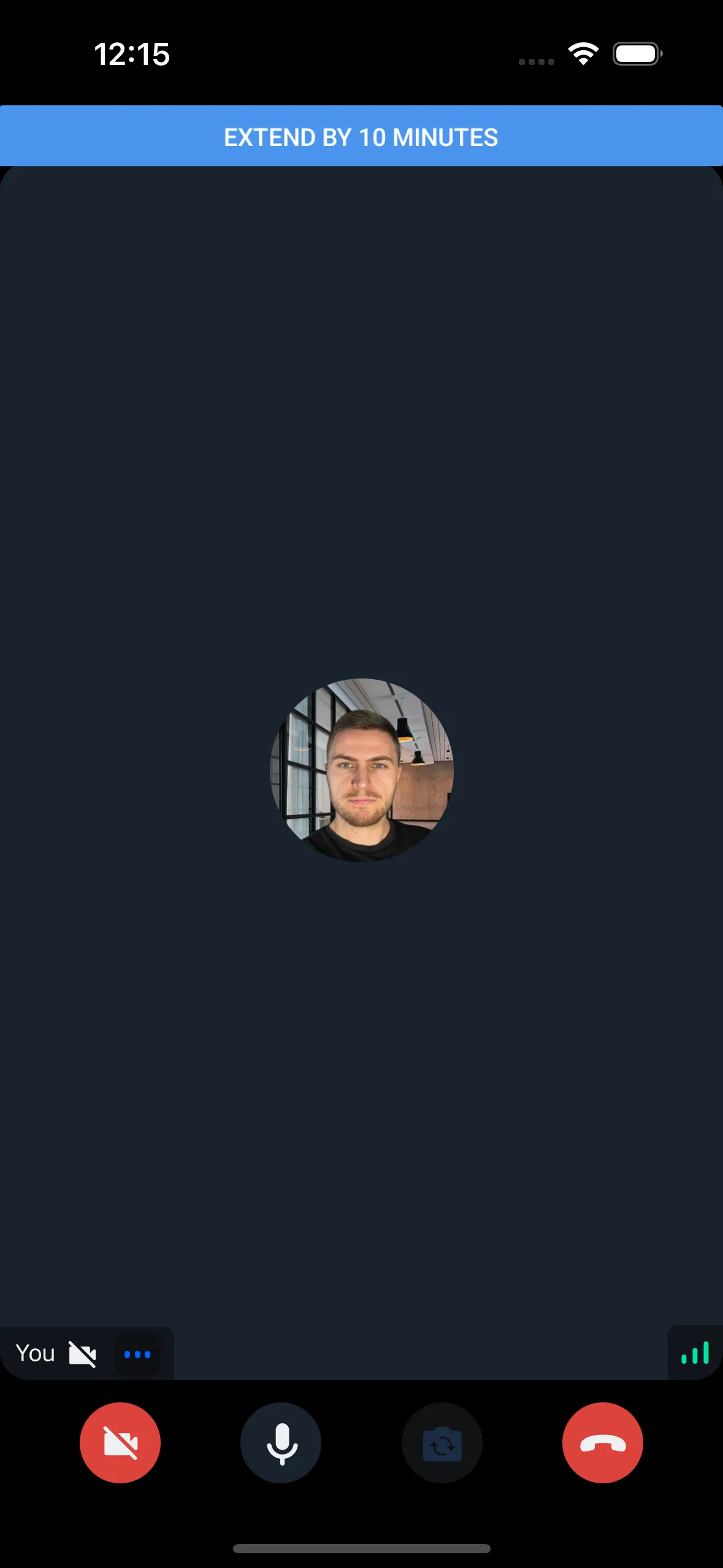
SDK states update automatically when call settings change, keeping SessionTimer current.