
 React
React iOS
iOS Android
 Flutter
 JavaScript
 Unity
Unity Platform
 Python AI
Architecture & Benchmark
Stream's video API is designed to scale WebRTC-based video calling to massive audiences while maintaining low latency and high quality. Here we explain the architecture that allows the video API to scale to 100k participants with excellent performance.
Benchmark at a glance
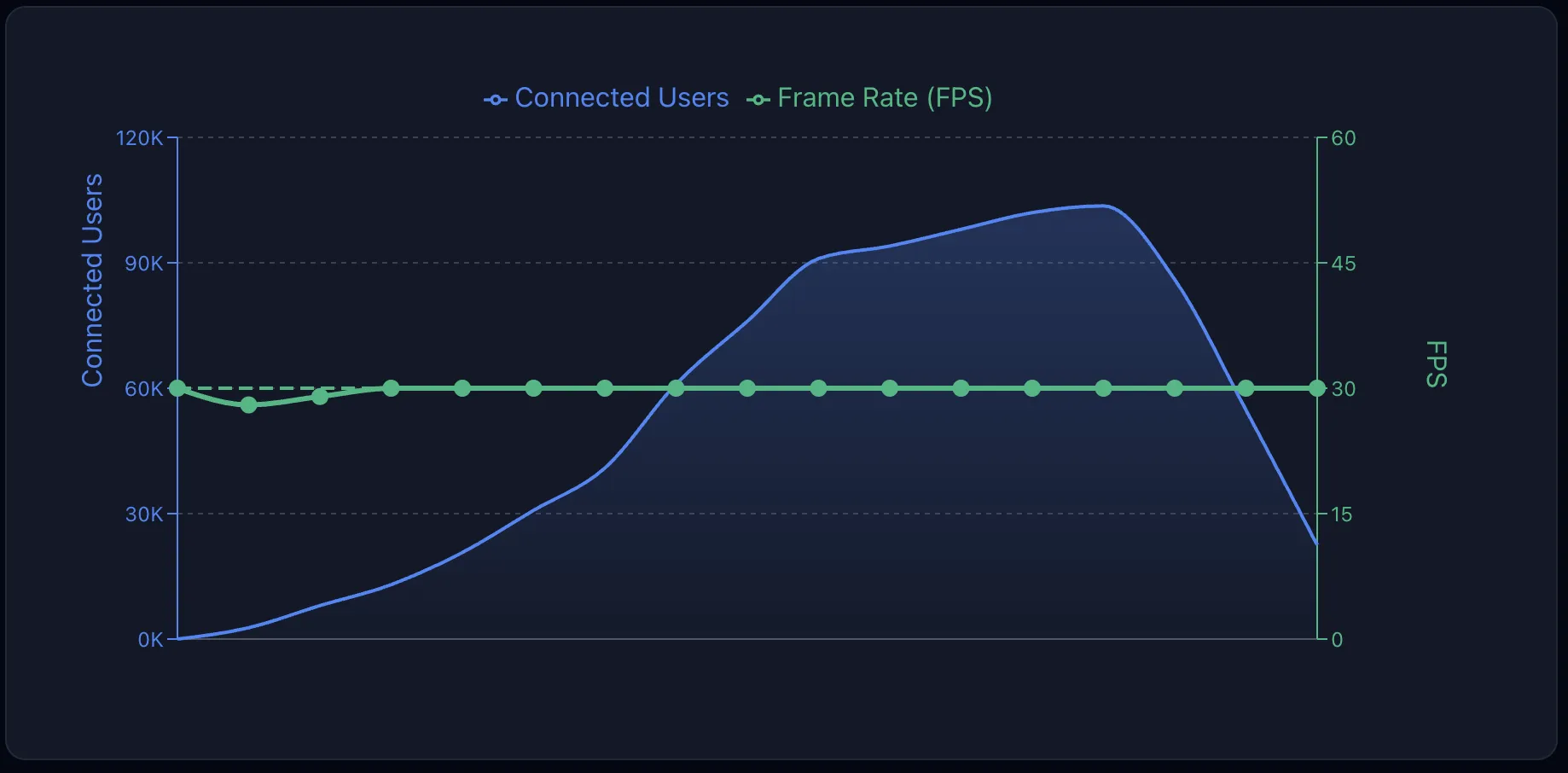
As you can see in the graph above, Stream's video scales to 100k users without any degradation in video quality. The full benchmark for 100k participants is included below. The team is working on our first 1M concurrent user livestream.
Scaling WebRTC
Why WebRTC has a reputation for not scaling
WebRTC was originally designed for peer-to-peer communication. In a naive implementation, each participant would need to send their video to every other participant, creating an O(n²) scaling problem. For example, with just 10 participants, you'd need 90 direct connections. This approach quickly becomes impractical.
Additionally, WebRTC's real-time nature means you can't rely on buffering to hide network issues, making it challenging to maintain quality at scale.
How we scale to 100k participants
We've overcome these limitations through a combination of architectural decisions and optimizations:
SFU + SFU Cascading
Instead of peer-to-peer connections, we use Selective Forwarding Units (SFUs). An SFU receives media from each participant and selectively forwards it to others, reducing the connection complexity from O(n²) to O(n).
For very large calls, we cascade multiple SFUs together. This allows us to distribute participants across multiple servers while maintaining real-time communication between them. The cascading layer handles:
- Forwarding video and audio streams between SFUs
- Synchronizing call state across all instances
- Optimizing routing to minimize latency
Automatic subscription management
Our SDKs automatically handle subscribing to the right video streams. If a participant isn't visible on screen, we don't download their video. This dramatically reduces bandwidth usage in large calls where you might only see a grid of several participants at a time.
Go for performance
Like our chat and feeds infrastructure, our video backend is written in Go. Go's excellent concurrency primitives and low memory footprint make it ideal for handling thousands of simultaneous WebRTC connections per server.
Auto-scaling and performance
Video traffic can spike at a moment's notice. Our video SFU infrastructure can scale very quickly to adjust to the needed capacity. Stepped scaling is used to scale SFU capacity based on how quickly capacity is required. For example: a large spike on SFU saturation metric can expand the number of SFU running by 2x or 3x.
SFU cascading deep dive
Streaming high quality video is very bandwidth intensive and the total throughput grows linearly with the amount of users. Hosting a call with 100k participants requires more than 200 Gbps on a 1080p stream.
It is not viable to always host a call on a single SFU for two reasons: the required bandwidth can be more than a single server can handle; there can be participants connecting from different countries.
For this reason, we cascade multiple SFUs together and as load increases we build in a hierarchy of SFUs.
For example a small call might have 1,000 users connected to an SFU. For a larger livestream the video is sent to an SFU, which broadcasts to another 100 SFUs, which each serve 1,000 end users.
Cascading could be a blogpost topic on its own. Many optimizations are necessary to make sure that SFUs can forward packets to each other at high rates (>100k per second).
- Batched system calls using sendmmsg and recvmmsg
- Generic Segmentation Offload (GSO)
- Generic Receive Offload (GRO)
- Zero-Allocation Hot Paths
- Per-Core Parallelization
- Direct syscalls (syscall.Syscall6 instead of Go's net package)
Performing a sendmsg syscall for each packet received and SFU does not perform well and the OS networking stack quickly becomes the bottleneck. With this setup, SFU performs approximately 1 syscall every 8 RTP packets received regardless of how many cascading SFU.
Video and state forwarding
The cascading layer efficiently forwards:
- Video streams: Only the streams that are needed on each SFU are forwarded
- Audio streams: Mixed or selectively forwarded based on who's speaking
- Call state: Participant lists, reactions, and other state are synchronized across all SFUs in real-time
Thundering herd prevention
When a large event starts, thousands of users may join simultaneously. We've built protections against thundering herd problems that could overwhelm the system during these spikes.
Hotspot prevention
Similar to our activity feeds architecture, we prevent database hotspots when updating timestamps and other frequently-changing data. This ensures that high-traffic calls don't create performance bottlenecks.
Redundancy and reliability
Infrastructure as code
All infrastructure is defined in code, ensuring consistent deployments and easy disaster recovery. This approach allows us to:
- Quickly spin up new capacity when needed
- Maintain identical configurations across environments
- Audit and version control all infrastructure changes
Multi-datacenter and multi-provider
We run across multiple datacenters and hosting providers. This provides:
- Geographic redundancy for disaster recovery
- Lower latency by routing users to nearby servers
- Protection against provider-specific outages
Ensuring high quality audio/video
Audio optimization
- DTX (Discontinuous Transmission): Reduces bandwidth by not transmitting during silence
- Opus RED (Redundant Encoding): Adds redundancy to audio packets, making audio more resilient to packet loss
Simulcast + automatic codec and resolution selection
When it's needed, participants upload high, medium and low quality. The system automatically selects the optimal codec and resolution based on:
- Network conditions
- Screen size
- Device capabilities
- Available bandwidth
AV1 codec
We always select the optimal codec based on the participants. In the case of a large livestream we support several codecs at once. This enables Stream to use newer AV1 codecs in addition to older systems like VP8.
Connectivity and TURN
Not all users can connect directly to our SFUs; some can only connect on specific ports, cannot use UDP or can only connect to well-known IP addresses.
- We run TURN on our SFU servers
- We support port TCP/443
- We operate a dedicated TURN network with static IP
UI best practices for quality
Our SDKs include UI components that follow best practices for video quality:
- Bad network indicator: Shows users when their connection quality is poor
- Speaking while muted detection: Alerts users when they're trying to speak with their microphone muted
- Mic input volume indicator: Visual feedback showing microphone input levels while talking
- Speaker test button: Allows users to test their speaker selection before joining a call
Benchmark results
The graph below shows the results of our 100k participant benchmark. The team is currently working on a 1M participant benchmark. Be sure to reach out to support if you need even higher numbers.
- 100k participants consuming a 1080p video using webRTC
- 10k participants joining per minute and 600/s joining at peak
- Six different locations (North Virginia, Ohio, Oregon, London, Frankfurt, Milan)
Results
- 225Gbps peak traffic
- 132 SFU in cascading mode
- 0 API call failures, no crashes
- FPS stable at 30fps during the entire duration of the benchmark
- 0% packet loss
- Jitter 4ms