
 React
React iOS
iOS Android
 Flutter
 Angular
 JavaScript
 Unity
Unity Unreal
 Node
Node Python
 Ruby
Ruby PHP
PHP Java
Java .NET
.NET Go
Go REST
RESTtype MessageActionType = {
action: () => void;
actionType: enum('blockUser', 'copyMessage', 'deleteMessage', 'deleteForMeMessage', 'editMessage', 'flagMessage', 'markUnread', 'muteUser', 'pinMessage', 'selectReaction', 'reply', 'retry', 'quotedReply', 'threadReply', 'unpinMessage');
title: string;
icon?: React.ReactElement;
titleStyle?: StyleProp<TextStyle>;
};Custom Message Actions
Message actions appear in the message menu when you long-press a message. You can control them granularly. By default, the following actions are shown:
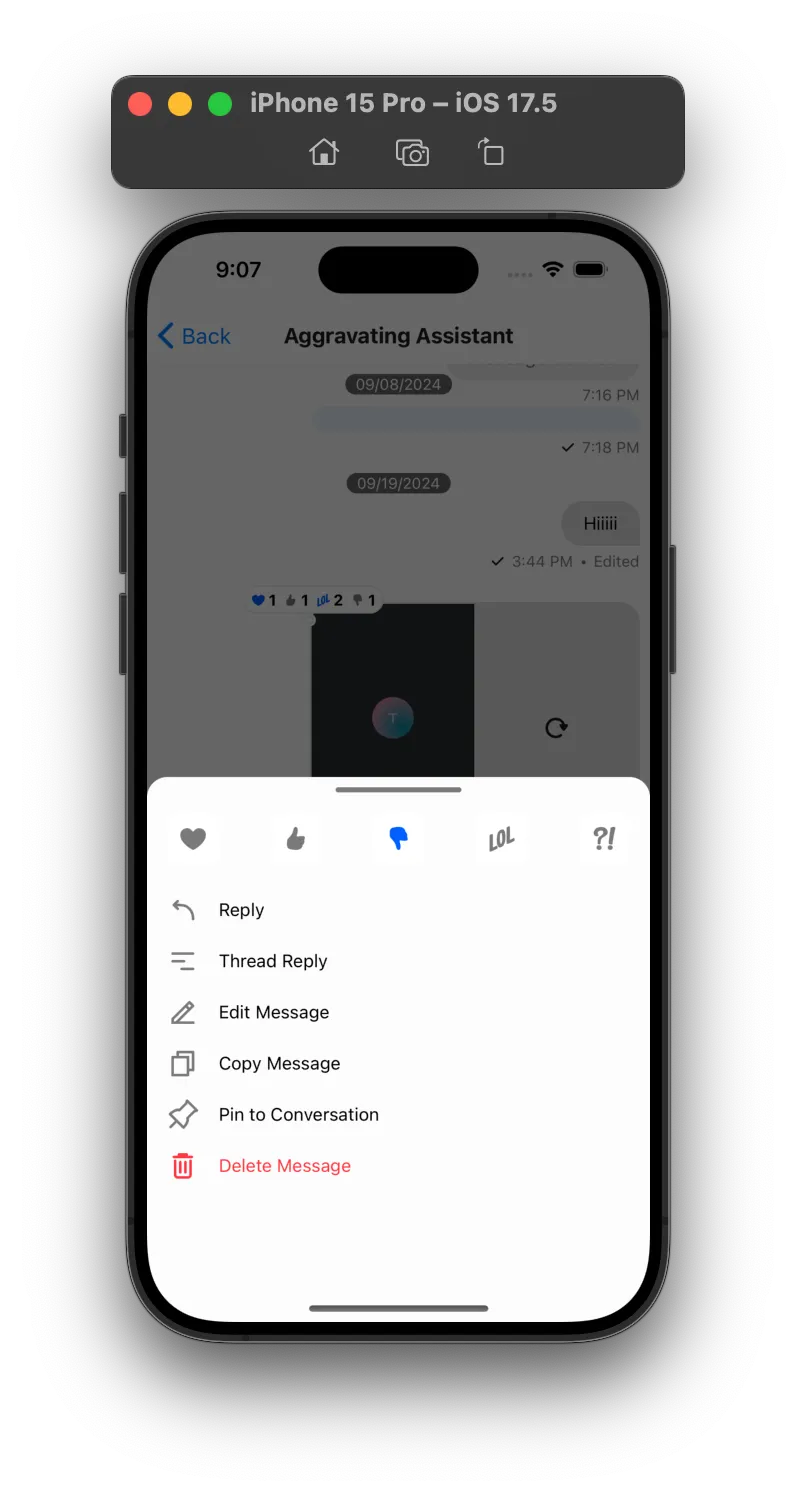
Best Practices
- Start from default actions and selectively remove or reorder to preserve platform expectations.
- Keep action lists short and context-aware (own message vs. others, threads vs. channel).
- Prefer
messageActionsfor UI changes andonLongPressMessagefor custom behavior. - Ensure destructive actions (delete, ban, mute) are gated by capabilities and confirmations.
- Return
nullfor actions you explicitly want to hide instead of leaving them undefined.
Each UI action maps to a MessageAction object that provides title, icon, handler, and actionType.
You can customize default actions via props on the Channel component. These props are available through MessagesContext.
Channel accepts a messageActions callback to selectively render actions.
The callback receives an object with default MessageAction objects. Return an array of actions to render in MessageActionList inside the message overlay.
Example:
messageActions={({
  blockUser, // MessageAction | null;
  copyMessage, // MessageAction | null;
  deleteMessage, // MessageAction | null;
  dismissOverlay, // () => void;
  editMessage, // MessageAction | null;
  error, // boolean;
  flagMessage, // MessageAction | null;
  isThreadMessage, // boolean;
  markUnread, // MessageAction | null;
  muteUser, // MessageAction | null;
  ownCapabilities, // object;
  pinMessage, // MessageAction | null;
  quotedReply, // MessageAction | null;
  retry, // MessageAction | null;
  showMessageReactions, // boolean;
  threadReply, // MessageAction | null;
  unpinMessage, // MessageAction | null;
}) => {
  return []; // Array<MessageAction>
}}
Message Action Object type
MessageAction
Long-pressing a message opens the menu and renders available actions. MessageAction defines a single action button.
Example
{
  action: () => { /** Some action here */ },
  icon: <PinIcon />,
  title: 'Pin Message',
  titleStyle: { color: 'red' }
}
Keys and Values
action
Called when the user presses the action.
| Type |
|---|
| Function |
actionType
Type of the action performed.
| Type |
|---|
| enum('blockUser', 'copyMessage', 'deleteMessage', 'deleteMessageForMe', 'editMessage', 'flagMessage', 'markUnread', 'muteUser', 'pinMessage', 'selectReaction', 'reply', 'retry', 'quotedReply', 'threadReply', 'unpinMessage') |
icon
Icon element for the action button.
| Type |
|---|
| React Element |
title
Action button title.
| Type |
|---|
| String |
titleStyle
Styles for the action title text.
| Type |
|---|
Text Style Props |
MessagePressableHandlerPayload
MessagePressableHandlerPayload is passed to handlers like onLongPressMessage and onPressMessage.
Example
{
  actionHandlers: {
    deleteMessage: [function],
    editMessage: [function],
    quotedReply: [function],
    resendMessage: [function],
    showMessageOverlay: [function],
    toggleBanUser: [function],
    toggleMuteUser: [function],
    toggleReaction: [function],
  },
  additionalInfo: [object],
  message: [message object],
}
Keys and values
additionalInfo
Additional message pressable handler info.
| Type |
|---|
| Object |
actionHandlers
Action handler functions for message actions. Use these to perform actions on interaction.
deleteMessageeditMessagequotedReplyresendMessageshowMessageOverlaytoggleBanUsertoggleMuteUsertoggleReaction(takesreactionTypeas parameter)
<Channel onLongPressMessage={({ defaultHandlers }) => defaultHandlers.quotedReply()}| Type |
|---|
| Object |
message
Message object that was interacted with.
<Channel onLongPressMessage={({ message }) => console.log(message.id, message.text)}| Type |
|---|
| Object |
How to conditionally render message actions
The following example demonstrates how to:
- Only show the "Copy Message" and "Edit Message" actions from the default message actions.
- Show "Edit Message" only for messages from the current user.
Additionally, the following example demonstrates how you can add custom styles for a message action title.
<Channel
  messageActions={({ copyMessage, deleteMessage, editMessage, isMyMessage }) =>
    isMyMessage
      ? [
          copyMessage,
          editMessage,
          {
            ...deleteMessage,
            titleStyle: {
              color: "red",
              fontWeight: "bold",
            },
          },
        ]
      : [copyMessage]
  }
>
  {/** MessageList and MessageInput component here */}
</Channel>
How to add a custom message action
- Add a new custom action - "Mute User"
- Show "Mute User" action only for messages from other user.
import {
  messageActions as defaultMessageActions,
  Mute as MuteIcon,
} from "stream-chat-react-native";

<Channel
  channel={channel}
  messageActions={(param) => {
    const { isMyMessage, ownCapabilities, dismissOverlay } = param;
    const actions = defaultMessageActions({ ...param });

    if (!isMyMessage) {
      const isMuted = (client.mutedUsers || []).some(
        (mute) =>
          mute.user.id === client.userID && mute.target.id === message.user?.id,
      );

      actions.push({
        action: async () => {
          dismissOverlay();
          if (message.user?.id) {
            if (isMuted) {
              await client.unmuteUser(message.user.id);
            } else {
              await client.muteUser(message.user.id);
            }
          }
        },
        actionType: "custom-mute-user",
        icon: <MuteIcon />,
        title: isMuted ? t("Custom Unmute User") : t("Custom Mute User"),
      });
    }

    return actions;
  }}
>
  {/** MessageList and MessageInput component here */}
</Channel>;
How to customize message action UI
Channel accepts MessageActionList and MessageActionListItem. They serve different purposes:
MessageActionList- Full control over the action list and its styles.MessageActionListItem- Customize a single action item.
Customize a Message Action List
Example MessageActionList:
import { Alert } from "react-native";
import {
  Channel,
  MessageActionListItem,
  useMessageContext,
} from "stream-chat-react-native";

const CustomMessageActionList = () => {
  const { dismissOverlay } = useMessageContext();
  const messageActions = [
    {
      action: () => {
        Alert.alert("Edit Message action called.");
        dismissOverlay();
      },
      actionType: "editMessage",
      title: "Edit message",
    },
    {
      action: () => {
        Alert.alert("Delete message action");
        dismissOverlay();
      },
      actionType: "deleteMessage",
      title: "Delete Message",
    },
  ];
  return (
    <View style={{ backgroundColor: "white" }}>
      {messageActions.map(({ actionType, ...rest }) => (
        <MessageActionListItem
          actionType={actionType}
          key={actionType}
          {...rest}
        />
      ))}
    </View>
  );
};

<Channel MessageActionList={CustomMessageActionList}>
  {/* Underlying MessageList and MessageInput components */}
</Channel>;
MessageActionList is just a prop that accepts your component. You define content, styles, and logic.
Customize Message Action list item
To customize pinMessage and muteUser, check actionType and return your own component.
The types of actions which are available by default are as follows:
blockUsercopyMessagedeleteMessagedeleteForMeMessageeditMessageflagMessagemarkUnreadmuteUserpinMessageselectReactionreplyretryquotedReplythreadReplyunpinMessage
If no custom condition matches, return the default MessageActionListItem.
You can use these props to provide your own component.
Example MessageActionListItem customization:
import { Pressable, Text } from "react-native";
import {
  Channel,
  MessageActionListItem,
  useMessageActionAnimation,
} from "stream-chat-react-native";

const CustomMessageActionListItem = ({
  action,
  actionType,
  ...rest
}: MessageActionListItemProps) => {
  if (actionType === "pinMessage") {
    return (
      <Pressable onPress={action}>
        <Text>{actionType}</Text>
      </Pressable>
    );
  } else if (actionType === "muteUser") {
    return (
      <Pressable onPress={action}>
        <Text>{actionType}</Text>
      </Pressable>
    );
  } else {
    return (
      <MessageActionListItem
        action={action}
        actionType={actionType}
        {...rest}
      />
    );
  }
};

<Channel MessageActionListItem={CustomMessageActionListItem}>
  {/* Underlying MessageList and MessageInput components */}
</Channel>;
Please continue reading further to see different use cases.
How to intercept a message action
To add analytics tracking, use these handler props (called before the default handlers):
Please note that these intercepts will neither change the standard functions nor block them.
handleBanhandleCopyhandleDeletehandleDeleteForMehandleEdithandleFlaghandleMutehandleReactionhandleReplyhandleRetryhandleThreadReply
Example: track "Copy Message":
<Channel handleCopy={() => trackCopyAction()} />How to disable a message action
To disable an action, return null for that actionType in MessageActionListItem:
import {
  Channel,
  MessageActionListItem,
  useMessageActionAnimation,
} from "stream-chat-react-native";

const CustomMessageActionListItem = ({ action, actionType, ...rest }) => {
  if (actionType === "pinMessage") {
    return null;
  } else {
    return (
      <MessageActionListItem
        action={action}
        actionType={actionType}
        {...rest}
      />
    );
  }
};

<Channel MessageActionListItem={CustomMessageActionListItem}>
  {/* Underlying MessageList and MessageInput components */}
</Channel>;On this page: