








Call Duration
Introduction
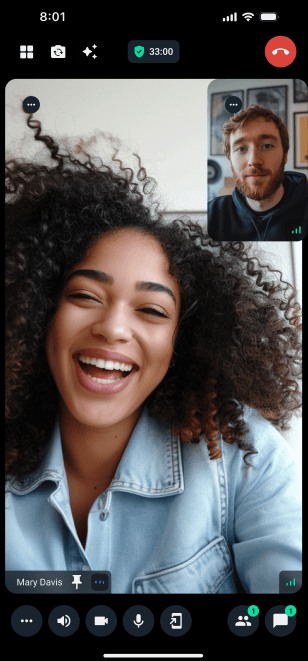
Build a call duration component showing elapsed time since call start.
Best Practices
- Update frequently - Refresh timer every second for accuracy
- Format consistently - Use HH:MM:SS format for clarity
- Handle edge cases - Account for missing start times
- Position strategically - Place timer where it doesn't obstruct content
Implementation
Example:
import React, { useEffect, useMemo, useState } from "react";
import { View, Text, StyleSheet } from "react-native";
import { useCallStateHooks, useTheme } from "@stream-io/video-react-native-sdk";
import { CallDuration } from "./icons/CallDuration";

const formatTime = (seconds: number) => {
  const date = new Date(0);
  date.setSeconds(seconds);
  const format = date.toISOString();
  const hours = format.substring(11, 13);
  const minutes = format.substring(14, 16);
  const seconds_str = format.substring(17, 19);
  return `${hours !== "00" ? hours + ":" : ""}${minutes}:${seconds_str}`;
};

const CallDurationBadge = () => {
  const [elapsed, setElapsed] = useState<string>("00:00");
  const { theme } = useTheme();
  const { useCallSession } = useCallStateHooks();
  const session = useCallSession();
  const startedAt = session?.started_at;
  const startedAtDate = useMemo(() => {
    if (!startedAt) {
      return Date.now();
    }
    const date = new Date(startedAt).getTime();
    return isNaN(date) ? Date.now() : date;
  }, [startedAt]);

  useEffect(() => {
    const initialElapsedSeconds = Math.max(
      0,
      (Date.now() - startedAtDate) / 1000,
    );

    setElapsed(formatTime(initialElapsedSeconds));

    const interval = setInterval(() => {
      const elapsedSeconds = (Date.now() - startedAtDate) / 1000;
      setElapsed(formatTime(elapsedSeconds));
    }, 1000);

    return () => clearInterval(interval);
  }, [startedAtDate]);

  return (
    <View style={styles.container}>
      <CallDuration
        color={theme.colors.iconAlertSuccess}
        size={theme.variants.iconSizes.md}
      />
      <Text style={styles.text}>{elapsed}</Text>
    </View>
  );
};
Features
The CallDurationBadge provides:
- Real-time display - Call duration in HH:MM:SS format
- Auto-start - Timer begins when call starts
- Clean UI - Minimal icon and timer display
Customization
Customize the CallDurationBadge by:
- Modifying styles - Update the styles object
- Changing icon - Adjust size or use custom icon
- Format adjustment - Modify time display format
Note:
For simplicity, the StyleSheet is not included in this guide.